
Memento — a Devin MCP server that gives Devin a nightly sleep cycle to self-improve its SKILL.md.

Project description
memento
Memento integration for Devin (Cognition).
Gives Devin a nightly sleep cycle: reviews past sessions, mines recurring
patterns, proposes bounded edits to a long-term SKILL.md, and gates every
change with a held-out validation score — so only improvements that actually
make Devin better at your work get adopted.
Built on microsoft/SkillOpt.
How it works
Devin does not write conversation transcripts to disk in a format
the sleep engine understands. harvest_devin.py bridges this by converting
every locally available source into Claude Code-compatible JSONL transcripts:
| Source | Where | What it contributes |
|---|---|---|
| Devin transcripts | ~/.local/share/devin/cli/transcripts/*.json |
Native ATIF-v1.7 sessions — real user↔agent turns |
| Memories | ~/.agentmemory/standalone.json |
Memories saved via memento's built-in memory_save tool (or the agentmemory MCP server if you run it) |
| Skill files | .devin/skills/*/SKILL.md |
Skill trigger patterns and expected behavior |
Memory is built in (memento_memory.py): a SQLite store
with BM25 search, tiers, secret redaction, and a local web dashboard — no
separate memory MCP required. It mirrors to the standalone.json the harvester
reads (and stays compatible with agentmemory
if you already use it). See Built-in memory.
Workspaces are auto-detected from the Devin registry (nothing to configure):
- Devin:
~/.config/Devin/User/workspaceStorage/*/workspace.json
After memento_adopt the evolved skill is synced to
.devin/skills/memento-learned/SKILL.md automatically.
Install
Requirements: Python ≥ 3.10, Git, Devin CLI.
git clone https://github.com/xerxes-y/memento.git
cd memento
bash install.sh
install.sh will:
- Use or clone microsoft/SkillOpt to
<project-dir>/../SkillOpt(or--skillopt-dir) - Install
skillopt_sleep(editable) into your Python environment - Create
~/.memento/(runtime data dir) - Seed
memento-learned/SKILL.mdinto every detected Devin workspace (.devin/skills/) - Auto-register with Devin CLI MCP (
devin mcp add memento) if the Devin CLI is on PATH
Devin post-install
MCP registration is automatic if the Devin CLI is installed.
Optionally copy devin-rules.snippet.md to .devin/rules/memento.md in your workspace so Devin knows to offer the sleep tools.
Windows
The runtime (mcp_server.py + harvest_devin.py) is cross-platform and
auto-detects Devin data under %LOCALAPPDATA%\devin\cli\transcripts — no extra flags needed.
install.sh is bash, so run it from Git Bash or WSL, or wire it up
manually: add the snippet from mcp-config.example.json to your Devin MCP config
(use python instead of python3 and absolute Windows paths in args/env).
Manual config
Devin — run once in a terminal:
devin mcp add memento \
  --env "MEMENTO_ENGINE_REPO=<project-dir>/../SkillOpt" \
  --env "MEMENTO_HOME=$HOME/.memento" \
  -- python3 <project-dir>/mcp_server.py
Add to Devin as an MCP extension (uvx, one line)
memento is published to PyPI as devin-memento
with a devin-memento console entrypoint, so it runs as a self-contained package
with no clone or path wiring — ideal for Devin's custom MCP UI
(Settings → Connections → MCP servers → Add a custom MCP → STDIO) or the
devin mcp add CLI.
STDIO config (Devin custom MCP):
| Field | Value |
|---|---|
| Command | uvx |
| Args | ["devin-memento"] |
| Env | MEMENTO_ENGINE_REPO, MEMENTO_HOME |
Or via the CLI:
devin mcp add memento \
  --env "MEMENTO_ENGINE_REPO=$HOME/.local/share/SkillOpt" \
  --env "MEMENTO_HOME=$HOME/.memento" \
  -- uvx devin-memento
To run the unreleased main instead of the PyPI release, swap the args for
["--from", "git+https://github.com/xerxes-y/memento", "devin-memento"].
Maintainers cut a release with:
python3 -m build && python3 -m twine upload dist/*
The optimization engine (
skillopt_sleep) is loaded at runtime fromMEMENTO_ENGINE_REPO(a local SkillOpt clone), so it works inside the isolateduvxenv without being on PyPI. PointMEMENTO_ENGINE_REPOat a clone (or runinstall.shonce to create one).
One-click install bundle (.mcpb)
memento also ships as an MCP Bundle
(.mcpb) — a single file that .mcpb-capable MCP clients install with one
click (the env vars become prompted config fields). Build it:
bash mcpb/build.sh # → dist/devin-memento.mcpb (needs Node/npx + python3)
The bundle ships the stdlib-only server and runs it with your python3; the
memory tools work immediately, while the sleep-cycle tools still need a
SkillOpt clone at MEMENTO_ENGINE_REPO (prompted at install).
Where the button appears:
.mcpbone-click install is supported in Claude-Desktop-class clients today. Devin's cloud IDE installs via its curated Marketplace or the manual Add a custom MCP form (see below), so for Devin the.mcpbis mainly the artifact to hand to Cognition for a listing. The manifest source lives inmcpb/.
Enabling it for your whole organization (admins)
memento is open-source and on PyPI, so anyone can add it to their own Devin org — no approval from Cognition or this project is required. It is not in the global Devin Marketplace (that is curated/partner-only), so each org enables it itself.
In Devin, adding a custom MCP server requires the "Manage MCP Servers" permission (org admins). Once an admin adds it, it is available org-wide to everyone in that organization:
- Settings → Connections → MCP servers → "Add a custom MCP"
- Name
memento, transport STDIO - Command
uvx, Args["devin-memento"], EnvMEMENTO_ENGINE_REPO+MEMENTO_HOME - Save → "Test listing tools" (should list the
memento_*/memory_*tools)
Not an admin? Ask whoever holds Manage MCP Servers to add it (or to grant you that permission).
Use
Ask Devin:
"run the sleep cycle", "what did the last sleep propose?", "adopt it"
Or call tools directly:
| Tool | What it does |
|---|---|
memento_auto |
fully automatic — run + auto-adopt above the validation gate, returns the SKILL.md diff report |
memento_status |
nights run so far + latest staged proposal |
memento_dry_run |
preview cycle — no staging, no changes |
memento_run |
full cycle; stages a proposal for your review |
memento_adopt |
apply the staged proposal; syncs skill to workspace |
memento_harvest |
debug: list the recurring tasks mined |
memory_brief |
recall-before-act: relevant memories + standing lessons for a task, in one call |
memory_save |
persist a memory (title, content, tier, tags, namespace) |
memory_recall |
hybrid search — BM25 + semantic vector, RRF-fused (mode, tier) |
memory_list |
list recent memories (optional tier / session) |
memory_forget |
delete a memory by id or by query |
memory_related |
knowledge-graph neighbours of a memory (shared entities) |
memory_graph |
knowledge-graph overview (top entities) |
memory_capture |
record a lifecycle event (e.g. PreToolUse) as a working memory |
memory_learn / memory_lessons |
derive lessons from recurring patterns; list them |
memory_consolidate |
promote reinforced memories; auto-forget stale ones |
memory_pin |
protect a memory from decay/consolidation |
memory_namespaces |
list scopes with counts |
memory_snapshot / memory_restore |
git-versionable backup / restore |
memory_audit |
recent audit-log entries |
memory_sessions / memory_stats / memory_dashboard |
sessions · stats · web UI |
The sleep-cycle tools (memento_*) accept:
| Argument | Values | Default |
|---|---|---|
project |
abs path | cwd |
backend |
mock / claude / codex |
mock |
scope |
invoked / all |
invoked |
mock is free (no API calls). For real LLM optimization:
backend: "claude"→ setANTHROPIC_API_KEYbackend: "codex"→ setOPENAI_API_KEY
Run it fully automatically
memento_auto runs a cycle and adopts the result in one step, gated by the
engine's held-out validation (plus an optional MEMENTO_AUTO_ADOPT_MIN_SCORE
floor), then returns a before/after SKILL.md diff. Ask Devin "auto-evolve the
skill", or schedule it to run unattended.
macOS (launchd) — nightly at 02:00:
bash install.sh --schedule                       # uses first detected workspace
bash install.sh --schedule --schedule-time 03:30 --schedule-project /path/to/repo
This writes ~/Library/LaunchAgents/com.memento.plist and loads it; logs
go to ~/.memento/memento-auto.log. Remove with
launchctl unload <plist> && rm <plist>.
Linux / cron — point a cron entry at the standalone runner:
0 2 * * * python3 /path/to/mcp_server.py --auto --project /path/to/repo --backend mock
Built-in memory
memento ships its own agentmemory-class memory engine
(memento_memory.py) — no external memory MCP, no Node.
stdlib-only (SQLite + http.server + math).
Two modes, identical tools & dashboard — chosen automatically by open_store():
| Mode | When | Storage |
|---|---|---|
| Solo (default) | no config | local SQLite at ~/.memento/memory.db |
| Team | MEMENTO_DB_URL = a Postgres DSN |
shared Postgres, scoped per team by namespace — see Team memory |
Solo needs zero setup; switching to team is one env var, nothing else changes
(same memory_* tools, same web dashboard). The active mode is shown by
memory_stats and in the dashboard footer. Core features in both modes:
- Hybrid retrieval — BM25 full-text (FTS5,
LIKEfallback) fused with semantic vector similarity via Reciprocal Rank Fusion (mode:hybrid/bm25/vector). - Memory tiers —
working/episodic/semantic/procedural, with auto-consolidation (reinforced memories promote up a tier) and decay / auto-forget of stale, never-used working memories.memory_pinprotects a memory.
How memento decides what's worth keeping — it doesn't judge importance at write time; worth is earned by reuse. New memories enter the short-lived
workingtier;memory_consolidatethen forgets any working memory recalled 0× after 24h and promotes any recalled ≥3× up a tier (working → episodic → semantic). Ranking uses a decay score (7-day half-life × recall reinforcement);memory_pinexempts must-keeps. Patterns recurring across ≥2 memories distill into lessons. Deterministic and API-free by design — the heuristics are LLM-swappable.
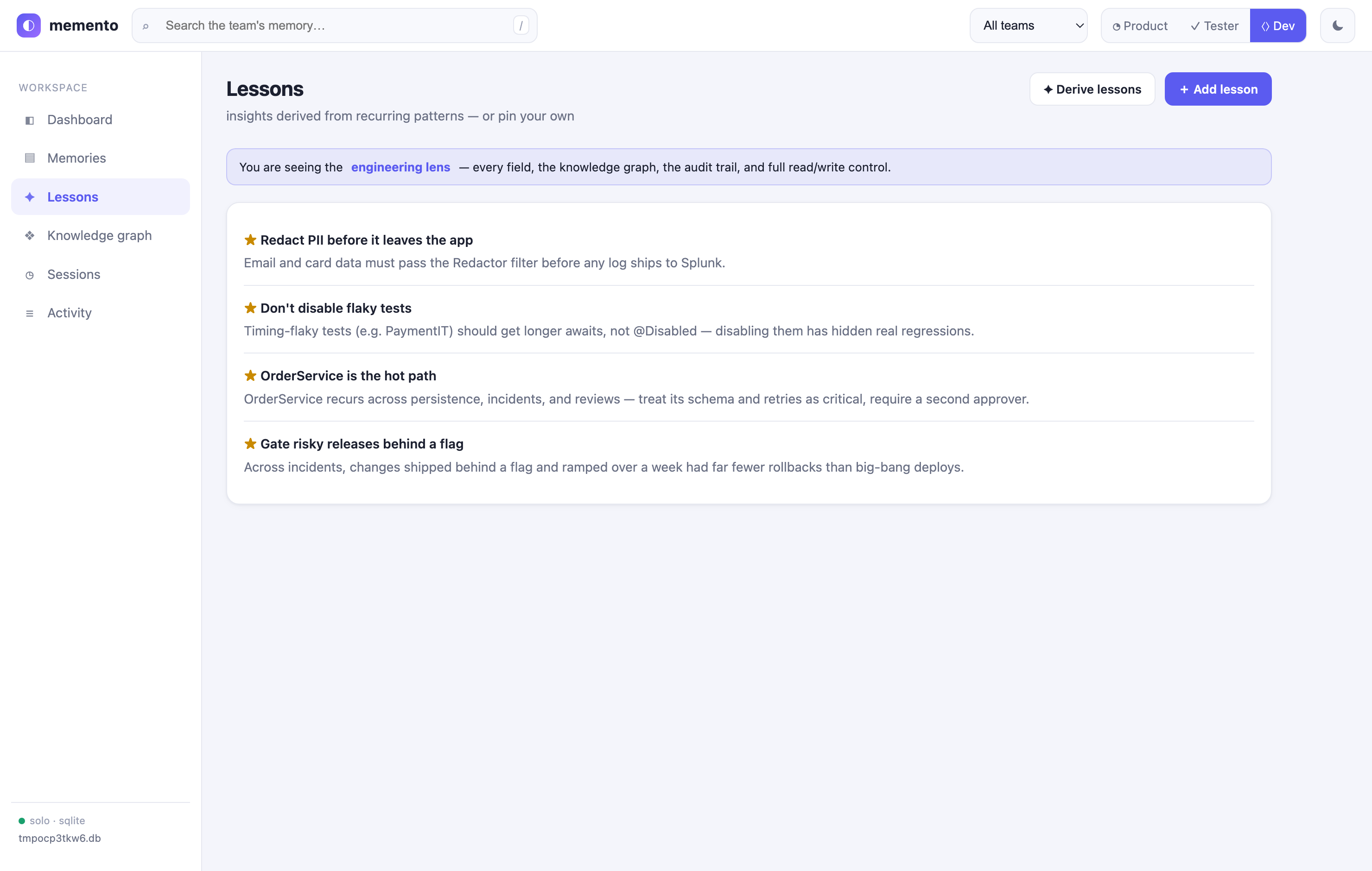
- Lessons —
memory_learnmines recurring patterns (entities, tags, repeated failures) and derives lessons into the semantic tier;memory_lessonslists them. Re-running regenerates them (pinned lessons are kept). Heuristic by default; swap in an LLM for richer synthesis. - Knowledge graph — entity extraction +
memory_related(neighbours that share an entity) andmemory_graph(overview), with a graph tab in the dashboard. - Capture hooks —
memory_capturerecords agent lifecycle events (SessionStart, PreToolUse, …) as working memories. - Governance — namespaces (scopes), an audit log, and git-versionable snapshot / restore.
- Secret redaction before storage; agentmemory-compatible export to
standalone.jsonso the sleep cycle harvests memories automatically (and it interoperates with agentmemory if you also run it).
Open the dashboard (ask Devin to run memory_dashboard, or standalone):
python3 mcp_server.py --web --port 3114 # → http://127.0.0.1:3114
An enterprise-style single-page app served from the stdlib (no npm, no build) — role-aware so the same team memory reads correctly for everyone:
- ◔ Product Owner — a value lens: KPIs (knowledge items, lessons learned, teams, weekly growth), plain-language "what the agent has learned", no internals.
- ✓ Tester / QA — a verification lens: search-first, inspect each memory's provenance (source, author, session, recall count), and correct anything wrong inline.
- ⟨⟩ Developer — the engineering lens: every field, the knowledge graph, the audit trail, and full read/write/derive control.
Plus global search (/ to focus, hybrid · keyword · semantic), inline create
and edit, a force-directed knowledge graph, lessons, sessions, an
activity/audit log, and a light/dark theme. Role is remembered per browser;
edits and deletes are gated by role and (in team mode) by the Keycloak gate.
Deep-link a view with ?role=tester#memories or ?theme=dark.
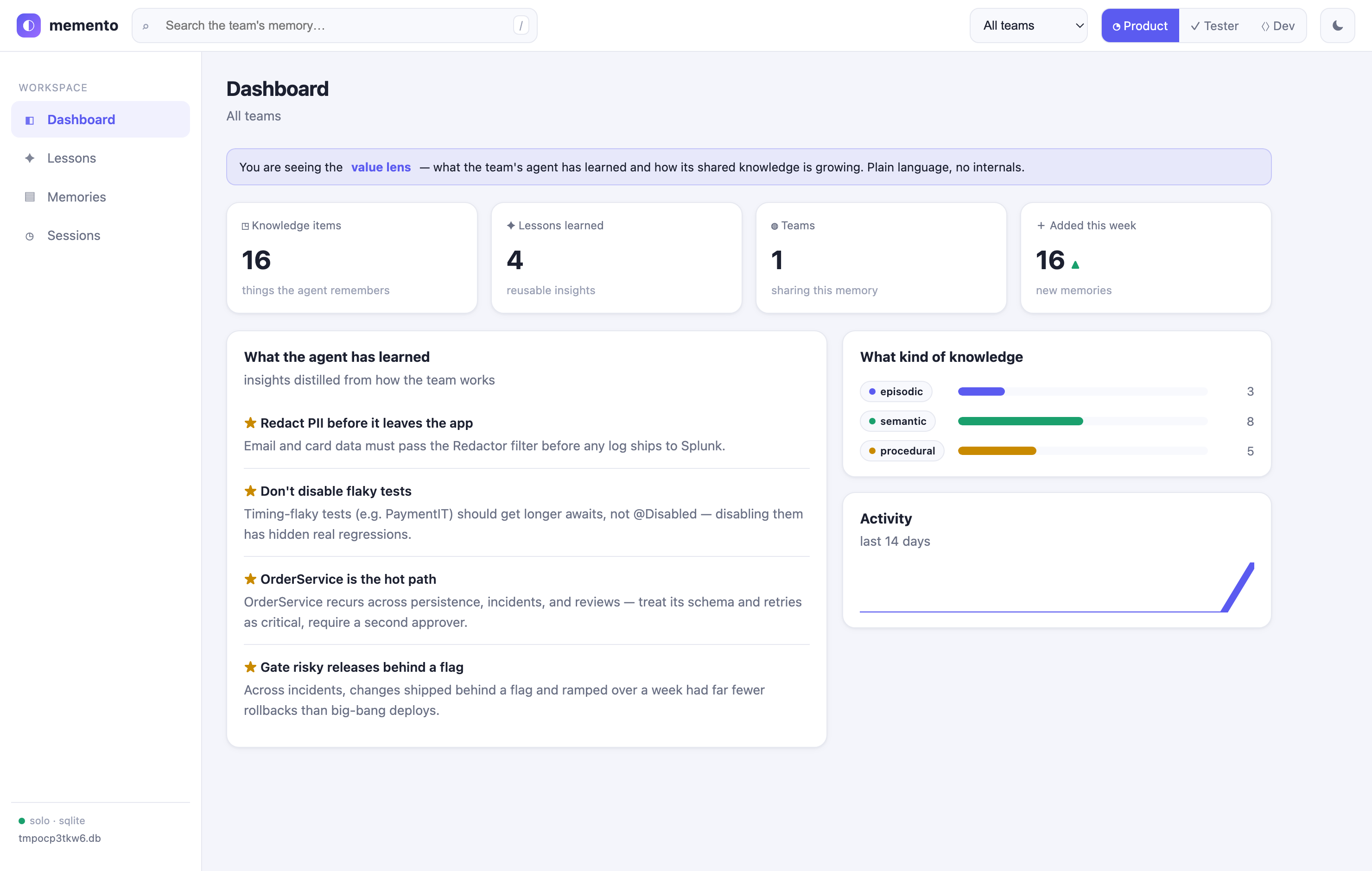
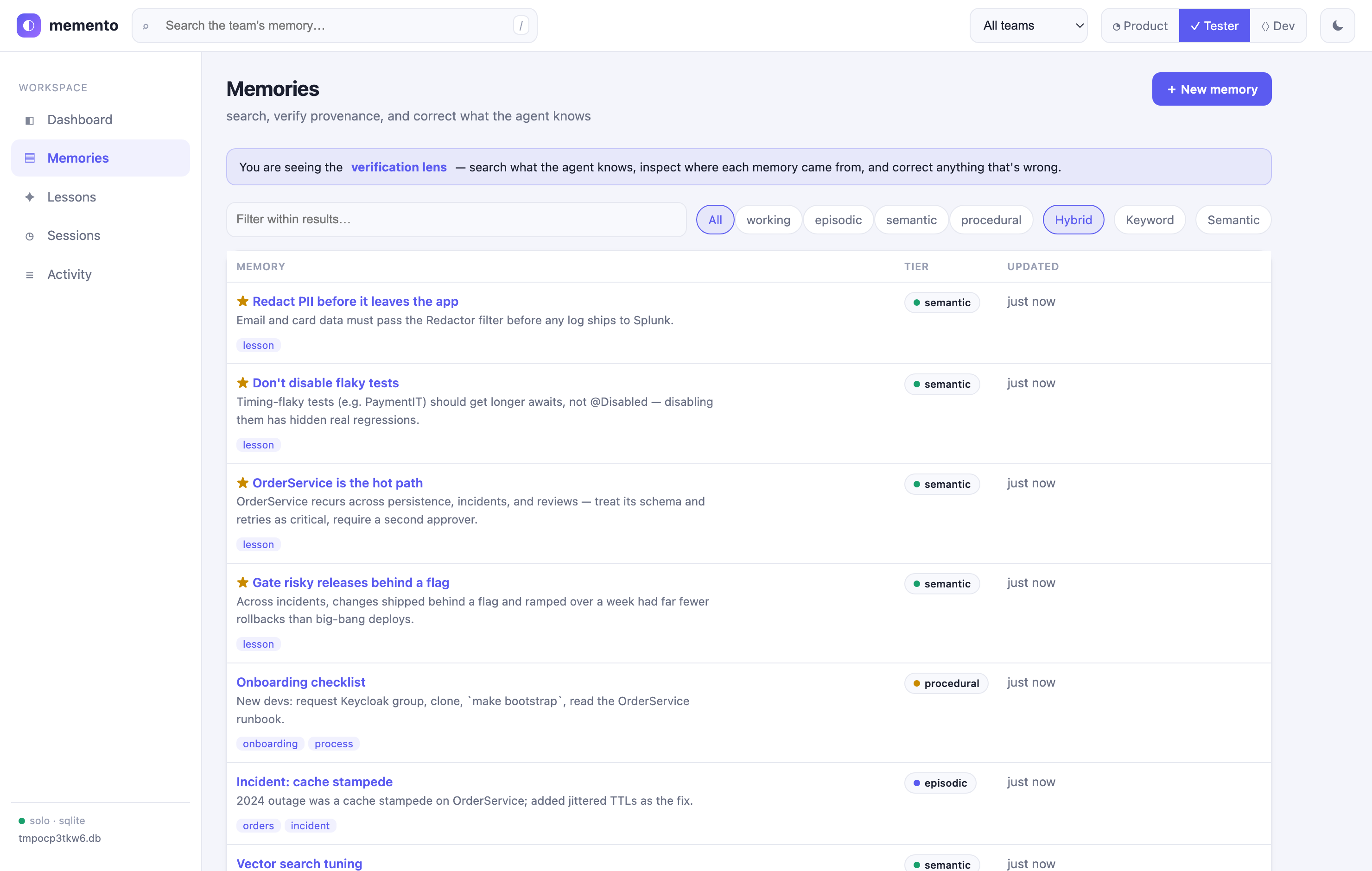
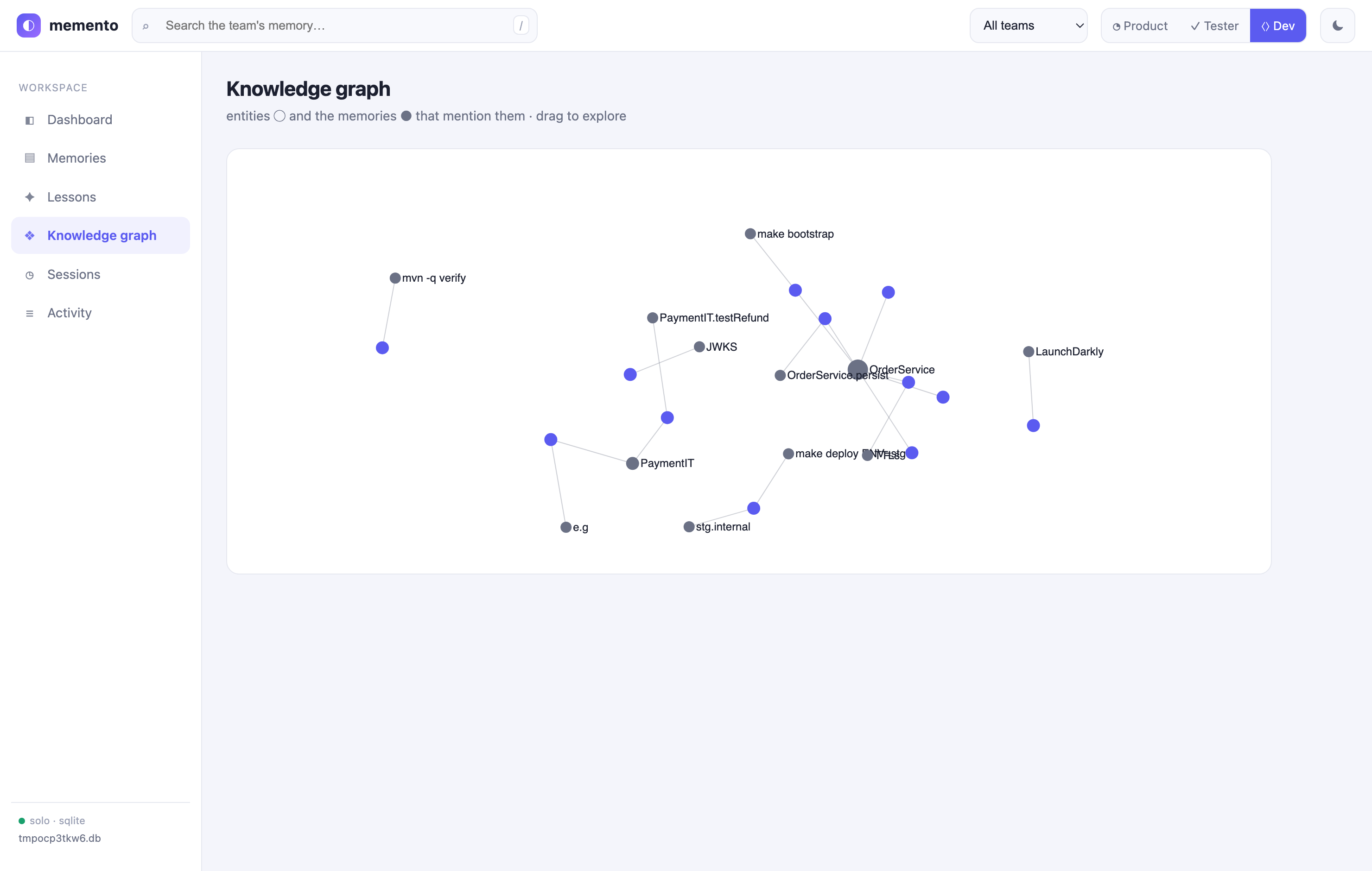
Scope note. Embeddings are deterministic term-frequency vectors (real vector-space cosine, no model/API needed) — for synonym-level semantics, swap in a neural embedder via the
Embedderclass. Entity extraction and lesson derivation are heuristic (LLM-swappable). This is agentmemory-class core coverage (~18 memory tools), not a byte-for-byte clone of its 53-tool surface.
Team memory (shared Postgres)
By default memory is local (SQLite, per machine). To share it across a
team, point everyone's memento at one PostgreSQL database — concurrent
multi-writer, full-text + vector search, scoped per team by namespace. Don't
put the SQLite file on a network drive; SQLite isn't safe for concurrent remote
writers.
# 1. one shared Postgres (pgvector) per team
docker compose -f team/docker-compose.yml up -d

# 2. each member installs the backend + points memento at the DB
pip install "devin-memento[postgres]"
export MEMENTO_DB_URL=postgresql://memento:memento@<host>:5432/memento
When MEMENTO_DB_URL is a postgres DSN, the engine transparently uses the
memento_memory_pg backend instead of SQLite — same MCP
tools, same dashboard (mcp_server.py --web then serves the team's memory).
Use the namespace argument on memory_save/memory_recall as the team/scope
boundary — the dashboard has a team selector (sidebar) that scopes the
memory list, graph, and lessons to one namespace. pgvector ANN activates
automatically once a dense embedder is
configured; otherwise vector search uses the built-in lexical cosine (works on
plain Postgres). Validate with MEMENTO_TEST_PG_DSN=… python3 -m unittest discover -s tests.
Dashboard in team mode: the dashboard needs no changes — each member runs
their own local mcp_server.py --web pointed at the shared DB (binds to
127.0.0.1, so no auth needed) and uses the team selector to scope the view
to their namespace. Only add authentication if you choose to host a single
shared dashboard instance.
Team gate with Keycloak / OIDC (optional)
Out of the box the namespace (= team) is self-asserted — any caller can
pass any team name. To make it identity-bound, turn on the Keycloak gate:
the team is then read from a verified access token (the user's Keycloak
groups), so a member can only read/write the team(s) they belong to.
pip install 'devin-memento[team-auth]'      # adds pyjwt[crypto]

export MEMENTO_AUTH=keycloak
export MEMENTO_OIDC_ISSUER=https://kc.example.com/realms/<realm>
export MEMENTO_OIDC_CLIENT_ID=memento        # device-flow enabled on the client
# export MEMENTO_OIDC_TEAMS_CLAIM=groups     # default; the claim that lists teams

python memento_auth.py login                 # one-time, OAuth2 device flow
python memento_auth.py whoami                # shows identity + teams
Once on, memory_save / memory_recall / memory_list / memory_forget
ignore a forged namespace and use the token's team instead: requesting a team
you're not in is denied, a read with no team is forced to your team (not
all teams), and saves are stamped with your token identity (actor). Keycloak
group membership = team membership — add a member to a group, they get that
team's memory.
This is Option A — the check runs in each member's local MCP server, so it
stops accidental cross-team access and gives correct attribution, but a member
who holds the Postgres credentials can still bypass it. For hard isolation
(a member genuinely cannot reach another team), put the DB behind a small
gateway that performs this same token→namespace check server-side and run
Postgres row-level security (namespace = current_setting('app.current_team'))
— clients then never hold DB credentials. The token logic in memento_auth.py
is the reusable piece for that gateway.
Environment variables
| Variable | Default | Purpose |
|---|---|---|
MEMENTO_ENGINE_REPO |
~/.local/share/SkillOpt |
Path to the SkillOpt repo |
MEMENTO_HOME |
~/.memento |
Runtime data dir |
MEMENTO_WORKSPACES |
auto-detected | Colon-separated workspace paths |
MEMENTO_MANAGED_SKILL |
memento-learned |
Skill name to evolve |
MEMENTO_DB_URL |
unset | Postgres DSN → shared team memory (else local SQLite) |
MEMENTO_AUTH |
unset | keycloak → derive the team namespace from a verified OIDC token (else self-asserted) |
MEMENTO_OIDC_ISSUER |
unset | Keycloak realm issuer URL (required when MEMENTO_AUTH is on) |
MEMENTO_OIDC_CLIENT_ID |
memento |
OIDC client id (device flow enabled) |
MEMENTO_OIDC_TEAMS_CLAIM |
groups |
Token claim listing the user's teams |
MEMENTO_MEMORY_DB |
~/.memento/memory.db |
SQLite memory store (when no MEMENTO_DB_URL) |
MEMENTO_MEMORY_PATH |
~/.agentmemory/standalone.json |
agentmemory-compatible export the harvester reads |
MEMENTO_DASHBOARD_PORT |
3114 |
Local memory dashboard port |
MEMENTO_AUTO_ADOPT_MIN_SCORE |
unset | Optional floor for memento_auto; skip adopt if the parsed validation score is below it (the engine's own gate still applies) |
Verify (no Devin session needed)
Run the test suite (stdlib-only, no pytest required):
python3 -m unittest discover -s tests -v
It covers the harvest helpers, the Devin ATIF transcript path, the judge, the MCP
protocol, and the microsoft/SkillOpt engine command contract. The one
integration test that runs the real engine is skipped automatically unless
skillopt_sleep is installed (via install.sh).
Or smoke-test the MCP server's JSON-RPC directly:
MEMENTO_ENGINE_REPO=~/.local/share/SkillOpt \
printf '%s\n' \
  '{"jsonrpc":"2.0","id":1,"method":"initialize","params":{}}' \
  '{"jsonrpc":"2.0","id":2,"method":"tools/list"}' \
  | python3 mcp_server.py
Project structure
memento/
├── mcp_server.py              MCP server (stdlib-only, stdio) — Devin
├── harvest_devin.py           Transcript generator (Devin ATIF-v1.7 + agentmemory + skills)
├── memento_memory.py          Built-in memory engine (SQLite + BM25 + tiers + web dashboard)
├── memento_memory_pg.py       Shared per-team backend (PostgreSQL + pgvector)
├── memento_auth.py            Keycloak/OIDC team gate — token→namespace (optional)
├── team/                       docker-compose for a per-team Postgres
├── judge.py                   Reference judge — scores a reply against a rubric (validation gate)
├── fixtures/
│   └── devin_sample.json      Sample ATIF transcript for offline testing
├── tests/
│   └── test_memento.py        Test suite (harvest, Devin path, judge, MCP, engine contract)
├── blog-memento.html   Walk-through / use-case blog (PO · QA · Developer)
├── mcp-config.example.json    Devin MCP config snippet
├── devin-rules.snippet.md     Copy to .devin/rules/memento.md
├── seed_skill/
│   └── SKILL.md               Initial skill seed (replaced by memento_adopt)
├── install.sh                 One-shot installer (Devin auto-detected)
├── pyproject.toml             Packaging — `devin-memento` console entrypoint (uvx/pip)
├── mcpb/                       MCP Bundle source — manifest.json + icon + build.sh (.mcpb)
└── README.md
Outcomes & the validation gate
SkillOpt only improves a skill where tasks recur and have a checkable
correctness signal. A bare transcript has neither, so harvest_devin.py
enriches Devin trajectories with two things and writes them to
<data-dir>/outcomes.jsonl:
taskKey— a stable<lang>:<intent>:<target>grouping key (e.g.java:fix:orderservice) so repeats of the same task collapse into one recurring task the gate can replay.- an outcome envelope — the checkable signal:
- hard signal when the agent recorded a test/build result:
{"success": true, "verifier": "tests", "evidence": "BUILD SUCCESS", "reference": {"repro": "rtk mvn test -Dtest=OrderServiceTest"}} - deferred (judge) when no hard signal exists:
{"success": null, "verifier": "judge", "rubric": [...]}— a rubric is derived from the task sojudge.py(or the engine) can score the replay instead.
- hard signal when the agent recorded a test/build result:
Score a reply against a rubric:
echo "<candidate reply>" | python3 judge.py --rubric-inline '["Addresses OrderService", "Resolves the reported defect without introducing new errors"]'
# → 0.5
judge.py defaults to an offline keyword-coverage heuristic (no API key).
Set MEMENTO_JUDGE=claude (+ ANTHROPIC_API_KEY) for an LLM judge.
Reality check: the hard-signal path only fires if Devin actually records test or build results in its transcripts. If it doesn't, every task falls to the
judgebranch — point--devin-transcriptsat a real transcript dir and inspectoutcomes.jsonlto find out which case you're in.
Try it on the bundled fixture:
python3 harvest_devin.py --devin-transcripts fixtures --out-dir /tmp/memento-test
cat /tmp/memento-test/outcomes.jsonl
Contributing / upstream
This plugin is being contributed back to
microsoft/SkillOpt as
plugins/devin/. Bug reports and improvements welcome here or upstream.
License
MIT — same as microsoft/SkillOpt.


Download files
Download the file for your platform. If you're not sure which to choose, learn more about installing packages.
Source Distribution
Built Distribution
Filter files by name, interpreter, ABI, and platform.
If you're not sure about the file name format, learn more about wheel file names.
Copy a direct link to the current filters
File details
Details for the file devin_memento-0.8.0.tar.gz.
File metadata
- Download URL: devin_memento-0.8.0.tar.gz
- Upload date:
- Size: 69.0 kB
- Tags: Source
- Uploaded using Trusted Publishing? No
- Uploaded via: twine/6.2.0 CPython/3.12.4
File hashes
| Algorithm | Hash digest | |
|---|---|---|
| SHA256 |
513eebce8dad0724d647c43a03305d259e9b8727d460985073b911101a252fe4
|
|
| MD5 |
e7ea62c8425a6a14d4ba55b49cb393f4
|
|
| BLAKE2b-256 |
6ddabe19c1eddbc466d98cd83b93c3e5a33ac1b05437074272fa50d4a3393a5c
|
File details
Details for the file devin_memento-0.8.0-py3-none-any.whl.
File metadata
- Download URL: devin_memento-0.8.0-py3-none-any.whl
- Upload date:
- Size: 61.5 kB
- Tags: Python 3
- Uploaded using Trusted Publishing? No
- Uploaded via: twine/6.2.0 CPython/3.12.4
File hashes
| Algorithm | Hash digest | |
|---|---|---|
| SHA256 |
94cfca4eebe51e8c40a690da97081f57d1721d3a0a10e14ad5b3482a7fbc3893
|
|
| MD5 |
0d04eeaf95eb543c9424b116f9c72c90
|
|
| BLAKE2b-256 |
cbffa2c275f94015c13808edf7c0f03e706257a5ad813332abf31a3e75a14bcc
|






