
AI Agent Policies

Policies turn your Cursor Rules or CLAUDE.md into hard guardrails which an AI Agent cannot simply ignore, or forget. They handle what to do when an agent wants to make a decision, along with other hooks-supported events. Policies can yield both decisions and guidance.
This framework supports Claude Code. Support for Cursor is in beta.
Why Policies
Automating Decisions
Rule files can be forgotten or ignored completely by LLMs. Policies are unavoidable:
if re.match(r'^terraform\s+apply(?:\s|$)', command):
    yield PolicyDecision(action=PolicyAction.DENY, reason="terraform apply is not allowed. Use `terraform plan` instead.")

if re.match(r'^terraform\s+(fmt|plan)(?:\s|$)', command):
    yield PolicyDecision(action=PolicyAction.ALLOW)
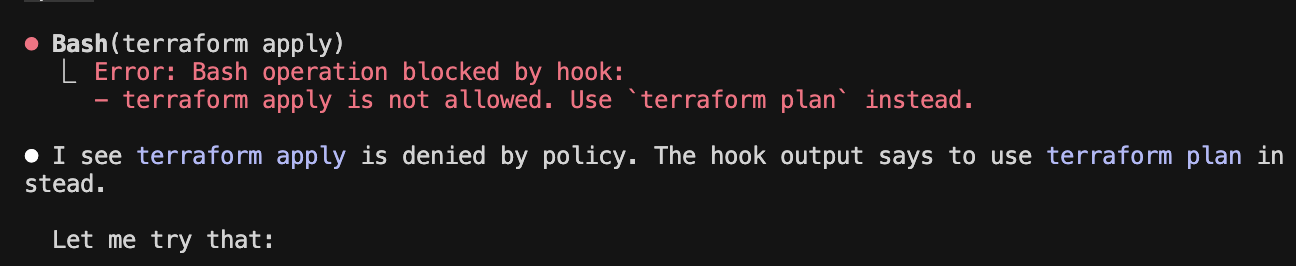
In the image below, the agent is denied by policy from running terraform apply. The agent can then make decisions on what to do next, in this case it outputs that it will attempt a terraform plan as per the policy recommendation.
Automating Guidance
Aside from denying and allowing automatically, policies can also provide guidance through Post-* events:
if comment_to_code_overlap >= 0.4:
    yield PolicyHelper.guidance(
        "Ensure comments add value beyond describing what's obvious from the code. "
        "This comment may be redundant with the code it describes."
    )
    return
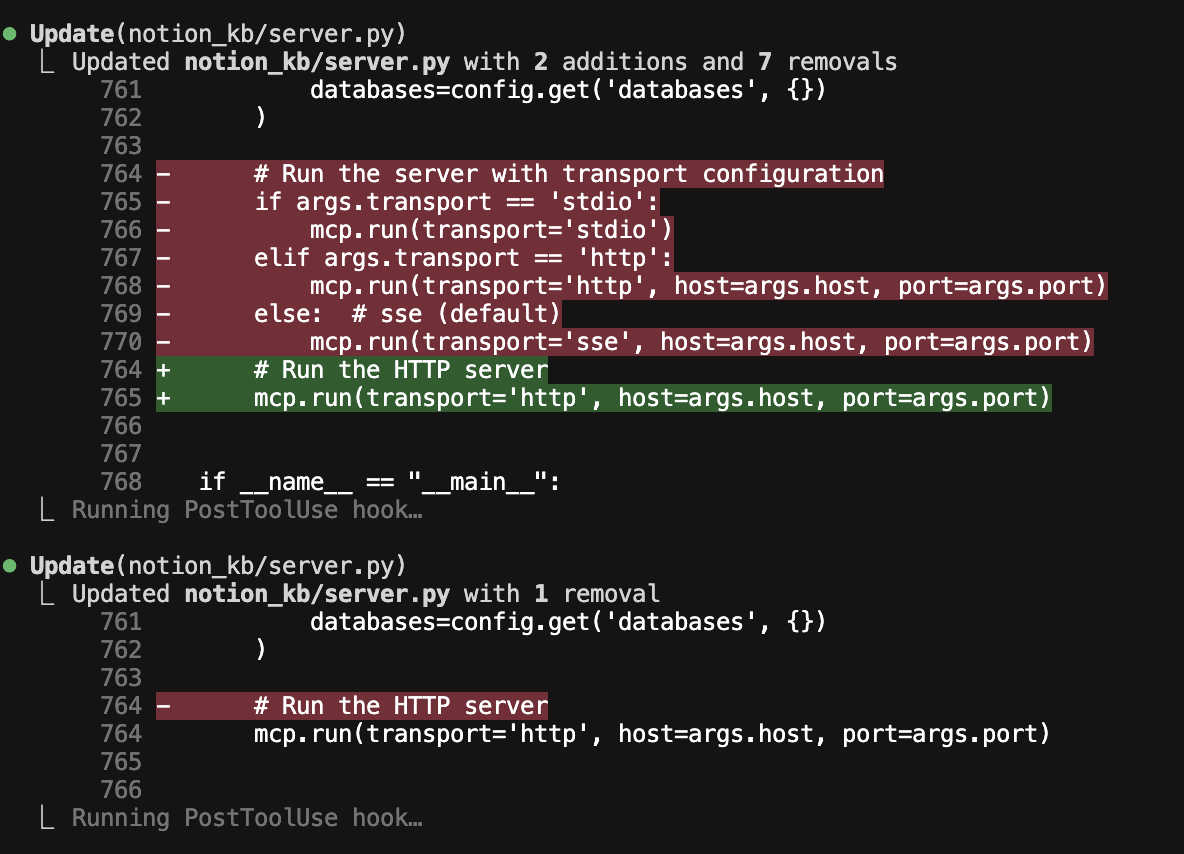
In the image below, an agent makes a change which includes a comment that is detected as being potentially redundant. The guidance from the snippet is given as feedback to the change, after which the agent by itself decides to remove the redundant comment.
Usage
At DevLeaps we developed an internal policy set for AI Agents. To create your own, refer to the example server as a starting point The example server contains:
- A basic server setup demonstrating the use of policies and middleware.
- Rudimentary policies showcasing how to automatically deny, allow and provide guidance.
- Rudimentary middleware showcasing how multi-command tool use could be handled.
To run the example server:
devleaps-policy-example-server
This starts a minimal server running just our example policies.
Architecture
graph TB
    subgraph "Developer Machine"
      Editor[Claude Code / Cursor]
        Client[devleaps-policy-client]
    end

    subgraph "Policy Server"
        Server[HTTP API]
        Policies[Your policies<br/>kubectl, terraform, git, python, etc.]
    end

    Editor -->|Hooks| Client
    Client --> Server
    Server -->|Events| Policies
    Policies -->|Decision and Guidance| Server
    Server --> Client
    Client -->|Decision and Guidance| Editor
Quick Start
Installation
Install from PyPI:
pip install devleaps-agent-policies
Or for development:
git clone https://github.com/Devleaps/agent-policies.git
cd agent-policies
uv sync
Running an Example Server
devleaps-policy-example-server
The example server runs on port 8338 by default and serves endpoints for both Claude Code and Cursor.
Configure Claude Code
Run the install command to automatically configure hooks:
devleaps-policy-client install
Or manually add devleaps-policy-client to your Claude Code hooks configuration in ~/.claude/settings.json:
Click to expand Claude Code configuration
{
  "hooks": {
    "PreToolUse": [
      {
        "hooks": [
          {
            "matcher": "*",
            "type": "command",
            "command": "devleaps-policy-client"
          }
        ]
      }
    ],
    "PostToolUse": [
      {
        "hooks": [
          {
            "matcher": "*",
            "type": "command",
            "command": "devleaps-policy-client"
          }
        ]
      }
    ],
    "UserPromptSubmit": [
      {
        "hooks": [
          {
            "matcher": "*",
            "type": "command",
            "command": "devleaps-policy-client"
          }
        ]
      }
    ],
    "Stop": [
      {
        "hooks": [
          {
            "matcher": "*",
            "type": "command",
            "command": "devleaps-policy-client"
          }
        ]
      }
    ],
    "SubagentStop": [
      {
        "hooks": [
          {
            "matcher": "*",
            "type": "command",
            "command": "devleaps-policy-client"
          }
        ]
      }
    ],
    "Notification": [
      {
        "hooks": [
          {
            "matcher": "*",
            "type": "command",
            "command": "devleaps-policy-client"
          }
        ]
      }
    ],
    "PreCompact": [
      {
        "hooks": [
          {
            "matcher": "*",
            "type": "command",
            "command": "devleaps-policy-client"
          }
        ]
      }
    ],
    "SessionStart": [
      {
        "hooks": [
          {
            "matcher": "*",
            "type": "command",
            "command": "devleaps-policy-client"
          }
        ]
      }
    ],
    "SessionEnd": [
      {
        "hooks": [
          {
            "matcher": "*",
            "type": "command",
            "command": "devleaps-policy-client"
          }
        ]
      }
    ]
  }
}
Configure Cursor
Run the install command to automatically configure hooks:
devleaps-policy-client install cursor
Or manually create or edit ~/.cursor/hooks.json:
Click to expand Cursor configuration
{
  "version": 1,
  "hooks": {
    "beforeShellExecution": [
      { "command": "devleaps-policy-client" }
    ],
    "beforeMCPExecution": [
      { "command": "devleaps-policy-client" }
    ],
    "afterFileEdit": [
      { "command": "devleaps-policy-client" }
    ],
    "beforeReadFile": [
      { "command": "devleaps-policy-client" }
    ],
    "beforeSubmitPrompt": [
      { "command": "devleaps-policy-client" }
    ],
    "stop": [
      { "command": "devleaps-policy-client" }
    ]
  }
}
The devleaps-policy-client command will forward hook events to the policy server running on localhost:8338.
Uninstall
To remove hooks from Claude Code:
devleaps-policy-client uninstall
To remove hooks from Cursor:
devleaps-policy-client uninstall cursor
This removes all devleaps-policy-client hooks from the respective editor configuration files.
Sessions
Each Claude Code or Cursor session receives a unique session_id. Policies can use this to track context across multiple hook events within the same session, enabling stateful policy decisions. See the session state utility to store and retrieve per-session data.
Configuration
The client supports centralized configuration via JSON files:
Home-level config (~/.agent-policies/config.json):
{
  "bundles": ["python", "git"],
  "editor": "claude-code",
  "server_url": "http://localhost:8338",
  "default_policy_behavior": "ask"
}
Project-level config (.agent-policies/config.json):
{
  "bundles": ["terraform"]
}
Configuration is merged with project settings overriding home settings.
Available fields:
bundles: List of enabled policy bundles (default:[])editor: Editor name, ignored by client (default:claude-code)server_url: Policy server endpoint (default:http://localhost:8338)
Policy Bundles
Policies can be organized into bundles to group related rules for specific workflows or project types. This allows you to compose different policy sets without having to manage separate server configurations.
How bundles work:
- Universal policies (registered with
bundle=None) are always enforced - Bundle-specific policies are only enforced when enabled in config
- Multiple bundles can be enabled: set
"bundles": ["bundle1", "bundle2"]in config - Bundles can coordinate through shared session state
See the uv example for a working one-rule bundle implementation.
Development
This project is built with uv.
1 maintainer

Metadata
1 maintainer
Release files for devleaps-agent-policies 2.1.1
For a detailed explanation of source distributions (sdists) and built distributions (wheels), please see the package formats documentation.
Source distribution (sdist)
| File | Size | Uploaded | |
|---|---|---|---|
| devleaps_agent_policies-2.1.1.tar.gz | 52.9 kB | Details |
Built distribution (wheel)
| File | Interpreter | ABI | Platform | Reset |
|---|---|---|---|---|
| devleaps_agent_policies-2.1.1-py3-none-any.whl | Python 3 | none | any | Details |
Total release size: 89.6 kB
Release files / devleaps_agent_policies-2.1.1.tar.gz
| Download URL | devleaps_agent_policies-2.1.1.tar.gz |
|---|---|
| Size | 52.9 kB |
| Tags | Source |
|
SHA-256 checksum How to use checksums |
4d32d6e887282e3f875929c1b05dc97d82ffd77bb4fdd32a69dadc24057a9f22
|
|
BLAKE2b-256 checksum How to use checksums |
c8ffd5d6d717088cf0bf5be6d27752e149c403ce0e8ba8185df520012bfca4af
|
| Upload date | |
|
Uploaded using Trusted Publishing? What is trusted publishing? |
Yes |
| Uploaded via |
uv/0.9.26 {"installer":{"name":"uv","version":"0.9.26","subcommand":["publish"]},"python":null,"implementation":{"name":null,"version":null},"distro":{"name":"Ubuntu","version":"24.04","id":"noble","libc":null},"system":{"name":null,"release":null},"cpu":null,"openssl_version":null,"setuptools_version":null,"rustc_version":null,"ci":true}
|
Release files / devleaps_agent_policies-2.1.1-py3-none-any.whl
| Download URL | devleaps_agent_policies-2.1.1-py3-none-any.whl |
|---|---|
| Size | 36.7 kB |
| Tags | Python 3 |
|
SHA-256 checksum How to use checksums |
86985c35cd16d293ac17d47898304f5e2e692c67fb1e19dbfb1a484ef2d15568
|
|
BLAKE2b-256 checksum How to use checksums |
d6570fd8b1422b5955f41aba394f9a182d6cf826d3835b52aac81f53298f5f41
|
| Upload date | |
|
Uploaded using Trusted Publishing? What is trusted publishing? |
Yes |
| Uploaded via |
uv/0.9.26 {"installer":{"name":"uv","version":"0.9.26","subcommand":["publish"]},"python":null,"implementation":{"name":null,"version":null},"distro":{"name":"Ubuntu","version":"24.04","id":"noble","libc":null},"system":{"name":null,"release":null},"cpu":null,"openssl_version":null,"setuptools_version":null,"rustc_version":null,"ci":true}
|














