
DevOrch
A multi-provider AI coding assistant CLI — like Claude Code and Gemini CLI, but open source.




DevOrch gives you a coding assistant in your terminal that can execute shell commands, edit files, search your codebase, manage terminal sessions, and remember context across conversations — powered by any of 13+ AI providers or your own local models.
Screenshots
| Startup | Chat |
|---|---|
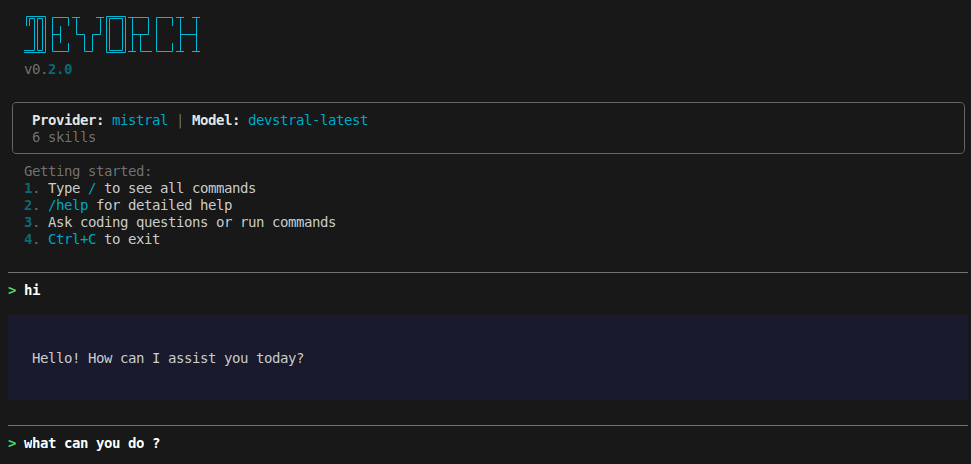 |
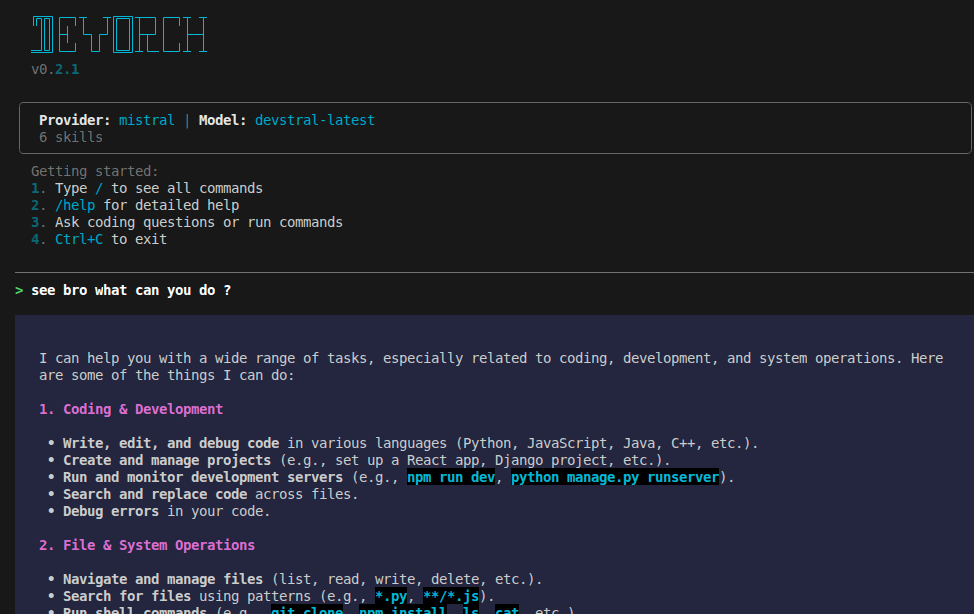 |
| Provider Selection | Model Selection |
|---|---|
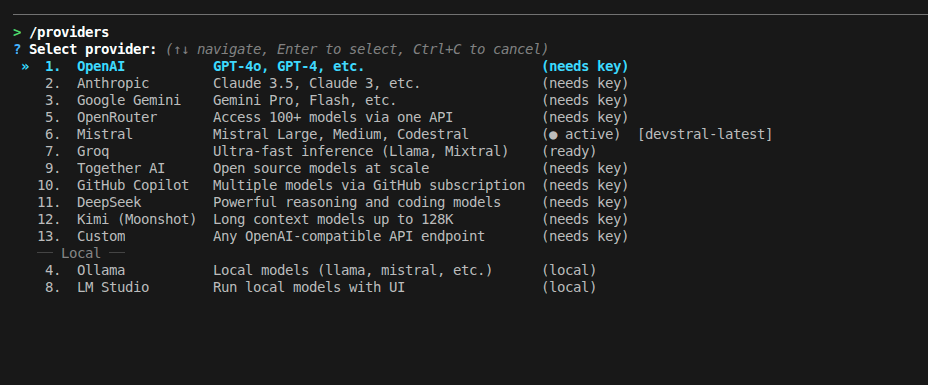 |
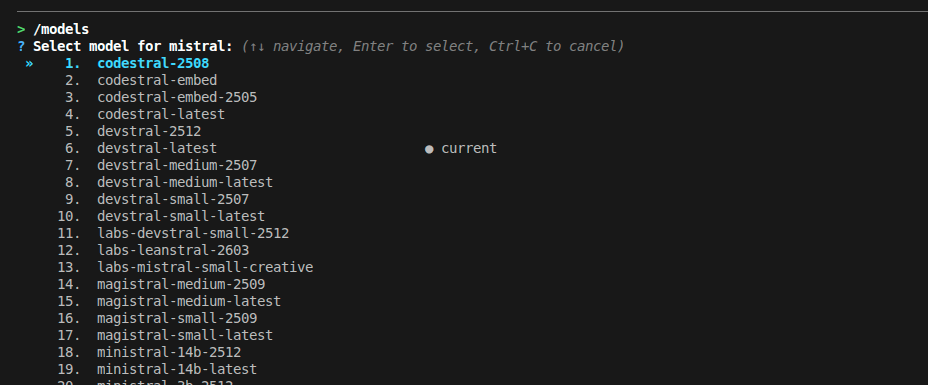 |
| Tool Execution | Terminal Session |
|---|---|
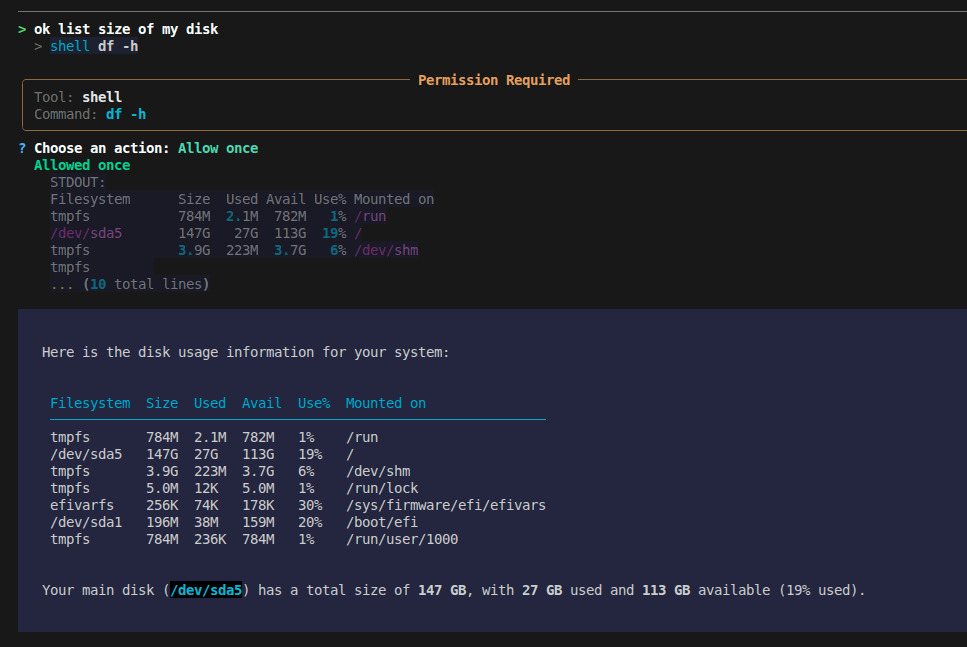 |
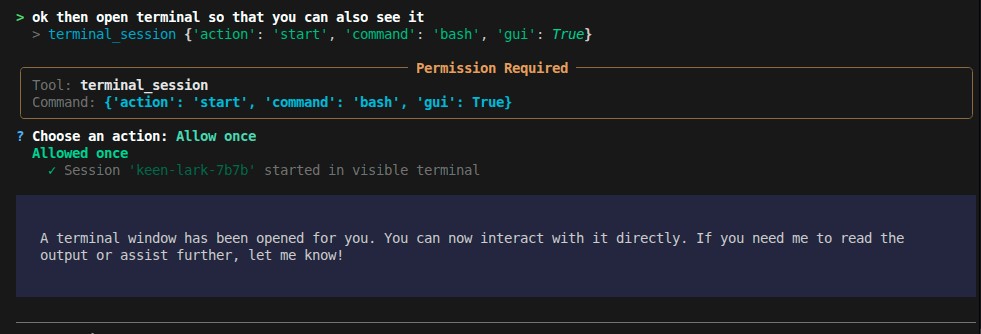 |
Why DevOrch?
- Provider freedom — Switch between OpenAI, Anthropic, Gemini, Mistral, Groq, and 8 more providers (including local models) with a single command. No vendor lock-in.
- Actually does things — Runs shell commands, edits files, manages background processes, searches the web. Not just a chatbot.
- Cross-session project memory — Per-project persistent memory system automatically recalls architecture decisions, coding preferences, and recent session milestones across sessions.
- Loop & thrashing safeguards — Advanced safety layer detects duplicate calls, tool oscillation, and error loops, preventing runaway token drain.
- Full token & speed transparency — Real-time prompt/completion token tracking, context compaction metrics, and generation speed (
tok/s) across 13 providers. - Extensible — Add custom skills as YAML files, connect MCP servers for additional tools, configure permissions per-tool.
Quick Start
Install
# Recommended
pipx install devorch

# Or with pip
pip install devorch

# Or from source
git clone https://github.com/Amanbig/DevOrch.git
cd DevOrch && pip install -e .
Run
devorch                    # Interactive setup on first run
devorch -p openai          # Use a specific provider
devorch -p local           # Use Ollama (local models)
devorch --resume abc123    # Resume a previous session

# Non-interactive (scripting / CI)
devorch ask "explain this project"
devorch ask --skill commit
devorch run review "focus on security"
devorch edit src/auth.py "add input validation"
On first run, DevOrch walks you through provider selection and API key setup.
Features
13+ AI Providers
| Cloud | Local / Self-Hosted |
|---|---|
| OpenAI (GPT-4o, o1) | Ollama (Llama, Mistral, CodeLlama) |
| Anthropic (Claude 4, 3.5) | LM Studio (any GGUF model) |
| Google Gemini (2.0, 1.5 Pro) | Custom (vLLM, TGI, llama.cpp) |
| Groq (ultra-fast Llama, Mixtral) | |
| Mistral (Large, Codestral) | |
| Together AI, OpenRouter, GitHub Copilot, DeepSeek, Kimi |
Switch anytime with /providers (interactive) or /provider <name> (direct).
Built-in Tools
DevOrch can act on your system, not just talk about it:
| Tool | What it does |
|---|---|
shell |
Execute commands (git status, npm install, etc.) |
terminal_session |
Managed background processes with optional GUI window |
filesystem |
Read, write, list files |
search / grep |
Find files and search contents |
edit |
Targeted find-and-replace edits |
task |
Track progress on multi-step work |
memory |
Persistent memory across conversations |
websearch / webfetch |
Search the web, fetch URLs |
Memory & Project Context
DevOrch maintains persistent memory so you never have to repeat context:
1. Per-Project Memory (Cross-Session Recall)
Stored automatically per repository in ~/.devorch/projects/<project_id>/:
/memory                              # View active architectural decisions & session history
/memory add Use uv for package management   # Record an architectural decision
/memory pref Prefer clean async/await       # Record a coding style preference
/memory clear                        # Clear project memory for this repository
Accomplishments are automatically extracted and summarized on session exit with zero raw command leakage.
2. Global Memory (Across All Projects)
Stored in ~/.devorch/memory/:
/remember I prefer tabs over spaces
/remember Use ruff for Python linting
/forget                              # Interactively choose a memory to remove
Skills
Reusable prompt templates for common workflows. Use them in chat or directly from the CLI:
# In chat
/commit       # Generate a descriptive git commit
/review       # Review code changes for bugs
/test         # Run tests and analyze results
/fix          # Fix the last error
/explain      # Explain project structure
/simplify     # Simplify recent code changes

# From the terminal (non-interactive)
devorch run commit
devorch run review "focus on auth module"
devorch run test

devorch skills              # List all available skills
Add your own in ~/.devorch/skills/:
# ~/.devorch/skills/deploy.yaml
name: deploy
description: Deploy to production
prompt: |
  Run the deploy script and verify it succeeds.
  Check the deploy logs for any errors.
Terminal Sessions
Background processes that persist across DevOrch restarts:
# Headless — AI monitors output
> terminal_session start command="npm run dev"
  Session 'swift-fox-a3f2' started (PID 12345)

# With GUI — user gets a visible terminal, AI can still read output
> terminal_session start command="bash" gui=true
  Session 'calm-owl-b7e1' started in visible terminal

# Check output / send input / stop
> terminal_session read session_id="swift-fox-a3f2"
> terminal_session send session_id="swift-fox-a3f2" input="rs\n"
> terminal_session stop session_id="swift-fox-a3f2"
MCP (Model Context Protocol)
Extend DevOrch with external tool servers:
# ~/.devorch/config.yaml
mcp_servers:
  github:
    command: npx
    args: ["-y", "@modelcontextprotocol/server-github"]
    env:
      GITHUB_TOKEN: "ghp_xxx"
  filesystem:
    command: npx
    args: ["-y", "@modelcontextprotocol/server-filesystem", "/home/user"]
MCP tools appear alongside built-in tools automatically.
Manage MCP servers live in chat:
/mcp                          # Show connected servers and their tools
/mcp add github npx -y @modelcontextprotocol/server-github
/mcp start github             # Reconnect a server from config
/mcp stop github              # Disconnect and remove its tools
Filter MCP servers per CLI run:
devorch ask --mcp github "review open PRs"   # Use only the github server
devorch ask --mcp github --mcp filesystem "..."  # Use specific servers
devorch run commit --no-mcp                  # Skip MCP entirely
Modes
| Mode | Behavior |
|---|---|
| ASK (default) | Asks permission before each tool execution |
| AUTO | Executes tools automatically (dangerous commands still blocked) |
| PLAN | Shows a plan before executing, asks for approval |
Permission System
Fine-grained control over what DevOrch can do:
devorch permissions list                    # View current rules
devorch permissions set shell allow         # Always allow shell
devorch permissions allow shell "git *"     # Allow specific patterns
devorch permissions deny shell "rm -rf *"   # Block dangerous commands
Or use /auth in-chat to set API keys without restarting.
Non-Interactive CLI Commands
DevOrch works as a scriptable CLI too — no REPL needed:
# Ask a one-shot question
devorch ask "what does this codebase do?"
devorch ask --skill review "focus on security"
devorch ask --mode plan "refactor the auth module"

# Run a skill directly (shorthand for ask --skill)
devorch run commit
devorch run test "only unit tests"
devorch run review --no-mcp

# Edit a file with an instruction
devorch edit src/auth.py "add input validation to login"
devorch edit README.md "update the installation section"
devorch edit app/models.py "add created_at field" --mcp sqlite

# List available skills
devorch skills

# Browse providers and models directly from terminal
devorch providers               # View all 13 providers & configuration status
devorch models                  # View models for active provider
devorch models anthropic        # View models for a specific provider

# Inspect or manage project memory
devorch memory                  # View project decisions and recent accomplishments
devorch memory add "Use pytest" # Record a decision from the terminal
devorch memory clear            # Clear project memory

# Repository initialization
devorch init                    # Generate or update DEVORCH.md repository instructions
All non-interactive commands support --provider, --model, --mode, --mcp, and --no-mcp.
All Slash Commands
| Command | Description |
|---|---|
/help |
Show categorized commands and shortcuts |
/mode [plan|auto|ask] |
Show or switch execution mode |
/plan /auto /ask |
Quick switch execution mode |
/models |
Search and browse models with 15/page pagination |
/model <name> |
Switch model directly or launch search |
/providers |
Search and browse providers with interactive pagination |
/provider <name> |
Switch provider directly or launch search |
/tokens |
Show session token usage, prompt/completion split, and costs |
/copy |
Copy last assistant response directly to clipboard |
/paste |
Enter multi-line paste mode for large text or code (Alt+Enter also inserts newlines) |
/status |
Show current provider, model, execution mode, and loaded context |
/auth [provider] |
Set or update API key for any provider |
/memory |
Show project memory (/memory add <dec>, /memory pref <p>, /memory clear) |
/remember <text> |
Save a note or convention to global memory |
/forget |
Delete a global memory interactively or by query |
/init |
Generate or update a DEVORCH.md project context file |
/skills |
List available skills |
/skill <name> |
Run a skill directly |
/commit /review /test /fix /explain /simplify |
Skill shortcuts |
/session |
Current session ID, model, and message count |
/history |
Full conversation history in this session |
/clear |
Clear history (saves accomplishments to project memory) |
/compact |
Summarize and compact conversation history to save tokens |
/save |
Save conversation history to a file |
/undo |
Undo last message and agent turn |
/mcp |
Show MCP server status |
/mcp add <name> <cmd> [args] |
Connect a new MCP server mid-session |
/mcp start <name> |
Reconnect a server from config |
/mcp stop <name> |
Disconnect a server and remove its tools |
/config |
Show configuration settings |
/permissions |
Show and manage tool permission settings |
/tasks |
Show multi-step task list and execution progress |
Configuration
API Keys
# Secure keychain storage
devorch set-key openai
devorch set-key anthropic

# Or in-chat
/auth openai

# Or environment variables
export OPENAI_API_KEY=sk-...
export ANTHROPIC_API_KEY=sk-ant-...
export GOOGLE_API_KEY=...
export GROQ_API_KEY=gsk_...
export MISTRAL_API_KEY=...
export OPENROUTER_API_KEY=sk-or-...
export TOGETHER_API_KEY=...
export GITHUB_TOKEN=ghp_...
export DEEPSEEK_API_KEY=sk-...
export MOONSHOT_API_KEY=sk-...
Config File
# ~/.devorch/config.yaml
default_provider: openai

providers:
  openai:
    default_model: gpt-4o
  anthropic:
    default_model: claude-sonnet-4-20250514
  custom_vllm:
    default_model: meta-llama/Meta-Llama-3-70B-Instruct
    base_url: http://localhost:8000/v1

mcp_servers:
  github:
    command: npx
    args: ["-y", "@modelcontextprotocol/server-github"]
    env:
      GITHUB_TOKEN: "ghp_xxx"
Directory Layout
~/.devorch/
├── config.yaml          # Provider settings, MCP servers
├── permissions.yaml     # Tool permission rules
├── sessions.db          # Chat history (SQLite)
├── memory/              # Persistent memories
│   ├── MEMORY.md
│   └── *.md
├── skills/              # Custom skill definitions
│   └── *.yaml
└── sessions/            # Terminal session logs
    ├── registry.json
    └── *.log
Contributing
Contributions are welcome! Here's how to get started:
# Clone and install in development mode
git clone https://github.com/Amanbig/DevOrch.git
cd DevOrch
pip install -e ".[dev]"

# Run linting
ruff check .
ruff format .

# Run tests
pytest
Guidelines
- Run
ruff check .andruff format .before submitting - Add tests for new features
- Keep PRs focused — one feature or fix per PR
- Update the README if adding user-facing features
Project Structure
DevOrch/
├── cli/
│   ├── main.py           # App wiring, REPL, sessions/config commands
│   ├── constants.py      # VERSION, banners, slash-command registry, styles
│   └── commands/
│       ├── _shared.py    # Shared helpers (agent builder, tool setup, etc.)
│       ├── ask.py        # devorch ask
│       ├── run.py        # devorch run
│       └── edit.py       # devorch edit
├── core/             # Agent, executor, memory, MCP, skills, modes
├── config/           # Settings, permissions
├── providers/        # AI provider implementations
├── tools/            # Built-in tools (shell, edit, search, etc.)
├── schemas/          # Pydantic models
├── utils/            # Logging, display helpers
└── tests/            # Test suite
Roadmap
- Streaming responses
- Multi-file context awareness
- Plugin marketplace
- VS Code extension
- Agent-to-agent delegation
Requirements
- Python 3.10+
- Works on Linux, macOS, and Windows
License
Built by Aman — star the repo if you find it useful!
1 maintainer

Download files
Download the file for your platform. If you're not sure which to choose, learn more about installing packages.
Source Distribution
Built Distribution
Filter files by name, interpreter, ABI, and platform.
If you're not sure about the file name format, learn more about wheel file names.
Copy a direct link to the current filters
File details
Details for the file devorch-0.4.0.tar.gz.
File metadata
- Download URL: devorch-0.4.0.tar.gz
- Upload date:
- Size: 425.2 kB
- Tags: Source
- Uploaded using Trusted Publishing? No
- Uploaded via:
twine/7.0.0 CPython/3.13.14
File hashes
| Algorithm | Hash digest | |
|---|---|---|
| SHA256 |
5e0a6f5aebb87263ffc1751df9ca26063eee4e7a5fe707353a0049d2da1c4691
|
|
| MD5 |
761061e6a103d76a25163ece000f0715
|
|
| BLAKE2b-256 |
f37a20b2cc8ba61144544e0e5fdee8533f389c0b278f09d072e453bd500771e4
|
File details
Details for the file devorch-0.4.0-py3-none-any.whl.
File metadata
- Download URL: devorch-0.4.0-py3-none-any.whl
- Upload date:
- Size: 134.9 kB
- Tags: Python 3
- Uploaded using Trusted Publishing? No
- Uploaded via:
twine/7.0.0 CPython/3.13.14
File hashes
| Algorithm | Hash digest | |
|---|---|---|
| SHA256 |
884b95d2a298b50727960f5ac4cf5005e7b24147369a1e98f5b82e29eef7b6de
|
|
| MD5 |
3711d040bcd17129e8aa703d0ee7dd2b
|
|
| BLAKE2b-256 |
464ce965cf1cdbb2c9cce7b9f471333aa53f4cad454dca7f3ba52ba8c54aedf7
|














