
DevPilot MCP



Chat with a code repository and watch exactly what the AI does. DevPilot lets an AI model read, search and inspect one repository through 18 safe tools, and it never changes a file or runs tests without your approval.
It has two parts:
- DevPilot Studio: a local web UI. This is the easiest way to use it (see below).
- DevPilot MCP server: the same 18 tools for any MCP client, such as Claude Code or Gemini.
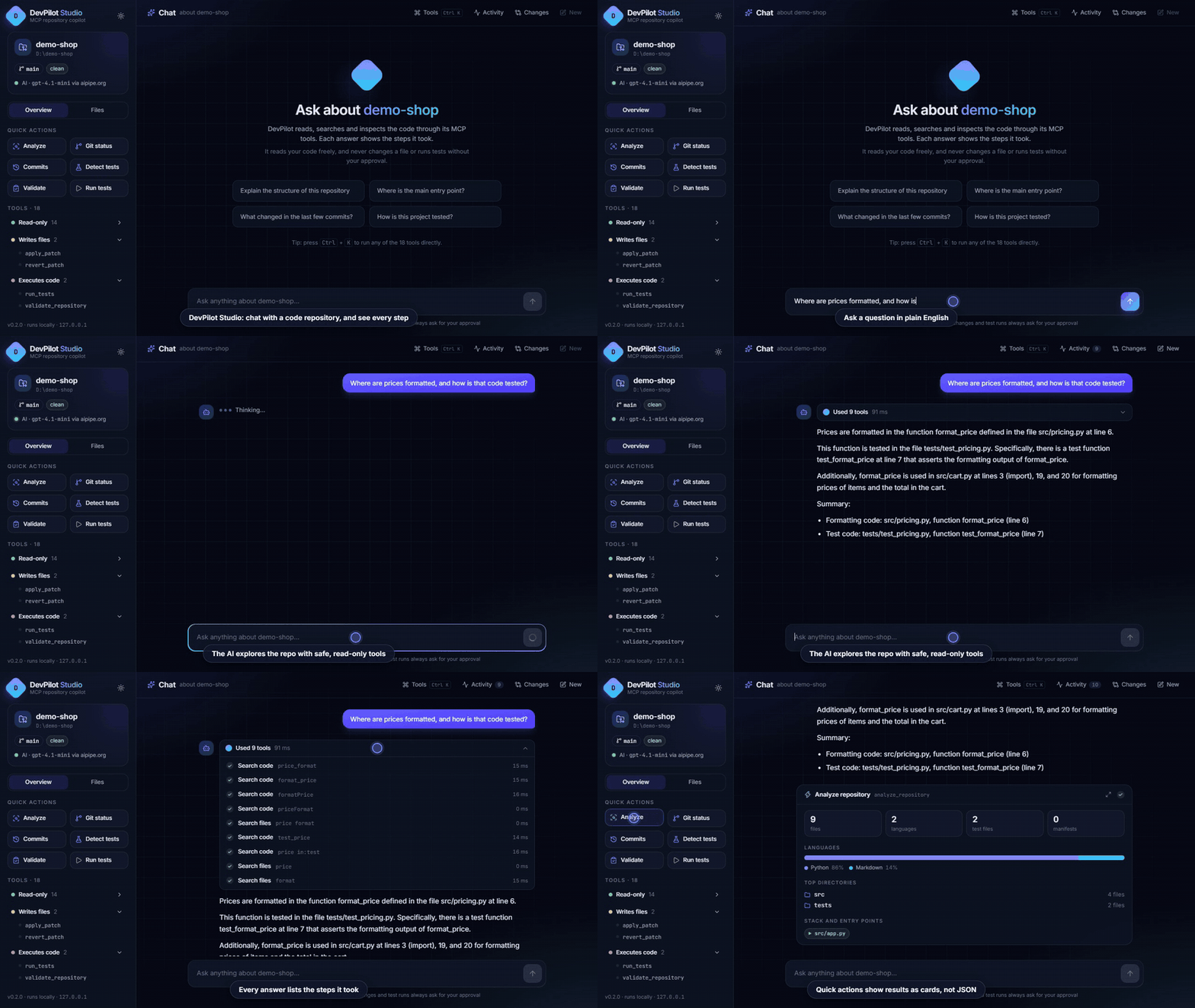
Watch the full 85-second demo (MP4)
Quick start (recommended: the web UI)
Requires Python 3.10+ (3.11+ recommended). Git is needed for the Git tools.
pip install "devpilot-mcp[ui]"
$env:DEVPILOT_WORKSPACE = "C:\path\to\your\repo"     # macOS/Linux: export DEVPILOT_WORKSPACE=/path/to/your/repo
devpilot-ui
Your browser opens at http://127.0.0.1:8765. Then:
- Try it right away, no account needed. Click a quick action (Analyze, Git status, Commits), press Ctrl+K to run any tool, or open the Files tab to browse the code.
- Turn on AI chat (optional). Get a free token at aipipe.org/login, then set it and restart:
$env:AIPIPE_TOKEN = "your-token"     # macOS/Linux: export AIPIPE_TOKEN=your-token
devpilot-ui
- Ask a question, like "Where is authentication implemented?" Each answer shows the steps the AI took.
Without a token, everything works except the chat. The full guide is in the Web UI docs.
What DevPilot Studio gives you
- Steps you can follow: every answer lists the tools the AI used, with timings. Anything DevPilot's security refuses (for example reading
.env) is shown as blocked. - Result cards, not JSON: language bars, commit timelines, colored diffs, grouped search matches, test results.
- Ctrl+K tool runner: run any of the 18 tools through a form, no AI needed.
- File explorer: browse the repository, open files, and ask the AI about one.
- Changes with Undo: every patch the AI applied is listed with its diff and a one-click undo.
- Approval first: changes and test runs always wait for you to click Approve.
| Steps you can follow | Result cards, secrets blocked | Approval with the exact diff |
|---|---|---|
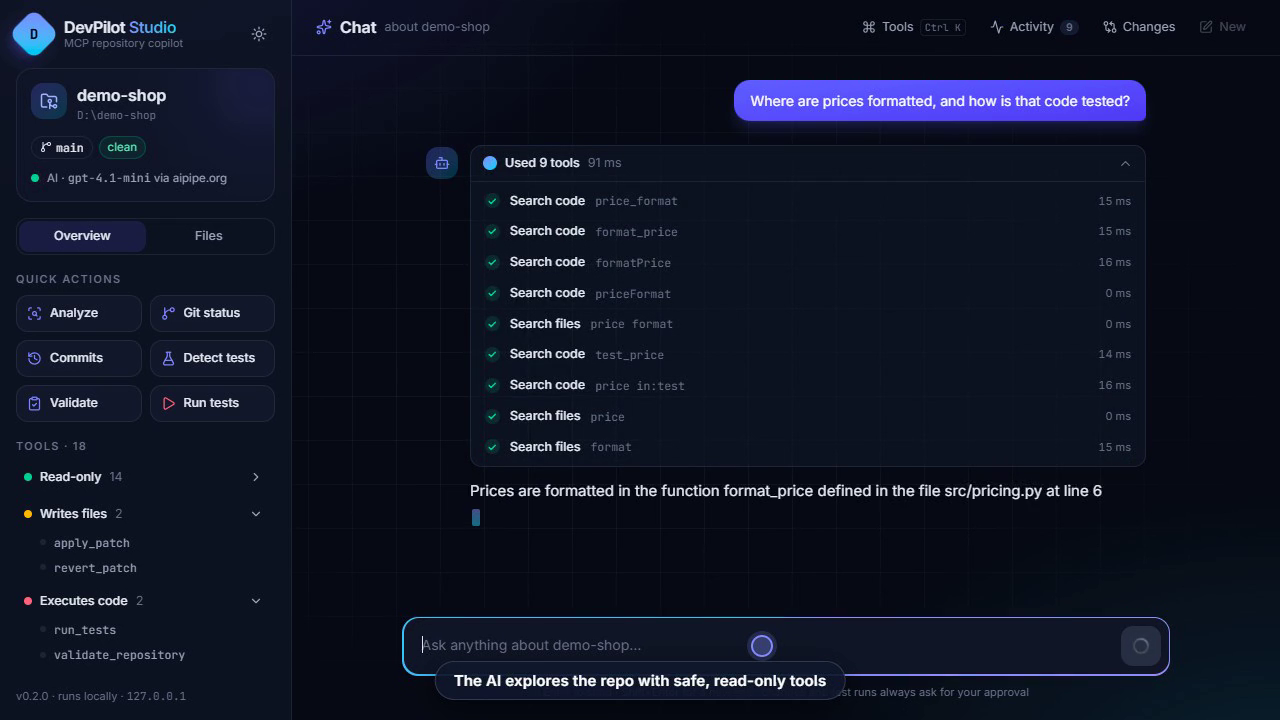 |
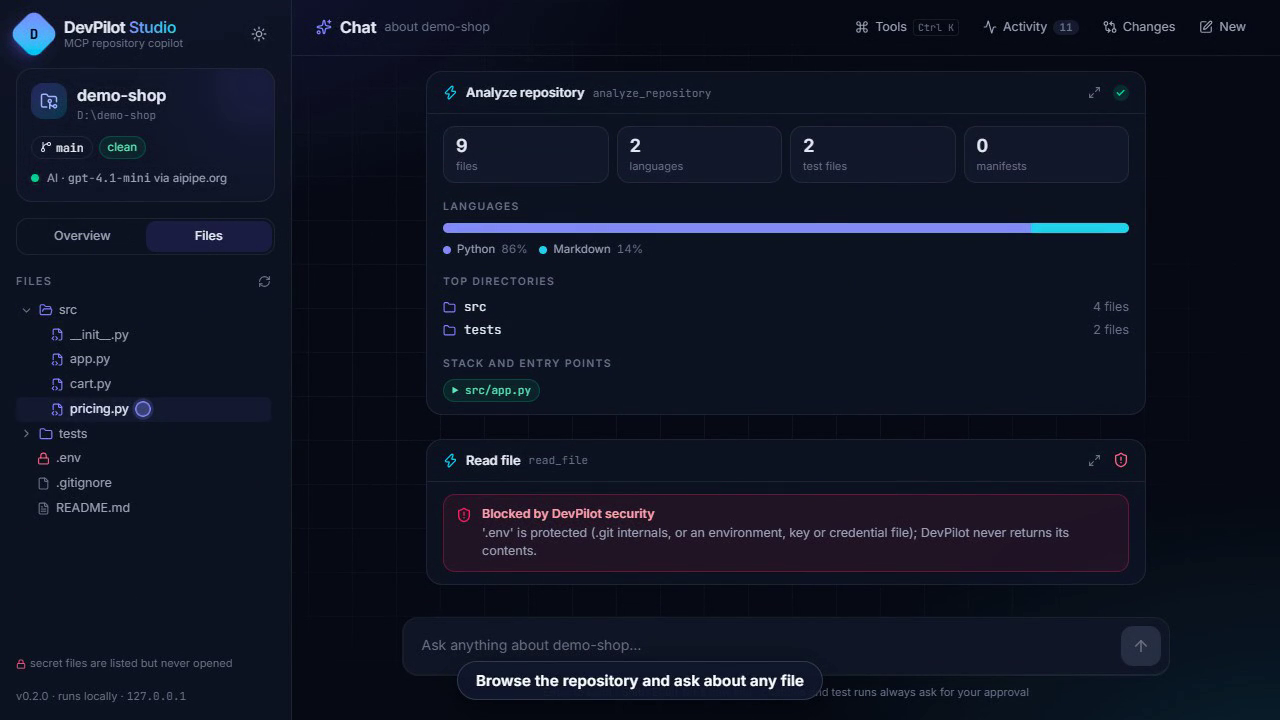 |
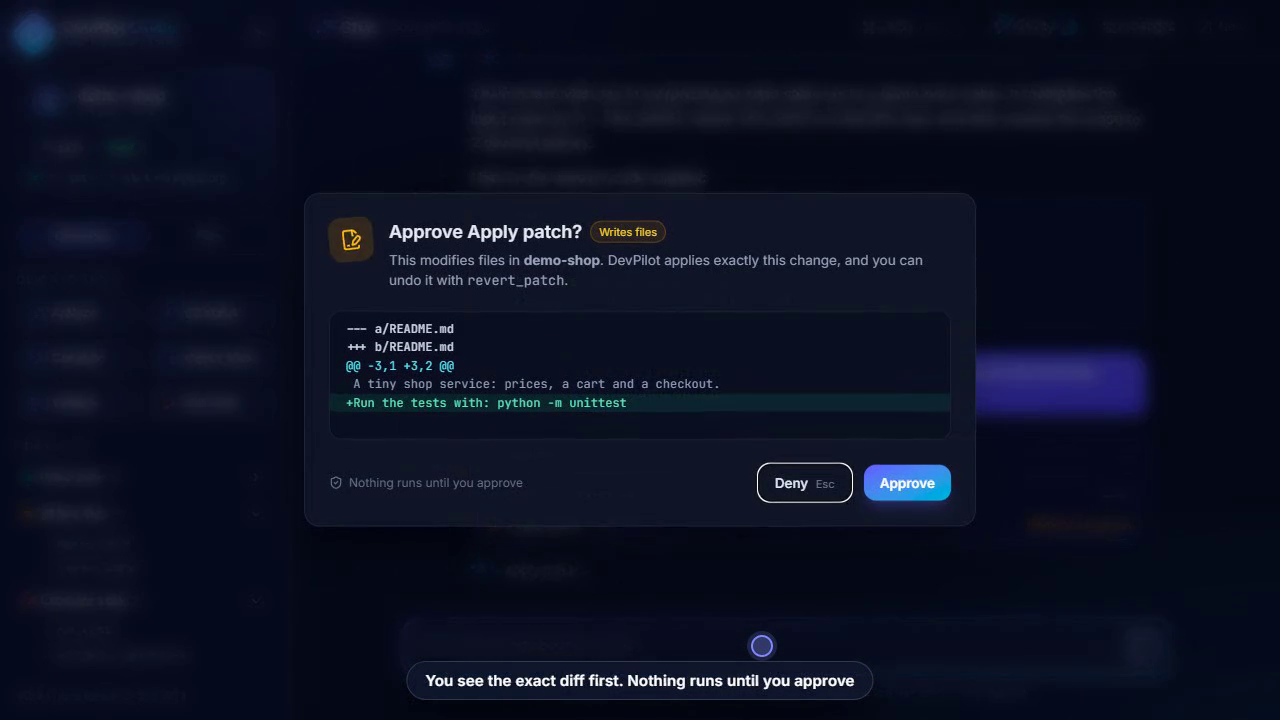 |
Use DevPilot from an AI client (MCP)
The same tools work in any app that supports MCP over stdio. With Claude Code, for example:
pip install devpilot-mcp
claude mcp add devpilot -e DEVPILOT_WORKSPACE=C:/path/to/your/repo -- devpilot-mcp
Then ask: "Use DevPilot to analyze this repository and explain its structure." You can also explore the tools by hand with MCP Inspector (npx @modelcontextprotocol/inspector). More in the usage guide.
Always set
DEVPILOT_WORKSPACEto the absolute path of the repository. Ifdevpilot-mcpis not on your PATH (for example it is inside a virtual environment), giveclaude mcp addthe full path to thedevpilot-mcpexecutable instead.
The 18 tools
| Tool | What it does | Access |
|---|---|---|
list_directory |
List a directory | Read-only |
read_file |
Read a text file | Read-only |
search_files |
Search text in all files, optionally in one folder | Read-only |
search_code |
Smart-case search in source files | Read-only |
analyze_repository |
Languages, structure, manifests, tests, entry points | Read-only |
git_status |
Branch, staged, unstaged and untracked files | Read-only |
git_log |
Recent commits | Read-only |
git_diff |
Staged or unstaged changes | Read-only |
git_branch |
Local branches | Read-only |
github_repository |
GitHub metadata for origin |
Read-only |
github_issues |
Recent issues | Read-only |
github_pull_requests |
Recent pull requests | Read-only |
investigate_repository |
Ranked evidence for a developer question | Read-only |
apply_patch |
Apply a unified diff you supply, atomically | Writes files |
revert_patch |
Undo an applied patch | Writes files |
get_test_commands |
Detect pytest/unittest (runs nothing) | Read-only |
run_tests |
Run the detected test command | Executes code |
validate_repository |
Validation report; tests only on request | Executes code |
DevPilot collects evidence and performs tightly bounded actions. The AI model does the reasoning, and it never writes a patch on DevPilot's behalf: patches come from the model or from you.
Security at a glance
- Every path stays inside the workspace.
.., absolute, drive and UNC paths, and escaping symlinks and junctions are rejected. .envfiles, private keys, credential files and.gitinternals are never read, searched or written.- Changes and test runs need your explicit approval in the UI, and patches are validated in full and applied atomically.
- Only two places start processes: allowlisted read-only Git commands, and two fixed Python test commands. There is no shell and no caller-supplied command.
- GitHub access is HTTPS GET to
api.github.comonly, and the token never appears in output. - The UI listens on
127.0.0.1only, and your AI token stays on the server side.
It is not a sandbox. Tests run with DevPilot's own permissions and network access, and secret redaction is best-effort. See Security for the full model and known limitations.
Run from source
git clone https://github.com/KD-kaustubh/devpilot-mcp.git
cd devpilot-mcp
python -m venv .venv
.venv\Scripts\activate           # macOS/Linux: source .venv/bin/activate
pip install -e ".[ui]"
python -m unittest discover -s tests -t .
The UI frontend needs Node.js to rebuild (cd ui && npm install && npm run build); see Development.
Documentation
| Document | Contents |
|---|---|
| Web UI | DevPilot Studio: setup, AI Pipe, approvals, safety, development |
| Usage guide | Configuration, MCP Inspector, client setup, example workflows |
| Tool reference | Every tool's inputs, output examples and limits |
| Security | Security model, known limitations, security tests |
| Development | Architecture, running tests, CI, phase history |
License
1 maintainer

Metadata
1 maintainer
Release files for devpilot-mcp 0.2.1
For a detailed explanation of source distributions (sdists) and built distributions (wheels), please see the package formats documentation.
Source distribution (sdist)
| File | Size | Uploaded | Provenance | Actions |
|---|---|---|---|---|
| devpilot_mcp-0.2.1.tar.gz | 750.6 kB | With provenance | Details for devpilot_mcp-0.2.1.tar.gz |
Built distribution (wheel)
| File | Interpreter | ABI | Platform | Actions Reset |
|---|---|---|---|---|
| devpilot_mcp-0.2.1-py3-none-any.whl | Python 3 | none | any | Details for devpilot_mcp-0.2.1-py3-none-any.whl |
Total release size: 1.5 MB
Release files / devpilot_mcp-0.2.1.tar.gz
| Download URL | devpilot_mcp-0.2.1.tar.gz |
|---|---|
| Size | 750.6 kB |
| Tags | Source |
|
SHA-256 checksum How to use checksums |
f251018fb8acb8e89ce208996cae2af30809022841e9058477ba8742237a126b
|
|
BLAKE2b-256 checksum How to use checksums |
34d39be6e716dccd6a015d4179a03363098c22ff03073785b008c9f2acbac57e
|
| Upload date | |
|
Uploaded using Trusted Publishing? What is trusted publishing? |
Yes |
| Uploaded via |
twine/7.0.0 CPython/3.13.16
|
Provenance
Provenance describes where a file came from. On PyPI, provenance is shared via attestations, which provide a verifiable record of the build or publishing details. View details, limitations and caveats.


PyPI Publish Attestation
PyPI verified that this artifact, at this checksum, originated from the publisher listed below.
Signed by GitHub Actions, verified by PyPI on Nov 2, 2026.
Transparency logRelease files / devpilot_mcp-0.2.1-py3-none-any.whl
| Download URL | devpilot_mcp-0.2.1-py3-none-any.whl |
|---|---|
| Size | 708.6 kB |
| Tags | Python 3 |
|
SHA-256 checksum How to use checksums |
8622bcfa100a7c3ec883a85d06f7c5fc8e27ae675ffe9c2f1b2c2d68f6065969
|
|
BLAKE2b-256 checksum How to use checksums |
f6690330bc3aa518a3fbd632fabe090cd1b21819c4b368c45f8ffc6341526c07
|
| Upload date | |
|
Uploaded using Trusted Publishing? What is trusted publishing? |
Yes |
| Uploaded via |
twine/7.0.0 CPython/3.13.16
|
Provenance
Provenance describes where a file came from. On PyPI, provenance is shared via attestations, which provide a verifiable record of the build or publishing details. View details, limitations and caveats.
PyPI Publish Attestation
PyPI verified that this artifact, at this checksum, originated from the publisher listed below.
Signed by GitHub Actions, verified by PyPI on Nov 2, 2026.
Transparency logSecurity for devpilot-mcp 0.2.1
Provenance
Provenance describes where a file came from. On PyPI, provenance is shared via attestations, which provide a verifiable record of the build or publishing details. View details, limitations and caveats.
Full provenance
All 2 files in this release have been uploaded with provenance metadata.
Attestation for devpilot_mcp-0.2.1.tar.gz
PyPI Publish Attestation
PyPI verified that this artifact, at this checksum, originated from the publisher listed below.
Signed by GitHub Actions, verified by PyPI on Nov 2, 2026.
Transparency logA note on package security
PyPI is a repository for distributing packages, not a service for auditing them. While third-party security researchers and our staff do their best to detect and remove malicious packages, PyPI cannot guarantee the quality, security or suitability of any given package.
To learn more about protecting yourself from malicious actors, visit our package security documentation.














