



DevTooling CLI
DevTooling CLI is an advanced command-line tool for project analysis and development management.
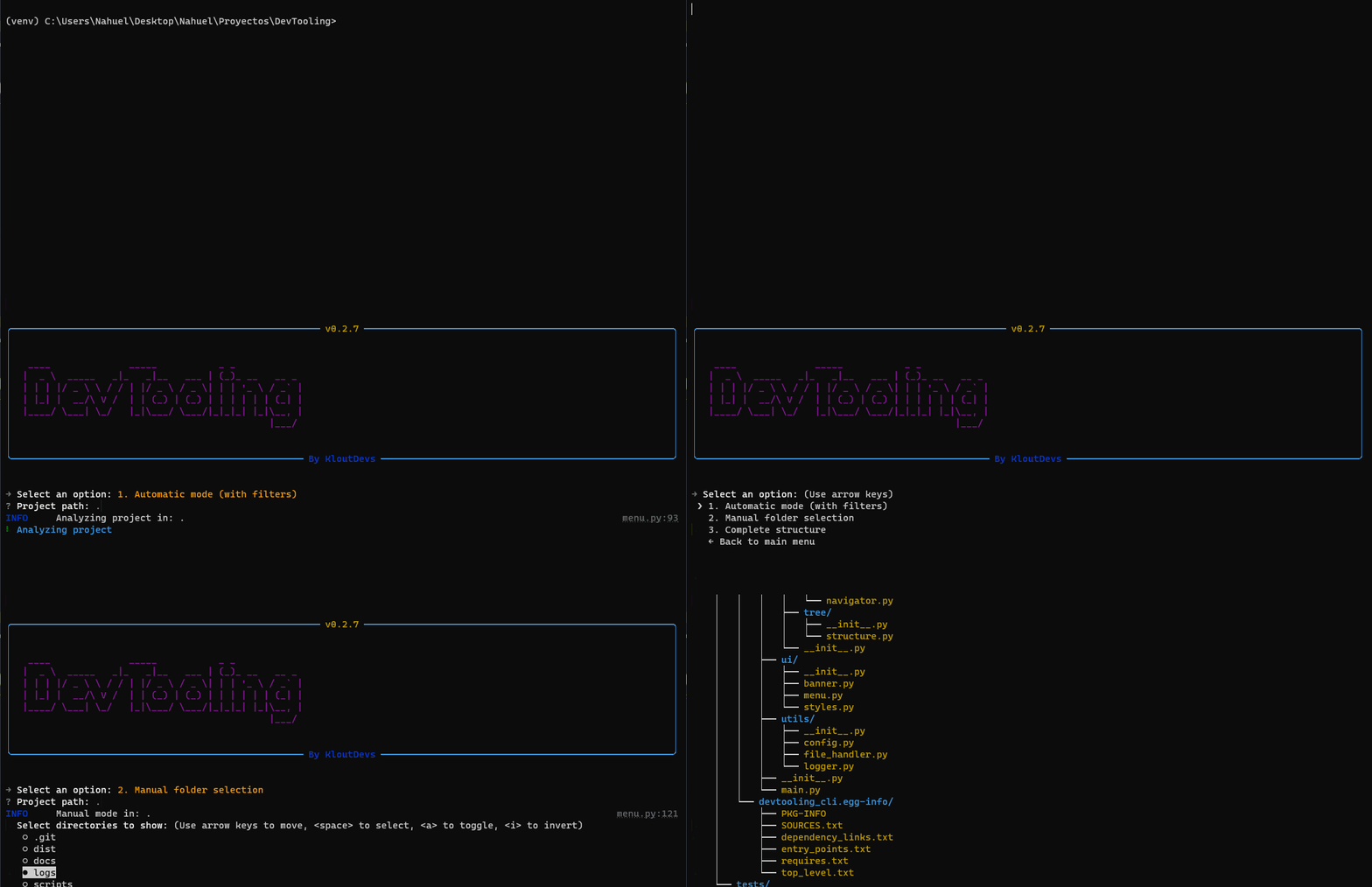
🚀 Features
- Smart Project Detection
- Automatic project type detection
- Support for multiple frameworks and technologies
- System of detection based on configurable rules
- Project Management
- Watch folders for automatic project detection
- Low-level and deep scanning modes
- Quick project navigation
- Project type classification
- Project listing and organization
- Visualization of Structure
- Interactive directory tree
- Smart filtering of files and folders
- Customizable visualization
🎯 Roadmap
Stage 1: Initial Development
-
Smart Project Detection
- Automatic project type detection
- Support for multiple frameworks and technologies
- System of detection based on configurable rules
-
Project Management
- Watch folders for automatic project detection
- Low-level and deep scanning modes
- Quick project navigation
- Project type classification
- Project listing and organization
-
Visualization of Structure
- Interactive directory tree
- Smart filtering of files and folders
- Customizable visualization
Stage 2: Integration with Git
-
View repository status: View remaining changes, modified files, and untracked files.
-
Manage branches: Create, delete, and switch between branches.
-
View commit history: Visualize commit history and filter by date, author, file, or message.
-
Generate .gitignore automatically: Generate a .gitignore file based on the current repository.
-
Contribution statistics: View fully detailed statistics about contributions to the repository.
-
Pull request statistics: View statistics about pull requests, including the number of open pull requests, closed pull requests, and merged pull requests.
-
Initialice a new repository tool: Tool for creating new repositories.
Stage 3: Dependencies Scanning
-
Detect outdated dependencies: Detect outdated dependencies in the project and suggest updates.
-
Detect vulnerabilities: Inspect the project for known vulnerabilities and suggest remediation. Integrated with tools like Snyk, OWASP, Dependency Check and GitHub Advisory Database.
-
Analyze dependency sizes: Analyze the size of dependencies of the project and identify those that are large or unnecessary.
-
Visualize dependency tree: Visualize the dependency tree of the project and identify potential issues.
Stage 4: Code Analysis
-
Count lines per language: Statistics about lines of code per programming language.
-
Detect duplicated code: Identify duplicated code in the project and suggest ways to optimize it.
-
Analyze complexity: Analyze the complexity of the project and identify potential issues.
-
Suggestions for improvements: Suggest improvements to the project based on standards and best practices.
-
Call Graph Analysis: Search for a function, find all places where it is called, and display execution paths. Generate diagrams with stack traces showing possible call chains.
Stage 5: Management of Scripts
-
Detect available scripts: Identify available scripts in the project and suggest ways to execute them.
-
Integrated execution: Execute scripts directly from the command line.
-
Customizable shortcuts: Create custom shortcuts for commonly used scripts.
-
Concurrent task management: Monitor and manage multiple tasks running in parallel.
Stage 6: Development Tools
-
Generate components from templates: Create new components from pre-defined templates.
-
Validate project structure: Check the adherence to conventions and best practices.
-
Manage configurations: Edit and update common configuration files.
-
Customizable templates: Create and manage custom templates for project generation.
Stage 7: Docker Integration
-
Analyze configurations: Detect and analyze configuration files for Docker.
-
Optimize Dockerfiles: Suggest improvements to improve the efficiency of Dockerfiles
-
Containers management: Commands for managing Docker containers.
-
Validate best practices: Ensure configurations meet safety and security standards.
Stage 8: Testing and Quality
-
Run tests: Integration with testing frameworks for run tests easily and generate reports.
-
Coverage reports: Show which parts of the code are covered by tests.
-
Integration with linters: Identify and fix issues with code quality.
-
Quality metrics: Resume of key metrics as bugs, vulnerabilities, and technical debts.
Stage 9: Documentation
-
Automatic documentation generation: Automatic generation of documentation from comments and code.
-
Update README: Facilitate the creation and maintenance of full README files.
-
Diagrams and visualizations: Generate diagrams and visualizations to better understand complex systems.
-
Documentation templates: Offer customizable templates of documentation for differents types of projects.
Stage 10: Manage of the environment
-
Environment management: Centralize and manage sensitive variables.
-
Configuration validation: Check for consistency and detect inconsistencies.
-
Environment comparison: Identify differences between configurations.
-
Configuration templates: Facilitate the creation of standard configuration files.
🛠️ Installation
Option 1: Using the Executable (Outdated)
Download the latest release for your operating system:
# Windows

Download  devtool.exe  from  the  latest  release

# Linux/MacOS

Download  devtool  from  the  latest  release

chmod  +x  devtool  # Make it executable
Option 2: Using pip
# Install globally

pip  install  devtooling-cli

# Or install in a virtual environment

python  -m  venv  .venv

source  .venv/bin/activate  # Linux/MacOS

venv\Scripts\activate  # Windows

pip  install  devtooling-cli
Option 3: From Source
# Clone the repository

git  clone  https://github.com/KloutDevs/DevTooling.git

cd  DevTooling

# Install dependencies

pip  install  -r  requirements.txt

# Install the package

pip  install  .
📖 Use
Interactive Mode
# Launch the interactive CLI

devtool

# Or if installed from source

python  -m  devtool
Command Line Mode
Structure Visualization
# Show project structure with different modes

devtool  structure  --mode  MODE  PATH

# Examples:

devtool  structure  --mode  automatic  ./my-project

devtool  structure  --mode  manual  .

devtool  structure  --mode  complete  /path/to/project
Projects Management
# Add a folder to watch for projects

devtool  projects  --folders-add  PATH

# Add with low-level scanning (only root and first level)

devtool  projects  --folders-add  PATH  --low-level

# Remove a watched folder

devtool  projects  --folders-remove  PATH

# List all watched folders and detected projects

devtool  projects  --list

# Refresh projects in watched folders

devtool  projects  --refresh-folders

# Navigate to a project

devtool  projects  --go  PROJECT_NAME

# or use the shortcut

devtool  go  PROJECT_NAME
📝 Configuration
The tool will automatically detect your project type and apply appropriate filters. You can customize the detection rules by modifying:
#Define the rules to detect project types and their dependencies,
#and the files and directories to ignore based on the project type.

config/detection_rules.json
🤝 Contributing
The contributions are welcome. Please read the contribution guide before starting.
🧪 Testing
Coverage Status

| Module | Coverage | Status |
|---|---|---|
| Core | 98% | ✅ Complete |
| Features | 93% | ✅ Complete |
| Utils | ~65% | 🟡 In Progress |
Test Suite Structure
tests/
├── core/
│   └── test_detector.py       # Project type detection tests
├── features/
│   ├── test_structure.py      # Directory visualization tests
│   └── test_projects.py       # Project management tests
└── utils/
    ├── test_config.py         # Configuration handling tests
    └── test_logger.py         # Logging system tests
Running Tests
# Run all tests
pytest

# Run specific test module
pytest tests/core/test_detector.py

# Run with coverage report
pytest --cov=devtooling tests/
Test Documentation
For detailed information about testing patterns and implementation, please refer to our Testing Documentation.
Contributing to Tests
When adding new features, please ensure:
- Write tests for new functionality
- Maintain or improve current coverage
- Follow existing test patterns
- Update test documentation
For more details about contributing to tests, see our Contributing Guidelines.
📜 License
MIT License.
🔄 Project Status
Developed with ❤️ by KloutDevs.
1 maintainer

Release files for devtooling-cli 0.3.0
For a detailed explanation of source distributions (sdists) and built distributions (wheels), please see the package formats documentation.
Source distribution (sdist)
| File | Size | Uploaded | |
|---|---|---|---|
| devtooling_cli-0.3.0.tar.gz | 36.8 kB | Details |
Built distribution (wheel)
| File | Interpreter | ABI | Platform | Reset |
|---|---|---|---|---|
| devtooling_cli-0.3.0-py3-none-any.whl | Python 3 | none | any | Details |
Total release size: 65.6 kB
Release files / devtooling_cli-0.3.0.tar.gz
| Download URL | devtooling_cli-0.3.0.tar.gz |
|---|---|
| Size | 36.8 kB |
| Tags | Source |
|
SHA-256 checksum How to use checksums |
73b1da4450fb2e1f20e1cf0f1678c8da3e855218eab6069e95afe93d310865f0
|
|
BLAKE2b-256 checksum How to use checksums |
a7b3018763dbcbd61fbee3f505192fb1bfb01c8c3a0e0374636d4fcb9c355b53
|
| Upload date | |
|
Uploaded using Trusted Publishing? What is trusted publishing? |
No |
| Uploaded via |
twine/6.1.0 CPython/3.10.6
|
Release files / devtooling_cli-0.3.0-py3-none-any.whl
| Download URL | devtooling_cli-0.3.0-py3-none-any.whl |
|---|---|
| Size | 28.8 kB |
| Tags | Python 3 |
|
SHA-256 checksum How to use checksums |
666b40578e224feeb30ccb6f86dc5755aee75493f5ca2e2c5b2d5ce381a79209
|
|
BLAKE2b-256 checksum How to use checksums |
9e238ddfc3d9f75d8d2966b964fba11eb55ae26fc97479844905ebdd0e9606b0
|
| Upload date | |
|
Uploaded using Trusted Publishing? What is trusted publishing? |
No |
| Uploaded via |
twine/6.1.0 CPython/3.10.6
|














