
A CLI tool for project analysis and management

Project description



DevTooling CLI
DevTooling CLI is an advanced command-line tool for project analysis and development management.
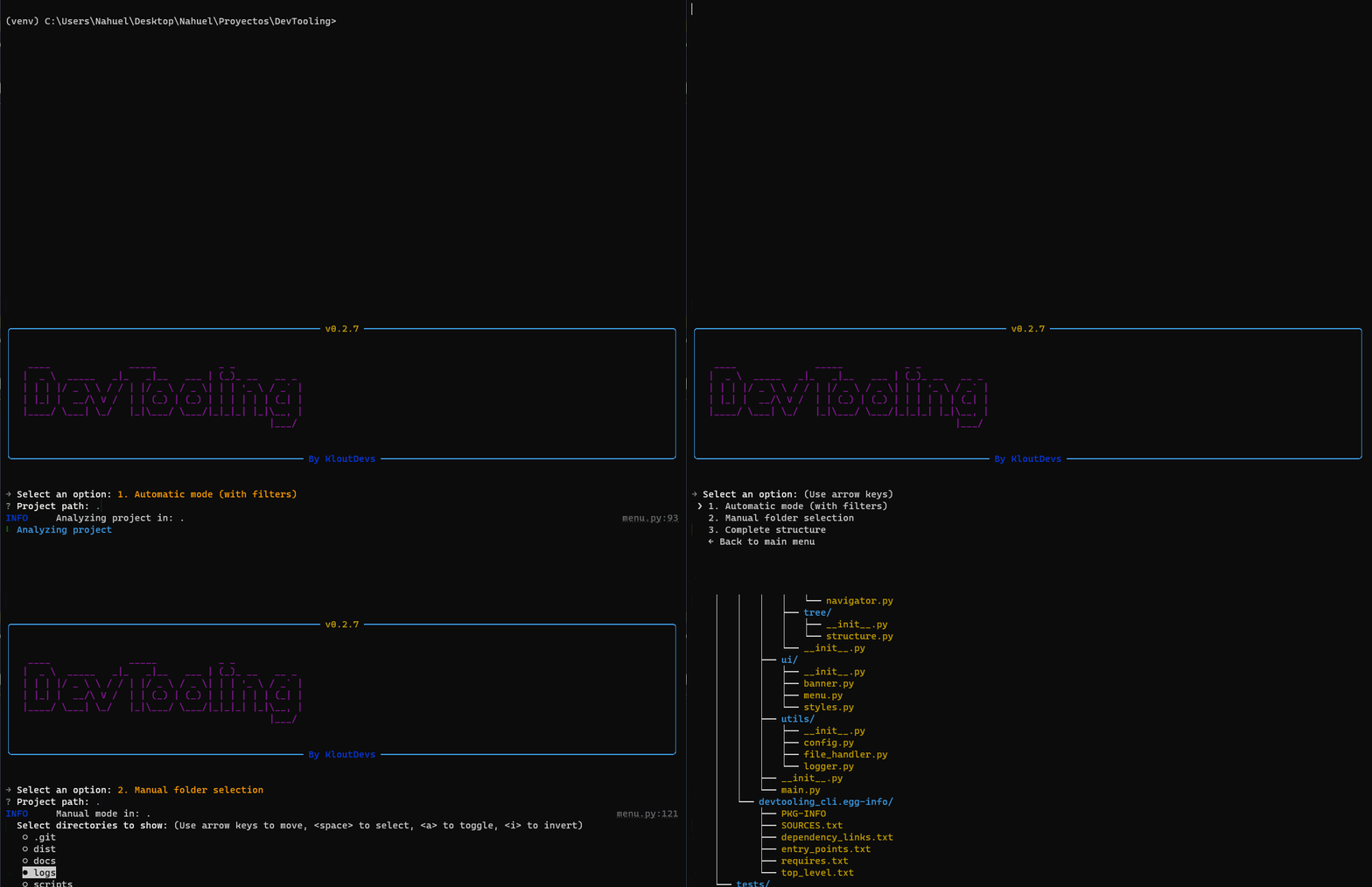
🚀 Features
- Smart Project Detection
- Automatic project type detection
- Support for multiple frameworks and technologies
- System of detection based on configurable rules
- Project Management
- Watch folders for automatic project detection
- Low-level and deep scanning modes
- Quick project navigation
- Project type classification
- Project listing and organization
- Visualization of Structure
- Interactive directory tree
- Smart filtering of files and folders
- Customizable visualization
🎯 Roadmap
Stage 1: Initial Development
-
Smart Project Detection
- Automatic project type detection
- Support for multiple frameworks and technologies
- System of detection based on configurable rules
-
Project Management
- Watch folders for automatic project detection
- Low-level and deep scanning modes
- Quick project navigation
- Project type classification
- Project listing and organization
-
Visualization of Structure
- Interactive directory tree
- Smart filtering of files and folders
- Customizable visualization
Stage 2: Integration with Git
-
View repository status: View remaining changes, modified files, and untracked files.
-
Manage branches: Create, delete, and switch between branches.
-
View commit history: Visualize commit history and filter by date, author, file, or message.
-
Generate .gitignore automatically: Generate a .gitignore file based on the current repository.
-
Contribution statistics: View fully detailed statistics about contributions to the repository.
-
Pull request statistics: View statistics about pull requests, including the number of open pull requests, closed pull requests, and merged pull requests.
-
Initialice a new repository tool: Tool for creating new repositories.
Stage 3: Dependencies Scanning
-
Detect outdated dependencies: Detect outdated dependencies in the project and suggest updates.
-
Detect vulnerabilities: Inspect the project for known vulnerabilities and suggest remediation. Integrated with tools like Snyk, OWASP, Dependency Check and GitHub Advisory Database.
-
Analyze dependency sizes: Analyze the size of dependencies of the project and identify those that are large or unnecessary.
-
Visualize dependency tree: Visualize the dependency tree of the project and identify potential issues.
Stage 4: Code Analysis
-
Count lines per language: Statistics about lines of code per programming language.
-
Detect duplicated code: Identify duplicated code in the project and suggest ways to optimize it.
-
Analyze complexity: Analyze the complexity of the project and identify potential issues.
-
Suggestions for improvements: Suggest improvements to the project based on standards and best practices.
-
Call Graph Analysis: Search for a function, find all places where it is called, and display execution paths. Generate diagrams with stack traces showing possible call chains.
Stage 5: Management of Scripts
-
Detect available scripts: Identify available scripts in the project and suggest ways to execute them.
-
Integrated execution: Execute scripts directly from the command line.
-
Customizable shortcuts: Create custom shortcuts for commonly used scripts.
-
Concurrent task management: Monitor and manage multiple tasks running in parallel.
Stage 6: Development Tools
-
Generate components from templates: Create new components from pre-defined templates.
-
Validate project structure: Check the adherence to conventions and best practices.
-
Manage configurations: Edit and update common configuration files.
-
Customizable templates: Create and manage custom templates for project generation.
Stage 7: Docker Integration
-
Analyze configurations: Detect and analyze configuration files for Docker.
-
Optimize Dockerfiles: Suggest improvements to improve the efficiency of Dockerfiles
-
Containers management: Commands for managing Docker containers.
-
Validate best practices: Ensure configurations meet safety and security standards.
Stage 8: Testing and Quality
-
Run tests: Integration with testing frameworks for run tests easily and generate reports.
-
Coverage reports: Show which parts of the code are covered by tests.
-
Integration with linters: Identify and fix issues with code quality.
-
Quality metrics: Resume of key metrics as bugs, vulnerabilities, and technical debts.
Stage 9: Documentation
-
Automatic documentation generation: Automatic generation of documentation from comments and code.
-
Update README: Facilitate the creation and maintenance of full README files.
-
Diagrams and visualizations: Generate diagrams and visualizations to better understand complex systems.
-
Documentation templates: Offer customizable templates of documentation for differents types of projects.
Stage 10: Manage of the environment
-
Environment management: Centralize and manage sensitive variables.
-
Configuration validation: Check for consistency and detect inconsistencies.
-
Environment comparison: Identify differences between configurations.
-
Configuration templates: Facilitate the creation of standard configuration files.
🛠️ Installation
Option 1: Using the Executable (Outdated)
Download the latest release for your operating system:
# Windows

Download  devtool.exe  from  the  latest  release

# Linux/MacOS

Download  devtool  from  the  latest  release

chmod  +x  devtool  # Make it executable
Option 2: Using pip
# Install globally

pip  install  devtooling-cli

# Or install in a virtual environment

python  -m  venv  .venv

source  .venv/bin/activate  # Linux/MacOS

venv\Scripts\activate  # Windows

pip  install  devtooling-cli
Option 3: From Source
# Clone the repository

git  clone  https://github.com/KloutDevs/DevTooling.git

cd  DevTooling

# Install dependencies

pip  install  -r  requirements.txt

# Install the package

pip  install  .
📖 Use
Interactive Mode
# Launch the interactive CLI

devtool

# Or if installed from source

python  -m  devtool
Command Line Mode
Structure Visualization
# Show project structure with different modes

devtool  structure  --mode  MODE  PATH

# Examples:

devtool  structure  --mode  automatic  ./my-project

devtool  structure  --mode  manual  .

devtool  structure  --mode  complete  /path/to/project
Projects Management
# Add a folder to watch for projects

devtool  projects  --folders-add  PATH

# Add with low-level scanning (only root and first level)

devtool  projects  --folders-add  PATH  --low-level

# Remove a watched folder

devtool  projects  --folders-remove  PATH

# List all watched folders and detected projects

devtool  projects  --list

# Refresh projects in watched folders

devtool  projects  --refresh-folders

# Navigate to a project

devtool  projects  --go  PROJECT_NAME

# or use the shortcut

devtool  go  PROJECT_NAME
📝 Configuration
The tool will automatically detect your project type and apply appropriate filters. You can customize the detection rules by modifying:
#Define the rules to detect project types and their dependencies,
#and the files and directories to ignore based on the project type.

config/detection_rules.json
🤝 Contributing
The contributions are welcome. Please read the contribution guide before starting.
🧪 Testing
Coverage Status

| Module | Coverage | Status |
|---|---|---|
| Core | 98% | ✅ Complete |
| Features | 93% | ✅ Complete |
| Utils | ~65% | 🟡 In Progress |
Test Suite Structure
tests/
├── core/
│   └── test_detector.py       # Project type detection tests
├── features/
│   ├── test_structure.py      # Directory visualization tests
│   └── test_projects.py       # Project management tests
└── utils/
    ├── test_config.py         # Configuration handling tests
    └── test_logger.py         # Logging system tests
Running Tests
# Run all tests
pytest

# Run specific test module
pytest tests/core/test_detector.py

# Run with coverage report
pytest --cov=devtooling tests/
Test Documentation
For detailed information about testing patterns and implementation, please refer to our Testing Documentation.
Contributing to Tests
When adding new features, please ensure:
- Write tests for new functionality
- Maintain or improve current coverage
- Follow existing test patterns
- Update test documentation
For more details about contributing to tests, see our Contributing Guidelines.
📜 License
MIT License.
🔄 Project Status
Developed with ❤️ by KloutDevs.
Release history Release notifications | RSS feed


Download files
Download the file for your platform. If you're not sure which to choose, learn more about installing packages.
Source Distribution
Built Distribution
Filter files by name, interpreter, ABI, and platform.
If you're not sure about the file name format, learn more about wheel file names.
Copy a direct link to the current filters
File details
Details for the file devtooling_cli-0.3.0.tar.gz.
File metadata
- Download URL: devtooling_cli-0.3.0.tar.gz
- Upload date:
- Size: 36.8 kB
- Tags: Source
- Uploaded using Trusted Publishing? No
- Uploaded via: twine/6.1.0 CPython/3.10.6
File hashes
| Algorithm | Hash digest | |
|---|---|---|
| SHA256 |
73b1da4450fb2e1f20e1cf0f1678c8da3e855218eab6069e95afe93d310865f0
|
|
| MD5 |
916e0f9ebcfb2e1ea1b21fd05dc3d654
|
|
| BLAKE2b-256 |
a7b3018763dbcbd61fbee3f505192fb1bfb01c8c3a0e0374636d4fcb9c355b53
|
File details
Details for the file devtooling_cli-0.3.0-py3-none-any.whl.
File metadata
- Download URL: devtooling_cli-0.3.0-py3-none-any.whl
- Upload date:
- Size: 28.8 kB
- Tags: Python 3
- Uploaded using Trusted Publishing? No
- Uploaded via: twine/6.1.0 CPython/3.10.6
File hashes
| Algorithm | Hash digest | |
|---|---|---|
| SHA256 |
666b40578e224feeb30ccb6f86dc5755aee75493f5ca2e2c5b2d5ce381a79209
|
|
| MD5 |
e7fc6a2644b95fdaf70f67e1805ad5b3
|
|
| BLAKE2b-256 |
9e238ddfc3d9f75d8d2966b964fba11eb55ae26fc97479844905ebdd0e9606b0
|






