
DexOnLinux is a tool that allows you to stream Samsung DeX from your Samsung device to your Linux PC, controlling it with your mouse and keyboard, and interacting with it as if it were a native application on your desktop.
Verified details
These details have been verified by PyPIProject links
GitHub Statistics
Maintainers

Project description

DexOnLinux
Got Samsung DeX on your device? What if you could stream directly on your Linux PC and use your mouse and keyboard to control it? DexOnLinux makes this possible in the easiest way possible.
What is DexOnLinux?
DexOnLinux is a tool that allows you to stream Samsung DeX from your Samsung device to your Linux PC, controlling it with your mouse and keyboard, and interacting with it as if it were a native application on your desktop.
How does it work?
DexOnLinux uses several different components to achieve this such as:
- miraclecast: A tool for Wi-Fi Direct connections, allowing your Linux PC to connect to your Samsung device.
- scrcpy: A display and control application for Android devices, enabling screen mirroring and input control.
- pydbus: A Python library for D-Bus, which makes it easier to read data or catch events from Miraclecast services.
How to install and run
This project requires Python 3.9 or higher, pip, and git to be installed on your system and root privileges to install some dependencies.
The installation process is pretty easy, just follow the steps below. At the moment everything has been tested only on Ubuntu 24.04, but it should work on other distributions as well.
1. Clone the repository
git clone https://github.com/gabdevele/DexOnLinux.git
2. Navigate to the project directory
cd DexOnLinux
3. Installation options
Now you have two options, either install it using the provided script or manually install the dependencies and run it directly from the source code.
Installation script only works on Ubuntu 24.04.
Option 1: Using the installation script (Ubuntu 24.04 only)
- Make the scripts executable:
chmod +x ./scripts/install.sh
chmod +x ./scripts/run.sh
- Run the installation script:
sudo ./scripts/install.sh
Option 2: Manual installation
Since the manual installation relies on external dependencies, I'll link the official installation guides for each of them.
After installing these dependencies you will need to install Python dependencies with uv:
uv sync --no-dev --locked
For development tools:
uv sync --group dev --locked
4. Run DexOnLinux
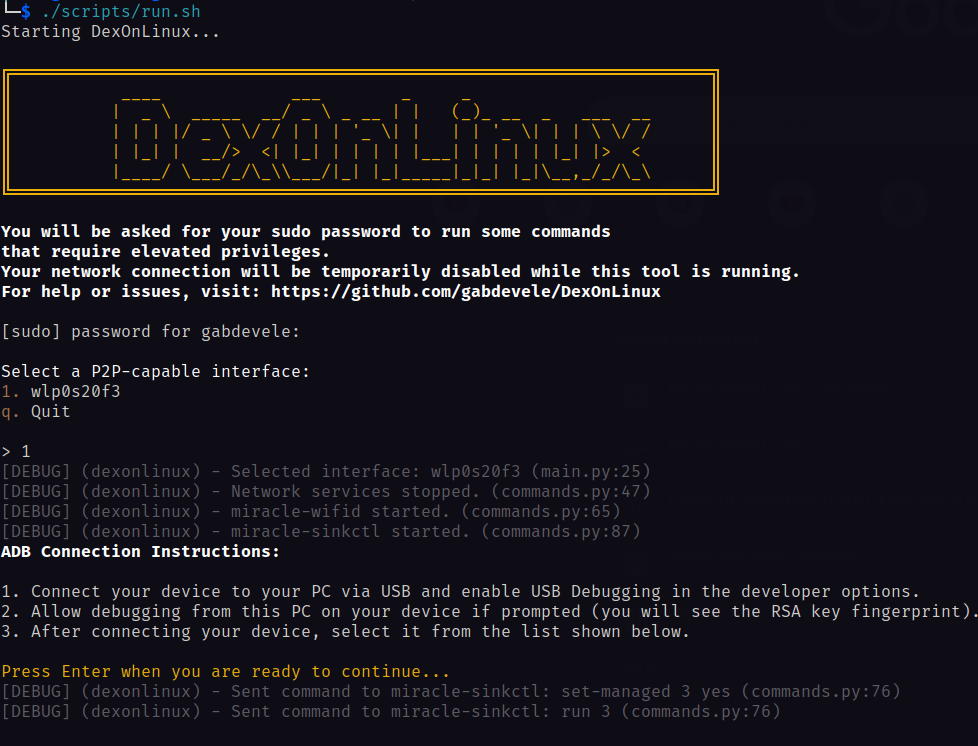
Keep in mind that your network connection will be temporarily disabled while this tool is running.
./scripts/run.sh
or, after activating the virtual environment:
dexonlinux
From the repository you can also run:
uv run dexonlinux
When DexOnLinux is published on PyPI, the Python package installation will be:
pip install dexonlinux
dexonlinux
Useful CLI options:
dexonlinux --interface wlan0 --device R5CN1234567
dexonlinux --fullscreen
dexonlinux --display-id 2
dexonlinux --debug --log-file dexonlinux.log
dexonlinux --no-banner --no-color
CLI behavior
DexOnLinux now performs dependency, Wi-Fi P2P, sudo, and ADB checks before disabling network services. Before the network is disabled, the CLI asks for confirmation unless you pass --yes.
If the session exits normally, on Ctrl+C, or after a startup error, DexOnLinux attempts to stop the Miraclecast processes it started and restore NetworkManager and wpa_supplicant.
Troubleshooting
- If your phone appears as
unauthorized, accept the ADB authorization prompt on the device and refresh. - If your phone appears as
offline, reconnect USB and restart ADB withadb kill-server && adb start-server. - If scrcpy opens the wrong display, reconnect DeX and pass
--display-id <id>after checking the display list shown by the CLI. - If networking is not restored, run
sudo systemctl start NetworkManager wpa_supplicant.
Project details
Verified details
These details have been verified by PyPIProject links
GitHub Statistics
Maintainers
Release history Release notifications | RSS feed


Download files
Download the file for your platform. If you're not sure which to choose, learn more about installing packages.
Source Distribution
Built Distribution
Filter files by name, interpreter, ABI, and platform.
If you're not sure about the file name format, learn more about wheel file names.
Copy a direct link to the current filters
File details
Details for the file dexonlinux-1.0.1.tar.gz.
File metadata
- Download URL: dexonlinux-1.0.1.tar.gz
- Upload date:
- Size: 558.1 kB
- Tags: Source
- Uploaded using Trusted Publishing? Yes
- Uploaded via: twine/6.1.0 CPython/3.13.12
File hashes
| Algorithm | Hash digest | |
|---|---|---|
| SHA256 |
a9baf9d7c05240839e19b47d9b82c311614ec291ef8eb3844e6f28d4f85864d5
|
|
| MD5 |
fd785e853f4302b789c53efbb9bd7818
|
|
| BLAKE2b-256 |
deba4d203c80342541e1c17fc1d2edf631f4570bcf449d4df345f5baf3a05687
|
Provenance
The following attestation bundles were made for dexonlinux-1.0.1.tar.gz:
Publisher:
publish.yml on gabdevele/DexOnLinux
-
Statement:
-
Statement type:
https://in-toto.io/Statement/v1 -
Predicate type:
https://docs.pypi.org/attestations/publish/v1 -
Subject name:
dexonlinux-1.0.1.tar.gz -
Subject digest:
a9baf9d7c05240839e19b47d9b82c311614ec291ef8eb3844e6f28d4f85864d5 - Sigstore transparency entry: 1749659127
- Sigstore integration time:
-
Permalink:
gabdevele/DexOnLinux@2cfac5026502aaf640bede197c46461e24ef59c4 -
Branch / Tag:
refs/tags/v1.0.1 - Owner: https://github.com/gabdevele
-
Access:
public
-
Token Issuer:
https://token.actions.githubusercontent.com -
Runner Environment:
github-hosted -
Publication workflow:
publish.yml@2cfac5026502aaf640bede197c46461e24ef59c4 -
Trigger Event:
release
-
Statement type:
File details
Details for the file dexonlinux-1.0.1-py3-none-any.whl.
File metadata
- Download URL: dexonlinux-1.0.1-py3-none-any.whl
- Upload date:
- Size: 556.6 kB
- Tags: Python 3
- Uploaded using Trusted Publishing? Yes
- Uploaded via: twine/6.1.0 CPython/3.13.12
File hashes
| Algorithm | Hash digest | |
|---|---|---|
| SHA256 |
28e0ff3c74f718121df9ab9e689c9677e2c0d880b0eb507c45982f2a5de4b9a2
|
|
| MD5 |
be62c0f4bb7e8f026f3ace21a5f6fae0
|
|
| BLAKE2b-256 |
68d85a8322683396553832040d630d1edb81dc9f93b9bed9ceb94e07e893250b
|
Provenance
The following attestation bundles were made for dexonlinux-1.0.1-py3-none-any.whl:
Publisher:
publish.yml on gabdevele/DexOnLinux
-
Statement:
-
Statement type:
https://in-toto.io/Statement/v1 -
Predicate type:
https://docs.pypi.org/attestations/publish/v1 -
Subject name:
dexonlinux-1.0.1-py3-none-any.whl -
Subject digest:
28e0ff3c74f718121df9ab9e689c9677e2c0d880b0eb507c45982f2a5de4b9a2 - Sigstore transparency entry: 1749659238
- Sigstore integration time:
-
Permalink:
gabdevele/DexOnLinux@2cfac5026502aaf640bede197c46461e24ef59c4 -
Branch / Tag:
refs/tags/v1.0.1 - Owner: https://github.com/gabdevele
-
Access:
public
-
Token Issuer:
https://token.actions.githubusercontent.com -
Runner Environment:
github-hosted -
Publication workflow:
publish.yml@2cfac5026502aaf640bede197c46461e24ef59c4 -
Trigger Event:
release
-
Statement type:






