
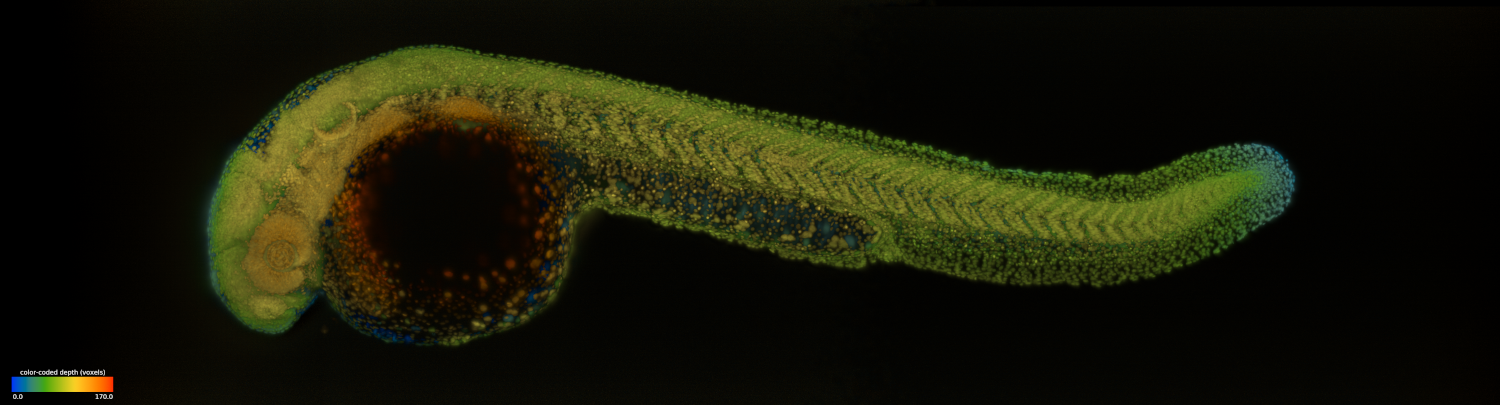
dexp | light-sheet Dataset EXploration and Processing
dexp is a napari, CuPy, Zarr, and DASK based library for managing, processing and visualizing light-sheet microscopy datasets. It consists in light-sheet specialised image processing functions (equalisation, denoising, dehazing, registration, fusion, stabilization, deskewing, deconvolution), visualization functions (napari-based viewing, 2D/3D rendering, video compositing and resizing, mp4 generation), as well as dataset management functions (copy, crop, concatenation, tiff conversion). Almost all functions are GPU accelerated via CuPy but also have a numpy-based fallback option for testing on small datasets. In addition to a functional API, DEXP offers a command line interface that makes it very easy for non-coders to pipeline large processing jobs all the way from a large multi-terabyte raw dataset to fully processed and rendered video in MP4 format.
How to install dexp
Prerequisites:
dexp works on OSX and Windows, but it is recomended to use the latest version of Ubuntu. We recommend a machine with NVIDIA graphics card with at least 12G.
First, make sure to have a working python installation. Second, make sure to have a compatible and functional CUDA installation
Once these prerequisites are satified, you can install dexp.
Installation:
dexp can simply be installed with:
pip install dexp
To installs dexp with GPU support, the optional features and colored console output:
conda install cupy
pip install dexp[optional,colored]
For OSX users: Before installating dexp, you will first need to install cairo:
brew install cairo
Quick conda environment setup and installation:
There are multiple options when using a conda environment:
-
You can create our suggested DEXP (and some additional packages) environment by, it requires GPU:
conda env create --name dexp --file env-linux-gpu.yaml -
Or create your own conda environment from scratch with the following commands delete any existing dexp environment, recreate it, install dexp with CUDA support and napari:
conda deactivate
conda env remove --name dexp
conda create -y --name dexp python=3.9
conda activate dexp
conda install cupy
pip install dexp[optional,colored]
pip install napari[all]
If you are having problems with the cuda/cuda-toolkit the best is to use conda to install the correct version of the cudatoolkit:
conda install -c conda-forge cudatoolkit==11.2.2You can check here for the best matching version.
Notes:
- You might get some error messages recommending you install missing libraries such as CUDNN, CuTensor, nccl, etc... These messages often come with instructions on what to do.
- Adjust your driver version (here 11.2) to your card(s) and drivers.
- Windows users should call
conda install -c conda-forge pyopenclbefore running the second to last step.
Leveraging extra CUDA libraries for faster processing:
If you want you dexp CUDA-based processing to be even faster, you can install additional libraries such as CUDNN and CUTENSOR with the following command:
conda install -y -c conda-forge cudnn cutensor nccl
or
dexp-install cudalibs 11.2
Change the CUDA version accordingly.
dexp Zarr dataset structure
The zarr datasets injested and written by dexp are organized as below:
/ (root)
 └── channel1 (group)
     ├── channel1 (array)
     ├── channel1_projection_0 (optional)
     ├── channel1_projection_1 (optional)
     └── channel1_projection_2 (optional)
  └── channel2 (group)
     ├── channel2 (array)
     ├── channel2_projection_0 (optional)
     ├── channel2_projection_1 (optional)
     └── channel2_projection_2 (optional)
  └── more channels ...
Channels (zarr group) could be of a particular emission color (e.g. DAPI, GFP, etc), or/and of a particular imaging views (e.g. view1 and view2 in a dual view acquisition). Under each channel group, there could be multiple zarr array. The array that has the same name as the group name is typically a n-dimentional stack (e.g. time-z-y-x). The projections of that nd array are optional (useful for quick exploration of the nd stack). When writting output datasets dexp automatically generates these projections. Future versions of dexp might add more such convenience arrays, high in the list is of course downscaled version sof the stacks for faster visualisation and browsing...
Note: Our goal is to eventually transition to a ome-zarr and/or ngff storage by defaut for both reading and writting. For reading we have also support for specific dataset produced by our light-sheet microscopes, see here for supported microscopes and formats. This is currently limited but contributions are very welcome!
DaXi
DEXP supports processing datasets acquired on the DaXi microscope (paper). You can test processing of DaXi data using an example dataset
Versions
The list of released versions can be found here. The version format is: YYYY.MM.DD.M where YYYY is the year, MM the month, dd the day, and M is the number of elapsed minutes of the day. Git tags are automatically set to link pipy versions to github tagged versions so that the corresponding code can be inspected on github, probably the most important feature. This is a very simple and semantically clear versionning scheme that accomodates for a rapid rate of updates.
How to use dexp ?
In depth documentation can be found here for both command line commands and for the python API.
Contributors:
Jordao Bragantini, Ahmet Can Solak, Bin Yang, and Loic A Royer


Release files for dexp 2023.4.10.686
For a detailed explanation of source distributions (sdists) and built distributions (wheels), please see the package formats documentation.
Source distribution (sdist)
| File | Size | Uploaded | Provenance | |
|---|---|---|---|---|
| dexp-2023.4.10.686.tar.gz | 215.8 kB | Without provenance | Details |
Built distribution (wheel)
| File | Interpreter | ABI | Platform | Reset |
|---|---|---|---|---|
| dexp-2023.4.10.686-py2.py3-none-any.whl | Python 2, Python 3 | none | any | Details |
Total release size: 557.0 kB
Release files / dexp-2023.4.10.686.tar.gz
| Download URL | dexp-2023.4.10.686.tar.gz |
|---|---|
| Size | 215.8 kB |
| Tags | Source |
|
SHA-256 checksum How to use checksums |
f026db0768d50c2e254959de01982fe36f62d3c362788fc9f1512595802c0a7e
|
|
BLAKE2b-256 checksum How to use checksums |
178bb20ad8ea4dd8023af9da4a8acca0939b6ecbc75ecea0b424f3b41133f925
|
| Upload date | |
|
Uploaded using Trusted Publishing? What is trusted publishing? |
No |
| Uploaded via |
twine/4.0.2 CPython/3.9.13
|
Release files / dexp-2023.4.10.686-py2.py3-none-any.whl
| Download URL | dexp-2023.4.10.686-py2.py3-none-any.whl |
|---|---|
| Size | 341.2 kB |
| Tags | Python 2 Python 3 |
|
SHA-256 checksum How to use checksums |
d81c98e574b0327524647c21253b31b73e163a058704c16d2a3567d516aab65e
|
|
BLAKE2b-256 checksum How to use checksums |
ae36f2e31d2adea76dc7b0d6a3238a3a6c8d020395ede157dc3e3989edab9e94
|
| Upload date | |
|
Uploaded using Trusted Publishing? What is trusted publishing? |
No |
| Uploaded via |
twine/4.0.2 CPython/3.9.13
|
Security for dexp 2023.4.10.686
Provenance
Provenance describes where a file came from. On PyPI, provenance is shared via attestations, which provide a verifiable record of the build or publishing details. View details, limitations and caveats.
No provenance found
None of the files in this release were uploaded with provenance metadata.
A note on package security
PyPI is a repository for distributing packages, not a service for auditing them. While third-party security researchers and our staff do their best to detect and remove malicious packages, PyPI cannot guarantee the quality, security or suitability of any given package.














