
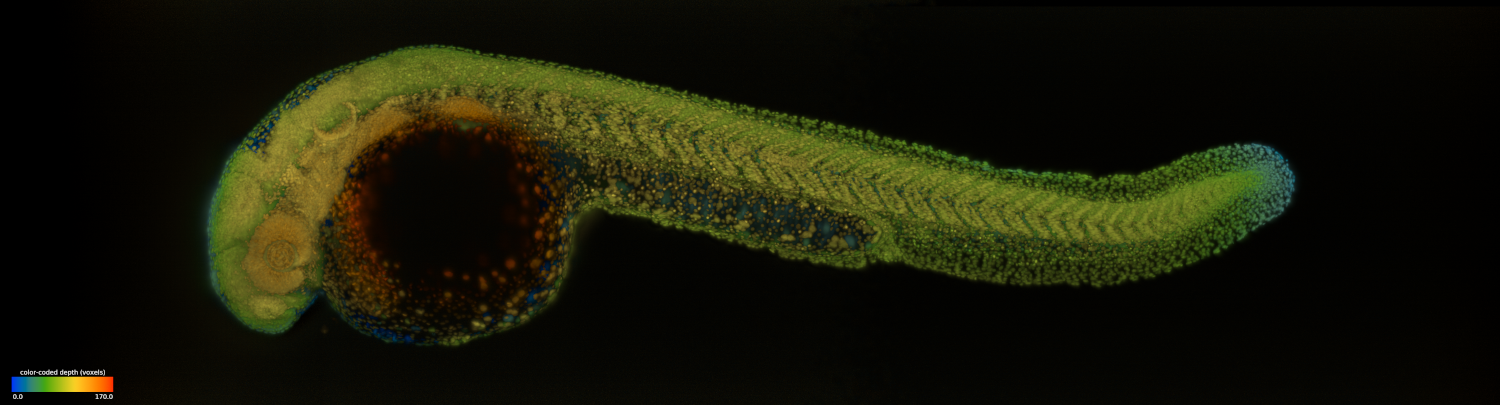
dexp | Light-sheet Dataset EXploration and Processing
dexp is a napari, CuPy, Zarr, and DASK based library for managing, processing and visualizing light-sheet microscopy datasets. It consists in light-sheet specialised image processing functions (equalisation, denoising, dehazing, registration, fusion, stabilization, deskewing, deconvolution), visualization functions (napari-based viewing, 2D/3D rendering, video compositing and resizing, mp4 generation), as well as dataset management functions (copy, crop, concatenation, tiff conversion). Almost all functions are GPU accelerated via CuPy but also have a numpy-based fallback option for testing on small datasets. In addition to a functional API, DEXP offers a command line interface that makes it very easy for non-coders to pipeline large processing jobs all the way from a large multi-terabyte raw dataset to fully processed and rendered video in MP4 format.
How to install dexp
Prerequisites:
dexp works on OSX and Windows, but it is recomended to use the latest version of Ubuntu. We recommend a machine with a top-of-the-line NVIDIA graphics card (min 12G to be confortable).
First, make sure to have a working python installation Second, make sure to have a compatible and functional CUDA installation
Once these prerequisites are satified, you can install dexp.
Installation:
dexp can simply be installed with:
To installs dexp with GPU support (CUDA 11.2) do:
pip install dexp[cuda112]
Other available CUDA versions (from CuPy) are: cuda111, cuda110, cuda102, cuda101, cuda100.
If instead you do not wish to add CUDA support, you can instead do:
pip install dexp
For OSX users: Before installating dexp, you will first need to install cairo:
brew install cairo
Quick one-line environment setup and installation:
The following line will delete any existing dexp environment, recreate it, and install dexp with support for CUDA 11.2:
conda deactivate; conda env remove --name dexp; conda create -y --name dexp python=3.8; conda activate dexp; pip install dexp[cuda112]
Leveraging extra CUDA libraries for faster processing:
If you want you dexp installation to be even faster, you can install additional libraries such as CUDNN and CUTENSOR with the following command:
install cudalibs 11.2
Change the CUDA version accordingly...
How to use dexp ?
First you need a dataset aqquired on a light-sheet microscope, see here for supported microscopes and formats.
Second, you can use any of the commands here to process your data. The list of commands can be found by :
dexp --help
Example usage


Release files for dexp 2021.4.8.855
For a detailed explanation of source distributions (sdists) and built distributions (wheels), please see the package formats documentation.
Source distribution (sdist)
| File | Size | Uploaded | |
|---|---|---|---|
| dexp-2021.4.8.855.tar.gz | 179.3 kB | Details |
Built distribution (wheel)
| File | Interpreter | ABI | Platform | Reset |
|---|---|---|---|---|
| dexp-2021.4.8.855-py2.py3-none-any.whl | Python 3, Python 2 | none | any | Details |
Total release size: 517.2 kB
Release files / dexp-2021.4.8.855.tar.gz
| Download URL | dexp-2021.4.8.855.tar.gz |
|---|---|
| Size | 179.3 kB |
| Tags | Source |
|
SHA-256 checksum How to use checksums |
811255a227088c6b2904a39784f23b732f3899c39b0a2450f5936a123b07c803
|
|
BLAKE2b-256 checksum How to use checksums |
82eae9b249c1fcaff6fed92dd2103563b0ed6ce0811932696598b1460ef013a2
|
| Upload date | |
|
Uploaded using Trusted Publishing? What is trusted publishing? |
No |
| Uploaded via |
twine/3.4.1 importlib_metadata/3.10.0 pkginfo/1.7.0 requests/2.25.1 requests-toolbelt/0.9.1 tqdm/4.60.0 CPython/3.8.5
|
Release files / dexp-2021.4.8.855-py2.py3-none-any.whl
| Download URL | dexp-2021.4.8.855-py2.py3-none-any.whl |
|---|---|
| Size | 337.9 kB |
| Tags | Python 2 Python 3 |
|
SHA-256 checksum How to use checksums |
d9b2ba5a445f390ea4a527dfd247580e9f3a79945264c575ad062c109c17eea8
|
|
BLAKE2b-256 checksum How to use checksums |
ab825571f91f7a424546af9fbf84e686926dd0149eee44c587be77bfdf58702b
|
| Upload date | |
|
Uploaded using Trusted Publishing? What is trusted publishing? |
No |
| Uploaded via |
twine/3.4.1 importlib_metadata/3.10.0 pkginfo/1.7.0 requests/2.25.1 requests-toolbelt/0.9.1 tqdm/4.60.0 CPython/3.8.5
|














