
Lightweight library to stream Pandas workflows

Project description
dfchain



A small library for composing Pandas ETL task functions involving a DataFrame.
Overview
- Library
dfchainprovides lightweight building blocks to implement ETL operations as Python functions and run them in a sequential pipeline.
Requirements
- Python 3.12 or newer
- pandas >= 2
- SQLAlchemy >= 2
Installation
From the project root:
-
Install Python 3.12 or newer. Using Anaconda,
conda create --name [env-name] python=3.12 -
Create and activate a virtual environment (recommended),
python -m venv .venv source .venv/bin/activate -
Install the package,
python -m pip install .
High-level API (overview)
The library provides a few simple moving parts to compose ETL logic as reusable functions.
-
Pipeline
- Class: dfchain.api.pipeline.Pipeline
- Purpose: Compose and execute an ordered sequence of Transformations.
- Usage: pipeline = Pipeline([step1, step2]); pipeline.run(executor)
- Steps: callables following the Transformation protocol (see below).
-
Transformation
- Protocol: any callable matching (df: pd.DataFrame, executor: Executor, **kwargs) -> pd.DataFrame
- Note: The simple @task decorator adapts plain functions to this protocol.
-
task decorator
- Function: dfchain.api.task.task
- Purpose: Adapt a simple function that operates on a pandas.DataFrame so it can be used as a Pipeline step. Supports both single-DataFrame and iterator-of-chunks input shapes.
-
Executor (core abstraction)
- Interface: dfchain.core.executor.Executor (abstract base)
- Responsibilities:
- Provide chunk iteration via iter_chunks() -> Iterator[(chunk_id, DataFrame)]
- Optionally provide group semantics (groupkey, rebuild_groups, iter_groups)
- Control eager vs non-eager update semantics via is_eager/is_inplace flags
- Persist transformed chunks via write_chunk / update_group
-
Provided executors
- PandasExecutor: In-memory executor backed by a pandas.DataFrame.
- SqliteExecutor: SQLite-backed executor that stores pickled chunk blobs and per-group aggregated blobs to enable chunked processing with a small on-disk footprint.
-
Writing a pipeline
- Define a list of step callables (functions decorated with @df_task or compatible with the Transformation protocol).
- Construct a Pipeline and run it with a PandasExecutor.
Example:
from dfchain import SqliteExecutor, Pipeline, task
import pandas as pd

@task
def add_dark_border_flag(
    df: pd.DataFrame,
    score_col: str = "border_darkness_score",
    threshold: float = 0.8,
    output_col: str = "has_dark_border",
) -> pd.DataFrame:
  """Adds a boolean column indicating whether the border is very dark.

  Args:
      df: DataFrame containing a border darkness score column.
      score_col: Name of the column with border darkness scores in [0, 1].
      threshold: Threshold above which the border is considered dark.
      output_col: Name of output boolean column.

  Returns:
      pandas.DataFrame: Copy of df with new boolean column.
  """
  df = df.copy()
  df[output_col] = df[score_col] > threshold
  return df


executor = (
  SqliteExecutor(chunksize=1_000)
  .session()
  .textFileReader(pd.read_csv("api_rawitem.csv", chunksize=1_000))
)

pipeline = Pipeline([add_border_darkness_score, add_dark_border_flag])
pipeline.run(executor)

merged_df = pd.concat(
  (df for _, df in executor.iter_chunks()),
  ignore_index=True
) # This concatenates in memory. You do not need to do this to save the DataFrame as a CSV
The resulting DataFrame can be streamed by iterating over executor.iter_chunks(), or saved with
from dfchain import SqliteCsvWriter
SqliteCsvWriter(executor).to_csv("api_rawitem_flags.csv", index=False)
Examples
Operating on a CSV file containing base64 encoding images is memory-intensive. Using distributed execution like with dfchain reduces active RAM usage by doing it in chunks. Here is the before and after of an image manipulation task that removes dark borders from base64 images in a CSV file, using the opencv library.


RAM Usage
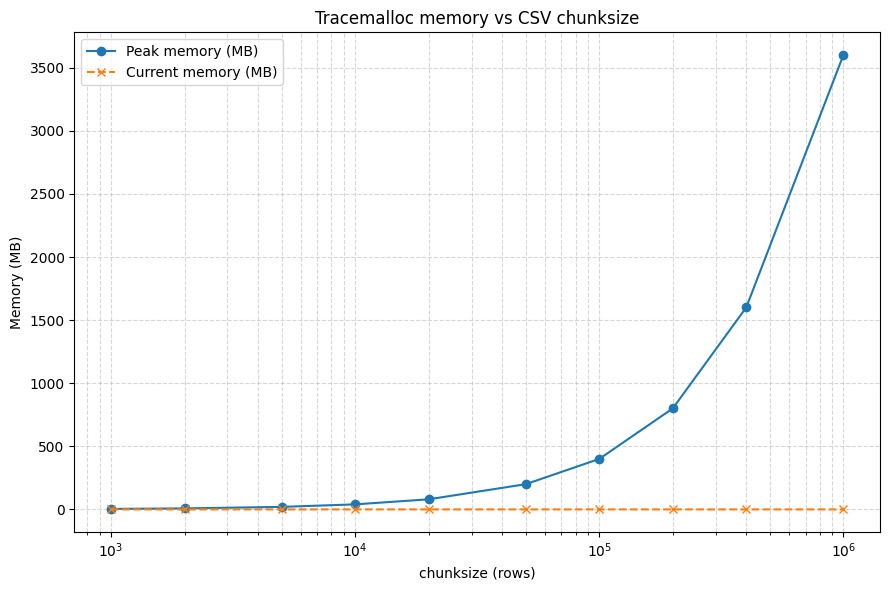
By distributing pandas operations, only one chunk of a CSV needs to be held in memory. The graph below shows the maximum RAM usage of dfchain on a 4gb CSV file, depending on chunk_size. The orange line shows the usage when chunk_size is 100.
Release history Release notifications | RSS feed


Download files
Download the file for your platform. If you're not sure which to choose, learn more about installing packages.
Source Distribution
Built Distribution
Filter files by name, interpreter, ABI, and platform.
If you're not sure about the file name format, learn more about wheel file names.
Copy a direct link to the current filters
File details
Details for the file dfchain-0.1.2.tar.gz.
File metadata
- Download URL: dfchain-0.1.2.tar.gz
- Upload date:
- Size: 27.5 kB
- Tags: Source
- Uploaded using Trusted Publishing? No
- Uploaded via: twine/6.2.0 CPython/3.14.2
File hashes
| Algorithm | Hash digest | |
|---|---|---|
| SHA256 |
5e08f9db8b7d76907a75ee75033080faf2543d8273504a5e85a05e575cf6d2c0
|
|
| MD5 |
4cff22178c448f0a78bba450e515f5bb
|
|
| BLAKE2b-256 |
3805836229c2a949a79ee40d7e3313453de081061b05bb7327c1f6a6b02480b0
|
File details
Details for the file dfchain-0.1.2-py3-none-any.whl.
File metadata
- Download URL: dfchain-0.1.2-py3-none-any.whl
- Upload date:
- Size: 27.2 kB
- Tags: Python 3
- Uploaded using Trusted Publishing? No
- Uploaded via: twine/6.2.0 CPython/3.14.2
File hashes
| Algorithm | Hash digest | |
|---|---|---|
| SHA256 |
fa2b5be59dd1f69253e4497f95454c01614ed266eb5a207cd6b2c7c44a9af876
|
|
| MD5 |
af66a2a1e9b9a65ed2434f450594e27d
|
|
| BLAKE2b-256 |
e76fd9988b6c1b3d47ea5c103f9b6378e1edb14f8cdaf09ebaa66fe0add9becd
|






