
This release is a pre-release and may not be stable for production use.
Dataflow Kernel for Jupyter/Python


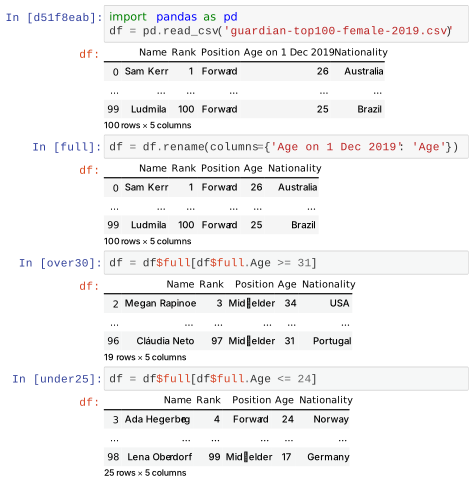
This package is part of the Dataflow Notebooks project and provides the Dataflow Python kernel for Jupyter, and is intended to be used with JupyerLab in concert with the dfnotebook-extension. This kernel seeks to elevate outputs as memorable waypoints during exploratory computation. To that end,
- Cell identifiers are persistent across sessions and are random UUIDs to signal they do not depend on top-down order.
- As with standard IPython, outputs are designated by being written as expressions or assignments on the last line of a cell.
- Each output is identified by its variable name if one is specified (e.g.
a,c,d = 4,5), and the cell identifier if not (e.g.4 + c) - Variable names can be reused across cells.
- Cells are executed as closures so only the outputs are accessible from other cells.
- An output can then be referenced in three ways:
- unscoped:
foorefers to the most recent execution output namedfoo - persistent:
foo$ba012345refers to outputfoofrom cellba012345 - tagged:
foo$barrefers to outputfoofrom the cell tagged asbar
- unscoped:
- All output references are transformed to persistent names upon execution.
- Output references implicitly define a dataflow in a directed acyclic graph, and the kernel automatically executes dependencies.
Example Notebook
Installation
These instructions only install the kernel. Please see the dfnotebook-extension instructions for full instructions.
PyPI
pip install dfkernel
From source
git clone https://github.com/dataflownb/dfkernelcd dfkernelpip install -e .python -m dfkernel install [--user|--sys-prefix]
Note that --sys-prefix works best for conda environments.
Dependencies
- IPython >= 7.0
- JupyterLab >= 2.0
- ipykernel >= 4.8.2
Previous Versions
dfkernel 1.0 worked with Jupyter Notebook, but we have decided to support JupyterLab in the future. Documentation and tutorials for v1.0 are below, but still need to be updated for v2.0.
v1.0 Documentation
General
Advanced Usage
3 maintainers


Metadata
3 maintainers
Release files for dfkernel 4.0.0a2
For a detailed explanation of source distributions (sdists) and built distributions (wheels), please see the package formats documentation.
Source distribution (sdist)
| File | Size | Uploaded | |
|---|---|---|---|
| dfkernel-4.0.0a2.tar.gz | 1.2 MB | Details |
Built distribution (wheel)
| File | Interpreter | ABI | Platform | Reset |
|---|---|---|---|---|
| dfkernel-4.0.0a2-py3-none-any.whl | Python 3 | none | any | Details |
Total release size: 2.8 MB
Release files / dfkernel-4.0.0a2.tar.gz
| Download URL | dfkernel-4.0.0a2.tar.gz |
|---|---|
| Size | 1.2 MB |
| Tags | Source |
|
SHA-256 checksum How to use checksums |
94966215310c151b0ff247bb923ed16c673196e7fcc3f49c35ecfbaf2224255a
|
|
BLAKE2b-256 checksum How to use checksums |
7680121c8da8043bb8ebc2d164efa219d72d8202647704b31c20c3034736e84d
|
| Upload date | |
|
Uploaded using Trusted Publishing? What is trusted publishing? |
No |
| Uploaded via |
twine/5.1.0 CPython/3.12.1
|
Release files / dfkernel-4.0.0a2-py3-none-any.whl
| Download URL | dfkernel-4.0.0a2-py3-none-any.whl |
|---|---|
| Size | 1.7 MB |
| Tags | Python 3 |
|
SHA-256 checksum How to use checksums |
814f33a8c68c34051ee711c173f1d0d0e1cd1ed678b96357dbeb1d8e72ffdccb
|
|
BLAKE2b-256 checksum How to use checksums |
56463a4d520e8a38e8bb55daa34efb4a9810da7c22f7b3fc57d18274e5dde1a2
|
| Upload date | |
|
Uploaded using Trusted Publishing? What is trusted publishing? |
No |
| Uploaded via |
twine/5.1.0 CPython/3.12.1
|














