
dframe-trace
Find out where your data pipeline silently broke — without writing a single rule.
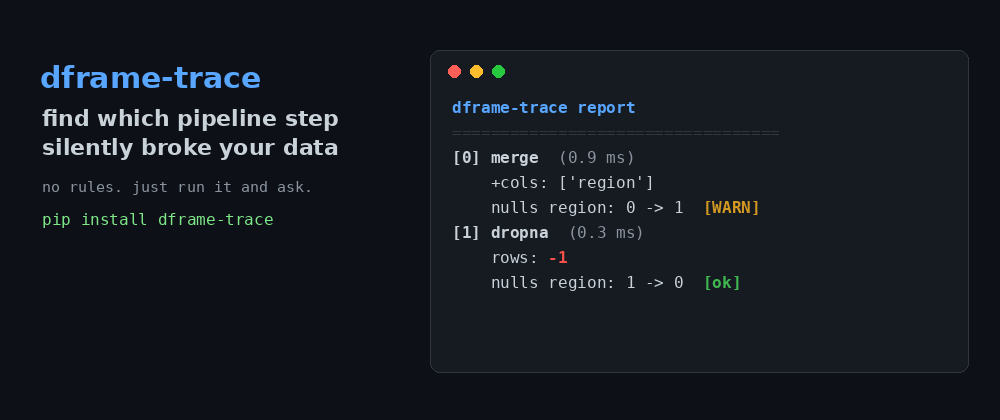
dframe-trace pinpoints which step introduced nulls or dropped rows — no rules to write.
When you process data in pandas or polars, each step quietly reshapes it: a join introduces blank values, a filter drops rows you didn't expect, a cast turns whole numbers into decimals. These bugs don't crash your program — they just hand you wrong answers, often noticed far too late.
The usual fix is sprinkling print(df.shape) between every step and squinting at
the output. dframe-trace automates that. Turn it on with one line, run your normal
code, then ask questions afterward:
t.where_null_introduced("region")   # -> "merge_meta"   (the step that did it)
t.where_rows_lost()                 # -> [("filter", -1)]
No schemas, no rules, no upfront declarations. Run your code, then interrogate what happened.
Table of contents
- How it's different from Great Expectations / Pandera
- Install
- Quick start
- Frictionless mode (no decorators)
- Use it as a CI gate
- Works with polars too
- API reference
- Limitations
- Requirements
- Contributing & license
How it's different
The Python data-validation space is crowded, so here's where dframe-trace fits.
Validation tools (Great Expectations, Pandera, Hamilton) check your data against rules you write in advance: "this column must never be null", "row count must stay above 1000". They're excellent, mature, and the right choice when you know your expectations.
dframe-trace is the opposite philosophy: zero rules. You declare nothing. It
records what every step did to your data, and you ask after the fact where
something changed. It's a debugging/observability tool, not a validation
framework — closer to a profiler that tracks data shape across a whole pipeline
than to a schema checker.
Use Pandera/GE when you know what "correct" looks like and want to enforce it.
Use dframe-trace when something is already wrong and you need to find which step
did it — or when you want a cheap always-on record of how data flows through a
script.
The two are complementary; nothing stops you using both.
Install
pip install dframe-trace
dframe-trace itself has no required dependencies. You bring your own pandas
and/or polars.
Quick start
Decorate each pipeline step, run inside a trace() block, then interrogate it:
from dframe_trace import traced, trace

@traced("merge_meta")
def merge_meta(df):
    return df.merge(meta, on="id", how="left")   # silently introduces nulls

@traced("filter")
def filter_rows(df):
    return df[df.amt > 15]                         # silently drops rows

with trace() as t:
    df = load(None)
    df = merge_meta(df)
    df = filter_rows(df)

print(t.where_null_introduced("region"))   # -> "merge_meta"
print(t.where_rows_lost())                 # -> [("filter", -1)]
print(t.report())
t.report() prints a readable step-by-step diff:
dframe-trace report
============================================================
[0] load  (0.5 ms)
    start: 4 rows, 2 cols
[1] merge_meta  (1.4 ms)
    +cols: ['region']
    nulls region: 0 -> 1  [WARN]
[2] filter  (0.4 ms)
    rows: -1
Frictionless mode (no decorators)
Don't want to touch your functions? Patch pandas/polars once and write ordinary
code — every relevant call inside a trace() block is recorded automatically:
import pandas as pd
from dframe_trace import trace, autopatch

autopatch.install()   # one line at the top of your script

with trace() as t:
    df = raw.merge(meta, on="id", how="left")   # recorded automatically
    df = df.astype({"id": "float64"})            # recorded automatically
    summary = df.groupby("region").sum()         # recorded as "groupby.sum"

print(t.report())
print(t.where_null_introduced("region"))   # -> "merge"

autopatch.uninstall()   # optional: restore original methods
autopatch wraps the methods that most often cause silent bugs — including
groupby terminal methods (agg, sum, mean, count, …), recorded as
groupby.<method> with the source frame as "before" and the aggregate as
"after". Outside an active trace() block the overhead is a single is None
check, so it's safe to leave installed.
Use it as a CI gate
Turn a trace into a build-failing assertion in your test suite:
from dframe_trace import trace, guards

with trace() as t:
    run_pipeline()

guards.assert_no_new_nulls(t)                    # raises if a step added nulls
guards.assert_no_row_loss(t, allow={"filter"})   # allow expected row drops
guards.assert_no_silent_casts(t, allow={"astype"})
guards.assert_no_schema_change(t, allow={"groupby.sum"})  # cols/dtypes stable
Each guard raises TraceAssertionError with a structured .violations list, so
failures are precise: "merge introduced 2 null(s) in 'region'" or
"schema changed: rename (added ['amount']; dropped ['amt'])".
Works with polars too
dframe-trace is backend-agnostic. autopatch.install() patches whichever of
pandas / polars is installed:
import polars as pl
from dframe_trace import trace, autopatch

autopatch.install()

with trace() as t:
    df = raw.join(meta, on="id", how="left")   # eager: recorded automatically
    df = df.drop_nulls(subset=["region"])
    agg = df.group_by("region").agg(pl.col("amt").sum())  # "group_by.agg"

    out = (lf.filter(pl.col("amt") > 15)        # lazy: the chain builds a plan…
             .collect())                         # …and is recorded at .collect()

print(t.where_null_introduced("region"))   # -> "join"
Eager polars DataFrame methods (join, drop_nulls, fill_null, cast,
filter, sort, unique, with_columns, select, …) are traced like pandas,
and eager group_by(...).agg(...) is recorded as group_by.agg. For lazy
LazyFrame pipelines, intermediate operations only build a query plan and can't
be snapshotted cheaply, so tracing happens at the .collect() boundary where
the plan materializes into a real frame.
API reference
trace() — context manager. Opens a recording session; yields a Trace.
@traced(name=None, note="") — decorator for a function whose first argument
is a frame and which returns a frame. Records a before/after snapshot under
name (defaults to the function name).
autopatch.install(pandas=True, polars=True) — monkeypatch DataFrame and
GroupBy methods so calls record automatically. Idempotent; safe when a library
is absent. autopatch.uninstall() restores originals.
autopatch.is_installed() returns the current state.
Trace methods:
where_null_introduced(column)→ name of the first step that added nulls tocolumn, orNone.where_rows_lost()→ list of(step_name, negative_delta)for steps that dropped rows.report()→ human-readable string of every step and what changed.steps→ the raw list ofStepobjects; each has.diff()returning a dict ofrows_delta,cols_added,cols_dropped,dtype_changes,null_changes,mem_delta_bytes.
Guards (each raises guards.TraceAssertionError on violation):
assert_no_new_nulls(trace, columns=None)assert_no_row_loss(trace, allow=None)assert_no_silent_casts(trace, allow=None)assert_no_schema_change(trace, allow=None)— fails if any step added or dropped columns or changed a dtype; useallowfor steps expected to reshape.
A snapshot is structural only — row count, column names, dtypes, per-column null counts, and estimated memory. No row values are ever copied or stored, which is why it's cheap enough to leave on.
Limitations (read before relying on it)
- Boolean-mask filtering (
df[df.x > 0]) is not auto-traced. That uses__getitem__, an operator we deliberately don't patch (too broad, too risky). The row loss still appears in the next recorded step's row delta, just not attributed to the filter itself. For precise attribution, wrap that function with@traced. - groupby tracing covers DataFrame-returning terminal methods (
agg,sum,mean,count, …)..applyand.transformare not traced, and terminal calls that return a Series are skipped gracefully. - polars support is newer than the pandas support, and
group_by.aggtracing uses a best-effort source-frame lookup that may vary across polars versions. Please run the polars test suite against your version (see below) and report issues. - This is a young project. It's a debugging aid, not a guarantee of correctness.
Requirements
- Python 3.9+
- pandas and/or polars (whichever you use; neither is installed by
dframe-trace)
To run the tests locally:
pip install pandas polars pytest
pip install -e .
python -m pytest tests/ -v
The polars tests auto-skip if polars isn't installed.
Roadmap (good first issues for contributors)
- HTML / Mermaid lineage diagram export from a
Trace - Boolean-mask filter attribution (opt-in
__getitem__patching) - polars
LazyGroupByand pandasSeriesGroupBycoverage
Contributing
Issues and pull requests welcome. Fork the repo, make your change with a test, and open a PR. Good first issues are tagged in the roadmap above.
License
MIT. See the LICENSE file.
1 maintainer

Metadata
1 maintainer
Release files for dframe-trace 0.4.0
For a detailed explanation of source distributions (sdists) and built distributions (wheels), please see the package formats documentation.
Source distribution (sdist)
| File | Size | Uploaded | Provenance | |
|---|---|---|---|---|
| dframe_trace-0.4.0.tar.gz | 18.4 kB | Without provenance | Details |
Built distribution (wheel)
| File | Interpreter | ABI | Platform | Reset |
|---|---|---|---|---|
| dframe_trace-0.4.0-py3-none-any.whl | Python 3 | none | any | Details |
Total release size: 32.2 kB
Release files / dframe_trace-0.4.0.tar.gz
| Download URL | dframe_trace-0.4.0.tar.gz |
|---|---|
| Size | 18.4 kB |
| Tags | Source |
|
SHA-256 checksum How to use checksums |
e6f6ff1f0dfc1aec21465adc80f749df38669d01336551b03ec6b53dce5cff81
|
|
BLAKE2b-256 checksum How to use checksums |
de24f5a527a0d45b6b62ef77e7cdf9dcb598dff37196a7c4af9c0edb6193db06
|
| Upload date | |
|
Uploaded using Trusted Publishing? What is trusted publishing? |
No |
| Uploaded via |
twine/6.2.0 CPython/3.11.3
|
Release files / dframe_trace-0.4.0-py3-none-any.whl
| Download URL | dframe_trace-0.4.0-py3-none-any.whl |
|---|---|
| Size | 13.8 kB |
| Tags | Python 3 |
|
SHA-256 checksum How to use checksums |
0098665354f85fafd6356a414ceb4caba72059a15c69a932beb503d85b46a104
|
|
BLAKE2b-256 checksum How to use checksums |
230da147cefa6de9fcdcd6be0d797bedf5f701536a83bef72997009ff12c042b
|
| Upload date | |
|
Uploaded using Trusted Publishing? What is trusted publishing? |
No |
| Uploaded via |
twine/6.2.0 CPython/3.11.3
|
Security for dframe-trace 0.4.0
Provenance
Provenance describes where a file came from. On PyPI, provenance is shared via attestations, which provide a verifiable record of the build or publishing details. View details, limitations and caveats.
No provenance found
None of the files in this release were uploaded with provenance metadata.
A note on package security
PyPI is a repository for distributing packages, not a service for auditing them. While third-party security researchers and our staff do their best to detect and remove malicious packages, PyPI cannot guarantee the quality, security or suitability of any given package.
To learn more about protecting yourself from malicious actors, visit our package security documentation.














