
Caldron AI platform
version 0.1.13
System Architecture
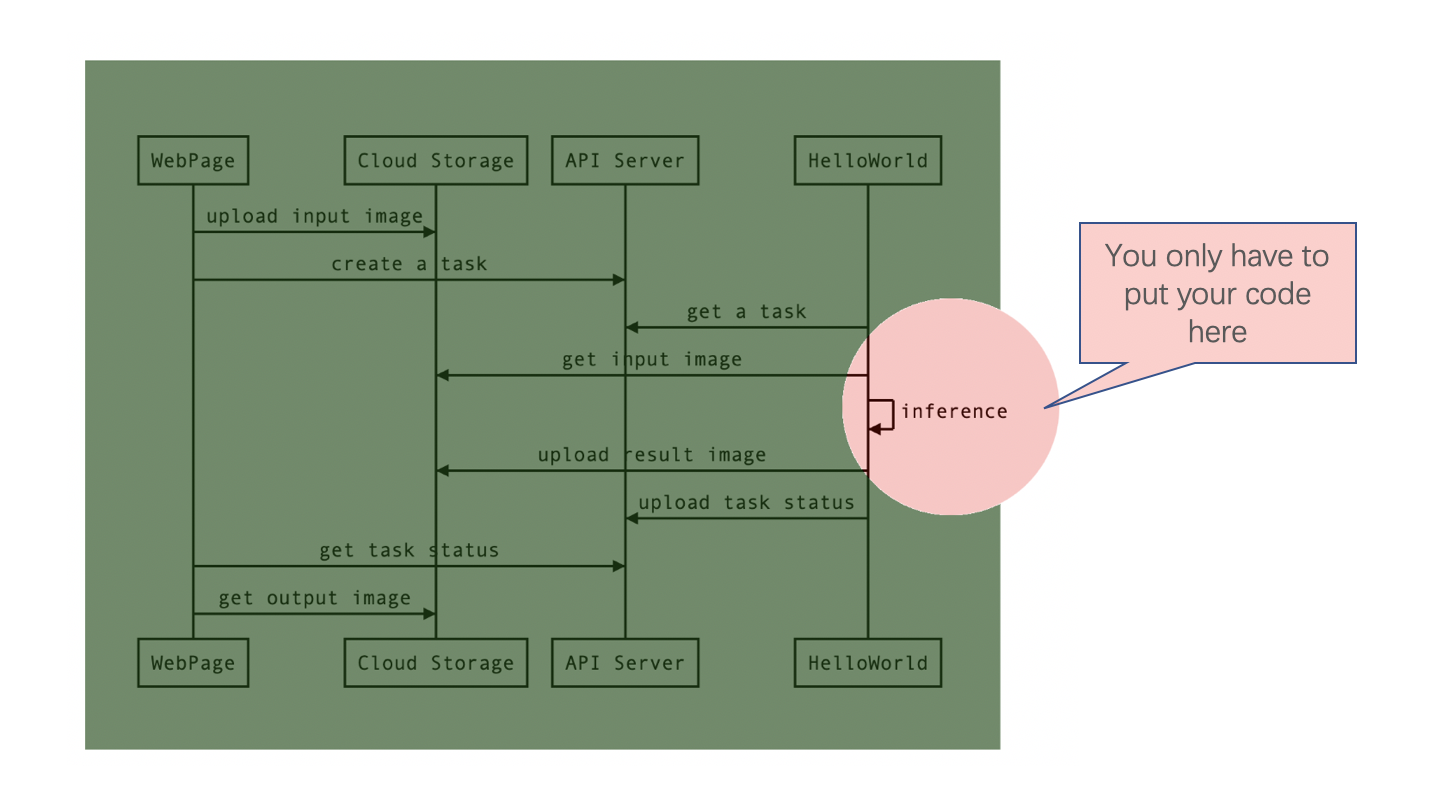
How to run hello world demo
1. pip install dg-ai-platform.
2. Login to Caldron AI platform website.
3. You will see a HelloWorld app with PID and public key.
4. Paste following code to a blank python file and change #pid# to your demo PID.
5. run this python file.
from dg_ai_platform.example import HelloWorld
from dg_ai_platform.dg_platform import CaldronAI

ca = CaldronAI(HelloWorld, pid="xxxx", public_key="xxxx")
ca.run()
6. Create your task in HelloWorld task page.
7. Your local python process will fetch a task and process it.
8. When the task finished, result will show on the page
Run your own App
1. Create a app then setup inputs and outputs on website.
2. Create yourself class must be implementing ITaskProcess(see below code).
from dg_ai_platform.dg_platform import ITaskProcess

class CustomTask(ITaskProcess):
    def __init__(self):
        super().__init__()

    def inference(self, input_list, output_list, options=None):
        #your logic
3.You should be let your logic into function inference(self, input_list, output_list, options=None)
- param input_list: all inputs local path in this array. You should be load your all inputs then put it to your model.
- param output_list: all outputs local path in this array. You should be save your outputs to these outputs path.
- param options: This is a json data.
4. Run your app with CustomTask
from your_python_file import CustomTask
from dg_ai_platform.dg_platform import CaldronAI

ca = CaldronAI(CustomTask, pid="xxxx", public_key="xxxx")
ca.run()
5. Create your custom task on website.
6. You will see a result on result page.
1 maintainer

Download files
Download the file for your platform. If you're not sure which to choose, learn more about installing packages.
Source Distribution
dg_ai_platform-0.2.1.tar.gz
(5.2 kB
view details)
Built Distribution
Filter files by name, interpreter, ABI, and platform.
If you're not sure about the file name format, learn more about wheel file names.
Copy a direct link to the current filters
File details
Details for the file dg_ai_platform-0.2.1.tar.gz.
File metadata
- Download URL: dg_ai_platform-0.2.1.tar.gz
- Upload date:
- Size: 5.2 kB
- Tags: Source
- Uploaded using Trusted Publishing? No
- Uploaded via:
twine/3.4.1 importlib_metadata/3.10.1 pkginfo/1.7.1 requests/2.24.0 requests-toolbelt/0.9.1 tqdm/4.51.0 CPython/3.7.7
File hashes
| Algorithm | Hash digest | |
|---|---|---|
| SHA256 |
c26754afd1234669b36535a5dc7e52ad0f910910ecb1d92f0fd2ccaad2e82915
|
|
| MD5 |
c3bef73646eb026f99dede9b56263743
|
|
| BLAKE2b-256 |
980e068ad1d3be79e950c21c96ace622ff171019579428f3ee5374a2a522a851
|
File details
Details for the file dg_ai_platform-0.2.1-py3-none-any.whl.
File metadata
- Download URL: dg_ai_platform-0.2.1-py3-none-any.whl
- Upload date:
- Size: 9.8 kB
- Tags: Python 3
- Uploaded using Trusted Publishing? No
- Uploaded via:
twine/3.4.1 importlib_metadata/3.10.1 pkginfo/1.7.1 requests/2.24.0 requests-toolbelt/0.9.1 tqdm/4.51.0 CPython/3.7.7
File hashes
| Algorithm | Hash digest | |
|---|---|---|
| SHA256 |
5b7ec62ca58261e8cffcef147fe4d2f8c6d2814fd8da641c3c22ed0f7a9b91aa
|
|
| MD5 |
a5a8f8e119028cc4171eb04b83fd0aa1
|
|
| BLAKE2b-256 |
8037a1672eeb1e494bf5c94ba281c9afc1d44057f56fadf1d0af653f550eacdf
|














