
Distributed Graph Flow





Graph Flow (DGF) is an open-source Python library to train, evaluate, and deploy Graph Neural Networks (GNNs) on tabular, relational, and temporal data. It is developed by the Google GNN team, the team behind TensorFlow GNN, and is its successor.
Graph Flow has two APIs:
- The Simple API is as easy to use as scikit-learn: one function call trains a GNN model from a graph and a target column, and the resulting model can be evaluated, used for predictions, and saved.
- The Advanced API is a set of composable building blocks (graph IO, samplers, feature normalizers, and JAX/Flax GNN layers). Like Lego bricks, you pick the ones you need and assemble them with your own code, including PyTorch Geometric models.
📖 Documentation: https://dgf.readthedocs.io/
This is not an officially supported Google product. This project is not eligible for the Google Open Source Software Vulnerability Rewards Program.
📦 Installation
To install DGF from PyPI, run:
pip install dgf -U
Graph Flow is available for Python 3.11–3.13 on Linux x86-64.
🔥 Why Graph Flow?
- Simple API: Train, evaluate, and save a GNN model in about 10 lines of Python, without prior GNN experience.
- Temporal graphs: Dynamic graphs and time-series features are supported. Time-aware sampling ensures that a model only sees information available before the prediction time.
- Scale: Train in memory on graphs with up to 1B edges on a single machine. For larger graphs, the distributed sampler (Apache Beam on Google Cloud Dataflow) scales to trillions of edges.
- Advanced API: Message-passing layers (MPNN, GAT, Graph Transformer), samplers, and normalizers are independent JAX/Flax building blocks for custom models.
- Interoperability: Convert graphs to PyTorch Geometric, TensorFlow, TF-GNN, and NetworkX.
- Deployment: Run inference in-process in Python, or export models to TensorFlow SavedModel (e.g., for Vertex AI).
😎 Minimal usage example
import dgf

# Download an example graph
graph, schema = dgf.io.fetch_ogb_graph("arxiv")

# Train a GNN model to predict the "labels" feature on the "nodes" nodeset
model = dgf.learning.train_node_model(
    graph=graph,
    schema=schema,
    target_column="labels",
    target_nodeset="nodes",
)

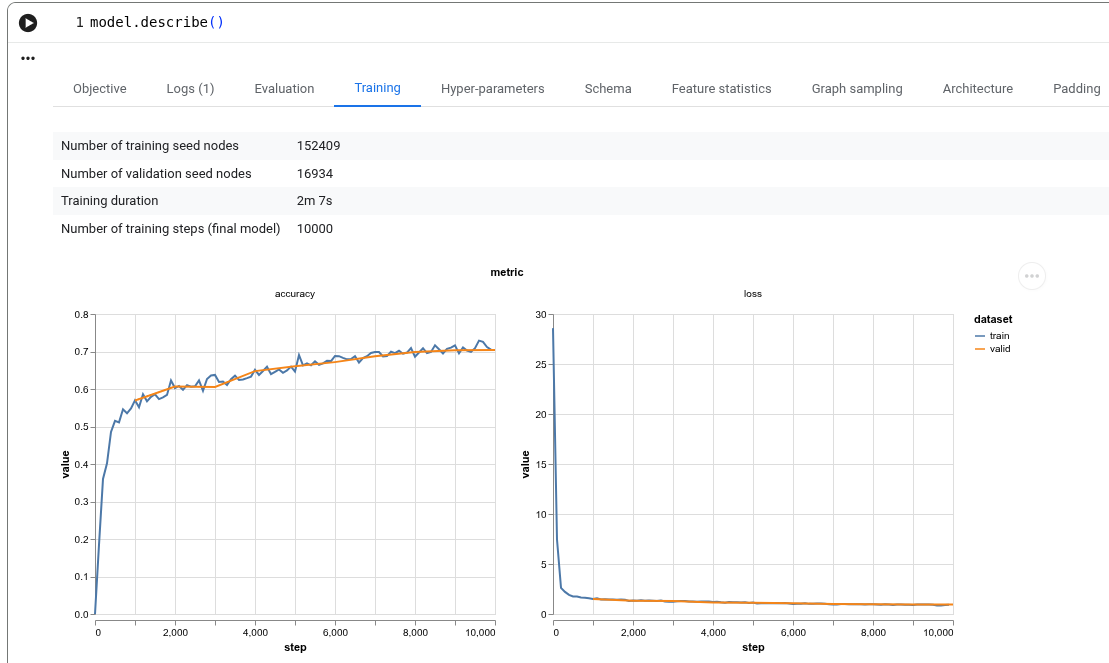
# Inspect training statistics, architecture, and schema
model.describe()

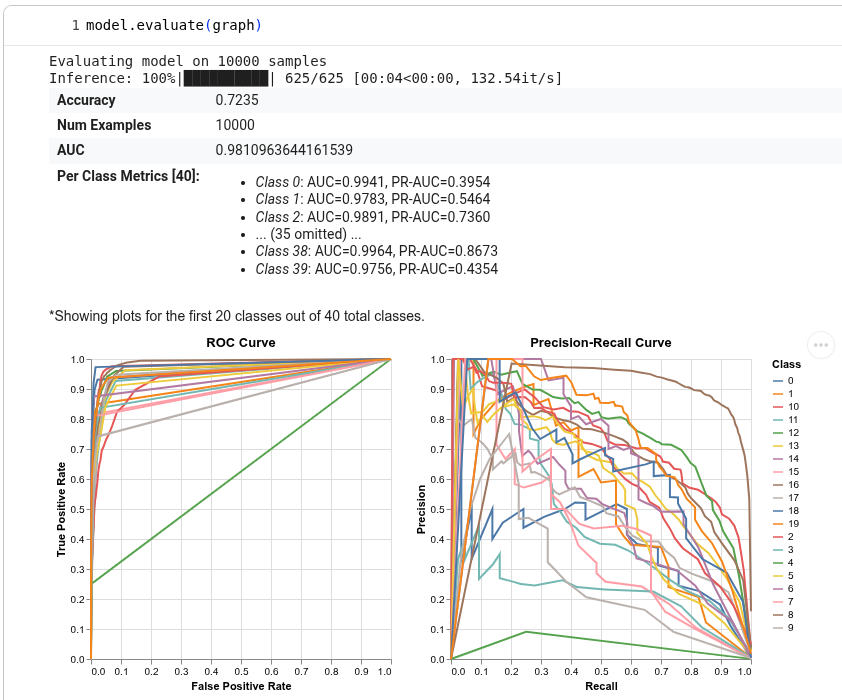
# Evaluate quality metrics
model.evaluate()

# Make low-latency predictions in-process
model.predict(graph, seed_node_idxs=[0, 1, 2])

# Save the model (architecture, weights, sampling config, training logs, etc.)
model.save("/tmp/model")
Output of model.describe()
Output of model.evaluate()
See the Getting Started tutorial for the complete walkthrough.
🤗 Need help?
- Read the documentation and the Q&A.
- Bugs & feature requests: Open a GitHub issue.
- Contact the team: Email us at distributed-graph-flow-contact@google.com.
1 maintainer

Release files for dgf 0.1.0
For a detailed explanation of source distributions (sdists) and built distributions (wheels), please see the package formats documentation.
Built distributions (wheels)
| File | Interpreter | ABI | Platform | Reset |
|---|---|---|---|---|
| dgf-0.1.0-cp313-cp313-manylinux_2_27_x86_64.manylinux_2_28_x86_64.whl | CPython 3.13 | CPython 3.13 | Linux glibc 2.27+ x86-64, Linux glibc 2.28+ x86-64 | Details |
| dgf-0.1.0-cp312-cp312-manylinux_2_27_x86_64.manylinux_2_28_x86_64.whl | CPython 3.12 | CPython 3.12 | Linux glibc 2.27+ x86-64, Linux glibc 2.28+ x86-64 | Details |
| dgf-0.1.0-cp311-cp311-manylinux_2_27_x86_64.manylinux_2_28_x86_64.whl | CPython 3.11 | CPython 3.11 | Linux glibc 2.27+ x86-64, Linux glibc 2.28+ x86-64 | Details |
Total release size: 13.0 MB
Release files / dgf-0.1.0-cp313-cp313-manylinux_2_27_x86_64.manylinux_2_28_x86_64.whl
| Download URL | dgf-0.1.0-cp313-cp313-manylinux_2_27_x86_64.manylinux_2_28_x86_64.whl |
|---|---|
| Size | 4.3 MB |
| Tags | CPython 3.13 Linux glibc 2.27+ x86-64 Linux glibc 2.28+ x86-64 |
|
SHA-256 checksum How to use checksums |
8c4b6f4d8107b6385e7ae93bf871f9ed213b80e7f5bcb4bd999a8df6dd0439a8
|
|
BLAKE2b-256 checksum How to use checksums |
bcb1ad7d1ae461131ad2201e33df7d42bb4a4322e1e54d245d3860ea88fe69e1
|
| Upload date | |
|
Uploaded using Trusted Publishing? What is trusted publishing? |
No |
| Uploaded via |
twine/6.2.0 CPython/3.13.15
|
Release files / dgf-0.1.0-cp312-cp312-manylinux_2_27_x86_64.manylinux_2_28_x86_64.whl
| Download URL | dgf-0.1.0-cp312-cp312-manylinux_2_27_x86_64.manylinux_2_28_x86_64.whl |
|---|---|
| Size | 4.3 MB |
| Tags | CPython 3.12 Linux glibc 2.27+ x86-64 Linux glibc 2.28+ x86-64 |
|
SHA-256 checksum How to use checksums |
626bc62154c0059e1b1614b3d3c64b55fda429ab0d56901eda0d5a659bdc7d33
|
|
BLAKE2b-256 checksum How to use checksums |
f324300948647fe19b9889961f1f6899b442cebb5e752e7f09b7564b589d3345
|
| Upload date | |
|
Uploaded using Trusted Publishing? What is trusted publishing? |
No |
| Uploaded via |
twine/6.2.0 CPython/3.13.15
|
Release files / dgf-0.1.0-cp311-cp311-manylinux_2_27_x86_64.manylinux_2_28_x86_64.whl
| Download URL | dgf-0.1.0-cp311-cp311-manylinux_2_27_x86_64.manylinux_2_28_x86_64.whl |
|---|---|
| Size | 4.3 MB |
| Tags | CPython 3.11 Linux glibc 2.27+ x86-64 Linux glibc 2.28+ x86-64 |
|
SHA-256 checksum How to use checksums |
511888f2ddb35b8c2606c3edf3b3e3aa3969928317410763e1a95c9ccd4b38c0
|
|
BLAKE2b-256 checksum How to use checksums |
c2f1e70dbbb8e5fe1ce3a780081fa7236304808000fea26b5de255cd64c2fce5
|
| Upload date | |
|
Uploaded using Trusted Publishing? What is trusted publishing? |
No |
| Uploaded via |
twine/6.2.0 CPython/3.13.15
|














