
Overview
Welcome to DHART:a C++ package with interfaces to Python, C, and C# for Design, Humans, Analysis, and RoboTics.
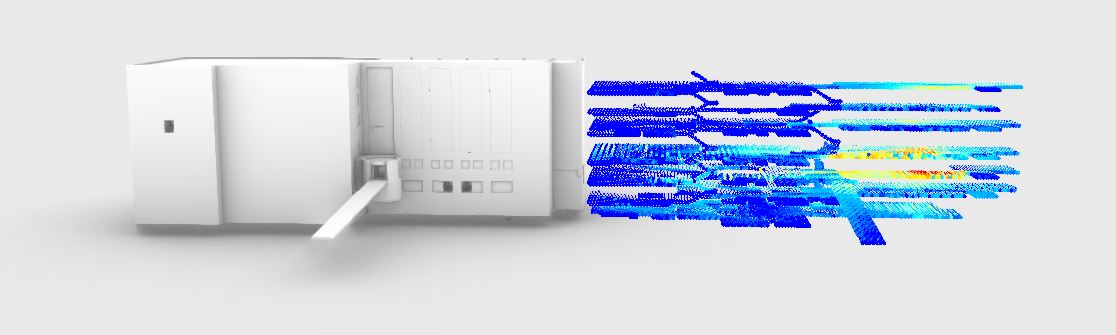
There are a few components to the package, but the main focus is in providing fast ray-casting interfaces for python and C# for a variety of analysis and evaluation techniques. Generally, you should be able to build a grid-like structure of the floors for a 3D model, calculate shortest paths by distance and custom metrics, and use these tools inside of a variety of programs such as Unity, Rhino, and more.
We have extensive documentation on the API, and welcome new contributions and bug fixes. Please make sure to take a look at the contributing guide.
Limitations
- Currently it is only available on Windows OS. (We happily would accept contributors to help expand to Linux. )
- Integration with Rhino is currently limited to viewing analysis results through
jsonfiles.
Coming Soon
- Rhino and Grasshopper Plugin
- Additional documentation for how to simulate LIDAR in python
- Dedicated Releases for each language
- Revit Plugin
Features
- Python, C, C#, C++ interface
- Extract connected grid-based graphs from 3d models
- Calculate shortest path based on Distance, Energy, Visibility, and others
- Graph parsing traverses stairs and slopes
- Easily generate visibility graphs and analyze locations of environment
- Calculate view scores, percentage of view, and points of interest
- Uses Embree raytracer for fast raycasting
- Demos and instructions for integrating with Unity
Credits
This repository contains work that was supported in part by the U.S. Army Combat Capabilities Development Command (CCDC) Armaments Center and the U.S. Army ManTech Office under Contract Delivery Order W15QKN19F0002 - Advanced Development of Asset Protection Technologies (ADAPT).
Any opinions, findings and conclusions or recommendations expressed in this material are those of the author(s) and do not necessarily reflect the views of the Army Contracting Command - New Jersey.
If you find this repo useful, please cite using the following bibtex
@article{schwartz2021human,
  title={Human centric accessibility graph for environment analysis},
  author={Schwartz, Mathew},
  journal={Automation in Construction},
  volume={127},
  pages={103557},
  year={2021},
  publisher={Elsevier}
}
Example Usage
- Python docs: https://cadop.github.io/dhart/Python%20Docs/build/html/index.html
- C++ and C Interface docs: https://cadop.github.io/dhart/C++/html/index.html
- C# docs: https://cadop.github.io/dhart/C%23%20Public%20Docs/html/index.html
Once the python package is installed, the basic setup for loading a model (e.g. obj), setting its rotation (if its not default z up), and creating a BVH (the accelerated structure of the mesh) is done by:
from dhart.geometry import LoadOBJ, CommonRotations
from dhart.raytracer import (EmbreeBVH,Intersect,
                                        IntersectForPoint,
                                        IntersectOccluded)
import dhart

# Get model path
obj_path = dhart.get_sample_model('plane.obj')
# Load mesh
loaded_obj = LoadOBJ(obj_path, rotation=CommonRotations.Yup_to_Zup)
# Create BVH
bvh = EmbreeBVH(loaded_obj)
After this, different methods for casting a ray can be used:
# Define point to start ray
p1 = (0, 0, 2)
# Define direction to cast ray
dir = (0, 0, -1)

# Cast a ray for the hitpoint
hit_point = IntersectForPoint(bvh, p1, dir, -1)
print(f"Hit point: {hit_point}")

# Cast a ray for distance/meshid
distance, mesh_id = Intersect(bvh, p1, dir, -1)
print(f"distance is {distance}, meshid is {mesh_id}")

# See if it occludes
does_occlude = IntersectOccluded(bvh, p1, (0, 0, -1), 9999)
print(f"Does the ray connect? {does_occlude}")
which would output
Hit point: (0.0, 0.0, 0.0)
distance is 2.0, meshid is 0
Does the ray connect? True
Getting started
Installing
- Requires Windows 10
- Tested on Python 3.8 +
For Python you can use
pip install dhart
- However, if you would like to use Python with Rhino Grasshopper, you will need to follow the install instructions in the Python Docs.
For C# you can download from the Releases page.
- Of course, you can always clone this repo and build the project yourself.
We supply .dll's to try and make the installation and linking process as easy as possible.
Building from Source
You can use cmake on the commandline or Visual Studio, follow the instructions in BUILD.md to get started.
1 maintainer

Metadata
1 maintainer
Release files for dhart 0.2.8
For a detailed explanation of source distributions (sdists) and built distributions (wheels), please see the package formats documentation.
Source distribution (sdist)
| File | Size | Uploaded | |
|---|---|---|---|
| dhart-0.2.8.tar.gz | 31.3 MB | Details |
Built distribution (wheel)
| File | Interpreter | ABI | Platform | Reset |
|---|---|---|---|---|
| dhart-0.2.8-py3-none-any.whl | Python 3 | none | any | Details |
Total release size: 94.2 MB
Release files / dhart-0.2.8.tar.gz
| Download URL | dhart-0.2.8.tar.gz |
|---|---|
| Size | 31.3 MB |
| Tags | Source |
|
SHA-256 checksum How to use checksums |
74b978f1a1610365f95a8db3c8182e1ffb54694537eec0c2a9e6bce8bd7992fd
|
|
BLAKE2b-256 checksum How to use checksums |
8e6bdf346c086feeda3bb0b50c5a68723e6b8e53cdc3a051f576bb9aa2fb91f1
|
| Upload date | |
|
Uploaded using Trusted Publishing? What is trusted publishing? |
No |
| Uploaded via |
twine/4.0.1 CPython/3.8.3
|
Release files / dhart-0.2.8-py3-none-any.whl
| Download URL | dhart-0.2.8-py3-none-any.whl |
|---|---|
| Size | 63.0 MB |
| Tags | Python 3 |
|
SHA-256 checksum How to use checksums |
11cafb998f676ecc2d25620d2e693280b74a5761f811d3b760012bb927fc52e6
|
|
BLAKE2b-256 checksum How to use checksums |
8d0522a69c1d92988c8dbd1d92a8d7168c7c731d19601a5027d9cac3099fe41d
|
| Upload date | |
|
Uploaded using Trusted Publishing? What is trusted publishing? |
No |
| Uploaded via |
twine/4.0.1 CPython/3.8.3
|














