
diagr
Diagrams from a YAML file that you can read and also play. One file gives you a static SVG for light mode and one for dark mode, for READMEs, docs and slides, and a single HTML page where the diagram plays a scenario step by step: edges draw as a request moves along them, nodes turn active, done or failed, and text changes as the story goes.
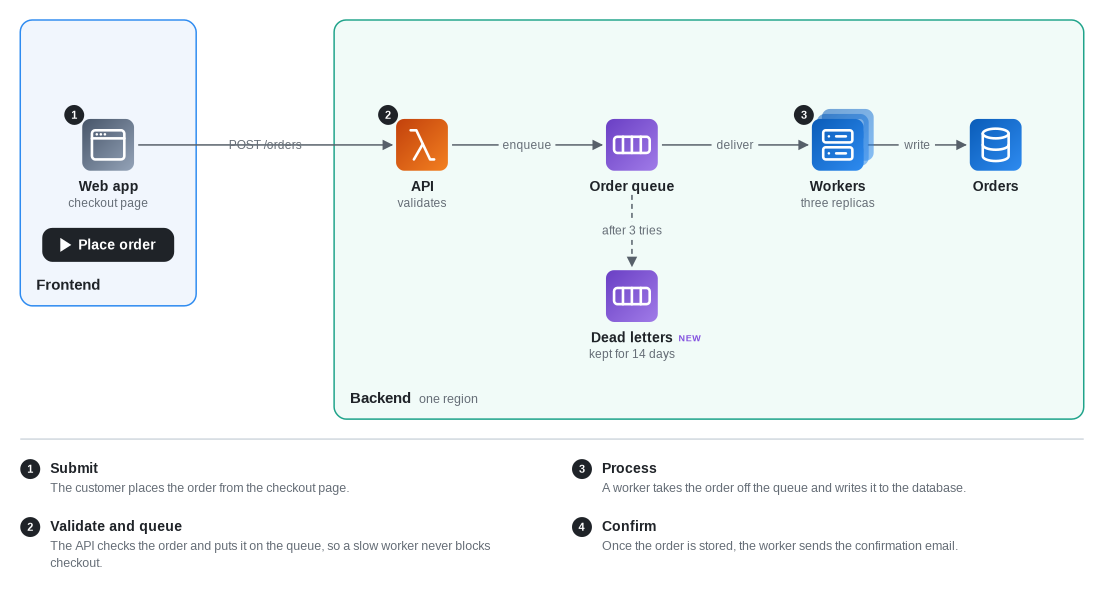
- Static first. The SVGs are laid out on a grid, automatically or with the cells you pin, with rounded orthogonal edges, label pills and tinted groups. Icons are inlined and colours are baked in, so the files work anywhere an image does.
- Interactive on top. The HTML page has a scenario player: run, play and pause, step forward and back, scrub, change the speed. A diagram can have several scenarios, each with its own trigger button. Each frame's state is worked out from the frame number, so stepping back or scrubbing shows exactly what playing would.
- One HTML file. Inline SVG, CSS and JavaScript. No CDN, no framework, nothing to load at runtime.
- Checks that point at the line.
diagr checkreports problems asfile:line:col, suggests the id you probably meant, and warns about what you would otherwise only spot in the picture, such as an edge running through a node. - Domain-neutral. Nothing in the format assumes pipelines or a vendor. Vendor icons go in a folder next to the diagram.
Install
diagr needs Python 3.12 or later.
uv tool install diagr
# or
pip install diagr
Quick start
diagr init my-flow.yml           # writes a starter diagram, and never overwrites a file
diagr build my-flow.yml --svg --html -o dist  # dist/my-flow-light.svg, dist/my-flow-dark.svg, dist/my-flow.html
Open dist/my-flow.html and press Place order to play the scenario. While you edit,
diagr watch my-flow.yml --html -o dist --serve rebuilds on every save and serves the output at http://127.0.0.1:8001/,
where open pages reload and keep their place in the scenario.
The starter is a short order flow:
version: 1
title: Order processing

groups:
  front:
    title: Frontend
    nodes:
      web: {icon: browser, title: Web app}
  back:
    title: Backend
    sub: one region
    nodes:
      api:   {icon: function, title: API, sub: validates}
      queue: {icon: queue,    title: Order queue}
      db:    {icon: database, title: Orders}

edges:
  web   -> api:   POST /orders
  api   -> queue: enqueue
  queue -> db:    write

scenario:
  trigger: {at: web, label: Place order}
  steps:
    - Submit: {at: web, do: [flow web -> api]}
    - Queue: {at: api, do: [flow api 400ms -> queue]}
    - Store: {at: db, do: [flow queue -> db 300ms done]}
Groups hold nodes, nodes are placed for you, each edge has its label after the colon, and each step of the
scenario says what happens: flow web -> api makes web active, draws its edge to api, then
marks web done.
To show a diagram in a README, use both SVGs so the image follows the reader's theme:
<picture>
  <source media="(prefers-color-scheme: dark)" srcset="my-flow-dark.svg">
  <img alt="Order processing" src="my-flow-light.svg">
</picture>
What a diagram can hold
- Groups and nodes, nested as deep as you like, with titles, sub lines, icons, tooltips, progress cells and
stacked copies. Pin any of them to grid cells, or leave out
atand diagr places them for you. - Edges, written as chains (
a -> b -> c), fans ((a b) -> c), dashed links (a --> b) and pairs that run both ways (a <-> b), with labels, ports and routes of your own when you want them. - Rows and columns that arrange a box's contents like CSS flexbox, as an alternative to grid cells.
- Components: a block of groups, nodes and edges defined once and used as named instances, with text parameters.
- Scenarios: steps whose effects activate, finish or fail nodes, draw edges, fill cells, change text, show and hide parts, and run side by side or on repeat.
- Views: parts of one diagram built as their own images and page, including dynamic views that number a scenario's edges by step.
- Themes and icons: a default and a high-contrast theme, brand themes that change only what they need, 40 core icons, and folders of your own.
Documentation
- Diagram format: everything a diagram file can say, with examples
- Themes and icons
- Docs and CI:
```diagrblocks in MkDocs, and a GitHub Actions workflow that keeps committed SVGs in step with their diagrams - How diagr compares with D2, Mermaid, Structurizr, LikeC4, Ilograph and IcePanel, and when another tool fits better
- Examples, with their source in
examples/:order-flow: the example above, looping, with a dead-letter queuecloud-architecture: pull-based workers, retries, and a captions path running alongside the jobmulti-region: nested groups, a component used twice and three scenariosdata-platform: a three-instance component, three levels of nesting, a merge junction and four scenariosevent-driven: no positions at all, so every node is placed automatically
CLI
| Command | What it does |
|---|---|
diagr init [FILE] |
Write a starter diagram (default diagram.yml); never overwrites |
diagr build FILE... [--light] [--dark] [--svg] [--html] [-o DIR] [--theme T] [--debug] [--transparent] |
Write the files you ask for, at least one, for each diagram and each of its views: --light and --dark the static SVGs, --svg both, --html the page with the player; --debug adds the grid and route overlay to the page (G toggles it); --transparent leaves the background out of the SVGs |
diagr watch FILE... [--light] [--dark] [--svg] [--html] [-o DIR] [--theme T] [--interval S] [--debug] [--transparent] [--serve] [--port P] |
Rebuild the files you ask for, as build does, when the diagram, its icon folders or its theme file change; --serve also serves the output, and open pages reload on each rebuild |
diagr check FILE... [--theme T] [--strict] [--format json] |
Validate; problems are printed as file:line:col, or as JSON on stdout; --strict fails on warnings too |
diagr fmt FILE... [--check] |
Line up nodes and edges into columns, in place, leaving comments and everything else as written; --check changes nothing and fails if a file would change |
diagr expand FILE [-o OUT] |
Print the diagram with its components written out as plain groups, nodes and edges and every position pinned; the output builds to the same files |
diagr icons [FILE] |
List the core icons, plus the icon folders of FILE if given |
diagr schema [-o FILE] |
Print the JSON Schema |
diagr --version |
Print the installed version |
--theme on the command line is resolved against the current folder; theme: in a diagram against the diagram's
folder.
For autocomplete in editors that support it, put # yaml-language-server: $schema=<path>/diagr.schema.json at the
top of a diagram, pointing at schema/diagr.schema.json or at the file
diagr schema -o writes.
Player keys
The keys work once the diagram or the player has focus: click the diagram, or Tab to it. The rest of the page keeps its keys, so Space and the arrows still scroll it.
| Key | Does |
|---|---|
| Space | Play or pause |
| Left, Right | Previous or next step; with Shift, one frame |
| Home, End | Back to the start, or to the end |
+, -, 0 |
Zoom in, zoom out, fit the whole diagram |
F |
Full screen |
C |
High contrast, remembered like the light or dark choice |
Ctrl or ⌘ with the scroll wheel, or a pinch, zooms around the pointer, and you can drag to pan once zoomed in.
Clicking a step in the list jumps to it, and with several scenarios the buttons above the progress bar switch between
them. A scenario with loop: true plays on its own and replays until you pause it.
Development
uv sync
uv run ruff check .
uv run ruff format --check .   # or: uv run ruff format .
uv run pyright
uv run python -m unittest discover -s tests -t .
tests/golden/ holds the expected output of every example. After a change that is meant to alter the output, run
DIAGR_UPDATE_GOLDEN=1 uv run python -m unittest tests.test_examples and review the diff. After changing the format,
regenerate the schema with uv run diagr schema -o schema/diagr.schema.json; a test fails if it is out of date. One
test runs the player's state code with Node and is skipped when node is not installed.
.github/workflows/ci.yml runs all of this on every push and pull request.
The docs site is built with MkDocs Material, with the examples built from examples/ each time:
uv sync --group docs
uv run mkdocs serve           # live preview
uv run mkdocs build --strict  # writes site/
.github/workflows/docs.yml builds it on every push to main, and deploys it to GitHub Pages once the repository is
public.
| Path | What |
|---|---|
src/diagr/ |
The package: parser, validator, layout, scenario compiler, renderers, themes, core icons |
examples/ |
Example diagrams |
schema/ |
Generated JSON Schema |
tests/ |
Unit tests and golden files for the examples |
tools/measure_text.py |
Regenerates the text width table from installed fonts (needs Chrome) |
License
MIT, see LICENSE.
1 maintainer

Metadata
1 maintainer
Release files for diagr 0.2.0
For a detailed explanation of source distributions (sdists) and built distributions (wheels), please see the package formats documentation.
Source distribution (sdist)
| File | Size | Uploaded | Provenance | Actions |
|---|---|---|---|---|
| diagr-0.2.0.tar.gz | 141.8 kB | Without provenance | Details for diagr-0.2.0.tar.gz |
Built distribution (wheel)
| File | Interpreter | ABI | Platform | Actions Reset |
|---|---|---|---|---|
| diagr-0.2.0-py3-none-any.whl | Python 3 | none | any | Details for diagr-0.2.0-py3-none-any.whl |
Total release size: 301.5 kB
Release files / diagr-0.2.0.tar.gz
| Download URL | diagr-0.2.0.tar.gz |
|---|---|
| Size | 141.8 kB |
| Tags | Source |
|
SHA-256 checksum How to use checksums |
13197b83b3978fd0439a54219a1aafc2594d6eb6ac53b780c627cbade02e7d18
|
|
BLAKE2b-256 checksum How to use checksums |
2343f76a341448837ef3e43f45d0a0e622b53ed5d6289c6f187257cecd55811f
|
| Upload date | |
|
Uploaded using Trusted Publishing? What is trusted publishing? |
No |
| Uploaded via |
uv/0.13.9 {"installer":{"name":"uv","version":"0.13.9","subcommand":["publish"]},"python":null,"implementation":{"name":null,"version":null},"distro":{"name":"Ubuntu","version":"26.04","id":"resolute","libc":null},"system":{"name":null,"release":null},"cpu":null,"openssl_version":null,"setuptools_version":null,"rustc_version":null,"ci":true}
|
Release files / diagr-0.2.0-py3-none-any.whl
| Download URL | diagr-0.2.0-py3-none-any.whl |
|---|---|
| Size | 159.7 kB |
| Tags | Python 3 |
|
SHA-256 checksum How to use checksums |
b38000ab19433f595eb8a3f08880bda15323f18f4ae5222d4d5a80e38087f632
|
|
BLAKE2b-256 checksum How to use checksums |
0294c4371bda5a8261d89ae6f21b82e3f463bad58f8a0f3f58b849ec38fd5957
|
| Upload date | |
|
Uploaded using Trusted Publishing? What is trusted publishing? |
No |
| Uploaded via |
uv/0.13.9 {"installer":{"name":"uv","version":"0.13.9","subcommand":["publish"]},"python":null,"implementation":{"name":null,"version":null},"distro":{"name":"Ubuntu","version":"26.04","id":"resolute","libc":null},"system":{"name":null,"release":null},"cpu":null,"openssl_version":null,"setuptools_version":null,"rustc_version":null,"ci":true}
|
Security for diagr 0.2.0
Provenance
Provenance describes where a file came from. On PyPI, provenance is shared via attestations, which provide a verifiable record of the build or publishing details. View details, limitations and caveats.
No provenance found
None of the files in this release were uploaded with provenance metadata.
A note on package security
PyPI is a repository for distributing packages, not a service for auditing them. While third-party security researchers and our staff do their best to detect and remove malicious packages, PyPI cannot guarantee the quality, security or suitability of any given package.
To learn more about protecting yourself from malicious actors, visit our package security documentation.














