
MCP server for rendering diagrams using mingrammer/diagrams, Mermaid, and PlantUML
Verified details
These details have been verified by PyPIProject links
GitHub Statistics
Maintainers

Project description
diagrams-mcp-server

MCP server for generating cloud architecture diagrams, flowcharts, sequence diagrams, and more — powered by three rendering engines: mingrammer/diagrams, Mermaid, and PlantUML.
Getting Started
Hosted (Recommended)
Connect to the public hosted server — no installation required. All rendering engines and dependencies are pre-installed.
Add to your MCP client configuration:
{
  "mcpServers": {
    "diagrams-mcp": {
      "url": "https://diagrams-mcp-production.up.railway.app/mcp"
    }
  }
}
That's it — you're ready to generate diagrams.
Local Installation
Prerequisites
Graphviz is required for the core diagram rendering engine. Mermaid CLI and PlantUML are optional — install them only if you need those specific rendering engines.
| Dependency | Required for | Install |
|---|---|---|
| Graphviz | render_diagram (cloud architecture) |
brew install graphviz |
| Mermaid CLI | render_mermaid (flowcharts, sequence, etc.) |
npm install -g @mermaid-js/mermaid-cli |
| Java + PlantUML | render_plantuml (UML diagrams) |
brew install openjdk + download plantuml.jar |
Note: The hosted server has all dependencies pre-installed. Local prerequisites only apply if you're running the server yourself.
Install the server
Via uvx (recommended):
uvx diagrams-mcp-server
Via pip:
pip install diagrams-mcp-server
From source:
pip install git+https://github.com/ByteOverDev/diagrams-mcp.git
Configure your MCP client
After installing, add to your MCP client configuration:
{
  "mcpServers": {
    "diagrams-mcp": {
      "command": "uvx",
      "args": ["diagrams-mcp-server"]
    }
  }
}
Or if installed via pip:
{
  "mcpServers": {
    "diagrams-mcp": {
      "command": "diagrams-mcp-server"
    }
  }
}
Available Tools
Discovery
list_providers()→list[str]— List all diagram providers (aws,gcp,k8s,azure,onprem, etc.)list_services(provider)→list[str]— List service categories within a provider (e.g.aws→compute,database,network)list_nodes(provider, service)→list[dict]— List node classes for a provider.service pair with import pathssearch_nodes(query)→list[dict]— Search for nodes by keyword across all providers (e.g. "postgres", "lambda")
Rendering
render_diagram(code)→Image(PNG) — Execute a Python script using mingrammer/diagrams in a sandboxed subprocess. Returns a rendered cloud architecture diagram.render_mermaid(definition)→Image(PNG/SVG) — Render a Mermaid diagram definition (flowcharts, sequence, class, ER, state, Gantt, and more).render_plantuml(definition)→Image(PNG) — Render a PlantUML diagram definition (sequence, class, component, activity, state, deployment).
Cross-Provider Equivalence
find_equivalent(node, target_provider?)→dict— Find equivalent services across cloud providers (e.g.EC2→ComputeEngineon GCP).list_categories()→list[dict]— List all 30 infrastructure role categories with mapped nodes across providers.
Resources
The server provides reference documentation accessible via MCP resource URIs:
| URI | Description |
|---|---|
diagrams://reference/diagram |
Diagram constructor parameters, defaults, and usage |
diagrams://reference/edge |
Edge operators, labels, styling, and chaining |
diagrams://reference/cluster |
Cluster nesting, styling, and graph attributes |
diagrams://reference/mermaid |
Mermaid syntax examples for 6 diagram types |
diagrams://reference/plantuml |
PlantUML syntax examples for 6 diagram types |
Examples
Cloud Architecture (mingrammer/diagrams)
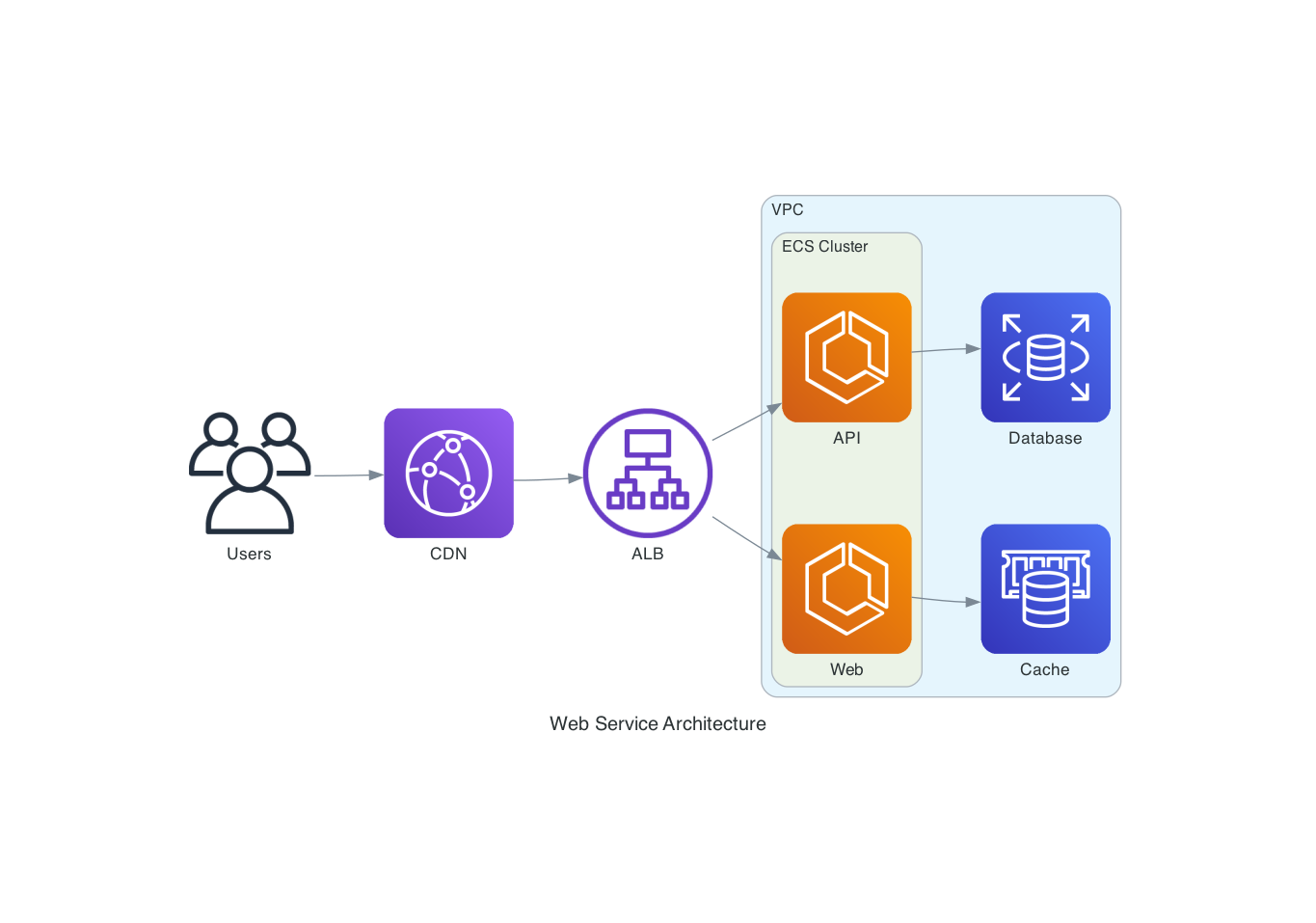
"Draw an AWS architecture with an ALB routing to two ECS services, backed by RDS and ElastiCache"
from diagrams import Diagram, Cluster
from diagrams.aws.network import ALB
from diagrams.aws.compute import ECS
from diagrams.aws.database import RDS, ElastiCache

with Diagram("ECS Service", direction="LR"):
    lb = ALB("ALB")

    with Cluster("ECS Cluster"):
        services = [ECS("Web"), ECS("API")]

    lb >> services
    services[0] >> ElastiCache("Cache")
    services[1] >> RDS("Database")
Flowchart (Mermaid)
"Create a flowchart showing a CI/CD pipeline"

Sequence Diagram (PlantUML)
"Show the authentication flow between a client, API gateway, and auth service"
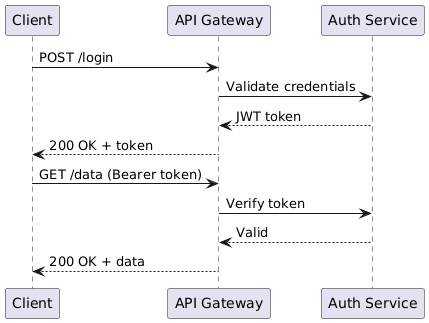
@startuml
Client -> "API Gateway": POST /login
"API Gateway" -> "Auth Service": Validate credentials
"Auth Service" --> "API Gateway": JWT token
"API Gateway" --> Client: 200 OK + token
Client -> "API Gateway": GET /data (Bearer token)
"API Gateway" -> "Auth Service": Verify token
"Auth Service" --> "API Gateway": Valid
"API Gateway" --> Client: 200 OK + data
@enduml
Development
# Clone and install
git clone https://github.com/ByteOverDev/diagrams-mcp.git
cd diagrams-mcp
pip install -e ".[dev]"

# Run tests
pytest

# Lint and format
ruff check .
ruff format .

# Run the MCP server locally (stdio mode)
diagrams-mcp-server
Supported Providers
The render_diagram tool supports all providers from the mingrammer/diagrams library, including:
AWS, GCP, Azure, Kubernetes, On-Premise, AlibabaCloud, OCI, OpenStack, DigitalOcean, Elastic, Outscale, Generic, and Custom nodes.
Use list_providers() and search_nodes(query) to discover available nodes.
License
MIT
Project details
Verified details
These details have been verified by PyPIProject links
GitHub Statistics
Maintainers


Download files
Download the file for your platform. If you're not sure which to choose, learn more about installing packages.
Source Distribution
Built Distribution
Filter files by name, interpreter, ABI, and platform.
If you're not sure about the file name format, learn more about wheel file names.
Copy a direct link to the current filters
File details
Details for the file diagrams_mcp_server-0.1.2.tar.gz.
File metadata
- Download URL: diagrams_mcp_server-0.1.2.tar.gz
- Upload date:
- Size: 153.1 kB
- Tags: Source
- Uploaded using Trusted Publishing? Yes
- Uploaded via: twine/6.1.0 CPython/3.13.12
File hashes
| Algorithm | Hash digest | |
|---|---|---|
| SHA256 |
7f867828152b1d2f7a9f5d528d998a8628a533a70d956206c87fa95a671dd012
|
|
| MD5 |
51f4c20b4e284e7690590b13cbdf9a29
|
|
| BLAKE2b-256 |
7facad77b80b9c609eb37c0cd877aa224806113d1256c70e01e6c28ee685354d
|
Provenance
The following attestation bundles were made for diagrams_mcp_server-0.1.2.tar.gz:
Publisher:
release.yml on ByteOverDev/diagrams-mcp
-
Statement:
-
Statement type:
https://in-toto.io/Statement/v1 -
Predicate type:
https://docs.pypi.org/attestations/publish/v1 -
Subject name:
diagrams_mcp_server-0.1.2.tar.gz -
Subject digest:
7f867828152b1d2f7a9f5d528d998a8628a533a70d956206c87fa95a671dd012 - Sigstore transparency entry: 1277495911
- Sigstore integration time:
-
Permalink:
ByteOverDev/diagrams-mcp@b5ec0086a261cb61266b45818722601e580dd66e -
Branch / Tag:
refs/tags/v0.1.2 - Owner: https://github.com/ByteOverDev
-
Access:
public
-
Token Issuer:
https://token.actions.githubusercontent.com -
Runner Environment:
github-hosted -
Publication workflow:
release.yml@b5ec0086a261cb61266b45818722601e580dd66e -
Trigger Event:
push
-
Statement type:
File details
Details for the file diagrams_mcp_server-0.1.2-py3-none-any.whl.
File metadata
- Download URL: diagrams_mcp_server-0.1.2-py3-none-any.whl
- Upload date:
- Size: 22.3 kB
- Tags: Python 3
- Uploaded using Trusted Publishing? Yes
- Uploaded via: twine/6.1.0 CPython/3.13.12
File hashes
| Algorithm | Hash digest | |
|---|---|---|
| SHA256 |
c2fddc162e8b74516fb2faff1596ca36e789db769e36f61d2283b995a20977de
|
|
| MD5 |
917833ede835111a2947746da06e3db1
|
|
| BLAKE2b-256 |
624871bbdb5ef351a6231564089fa90ff2878a6e17475de766d2770e36312a7c
|
Provenance
The following attestation bundles were made for diagrams_mcp_server-0.1.2-py3-none-any.whl:
Publisher:
release.yml on ByteOverDev/diagrams-mcp
-
Statement:
-
Statement type:
https://in-toto.io/Statement/v1 -
Predicate type:
https://docs.pypi.org/attestations/publish/v1 -
Subject name:
diagrams_mcp_server-0.1.2-py3-none-any.whl -
Subject digest:
c2fddc162e8b74516fb2faff1596ca36e789db769e36f61d2283b995a20977de - Sigstore transparency entry: 1277495916
- Sigstore integration time:
-
Permalink:
ByteOverDev/diagrams-mcp@b5ec0086a261cb61266b45818722601e580dd66e -
Branch / Tag:
refs/tags/v0.1.2 - Owner: https://github.com/ByteOverDev
-
Access:
public
-
Token Issuer:
https://token.actions.githubusercontent.com -
Runner Environment:
github-hosted -
Publication workflow:
release.yml@b5ec0086a261cb61266b45818722601e580dd66e -
Trigger Event:
push
-
Statement type:






