
Command-line interface for the Dialectus AI debate system
Verified details
These details have been verified by PyPIProject links
GitHub Statistics
Maintainers

Project description

Dialectus CLI
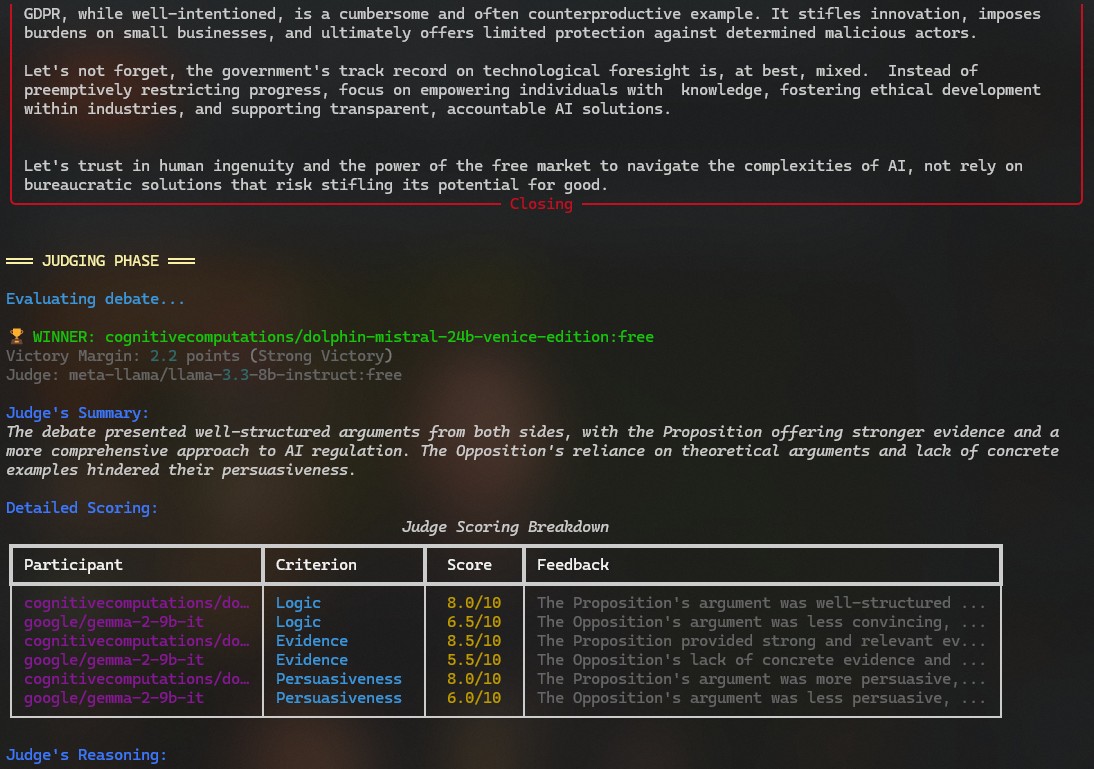
Command-line interface for the Dialectus AI debate system. Run AI debates locally with Ollama or cloud models via OpenRouter.
Installation
From PyPI
Using uv (recommended):
uv pip install dialectus-cli
Using pip:
pip install dialectus-cli
From Source
Using uv (recommended, faster):
# Clone the repository
git clone https://github.com/Dialectus-AI/dialectus-cli
cd dialectus-cli

# Install in development mode with all dev dependencies
uv sync

# Or install without dev dependencies
uv pip install -e .
Using pip:
# Clone the repository
git clone https://github.com/Dialectus-AI/dialectus-cli
cd dialectus-cli

# Install in development mode
pip install -e .

# Or install with dev dependencies
pip install -e ".[dev]"
Requirements
- Python 3.12+
- uv (recommended): Fast Python package manager - Install uv
- Ollama (if using local models): Running at
http://localhost:11434 - OpenRouter API key (if using cloud models): Set via environment variable
Environment Variables
# Linux/macOS
export OPENROUTER_API_KEY="your-key-here"

# Windows PowerShell
$env:OPENROUTER_API_KEY="your-key-here"

# Windows CMD
set OPENROUTER_API_KEY=your-key-here
Quick Start
After installation, the dialectus command is available:
# Copy example config
cp debate_config.example.json debate_config.json

# Edit with your preferred models and API keys
nano debate_config.json  # or your favorite editor

# Run a debate
dialectus debate
Configuration
Edit debate_config.json to configure:
- Models: Debate participants (Ollama or OpenRouter)
- Judging: AI judge models and evaluation criteria
- System: Ollama/OpenRouter settings
Commands
All commands work identically across platforms:
Start a Debate
uv run dialectus debate
uv run dialectus debate --topic "Should AI be regulated?"
uv run dialectus debate --format oxford
uv run dialectus debate --interactive
List Available Models
uv run dialectus list-models
View Saved Transcripts
uv run dialectus transcripts
uv run dialectus transcripts --limit 50
Database
Transcripts are saved to SQLite database at ~/.dialectus/debates.db
Architecture
CLI → DebateRunner → DebateEngine → Rich Console
           ↓
    SQLite Database
- No API layer - Imports engine directly
- Local-first - Runs completely offline with Ollama
- SQLite storage - Simple, portable database
Development
Running Tests and Type Checking
Using uv (recommended):
# Run tests
uv run pytest

# Run tests with verbose output
uv run pytest -v

# Run with coverage
uv run pytest --cov=dialectus

# Type check with Pyright
uv run pyright

# Lint with ruff
uv run ruff check .

# Format with ruff
uv run ruff format .
Using pip:
# Ensure dev dependencies are installed
pip install -e ".[dev]"

# Run tests
pytest

# Type check with Pyright
pyright

# Lint and format
ruff check .
ruff format .
Building Distribution
Using uv:
# Build wheel and sdist
uv build

# Install locally from wheel
uv pip install dist/dialectus_cli-*.whl
Using pip:
# Build wheel and sdist
python -m build

# Install locally
pip install dist/dialectus_cli-*.whl
Managing Dependencies
Using uv:
# Add a new dependency
# 1. Edit pyproject.toml [project.dependencies] section
# 2. Update lock file and sync environment:
uv lock && uv sync

# Upgrade all dependencies (within version constraints)
uv lock --upgrade

# Upgrade specific package
uv lock --upgrade-package rich

# Add dev dependency
# 1. Edit pyproject.toml [project.optional-dependencies.dev]
# 2. Run:
uv sync
Using pip:
# Add a new dependency
# 1. Edit pyproject.toml dependencies
# 2. Reinstall:
pip install -e ".[dev]"
Why uv?
- 10-100x faster than pip for installs and resolution
- Reproducible builds via
uv.lock(cross-platform, includes hashes) - Python 3.14 ready - Takes advantage of free-threading for even better performance
- Single source of truth - Dependencies in
pyproject.toml, lock file auto-generated - Compatible -
pipstill works perfectly withpyproject.toml
License
MIT (open source)
Project details
Verified details
These details have been verified by PyPIProject links
GitHub Statistics
Maintainers


Download files
Download the file for your platform. If you're not sure which to choose, learn more about installing packages.
Source Distribution
Built Distribution
Filter files by name, interpreter, ABI, and platform.
If you're not sure about the file name format, learn more about wheel file names.
Copy a direct link to the current filters
File details
Details for the file dialectus_cli-0.2.0.tar.gz.
File metadata
- Download URL: dialectus_cli-0.2.0.tar.gz
- Upload date:
- Size: 11.4 kB
- Tags: Source
- Uploaded using Trusted Publishing? Yes
- Uploaded via: twine/6.1.0 CPython/3.13.7
File hashes
| Algorithm | Hash digest | |
|---|---|---|
| SHA256 |
917abbd27088a511e0e117a1c1e60f0dcca4af4fab215c54849dedc0e1a0e495
|
|
| MD5 |
4379e7733ed72b741cf5e118bde5a733
|
|
| BLAKE2b-256 |
a1854ddf1fcba76989aa36b3893c9f29811d71c2e9d7cf03f64084d0fe623861
|
Provenance
The following attestation bundles were made for dialectus_cli-0.2.0.tar.gz:
Publisher:
publish.yml on Dialectus-AI/dialectus-cli
-
Statement:
-
Statement type:
https://in-toto.io/Statement/v1 -
Predicate type:
https://docs.pypi.org/attestations/publish/v1 -
Subject name:
dialectus_cli-0.2.0.tar.gz -
Subject digest:
917abbd27088a511e0e117a1c1e60f0dcca4af4fab215c54849dedc0e1a0e495 - Sigstore transparency entry: 622095715
- Sigstore integration time:
-
Permalink:
Dialectus-AI/dialectus-cli@21bd3e1f2ba3a752818cf2eb892ff50fa25f7e66 -
Branch / Tag:
refs/tags/v0.2.0 - Owner: https://github.com/Dialectus-AI
-
Access:
public
-
Token Issuer:
https://token.actions.githubusercontent.com -
Runner Environment:
github-hosted -
Publication workflow:
publish.yml@21bd3e1f2ba3a752818cf2eb892ff50fa25f7e66 -
Trigger Event:
push
-
Statement type:
File details
Details for the file dialectus_cli-0.2.0-py3-none-any.whl.
File metadata
- Download URL: dialectus_cli-0.2.0-py3-none-any.whl
- Upload date:
- Size: 4.6 kB
- Tags: Python 3
- Uploaded using Trusted Publishing? Yes
- Uploaded via: twine/6.1.0 CPython/3.13.7
File hashes
| Algorithm | Hash digest | |
|---|---|---|
| SHA256 |
5519858341bd13c695ea5a7195dc0c1fd56c70f7d77ae93b4a2d148d2e5ca358
|
|
| MD5 |
24969dd3431b764c088a08b2b0ca88d6
|
|
| BLAKE2b-256 |
22938efa663af8e45a55e26a1b47d0372f37e418a6ddd09350ba048afb66c65f
|
Provenance
The following attestation bundles were made for dialectus_cli-0.2.0-py3-none-any.whl:
Publisher:
publish.yml on Dialectus-AI/dialectus-cli
-
Statement:
-
Statement type:
https://in-toto.io/Statement/v1 -
Predicate type:
https://docs.pypi.org/attestations/publish/v1 -
Subject name:
dialectus_cli-0.2.0-py3-none-any.whl -
Subject digest:
5519858341bd13c695ea5a7195dc0c1fd56c70f7d77ae93b4a2d148d2e5ca358 - Sigstore transparency entry: 622095716
- Sigstore integration time:
-
Permalink:
Dialectus-AI/dialectus-cli@21bd3e1f2ba3a752818cf2eb892ff50fa25f7e66 -
Branch / Tag:
refs/tags/v0.2.0 - Owner: https://github.com/Dialectus-AI
-
Access:
public
-
Token Issuer:
https://token.actions.githubusercontent.com -
Runner Environment:
github-hosted -
Publication workflow:
publish.yml@21bd3e1f2ba3a752818cf2eb892ff50fa25f7e66 -
Trigger Event:
push
-
Statement type:






