
A package which can implement and draw the diamond-square in pgzero.

Project description
Diamond Square
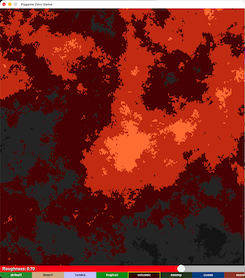
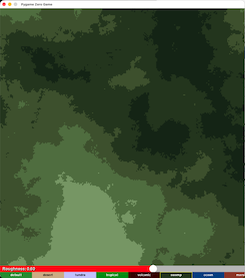
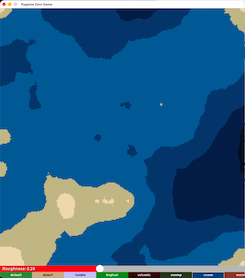
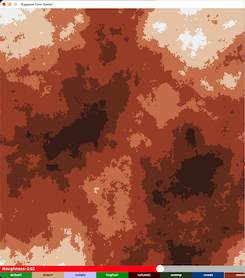
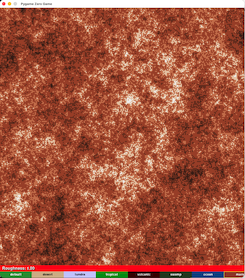
Implementation of the Diamond–Square Algorithm. This package can draw terrain on pgzero and pygame, and can also set up interactive mode.
Visit the documentation page for more details:
Diamond Square Description
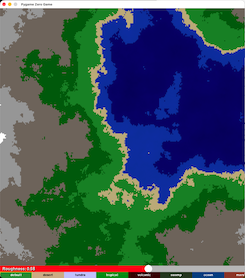
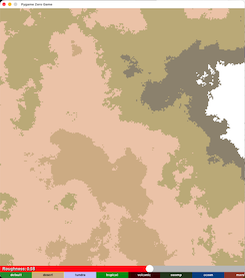
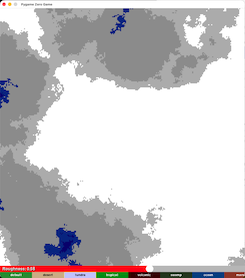
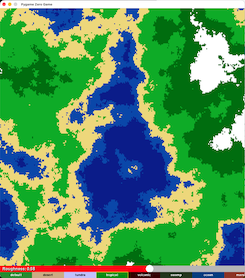
Sample Generations
⚠️ You MUST include all four interactive functions for pgzero interactive
Missing even one will cause failures or unpredictable behavior.
⚠️ You must pass the pgzero screen into draw functions
Use
terrain.draw(screen)orterrain.for_draw(screen)— the yellow underline is expected.
Table of Contents
- Quick Start
- Why Use Diamond Square?
- Usage
- Drawing Terrain
- Pgzero Example
- Pygame Example
- Requirements for Pgzero Interactive
- Interactive Mode
- Pgzero Example
- Pygame Example
- Versions
- Coming Soon
Quick Start
Installation
pip install diamond-square
Minimal Example
from diamond_square import generate_terrain

terrain = generate_terrain(roughness = 1.0, biome = "default", scale = 1, size = 257)

def draw():
    terrain.draw(screen, pos = (100, 100))
Why Use Diamond Square?
This package provides a complete implementation of the Diamond–Square algorithm with:
- multiple built‑in biomes
- adjustable roughness and scale
- support for pgzero and pygame
- optional interactive mode (pgzero only)
- the ability to save generated terrain as an image
- functions to add or remove biomes dynamically
It is designed for both experimentation and game development, making terrain generation simple and customizable.
Usage
Drawing Terrain
Use:
terrain = generate_terrain(roughness=..., biome=..., scale=..., size=...)
Then draw it with:
terrain.draw(screen)
The screen parameter must be the pgzero screen or the pygame display surface. In pgzero, simply pass screen. Your editor may underline this, but it is correct.
Drawing Terrain
pgzero Example
from diamond_square import generate_terrain

terrain = generate_terrain(
    roughness=1.0,
    biome="default",
    scale=1,
    size=257
)

def draw():
    terrain.draw(screen)

def update():
    pass
Run with:
pgzrun yourfile.py
pygame Example
import pygame
from diamond_square import generate_terrain

pygame.init()
screen = pygame.display.set_mode((800, 600))

terrain = generate_terrain(
    roughness=1.0,
    biome="default",
    scale=1,
    size=257
)

running = True
while running:
    for event in pygame.event.get():
        if event.type == pygame.QUIT:
            running = False

    terrain.draw(screen)
    pygame.display.flip()

pygame.quit()
Requirements for Pgzero Interactive
For Pgzero Interative Mode, it requires all four of the following functions to be placed in their corresponding pgzero event handlers:
terrain.for_draw(screen)
terrain.for_on_mouse_down(pos)
terrain.for_on_mouse_up()
terrain.for_on_mouse_move(pos)
If any one of these is missing, the interactive mode will:
- fail to update correctly
- behave unpredictably
- or stop working entirely
These must be placed in:
draw()→terrain.for_draw(screen)on_mouse_down(pos)→terrain.for_on_mouse_down(pos)on_mouse_up()→terrain.for_on_mouse_up()on_mouse_move(pos)→terrain.for_on_mouse_move(pos)
Interactive Mode
This creates an interactive scene where the user can change the biome and roughness in real time.
Pgzero Example
from diamond_square import generate_interactive_mode

interactive_terrain = generate_interactive_mode(
    size=...,
    start_biome=...,
    max_roughness=...,
    scale=...,
    start_roughness=...
)

def draw():
    interactive_terrain.for_draw(screen)

def update():
    interactive_terrain.for_update()

def on_mouse_down(pos):
    interactive_terrain.for_on_mouse_down(pos)

def on_mouse_up():
    interactive_terrain.for_on_mouse_up()
Run with:
pgzrun yourfile.py
import pygame
from diamond_square import generate_interactive_terrain

pygame.init()
screen = pygame.display.set_mode((800, 600))

interactive_terrain = generate_interactive_terrain(
    roughness=1.0,
    scale=1,
    size=257
)

running = True
while running:
    events = pygame.event.get()
    for event in events:
        if event.type == pygame.QUIT:
            running = False

    interactive_terrain.draw(screen, events)
    pygame.display.flip()

pygame.quit()
Versions
Version 0.0.1: Main code for diamond-square added.
Version 0.0.2: Updated README file and added documentation.
Version 0.0.3: Fixed bugs and errors.
Version 0.0.4: Added sample terrain.
Version 0.0.5: Added sample terrains.
Version 0.0.6: Added functions to add/remove biomes and added external documentation website.
(Latest) Version 0.0.7: Added pos parameter to determine where to place the terrain and added function to save terrain as an image. Also made interative mode avaliable to pgzero.
Coming Soon
Version 0.0.8: Updates
Release history Release notifications | RSS feed


Download files
Download the file for your platform. If you're not sure which to choose, learn more about installing packages.
Source Distribution
Built Distribution
Filter files by name, interpreter, ABI, and platform.
If you're not sure about the file name format, learn more about wheel file names.
Copy a direct link to the current filters
File details
Details for the file diamond_square-0.0.7.tar.gz.
File metadata
- Download URL: diamond_square-0.0.7.tar.gz
- Upload date:
- Size: 6.9 kB
- Tags: Source
- Uploaded using Trusted Publishing? No
- Uploaded via: twine/6.2.0 CPython/3.14.2
File hashes
| Algorithm | Hash digest | |
|---|---|---|
| SHA256 |
a775325ba8f00387a67f5a327f224b70d57fbb779c5113f70995cb63b9833789
|
|
| MD5 |
5c139fe68b5ac3f1409b28714312da89
|
|
| BLAKE2b-256 |
853b644ef7d3d3382f8594d2289b92558255c636c66a4d3a1559f786622d5a9a
|
File details
Details for the file diamond_square-0.0.7-py3-none-any.whl.
File metadata
- Download URL: diamond_square-0.0.7-py3-none-any.whl
- Upload date:
- Size: 7.7 kB
- Tags: Python 3
- Uploaded using Trusted Publishing? No
- Uploaded via: twine/6.2.0 CPython/3.14.2
File hashes
| Algorithm | Hash digest | |
|---|---|---|
| SHA256 |
e523467fc8c26da801891bf8d71b2c1c334d5a492cc3b1543e5e60647c03129f
|
|
| MD5 |
ff5bb4c1e7974facaae7d960087885be
|
|
| BLAKE2b-256 |
6ebc6ed8c1bca55156e0634a243f8701a964a0dac1ea3cb0ee33876a515d2b78
|






