
dicleak
Catch patient overlap between training and evaluation data before you train.
A dependency-free Python CLI that audits a medical-imaging CSV manifest and writes readable Markdown or machine-readable JSON reports. Designed for researchers who split multiple images, examinations, or lesions from the same patient.
中文说明 · Passing example report · Failing example report · Report preview
Quick start
Install the released package:
python -m pip install dicleak
To use the features documented here from this source checkout:
git clone https://github.com/chenmei24/dicleak.git
cd dicleak
python -m pip install .
dicleak samples/clean_splits.csv --report audit.md --json audit.json
The checked-in source is version 0.1.1. A package installed from PyPI may be an
older release; check dicleak --version until 0.1.1 is published.
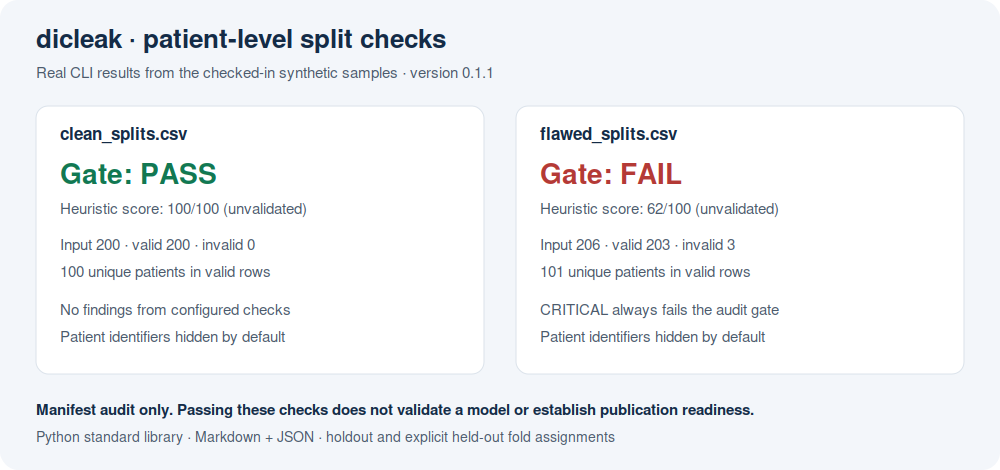
The clean synthetic sample produces:
Gate: PASS (configured checks only)
Heuristic score: 100/100. Unvalidated deduction heuristic; not a clinical or statistical quality score.
Input rows: 200; valid rows: 200; invalid rows: 0; unique patients: 100
Try the deliberately flawed sample:
dicleak samples/flawed_splits.csv --report flawed-audit.md --json flawed-audit.json
It reports FAIL and exits with code 1, even though its heuristic score is 62/100. The sample contains patient overlap, repeated filepath strings, a synthetic name-pattern identifier, and three invalid rows. All example data are synthetic; no image files or patient data are included. See the generated report.
Manifest format
patient_id,split,label,filepath
SYN001,train,0,synthetic/image_001.dcm
SYN002,train,1,synthetic/image_002.dcm
SYN003,test,0,synthetic/image_003.dcm
SYN004,test,1,synthetic/image_004.dcm
| Field | Accepted headers | Meaning |
|---|---|---|
| Patient | patient_id, patientid, patient, subject_id, subjectid, subject, pid |
Nonempty pseudonymous patient key |
| Partition | split, subset, fold, partition, set, phase |
Holdout partition or explicitly configured CV fold |
| Label | label, class, target, diagnosis, annotation |
Nonempty observation label |
| Filepath (optional) | filepath, file_path, path, filename, file |
Exact string comparison only; files are not opened |
Headers are case-insensitive; spaces and hyphens become underscores. A UTF-8 BOM is accepted. Duplicate normalized headers and two aliases for the same field are rejected, so a second label or patient column cannot silently overwrite the first. Each record must have the same column count as the header. Invalid records remain in input accounting, are excluded from distribution checks, and fail the gate; reports include physical CSV line numbers (the ending line for a multiline record).
Keep the same pseudonymous patient key across examinations. Different keys for the same person cannot be detected. Whitespace around values is stripped; label values and patient keys are otherwise case-sensitive.
Holdout and cross-validation
The default --split-mode holdout requires train and test, with optional val.
Common aliases (training, trn, validation, valid, dev, testing, tst)
are normalized. Blank or unrecognized partition names fail input validation.
A training-only manifest does not pass.
For CV, give each observation its one held-out fold assignment, then explicitly list all fold names (case-sensitive):
dicleak samples/cv_folds.csv --split-mode cv --folds fold1 fold2 fold3 --report cv-audit.md
Each configured fold must be present, and a patient must belong to exactly one fold.
A fold header alone does not switch modes. This format is not a long table of
train/validation memberships repeated for each CV round; legitimate reuse across
rounds would fail this assignment check. Nested or repeated CV and independent
external test sets require separate manifests and design-specific review.
Labels and intentional single-class tasks
By default, --label-mode row permits different observation labels within a patient
(e.g. lesions or time points). Label counts include both rows and patient label
incidences: a patient with two different labels is counted once for each label,
so patient label proportions can exceed 100% in total. Composite labels are treated
as opaque values; this CLI does not parse or validate multi-label encodings.
Use strict patient-level labels when appropriate:
dicleak samples/clean_splits.csv --label-mode patient
By default, a single-class partition fails the classification checks. For an intentional one-class, segmentation, or other task where this check is unsuitable:
dicleak samples/clean_splits.csv --allow-single-class
This disables only the single-class failure; all other checks remain active. It does not assess the adequacy of task-specific evaluation.
Checks and exit codes
| Check | Severity | Interpretation |
|---|---|---|
| Missing/invalid required values or row shape | CRITICAL | Correct the manifest; invalid rows are counted |
| Required partitions missing | CRITICAL | Train + test, or all configured CV folds, must be present |
| Patient assigned to multiple partitions | CRITICAL | Patient-level holdout or fold assignment conflict |
| Same filepath string across partitions | CRITICAL | Manifest path assignment conflict; content identity unverified |
| Single-class partition | CRITICAL | Classification-mode check; explicit opt-out available |
| Conflicting patient labels | CRITICAL | Enabled only with --label-mode patient |
| Label share differs by >20 percentage points | HIGH | Row and patient incidence review heuristic |
| Name-like patient identifier | HIGH | Limited Latin-pattern heuristic, not de-identification verification |
| Small partition share | MEDIUM | <10% for holdout test; <5% otherwise, at row or patient level |
| Repeated filepath string | MEDIUM | Exact strings only; no image comparison |
| Small patient count | LOW / MEDIUM | <50 / <20 patients; design-dependent review flag |
| Exit code | Meaning |
|---|---|
0 |
No CRITICAL findings and heuristic score ≥60 |
1 |
Any CRITICAL finding, or heuristic score <60 |
2 |
Usage error, unreadable/structurally invalid file, or report write failure |
CRITICAL always fails, including a 90/100 leakage result. The retained score is an unvalidated deduction heuristic for sorting review effort. It does not indicate publication readiness, model validity, statistical power, or regulatory compliance.
A CI command can simply rely on the exit code:
dicleak splits.csv --json audit.json
Reports and privacy
dicleak splits.csv --report audit.md --json audit.json
dicleak splits.csv --report private-audit.md --show-ids
Patient identifiers are hidden by default in terminal, Markdown, and JSON findings.
--show-ids includes a limited number of identifiers in findings; use it only for
private investigation. This is not a de-identification tool: labels, configured
fold names, and optional links remain visible. Review outputs before sharing.
Markdown text is escaped, and terminal control characters are replaced.
Input, Markdown output, and JSON output paths must be distinct, including existing symlinks and hardlinks. Reports are replaced atomically after rendering. An existing output report is overwritten intentionally; the input manifest is never an allowed report destination.
The original optional footer remains available:
dicleak splits.csv --report audit.md --cta "https://your-service.example/audit"
Scope
The tool reads only the manifest. It does not inspect DICOM metadata, image pixels, content hashes, model predictions, hidden aliases for one patient, scanner/site confounding, or external validation. Different paths can refer to identical images; repeated paths can be legitimate repeat observations. Neither condition proves image content duplication. Threshold flags require study-specific interpretation.
Development and contributions
Python 3.9+; runtime dependencies: none. CI covers Linux and Windows on Python 3.9, 3.11, and 3.13.
python -m pip install -e ".[dev]"
python -m pytest -q
python -m build
python samples/generate_samples.py
See CONTRIBUTING.md, CHANGELOG.md, and the issue tracker. Bug reports with a small synthetic manifest are especially useful. Please never attach patient data.
MIT licensed. If this catches a real workflow issue, an anonymized description of the issue and your split design can help improve the checks.
Related tools / 相关工具
1 maintainer

Metadata
1 maintainer
Release files for dicleak 0.1.1
For a detailed explanation of source distributions (sdists) and built distributions (wheels), please see the package formats documentation.
Source distribution (sdist)
| File | Size | Uploaded | Provenance | |
|---|---|---|---|---|
| dicleak-0.1.1.tar.gz | 196.7 kB | With provenance | Details |
Built distribution (wheel)
| File | Interpreter | ABI | Platform | Reset |
|---|---|---|---|---|
| dicleak-0.1.1-py3-none-any.whl | Python 3 | none | any | Details |
Total release size: 212.9 kB
Release files / dicleak-0.1.1.tar.gz
| Download URL | dicleak-0.1.1.tar.gz |
|---|---|
| Size | 196.7 kB |
| Tags | Source |
|
SHA-256 checksum How to use checksums |
76168f9a5ca1687a544bd3a5b08cd153804c586afb7df98d1d8008e038912d47
|
|
BLAKE2b-256 checksum How to use checksums |
752520957945ab4cc19408c645a544fd2ba7de13c4424fbd120194e16e6eba2b
|
| Upload date | |
|
Uploaded using Trusted Publishing? What is trusted publishing? |
Yes |
| Uploaded via |
twine/7.0.0 CPython/3.13.14
|
Provenance
Provenance describes where a file came from. On PyPI, provenance is shared via attestations, which provide a verifiable record of the build or publishing details. View details, limitations and caveats.


PyPI Publish Attestation
PyPI verified that this artifact, at this checksum, originated from the publisher listed below.
Signed by GitHub Actions, verified by PyPI on Oct 12, 2026.
Transparency logRelease files / dicleak-0.1.1-py3-none-any.whl
| Download URL | dicleak-0.1.1-py3-none-any.whl |
|---|---|
| Size | 16.1 kB |
| Tags | Python 3 |
|
SHA-256 checksum How to use checksums |
64f231607add0553ada7ed17f376b16945dba9773066909339da2333919af6e8
|
|
BLAKE2b-256 checksum How to use checksums |
ab929a5bbea49097da4b7247ba7b0f5d29c3028d1aa3dcc8161302fe6b793858
|
| Upload date | |
|
Uploaded using Trusted Publishing? What is trusted publishing? |
Yes |
| Uploaded via |
twine/7.0.0 CPython/3.13.14
|
Provenance
Provenance describes where a file came from. On PyPI, provenance is shared via attestations, which provide a verifiable record of the build or publishing details. View details, limitations and caveats.
PyPI Publish Attestation
PyPI verified that this artifact, at this checksum, originated from the publisher listed below.
Signed by GitHub Actions, verified by PyPI on Oct 12, 2026.
Transparency logSecurity for dicleak 0.1.1
Provenance
Provenance describes where a file came from. On PyPI, provenance is shared via attestations, which provide a verifiable record of the build or publishing details. View details, limitations and caveats.
Full provenance
All 2 files in this release have been uploaded with provenance metadata.
Attestation for dicleak-0.1.1.tar.gz
PyPI Publish Attestation
PyPI verified that this artifact, at this checksum, originated from the publisher listed below.
Signed by GitHub Actions, verified by PyPI on Oct 12, 2026.
Transparency logA note on package security
PyPI is a repository for distributing packages, not a service for auditing them. While third-party security researchers and our staff do their best to detect and remove malicious packages, PyPI cannot guarantee the quality, security or suitability of any given package.
To learn more about protecting yourself from malicious actors, visit our package security documentation.















