
dicom-organizer


English
A safe, offline desktop tool and command-line utility that organizes local messy DICOM directories into standardized series folders, audits acquisition parameters into unified CSV summaries, and prepares clean data for downstream research workflows.
1. Built for These Core Tasks
- List Imaging Parameters: Extract standardized acquisition parameters (TR, TE, flip angle, bandwidth, slice thickness, phase encoding direction, and parallel acceleration factor) into CSV tables across scanners without copying files.
- Copy and Organize: Safely sort messy slice exports into structured
<Device>/<StudyDate>/<SeriesNumber>_<SeriesFolderLabel>/directories (usingProtocolNameby default, orSeriesDescriptionfor Philips, GE, and Canon/Toshiba systems) while tracking identical duplicate slices. - Preview Before Organizing: Safely simulate organization and review planned directory layouts and metadata summaries before writing anything to disk.
2. Before and After Organization
See docs/images/before-after.md for full details.
Input Structure (Disorganized Exports)
sample_dataset/
├── BACKUP/
│   └── IM00001
└── EXPORT/
    ├── DISK1/
    │   ├── 0001/
    │   │   ├── IM00001
    │   │   ├── IM00002
    │   │   ├── IM00003
    │   │   └── ...
    │   ├── 0002/
    │   │   ├── IM00010
    │   │   ├── IM00011
    │   │   ├── IM00012
    │   │   └── ...
    │   ├── 0003/
    │   │   ├── IM00019
    │   │   ├── IM00020
    │   │   ├── IM00021
    │   │   └── ...
    │   └── 0004/
    │       ├── IM00028
    │       ├── IM00029
    │       └── IM00030
    └── README.TXT
Organized Output Structure
organized/
├── Example-Medical_Demo-CT/
│   └── 20260604/
│       ├── 000001_Axial-CT/
│       │   ├── 000001.dcm
│       │   ├── 000002.dcm
│       │   └── 000003.dcm
│       ├── dicom_parameters.csv
│       └── series_summary.csv
├── Example-Medical_Demo-MR-1.5T/
│   └── 20260603/
│       ├── 000001_T1/
│       │   ├── 000001.dcm
│       │   ├── 000002.dcm
│       │   └── 000003.dcm
│       ├── 000002_T2/
│       │   ├── 000001.dcm
│       │   ├── 000002.dcm
│       │   └── 000003.dcm
│       ├── 000003_FLAIR/
│       │   ├── 000001.dcm
│       │   ├── 000002.dcm
│       │   └── 000003.dcm
│       ├── dicom_parameters.csv
│       └── series_summary.csv
├── Example-Medical_Demo-MR-3T/
│   ├── 20260601/
│   │   ├── 000001_T1/
│   │   │   ├── 000001.dcm
│   │   │   ├── 000002.dcm
│   │   │   └── 000003.dcm
│   │   ├── 000002_T2/
│   │   │   ├── 000001.dcm
│   │   │   ├── 000002.dcm
│   │   │   └── 000003.dcm
│   │   ├── 000003_FLAIR/
│   │   │   ├── 000001.dcm
│   │   │   ├── 000002.dcm
│   │   │   └── 000003.dcm
│   │   ├── 000099_PR/
│   │   │   └── 000001.dcm
│   │   ├── dicom_parameters.csv
│   │   └── series_summary.csv
│   └── 20260602/
│       ├── 000001_T1/
│       │   ├── 000001.dcm
│       │   ├── 000002.dcm
│       │   └── 000003.dcm
│       ├── 000002_T2/
│       │   ├── 000001.dcm
│       │   ├── 000002.dcm
│       │   └── 000003.dcm
│       ├── 000003_FLAIR/
│       │   ├── 000001.dcm
│       │   ├── 000002.dcm
│       │   └── 000003.dcm
│       ├── dicom_parameters.csv
│       └── series_summary.csv
├── all_series_summary.csv
├── file_report.csv
└── organize_summary.json
Extracted Parameter Summary (all_series_summary.csv)
| StudyFolder | SeriesFolder | SeriesDescription | Modality | TR_ms | TE_ms | FlipAngle_deg | ScanDuration |
|---|---|---|---|---|---|---|---|
| Example-Medical_Demo-CT/20260604 | Example-Medical_Demo-CT/20260604/000001_Axial-CT | Demo CT Axial CT | CT | N/A | N/A | N/A | N/A |
| Example-Medical_Demo-MR-1.5T/20260603 | Example-Medical_Demo-MR-1.5T/20260603/000001_T1 | Demo MR 1.5T T1 | MR | 450.0 | 12.0 | 70.0 | 00:01:40 |
| Example-Medical_Demo-MR-1.5T/20260603 | Example-Medical_Demo-MR-1.5T/20260603/000002_T2 | Demo MR 1.5T T2 | MR | 3500.0 | 90.0 | 90.0 | 00:02:40 |
| Example-Medical_Demo-MR-1.5T/20260603 | Example-Medical_Demo-MR-1.5T/20260603/000003_FLAIR | Demo MR 1.5T FLAIR | MR | 8000.0 | 110.0 | 140.0 | 00:03:30 |
| Example-Medical_Demo-MR-3T/20260601 | Example-Medical_Demo-MR-3T/20260601/000001_T1 | Demo MR 3T T1 | MR | 500.0 | 10.0 | 70.0 | 00:02:00 |
| Example-Medical_Demo-MR-3T/20260601 | Example-Medical_Demo-MR-3T/20260601/000002_T2 | Demo MR 3T T2 | MR | 4000.0 | 80.0 | 90.0 | 00:03:00 |
| Example-Medical_Demo-MR-3T/20260601 | Example-Medical_Demo-MR-3T/20260601/000003_FLAIR | Demo MR 3T FLAIR | MR | 9000.0 | 120.0 | 150.0 | 00:04:00 |
| Example-Medical_Demo-MR-3T/20260602 | Example-Medical_Demo-MR-3T/20260602/000001_T1 | Demo MR 3T T1 | MR | 500.0 | 10.0 | 70.0 | 00:02:00 |
| Example-Medical_Demo-MR-3T/20260602 | Example-Medical_Demo-MR-3T/20260602/000002_T2 | Demo MR 3T T2 | MR | 4000.0 | 100.0 | 90.0 | 00:03:00 |
| Example-Medical_Demo-MR-3T/20260602 | Example-Medical_Demo-MR-3T/20260602/000003_FLAIR | Demo MR 3T FLAIR | MR | 9000.0 | 120.0 | 150.0 | 00:04:00 |
Interactive GUI Demonstration
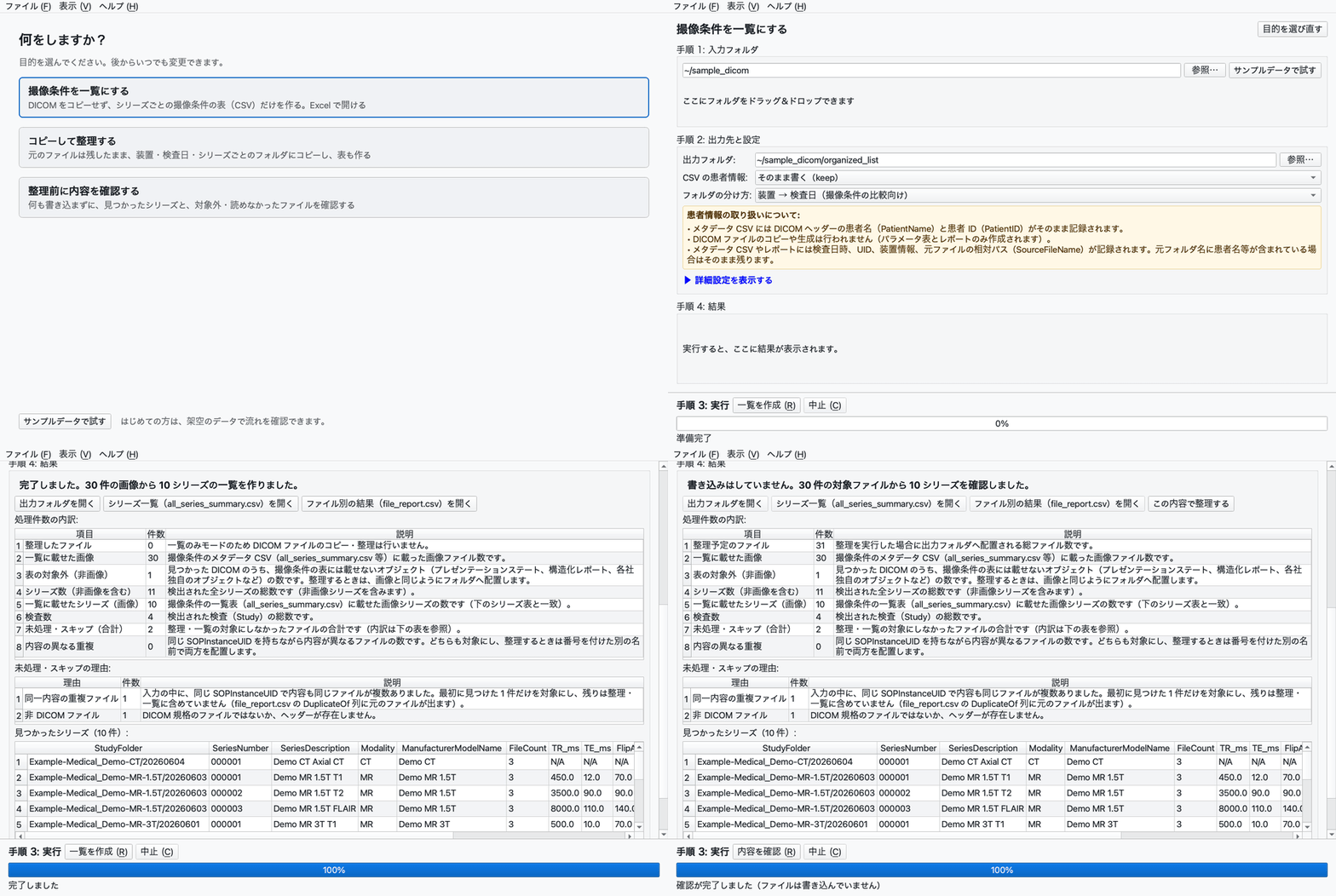
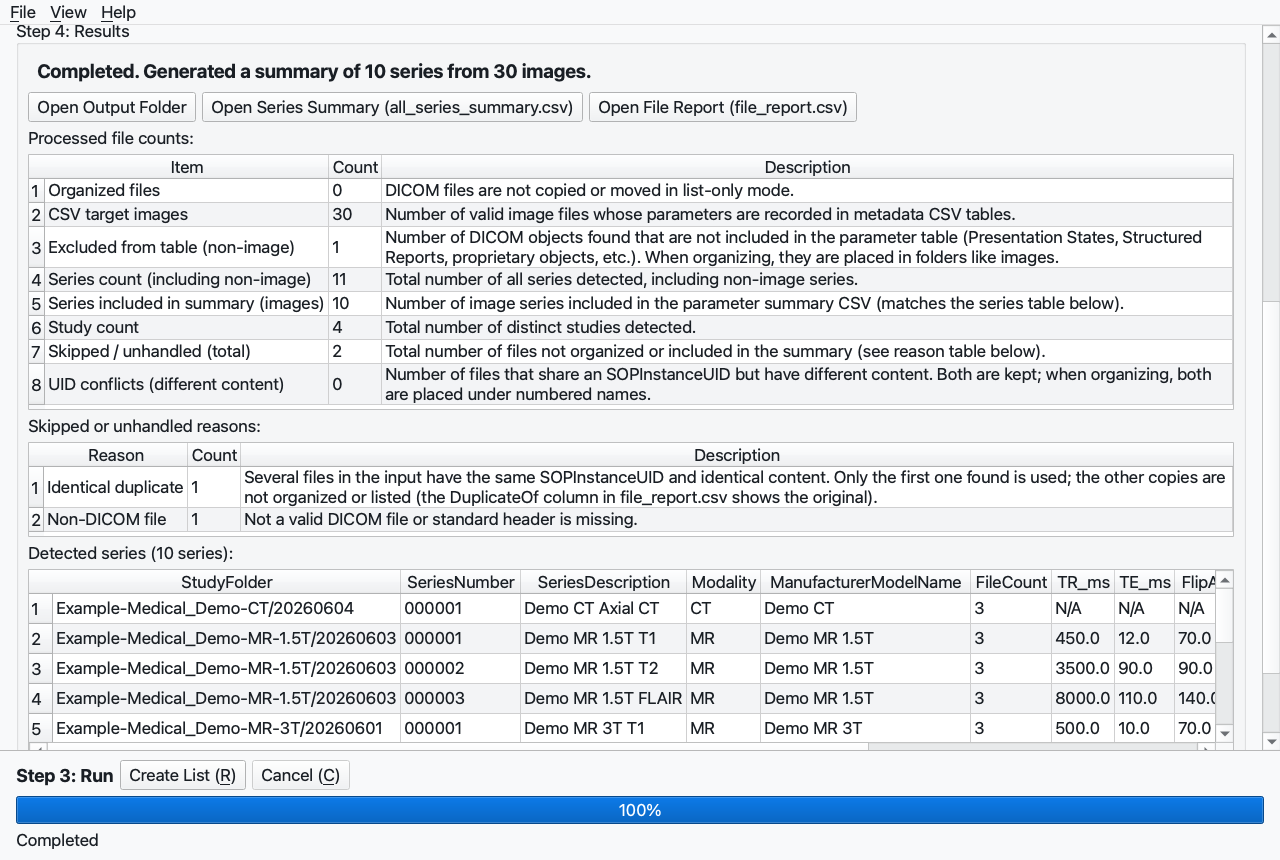
More screenshots are available in docs/images/.
3. Getting Started
Standalone Desktop App (Recommended for most users)
Download the application bundle for Windows or macOS from GitHub Releases.
Python Package Edition
Requires Python 3.11 or later (automated test suite verifies 3.11, 3.12, 3.13, and 3.14; using the GUI extra follows PySide6 version support, which is Python >=3.10,<3.15 as of PySide6 6.11.1 in 2026-09):
# Command-line tool only
uv tool install dicom-organizer

# Command-line tool + PySide6 desktop GUI
uv tool install 'dicom-organizer[gui]'
Try with Synthetic Samples
- In the GUI: Click "Try with Sample Data" on the start screen.
- In terminal: Run the built-in self-test:
dicom-organizer --self-test
For comprehensive CLI arguments and column derivations, see docs/usage.md.
4. Generated Output Files
When organizing completes, the following files are produced:
all_series_summary.csv: Root-level table concatenating imaging parameter summaries across all processed series and studies.<StudyFolder>/series_summary.csv&dicom_parameters.csv: Detailed parameter tables generated per examination folder.file_report.csv: Complete audit log tracking every candidate file, destination path, status, and skip reasons.organize_summary.json: Machine-readable execution summary recording configuration, timestamps (started_at,ended_at), and categorized skip counts.
In list-only mode (--list-only), all_series_summary.csv, all_dicom_parameters.csv, file_report.csv, and organize_summary.json are generated directly under the output root without per-study directories.
5. Essential Notices & Limitations
- Patient Information Safety:
dicom-organizeris not an anonymization tool. DICOM file binaries are never altered; patient identifiers remain embedded inside all organized DICOM slices.--patient-mode keep(default) writes patient names and IDs to CSV tables. Use--patient-mode hash(pseudonymization) or--patient-mode drop(omission) to sanitize CSV outputs. Seedocs/privacy.md.
- Not a Medical Device: Provided solely for research and local data organization workflows. It is not intended for diagnostic or clinical decision making.
- Modality Support Boundaries: Real scanner validation was performed on MR (5 scanner models across 4 manufacturers). CT, US, XA, and PT modalities, along with compressed transfer syntaxes and Japanese character sets, are verified using synthetic test datasets. See
docs/support-matrix.mdanddocs/validation.md.
6. Documentation Index by Role
- New Users & Technologists:
docs/install.md,docs/faq.md,docs/usage.md. - Researchers & Engineers:
docs/positioning.md,docs/support-matrix.md,docs/privacy.md,docs/performance.md. - IT Administrators:
docs/deployment-guide.md,docs/validation.md. - Full Library:
docs/README.md.
7. Support & Contact
If you have questions or encounter issues, refer to SUPPORT.md.
- For general questions: GitHub Discussions.
- For bugs: Bug Report Template.
- Email contact:
sugimotokouhei@gmail.com
8. Governance & Contributing
See GOVERNANCE.md and CONTRIBUTING.md. Released under the MIT License.
日本語
手元の PC で安全に動作し、散らばった DICOM フォルダを規格化されたシリーズ階層に自動整理するとともに、撮像条件(TR、TE、フリップ角、スライス厚、倍速数など)を 1 つの CSV 表に抽出するオープンソースツールです。
1. こんな作業に
- 撮像条件を一覧にする: 画像をコピーせず、複数メーカーの MR/CT 撮像パラメータ(TR, TE, フリップ角, スライス厚, 位相エンコード方向, 倍速数等)を 1 つの CSV に抽出します。
- コピーして整理する: コンソールやディスクから取り出した散乱スライスを、
<装置名>/<検査日>/<シリーズ番号>_<系列名>/(系列名は通常ProtocolName、Philips・GE・Canon/Toshiba ではSeriesDescription)の階層へコピーし、同一重複を除外します。 - 整理前に内容を確認する: 実際にディスクへ書き込む前に、整理対象ファイル数、スキップ理由、作成予定のフォルダ階層を画面上で安全に事前シミュレーションします。
2. 整理前と整理後
詳細は docs/images/before-after.md をご覧ください。
整理前の入力ツリー(散乱したエクスポート)
sample_dataset/
├── BACKUP/
│   └── IM00001
└── EXPORT/
    ├── DISK1/
    │   ├── 0001/
    │   │   ├── IM00001
    │   │   ├── IM00002
    │   │   ├── IM00003
    │   │   └── ...
    │   ├── 0002/
    │   │   ├── IM00010
    │   │   ├── IM00011
    │   │   ├── IM00012
    │   │   └── ...
    │   ├── 0003/
    │   │   ├── IM00019
    │   │   ├── IM00020
    │   │   ├── IM00021
    │   │   └── ...
    │   └── 0004/
    │       ├── IM00028
    │       ├── IM00029
    │       └── IM00030
    └── README.TXT
整理後の出力ツリー
organized/
├── Example-Medical_Demo-CT/
│   └── 20260604/
│       ├── 000001_Axial-CT/
│       │   ├── 000001.dcm
│       │   ├── 000002.dcm
│       │   └── 000003.dcm
│       ├── dicom_parameters.csv
│       └── series_summary.csv
├── Example-Medical_Demo-MR-1.5T/
│   └── 20260603/
│       ├── 000001_T1/
│       │   ├── 000001.dcm
│       │   ├── 000002.dcm
│       │   └── 000003.dcm
│       ├── 000002_T2/
│       │   ├── 000001.dcm
│       │   ├── 000002.dcm
│       │   └── 000003.dcm
│       ├── 000003_FLAIR/
│       │   ├── 000001.dcm
│       │   ├── 000002.dcm
│       │   └── 000003.dcm
│       ├── dicom_parameters.csv
│       └── series_summary.csv
├── Example-Medical_Demo-MR-3T/
│   ├── 20260601/
│   │   ├── 000001_T1/
│   │   │   ├── 000001.dcm
│   │   │   ├── 000002.dcm
│   │   │   └── 000003.dcm
│   │   ├── 000002_T2/
│   │   │   ├── 000001.dcm
│   │   │   ├── 000002.dcm
│   │   │   └── 000003.dcm
│   │   ├── 000003_FLAIR/
│   │   │   ├── 000001.dcm
│   │   │   ├── 000002.dcm
│   │   │   └── 000003.dcm
│   │   ├── 000099_PR/
│   │   │   └── 000001.dcm
│   │   ├── dicom_parameters.csv
│   │   └── series_summary.csv
│   └── 20260602/
│       ├── 000001_T1/
│       │   ├── 000001.dcm
│       │   ├── 000002.dcm
│       │   └── 000003.dcm
│       ├── 000002_T2/
│       │   ├── 000001.dcm
│       │   ├── 000002.dcm
│       │   └── 000003.dcm
│       ├── 000003_FLAIR/
│       │   ├── 000001.dcm
│       │   ├── 000002.dcm
│       │   └── 000003.dcm
│       ├── dicom_parameters.csv
│       └── series_summary.csv
├── all_series_summary.csv
├── file_report.csv
└── organize_summary.json
抽出された撮像条件の抜粋 (all_series_summary.csv)
| StudyFolder | SeriesFolder | SeriesDescription | Modality | TR_ms | TE_ms | FlipAngle_deg | ScanDuration |
|---|---|---|---|---|---|---|---|
| Example-Medical_Demo-CT/20260604 | Example-Medical_Demo-CT/20260604/000001_Axial-CT | Demo CT Axial CT | CT | N/A | N/A | N/A | N/A |
| Example-Medical_Demo-MR-1.5T/20260603 | Example-Medical_Demo-MR-1.5T/20260603/000001_T1 | Demo MR 1.5T T1 | MR | 450.0 | 12.0 | 70.0 | 00:01:40 |
| Example-Medical_Demo-MR-1.5T/20260603 | Example-Medical_Demo-MR-1.5T/20260603/000002_T2 | Demo MR 1.5T T2 | MR | 3500.0 | 90.0 | 90.0 | 00:02:40 |
| Example-Medical_Demo-MR-1.5T/20260603 | Example-Medical_Demo-MR-1.5T/20260603/000003_FLAIR | Demo MR 1.5T FLAIR | MR | 8000.0 | 110.0 | 140.0 | 00:03:30 |
| Example-Medical_Demo-MR-3T/20260601 | Example-Medical_Demo-MR-3T/20260601/000001_T1 | Demo MR 3T T1 | MR | 500.0 | 10.0 | 70.0 | 00:02:00 |
| Example-Medical_Demo-MR-3T/20260601 | Example-Medical_Demo-MR-3T/20260601/000002_T2 | Demo MR 3T T2 | MR | 4000.0 | 80.0 | 90.0 | 00:03:00 |
| Example-Medical_Demo-MR-3T/20260601 | Example-Medical_Demo-MR-3T/20260601/000003_FLAIR | Demo MR 3T FLAIR | MR | 9000.0 | 120.0 | 150.0 | 00:04:00 |
| Example-Medical_Demo-MR-3T/20260602 | Example-Medical_Demo-MR-3T/20260602/000001_T1 | Demo MR 3T T1 | MR | 500.0 | 10.0 | 70.0 | 00:02:00 |
| Example-Medical_Demo-MR-3T/20260602 | Example-Medical_Demo-MR-3T/20260602/000002_T2 | Demo MR 3T T2 | MR | 4000.0 | 100.0 | 90.0 | 00:03:00 |
| Example-Medical_Demo-MR-3T/20260602 | Example-Medical_Demo-MR-3T/20260602/000003_FLAIR | Demo MR 3T FLAIR | MR | 9000.0 | 120.0 | 150.0 | 00:04:00 |
デスクトップ GUI の操作例
その他の画面例は docs/images/ を参照してください。
3. はじめ方
単体デスクトップアプリ版(Python 不要・おすすめ)
GitHub Releases から Windows 版または macOS 版の zip をダウンロードして展開します。
Python パッケージ版
Python 3.11 以上(自動テストで確認しているのは 3.11・3.12・3.13・3.14。GUI を使う場合は PySide6 の対応範囲に従い、2026-09 時点の PySide6 6.11.1 は 3.10 以上 3.15 未満)の環境で uv を用いてインストールします:
# コマンドラインツールのみ
uv tool install dicom-organizer

# コマンドラインツール + PySide6 デスクトップ GUI
uv tool install 'dicom-organizer[gui]'
合成サンプルで試す(実データ不要)
- GUI の場合: 初期画面の「サンプルデータで試す」ボタンをクリック。
- コマンドラインの場合: 自己診断コマンドを実行:
dicom-organizer --self-test
CLI オプションの詳細や各パラメータの解説は docs/usage.md をご覧ください。
4. 出力されるもの
整理完了後、以下のファイルが作成されます:
all_series_summary.csv: 出力ルート直下に作成される、全検査・全シリーズを横断した撮像パラメータ一覧表。<検査フォルダ>/series_summary.csv&dicom_parameters.csv: 検査フォルダごとに作成される詳細パラメータ表。file_report.csv: 検出された全ファイルの元パス、整理先パス、処理成否、スキップ理由を記録した監査レポート。organize_summary.json: 実行オプション、開始・終了時刻(started_at、ended_at)、スキップ理由別の件数を記録した機械可読サマリ。
なお、一覧のみモード(--list-only)では、出力ルート直下に all_series_summary.csv、all_dicom_parameters.csv、file_report.csv、organize_summary.json が生成されます。
5. 大事な注意点
- 患者情報の保護:
dicom-organizerは 匿名化ツールではありません。整理された DICOM ファイルのバイナリやヘッダーは変更されず、患者情報は内部に残ります。--patient-mode keep(既定値)では患者氏名や ID が CSV に出力されます。外部共有時は--patient-mode hash(仮名化)または--patient-mode drop(除外)を指定し、事前に CSV を確認してください。詳細はdocs/privacy.mdを参照してください。
- 医療機器ではありません: 本ソフトウェアは研究およびデータ整理ワークフローを支援するものであり、診断や治療等の医療行為には使用できません。
- 対応範囲: 実データで検証したのは MR(4 社 5 機種)です。CT、US、XA、PT、圧縮転送構文、および日本語文字コードは合成データのテストで確認しています。詳細は
docs/support-matrix.mdおよびdocs/validation.mdをご覧ください。
6. ドキュメントの案内(利用者別)
- はじめて使う方・診療放射線技師:
docs/install.md,docs/faq.md,docs/usage.md. - 医用画像研究者・解析者:
docs/positioning.md,docs/support-matrix.md,docs/privacy.md,docs/performance.md. - 施設の IT 管理者:
docs/deployment-guide.md,docs/validation.md. - ドキュメント目次:
docs/README.md.
7. 困ったとき・お問い合わせ
困ったときは SUPPORT.md の手順をご確認ください。
- 使い方の質問や相談: GitHub Discussions
- 不具合の報告: Bug Report
- メールでのお問い合わせ:
sugimotokouhei@gmail.com
8. 運営方針と貢献
プロジェクトの運営体制は GOVERNANCE.md、開発や貢献の手順は CONTRIBUTING.md をご覧ください。本ソフトウェアは MIT License のもとで公開されています。
1 maintainer

Metadata
1 maintainer
Release files for dicom-organizer 0.2.0
For a detailed explanation of source distributions (sdists) and built distributions (wheels), please see the package formats documentation.
Source distribution (sdist)
| File | Size | Uploaded | |
|---|---|---|---|
| dicom_organizer-0.2.0.tar.gz | 272.0 kB | Details |
Built distribution (wheel)
| File | Interpreter | ABI | Platform | Reset |
|---|---|---|---|---|
| dicom_organizer-0.2.0-py3-none-any.whl | Python 3 | none | any | Details |
Total release size: 363.2 kB
Release files / dicom_organizer-0.2.0.tar.gz
| Download URL | dicom_organizer-0.2.0.tar.gz |
|---|---|
| Size | 272.0 kB |
| Tags | Source |
|
SHA-256 checksum How to use checksums |
341eae6b2b0e9a30a389ee82a860acb010d08eaa8a78fc663570d9a95a6d7eb9
|
|
BLAKE2b-256 checksum How to use checksums |
53e6376bae89a30b5b4bdc4429eb5999a043d47e7df5347ec432359f1ea992b0
|
| Upload date | |
|
Uploaded using Trusted Publishing? What is trusted publishing? |
Yes |
| Uploaded via |
twine/7.0.0 CPython/3.13.14
|
Provenance
Provenance describes where a file came from. On PyPI, provenance is shared via attestations, which provide a verifiable record of the build or publishing details. View details, limitations and caveats.


PyPI Publish Attestation
PyPI verified that this artifact, at this checksum, originated from the publisher listed below.
Signed by GitHub Actions, verified by PyPI on Sep 22, 2026.
Transparency logRelease files / dicom_organizer-0.2.0-py3-none-any.whl
| Download URL | dicom_organizer-0.2.0-py3-none-any.whl |
|---|---|
| Size | 91.2 kB |
| Tags | Python 3 |
|
SHA-256 checksum How to use checksums |
dd07b081c4087dbbe2207c731e16bcf411d23de1b148284e0519ab4efe21e4b7
|
|
BLAKE2b-256 checksum How to use checksums |
9a87e8827fbefd2f2bee2638d3593172c523bb516001c2e2a884b68dbbe2b659
|
| Upload date | |
|
Uploaded using Trusted Publishing? What is trusted publishing? |
Yes |
| Uploaded via |
twine/7.0.0 CPython/3.13.14
|
Provenance
Provenance describes where a file came from. On PyPI, provenance is shared via attestations, which provide a verifiable record of the build or publishing details. View details, limitations and caveats.
PyPI Publish Attestation
PyPI verified that this artifact, at this checksum, originated from the publisher listed below.
Signed by GitHub Actions, verified by PyPI on Sep 22, 2026.
Transparency log













