

Audit de-identified DICOM metadata for privacy risks





📚 Documentation · Desktop app · 📦 PyPI · 🧪 Try a demo · 📝 Changelog · ⚖️ Apache-2.0
dicomqc audits de-identified DICOM metadata for privacy risks. The desktop app is the recommended interface; the CLI supports advanced automation and scripted workflows. Both use the same Python audit engine.
It flags identifying fields, unexpected pseudonym formats, private tags, and unreadable files. It writes HTML, JSON, CSV, and MultiQC-compatible reports. Findings omit raw tag values; the optional scanner inventory exports observed labels and must be reviewed before sharing.
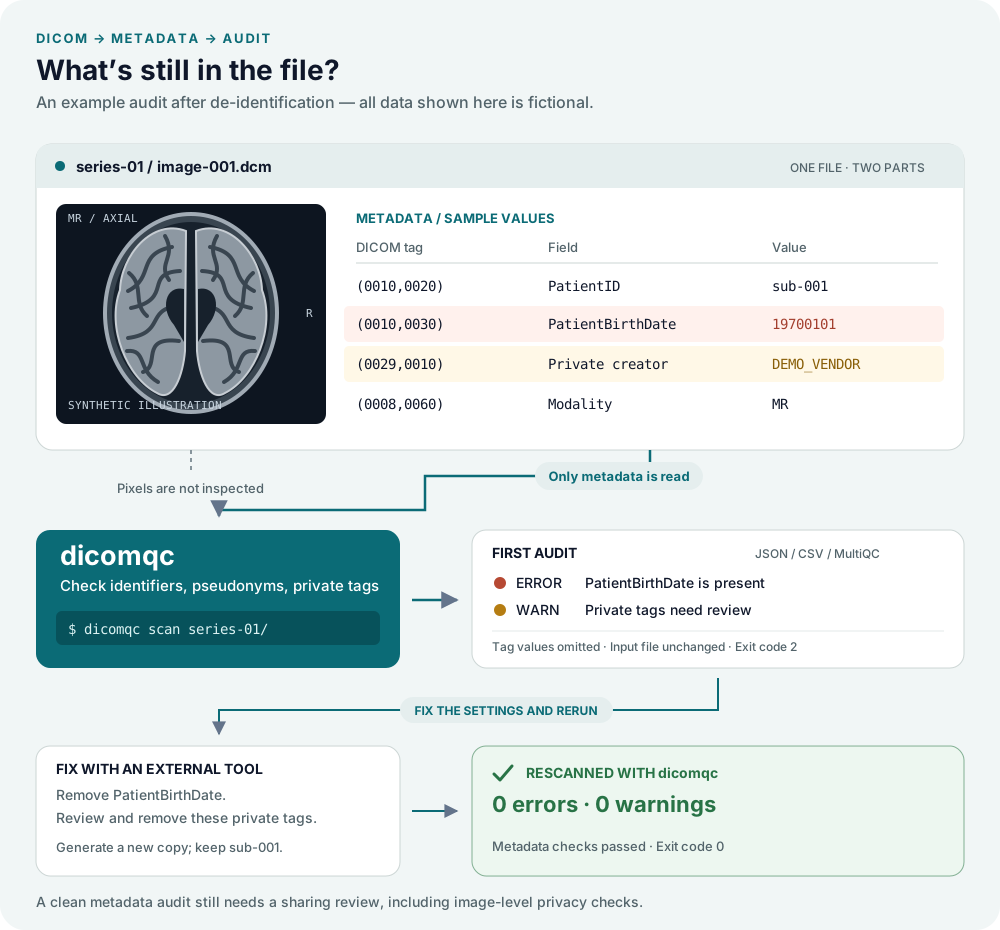
dicomqc is not an anonymizer. It never modifies original DICOM files. If it reports required changes, apply them with an external pseudonymization or anonymization tool and rerun the audit.
Get started
Desktop app
Select DICOM files or folders and run an
audit. The desktop workspace keeps sources and searchable, renameable run
history beside Setup, Policy, Findings, and Reports views. The
Policy workspace creates, edits, and validates YAML project policies while
preserving the original file. Raw DICOM files
remain external and unchanged. File > Save Project stores settings, policy
copies, run history, logs, and reports together in a portable .dicomqc file.
Example runs and audits of your own data can belong to the same project.
The app manages working storage internally; export individual reports with Save copy.
Only one audit runs at a time. Large audits parallelize independent DICOM files;
the metadata-thread count is configurable under Settings > Processing.
Each run log records file count, elapsed processing time, average throughput,
and the configured thread count.
Load example data runs built-in scan, comparison, policy, UID, scanner-inventory, and adjustable large-cohort examples without patient data. The large cohort includes 250 deterministic privacy findings so pagination and review workflows can be exercised.
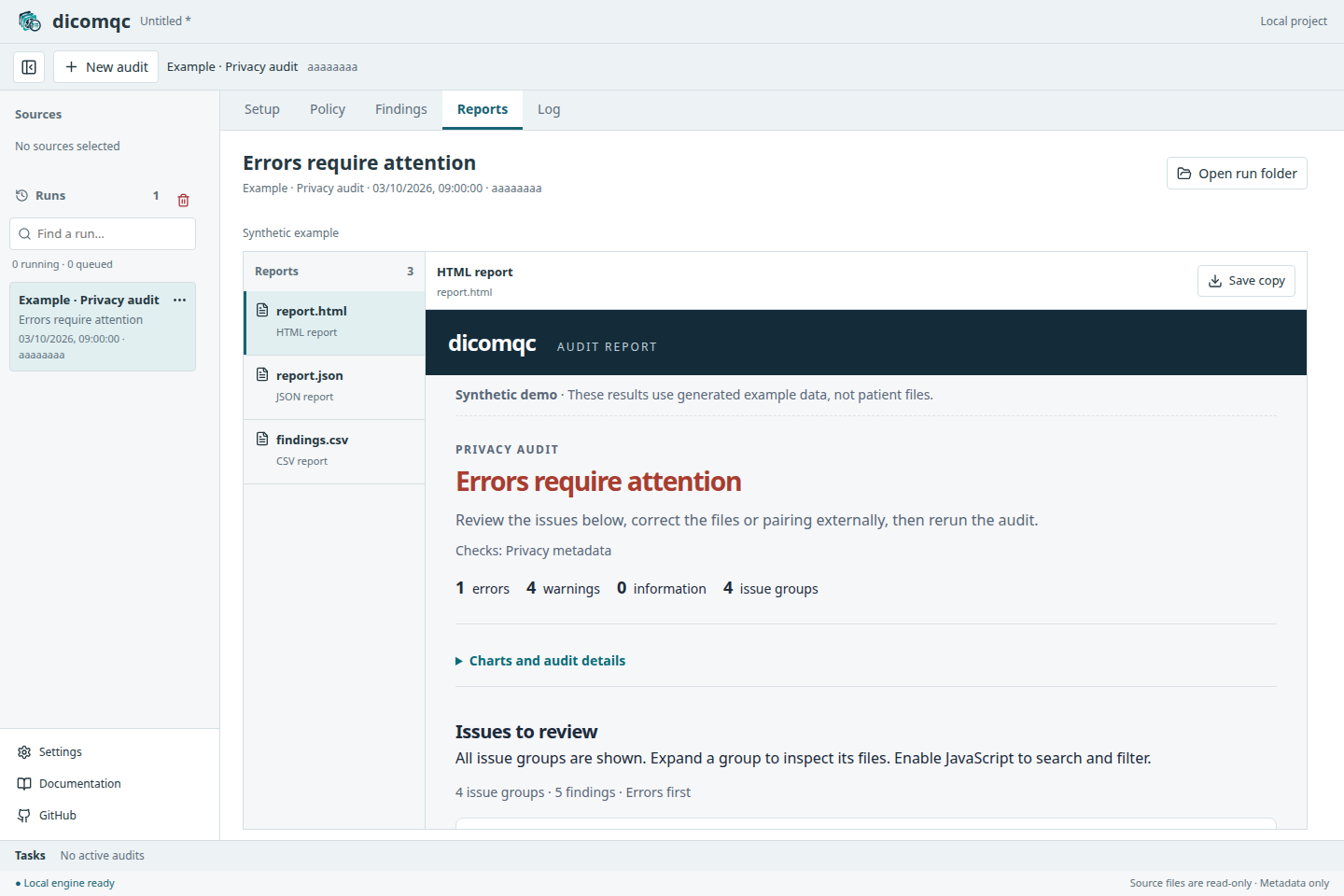
Download the Desktop app for Windows, macOS, or Linux from GitHub Releases. See Install for platform-specific instructions and Desktop usage for the audit workflow. The app starts its audit service locally; no remote server is required.
Command line
Install in a Python environment and try the synthetic demo:
pip install dicomqc
dicomqc demo
For a large dataset, dicomqc scan study/ --threads 8 uses eight metadata
threads within that single audit. Internally, files are dispatched to batched
worker processes and merged deterministically. The default is four threads, or
fewer on smaller systems; small audits run serially when multiprocessing would
cost more than it saves. The maximum is the logical-processor count available
to dicomqc.
The demo creates dicomqc-demo/ with synthetic DICOM files and sample reports.
See the documentation
for installation options, dataset comparisons, reports, and citation guidance.
Citation
A manuscript describing dicomqc is in preparation. Until publication, please cite the software using CITATION.cff and record the version used in your analysis.
Author
Written by Manuel Rueda. GitHub repository: https://github.com/CNAG-Biomedical-Informatics/dicomqc.
Copyright and License
Copyright 2026 Manuel Rueda, CNAG.
dicomqc is distributed under the Apache License 2.0.
1 maintainer

Metadata
1 maintainer
Release files for dicomqc 0.2.0
For a detailed explanation of source distributions (sdists) and built distributions (wheels), please see the package formats documentation.
Source distribution (sdist)
| File | Size | Uploaded | |
|---|---|---|---|
| dicomqc-0.2.0.tar.gz | 112.6 kB | Details |
Built distribution (wheel)
| File | Interpreter | ABI | Platform | Reset |
|---|---|---|---|---|
| dicomqc-0.2.0-py3-none-any.whl | Python 3 | none | any | Details |
Total release size: 187.7 kB
Release files / dicomqc-0.2.0.tar.gz
| Download URL | dicomqc-0.2.0.tar.gz |
|---|---|
| Size | 112.6 kB |
| Tags | Source |
|
SHA-256 checksum How to use checksums |
b37eedafe8dd69809618f03be603937cb181a9de8aae723f24034428cfa170a2
|
|
BLAKE2b-256 checksum How to use checksums |
aa551e2661ad45e33441fcc6c6f04a6e69bb81bedf2333421ff792d8d30a26c1
|
| Upload date | |
|
Uploaded using Trusted Publishing? What is trusted publishing? |
Yes |
| Uploaded via |
twine/7.0.0 CPython/3.13.14
|
Provenance
Provenance describes where a file came from. On PyPI, provenance is shared via attestations, which provide a verifiable record of the build or publishing details. View details, limitations and caveats.


PyPI Publish Attestation
PyPI verified that this artifact, at this checksum, originated from the publisher listed below.
Signed by GitHub Actions, verified by PyPI on Oct 5, 2026.
Transparency logRelease files / dicomqc-0.2.0-py3-none-any.whl
| Download URL | dicomqc-0.2.0-py3-none-any.whl |
|---|---|
| Size | 75.1 kB |
| Tags | Python 3 |
|
SHA-256 checksum How to use checksums |
b8cdcb507159f49fb52aa574449a5d434302032a5e5b80d6c5749f6922e41a6a
|
|
BLAKE2b-256 checksum How to use checksums |
56da6100fc3361f0ebdaeed5090c3af5b2913146fdd4f3c4bf62e14934be1a51
|
| Upload date | |
|
Uploaded using Trusted Publishing? What is trusted publishing? |
Yes |
| Uploaded via |
twine/7.0.0 CPython/3.13.14
|
Provenance
Provenance describes where a file came from. On PyPI, provenance is shared via attestations, which provide a verifiable record of the build or publishing details. View details, limitations and caveats.
PyPI Publish Attestation
PyPI verified that this artifact, at this checksum, originated from the publisher listed below.
Signed by GitHub Actions, verified by PyPI on Oct 5, 2026.
Transparency log













