
Python Package to convert dict to xlsx

Project description
Dict2XLSX
Dict2XLSX is a Python package that allows you to convert a dictionary into an XLSX (Excel) file.
Introduction
Installation
You can install Dict2XLSX using pip:
pip install dict2xlsx
Features
Dictionary to XLSX Conversion: Convert a dictionary into an XLSX file with ease.Columnar Organization: Automatically organizes dictionary * key-value pairs into separate columns in the XLSX file.Data Integrity: Maintains the order of keys and values from the original dictionary during the conversion process.Simple Integration: Easy-to-use API allows for seamless integration into existing Python projects.Customization Options: Customize the output file name, sheet name, and formatting options.
Usage
from dict2xlsx import Dict2XLSX

data = [
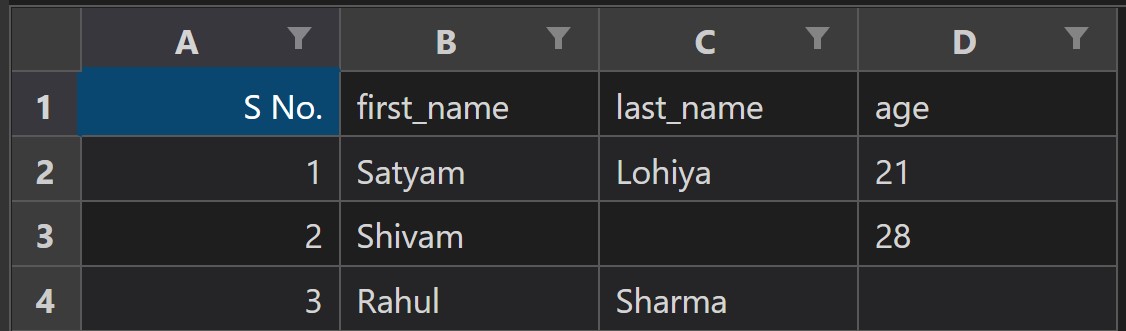
    {'first_name': 'Satyam', 'last_name': 'Lohiya', 'age': '21'},
    {'first_name': 'Shivam', 'age': '28'},
    {'first_name': 'Rahul', 'last_name': 'Sharma'},
]


xlsx_obj = Dict2XLSX(data)
xlsx_obj.save('output.xlsx')
Dependencies
Dict2XLSX has the following dependencies:
- openpyxl: A Python library for reading and writing Excel (XLSX) files.
Contributing
Contributions are welcome! If you encounter any issues or have suggestions for improvements, please open an issue on the GitHub repository.
To contribute to Dict2XLSX, follow these steps:
- Fork the repository.
- Create a new branch for your feature or bug fix.
- Implement your changes.
- Write tests to ensure the correctness of your code (if applicable).
- Run the test suite to make sure all tests pass.
- Submit a pull request.
Release history Release notifications | RSS feed

Download files
Download the file for your platform. If you're not sure which to choose, learn more about installing packages.
Source Distribution
Built Distribution
Filter files by name, interpreter, ABI, and platform.
If you're not sure about the file name format, learn more about wheel file names.
Copy a direct link to the current filters
File details
Details for the file dict2xlsx-0.0.1.tar.gz.
File metadata
- Download URL: dict2xlsx-0.0.1.tar.gz
- Upload date:
- Size: 3.4 kB
- Tags: Source
- Uploaded using Trusted Publishing? No
- Uploaded via: twine/4.0.2 CPython/3.10.6
File hashes
| Algorithm | Hash digest | |
|---|---|---|
| SHA256 |
9bd43db6b711d382429aae2c84371206b493f6ef7ae0ac3d62e83f28874d5802
|
|
| MD5 |
a7801b4c5c2f511966548fc41b8426de
|
|
| BLAKE2b-256 |
2f257055d299e6a96168860390ccc2f3729d522b2d990a2a3e61a32fa036b311
|
File details
Details for the file dict2xlsx-0.0.1-py3-none-any.whl.
File metadata
- Download URL: dict2xlsx-0.0.1-py3-none-any.whl
- Upload date:
- Size: 3.9 kB
- Tags: Python 3
- Uploaded using Trusted Publishing? No
- Uploaded via: twine/4.0.2 CPython/3.10.6
File hashes
| Algorithm | Hash digest | |
|---|---|---|
| SHA256 |
6ed8914e3c3204bcc7088e4bc89c29c8f95a670b54bce44a469b9c348fde077d
|
|
| MD5 |
cdb6f7a75a94da2efad85661a4ddda09
|
|
| BLAKE2b-256 |
75e5377cde9f11a20df3df6c38aa68c2938ac4ed2d56593ed69230251688004e
|






