
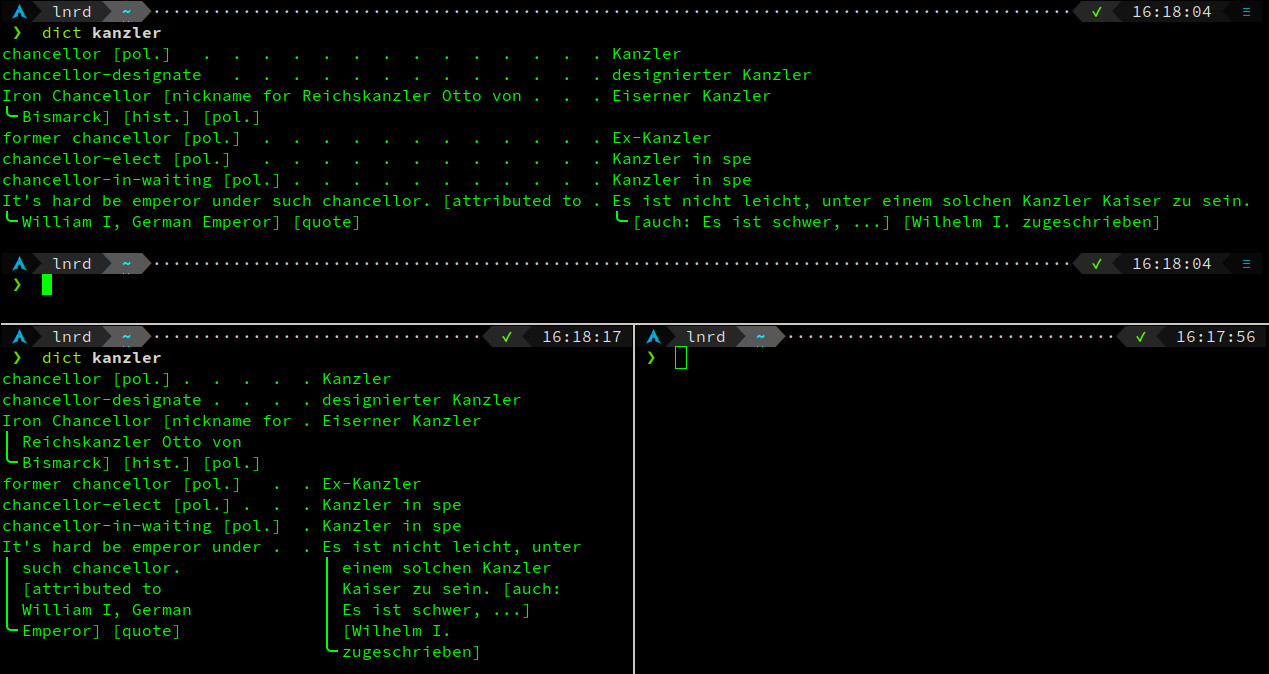
A lightweight, width-aware terminal formatter for dict.cc translations.

Project description
dictcc-cli
Quickly look up translations without relying on the browser. This script is mostly just a fancy table formatter which happens to get it's data for formatting from dict.cc.
Features:
- simple
- small footprint
- depends only on:
requests,beautifulsoup4andfake-headers site-packagesin freshly installed VENV including all transient dependencies likehtml5lib,idna,urllib3is sub 20 MB!
- depends only on:
- scales with respect to terminal width
About
I wanted a tool for the most convenient and quick access to vocab through cli. There is another similar tool already available which is more feature rich, but it has a larger dependency footprint. I've deliberately opted against depending on rich for formatting and lxml for parsing.
How to setup
pypi
classical: pip install dictcc-mini
manual
-
Download the source code from github.
-
Install dependencies (requests, beautifulsoup4, fake_headers) with
pip install -r requirements.txt. -
I recommend aliasing in an rc-file of your shell in one of the following two ways. For this to work you'll need to add the
dictcc-mini/srcdirectory to youPYTHONPATHenvironment variable.-
export PYTHONPATH=$PYTHONPATH:/your/path/to/dictcc-mini/src
-
alias dict="python3 -m dictcc_mini.cli "
function dict() { "python3 -m dictcc_mini.cli" "$@" }
-
defaults
As per my own preference, this script defaults to DE/EN as languages, which are
simply set as DEFAULT_LANG1 and DEFAULT_LANG2 constants in the languages.py
and easily modified to match your preference.
How to use
# regular lookup
dict word

# to start with language selector before search use -l (--language) toggle
dict word -l

# set -f (--full) toggle full table if default 20 line table is too short
dict word -f


Download files
Download the file for your platform. If you're not sure which to choose, learn more about installing packages.
Source Distribution
Built Distribution
Filter files by name, interpreter, ABI, and platform.
If you're not sure about the file name format, learn more about wheel file names.
Copy a direct link to the current filters
File details
Details for the file dictcc_mini-0.1.0.tar.gz.
File metadata
- Download URL: dictcc_mini-0.1.0.tar.gz
- Upload date:
- Size: 239.7 kB
- Tags: Source
- Uploaded using Trusted Publishing? No
- Uploaded via: twine/6.2.0 CPython/3.15.0a7
File hashes
| Algorithm | Hash digest | |
|---|---|---|
| SHA256 |
a12c279eac8553ca24b7b788284e9cfa0e3cc828af606c28cb1834d757c20ab5
|
|
| MD5 |
dcc511c5a118bbc176292ebbcdf33def
|
|
| BLAKE2b-256 |
8ddb62ad7789db99870b4b027feb2ab3f4ea136dacd36b2465f3ecbd196ed2b7
|
File details
Details for the file dictcc_mini-0.1.0-py3-none-any.whl.
File metadata
- Download URL: dictcc_mini-0.1.0-py3-none-any.whl
- Upload date:
- Size: 8.3 kB
- Tags: Python 3
- Uploaded using Trusted Publishing? No
- Uploaded via: twine/6.2.0 CPython/3.15.0a7
File hashes
| Algorithm | Hash digest | |
|---|---|---|
| SHA256 |
881c8cc54c542d7f823611b770f5c5d01b1e9bd7f1d578af492d24dec806ebc6
|
|
| MD5 |
c6a330b6eca4fd624e5ad8badd3cd9d7
|
|
| BLAKE2b-256 |
12adc49922925ce183c780dc96430f813d46281dee612018939a5a54ecfa5b9d
|






