
DictGest - Python Dictionary Ingestion










- DictGest - Python Dictionary Ingestion
- Description
- Examples
- Example 1: Trivial Example - Handling Extra parameters
- Example 2: Data mapping renaming & rerouting
- Example 3: Data type enforcing
- Example 4: Custom Data extraction/conversion for a specific field
- Example 5: Custom Data conversion for a specific type
- Example 6: Populating the same structure from multiple different dict formats (multiple APIs)
- Example 8: Populating from a 2D Table
- Installing
- Contributing
- Support
- License
- Acknowledgements
Description
When interacting with external REST APIs or with external configuration files we usually do not have control over the received data structure/format.
DictGest makes ingesting dictionary data into python objects(dataclasss objects included) easy when the dictionary data doesn't match 1 to 1 with the Python class:
- The dictionary might have extra fields that are of no interest
- The keys names in the dictionary do not match the class attribute names
- The structure of nested dictionaries does not match the class structure
- The data types in the dictionary do not match data types of the target class
Examples
Example 1: Trivial Example - Handling Extra parameters
The first most basic and trivial example is ingesting a dictionary that has extra data not of interest
from dictgest import from_dict
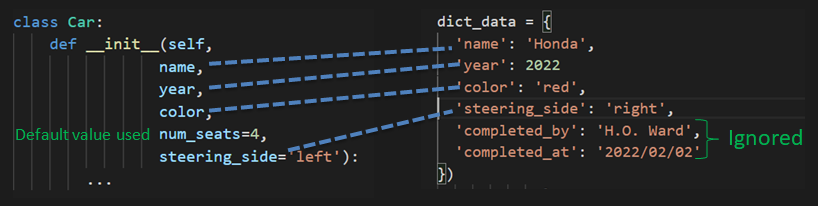
car = from_dict(Car, dict_data)
Example 2: Data mapping renaming & rerouting
The keys names in the source dictionary might not match the destionation class attribute names. Also the source dictionary might have a nested structure different than our desired structure.
from typing import Annotated
from dataclasses import dataclass
from dictgest import from_dict, Path
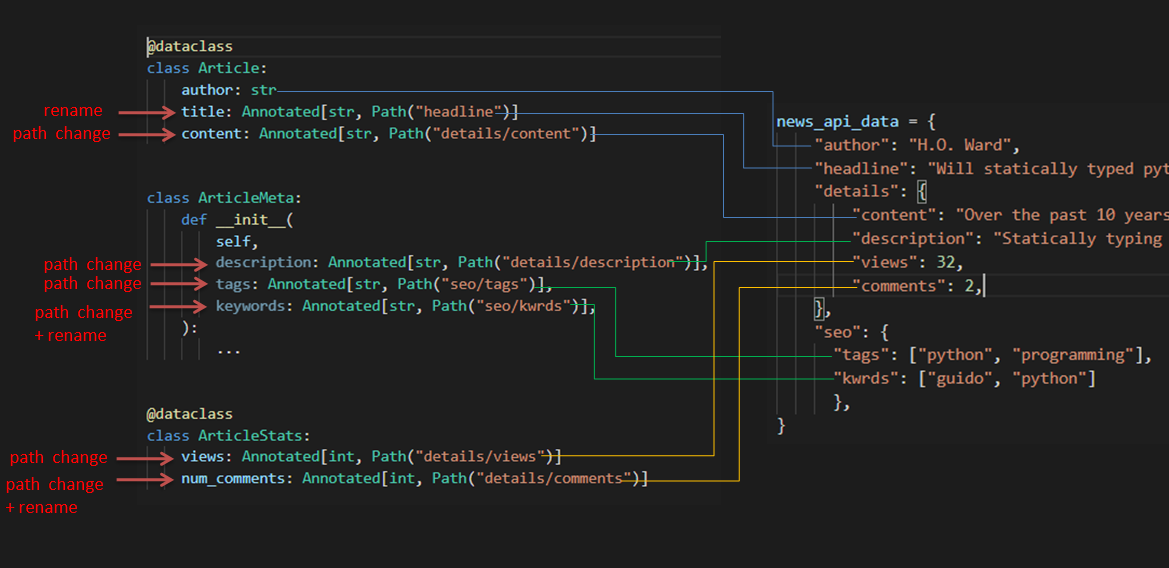
article = from_dict(Article, news_api_data)
meta = from_dict(ArticleMeta, news_api_data)
stats = from_dict(ArticleStats, news_api_data)
The full working example can be found in the examples folder
There can be cases where Annotating the type hints of the target class is not desired by the user or when mapping to multiple APIs might be required. For these cases look at examples 6 & 7 for an alternate solution.
Example 3: Data type enforcing
Sometimes the data coming from external sources might have different datatypes than what we desire. dictgen can do type conversion for you.
from dataclasses import dataclass
from dictgest import from_dict, typecast

@typecast # Makes the class type convertable when encountered as typing hint
@dataclass # The dataclass is just an example, it could have an normal class
class Measurment:
    temp: float
    humidity: float


class Sensor:
    def __init__(
        self, name: str, location: str, uptime: float, readings: list[Measurment]
    ):
        ...
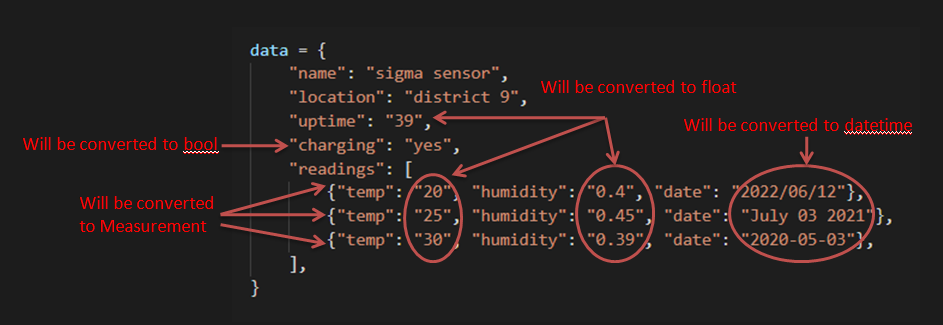
The conversions shown above were enabled by setting the @typecast decorator for the targetted classes.
The full working example can be found in the examples folder
Example 4: Custom Data extraction/conversion for a specific field
Sometimes we might want to apply custom transforms to some fields when extracting the data from the dictionary. In this example we want to read the total number of votes, but in the dictionary source we only have two partial values: the positive and negative number of votes.
We apply a custom transform to get our desired data, using the extractor argument of dictgest.Path
from typing import Annotated
from dictgest import Path, from_dict


def extract_votes(data):
    # creating a new value from two individual fields and converting them
    return int(data["positive"]) + int(data["negative"])


class Votes:
    def __init__(
        self,
        title,
        total_votes: Annotated[int, Path("details/votes", extractor=extract_votes)],
    ):
        ...

article_data = {
    "title": "Python 4.0 will...",
    "details": {"votes": {"positive": "245", "negative": "30"}},
}


votes = from_dict(Votes, article_data)
The full working example can be found in the examples folder
Example 5: Custom Data conversion for a specific type
In some cases we might want to employ a custom conversion for a certain datatype.
from dataclasses import dataclass
from dictgest import default_convertor, from_dict

# Get any already registered bool convertor
default_bool_conv = default_convertor.get_convertor(bool)

# create a custom converter
def custom_bool_conv(val):
    if val == "oups":
        return False

    # Let the other cases be treated as before
    return default_bool_conv(val)


# register the custom converter for bool
default_convertor.register(bool, custom_bool_conv)


@dataclass
class Result:
    finished: bool
    notified: bool


result = from_dict(Result, {"finished": True, "notified": "oups"})
print(result)
Example 6: Populating the same structure from multiple different dict formats (multiple APIs)
There are cases where you might read information from multiple heterogenous APIs and you might want to convert them all to the same structure.
Previously we have annotated fields( using typing.Annotation hint ) with Path eg: name: Annotated[str, Path('article')]. This works well for a single conversion mapping.
For this current scenario we are going to decouple the class from the Routing.
Previously single mapping scenario:
@dataclass
class Article:
    author: str
    title: Annotated[str, Path("headline")]
    content: Annotated[str, Path("details/content")]
But now we have 2 API news sources
data_from_api1 = {
    "author": "H.O. Ward"
    "headline" : "Top 10 Python extensions",
    "other_fields" : ...,
    "details": {
        "content": "Here are the top 10...",
        "other_fields": ...
         }
    }

data_from_api2 = {
    "author": "G.O. Gu"
    "news_title" : "Vscode gets a new facelift",
    "other_fields" : ...,
    "full_article": "Yesterday a new version ...",
    }


}
We are going to use dictgest.Route to define multiple standalone routes.
Our previous example becomes:
@dataclass
class Article:
    author: str
    title: str # Path annotations are decoupled
    content: str

# Routing equivalent to previous example
article_api1 = Route(title="headline", content="details/content")

# New Routing for a new dict structure
article_api2 = Route(title="news_title", content="full_article")


article1 = from_dict(Article, data_from_api1, routing=article_api1)
article2 = from_dict(Article, data_from_api2, routing=article_api2)
The full working example can be found in the examples folder
Example 8: Populating from a 2D Table
Sometimes when querying databases/external APIs the reponse might be in a form of a 2D Table (a list of lists)
    header = ["humidity", "temperatures", "timestamps"]
    table_data = [
        [0.4, 7.4, "1Dec2022"],
        ...
        [0.6, 5.4, "21Dec2022"],
    ]
And our desired target structure could look like this:
   @dataclass
    class SenzorData:
            timestamps: list[datetime.datetime]
            temperatures: list[float]
            humidity: list[float]
In this example we would like each data column to be treated as a field of the target type.
To ingest our data into our target type we can use table_to_item following:
    import dictgest as dg

    result = dg.table_to_item(SenzorData, table_data, header)
Transposing data
The operation can be also be performed row wise by using the transpose = True flag.
So given
    header = ["humidity", "temperatures", "timestamps"]
    table_data_transposed = [
        # rows are switched with columns
        [0.4, ..., 0.6],
        [5.4, ..., 7.4]
        ["1Dec2022", ..., "21Dec2022"],
    ]

    result = dg.table_to_item(SenzorData, table_data_transposed, header, transpose=True)
Mapping one table row to target type
We might not want to convert the whole table into a specific data type but map each row/column to a specific datatype.
#Unlike SenzorData defined previously SenzorDataPoint holds information only for a single specific time.
   @dataclass
    class SenzorDataPoint:
            timestamp: datetime.datetime
            temperature: float
            humidity: float
For this table_to_items can be used
    result = dg.table_to_item(SenzorDataPoint, table_data, header)

    result = dg.table_to_item(SenzorDataPoint, table_data_transposed, header, transpose=True)
Installing
pip install dictgest
Contributing
First off, thanks for taking the time to contribute! Contributions are what makes the open-source community such an amazing place to learn, inspire, and create. Any contributions you make will benefit everybody else and are greatly appreciated.
Support
Reach out to the maintainer at one of the following places:
License
This project is licensed under the MIT license. Feel free to edit and distribute this template as you like.
See LICENSE for more information.
Acknowledgements
- Thanks Dan Oneata for the discussions related to usecases and API.
1 maintainer

Metadata
1 maintainer
Release files for dictgest 0.4.0
For a detailed explanation of source distributions (sdists) and built distributions (wheels), please see the package formats documentation.
Source distribution (sdist)
| File | Size | Uploaded | |
|---|---|---|---|
| dictgest-0.4.0.tar.gz | 15.8 kB | Details |
Built distribution (wheel)
| File | Interpreter | ABI | Platform | Reset |
|---|---|---|---|---|
| dictgest-0.4.0-py3-none-any.whl | Python 3 | none | any | Details |
Total release size: 29.4 kB
Release files / dictgest-0.4.0.tar.gz
| Download URL | dictgest-0.4.0.tar.gz |
|---|---|
| Size | 15.8 kB |
| Tags | Source |
|
SHA-256 checksum How to use checksums |
5e5fd02b3aeb60058a46948564dba964b81e57e46e0261024de0575425fbf73d
|
|
BLAKE2b-256 checksum How to use checksums |
b4d4e2ce27b17f51b80c3fd74b57d8ec32b2e061c35604cec8b7f8e1d4537610
|
| Upload date | |
|
Uploaded using Trusted Publishing? What is trusted publishing? |
No |
| Uploaded via |
twine/4.0.0 CPython/3.10.4
|
Release files / dictgest-0.4.0-py3-none-any.whl
| Download URL | dictgest-0.4.0-py3-none-any.whl |
|---|---|
| Size | 13.5 kB |
| Tags | Python 3 |
|
SHA-256 checksum How to use checksums |
4e6743fb15d9c0bb8a8eeb376bfd51e12e6e89bb2b75fc2e19a3e5da0d32a461
|
|
BLAKE2b-256 checksum How to use checksums |
5e7de652ad140e3885f898fffdb65d4d3851f99435e472797c93f65a1554f3c0
|
| Upload date | |
|
Uploaded using Trusted Publishing? What is trusted publishing? |
No |
| Uploaded via |
twine/4.0.0 CPython/3.10.4
|














