
git diff, but for your data — powered by DuckDB. Any format, any scale, any cloud.
Verified details
These details have been verified by PyPIProject links
GitHub Statistics
Maintainers

Project description
difflake
git diff, but for your data lake.



difflake compares two datasets and tells you exactly what changed — schema, statistics, and row-level differences — across any file format, at any scale, from any storage location. It is powered by DuckDB, which means all queries run inside an embedded engine with no server required and no data size limit.
pip install difflake

difflake compare old.parquet new.parquet
difflake compare s3://bucket/v1/ s3://bucket/v2/ --mode stats
difflake compare delta_v1/ delta_v2/ --key trip_id --output html --out report.html
difflake show data.parquet --where "fare_amount > 500" --stats
Table of contents
- Why difflake
- Install
- Supported formats
- Quick start
- Feature guide
- Python API
- Exit codes
- Performance
- How it works
- Contributing
- License
Screenshots
difflake show — inspect any file instantly
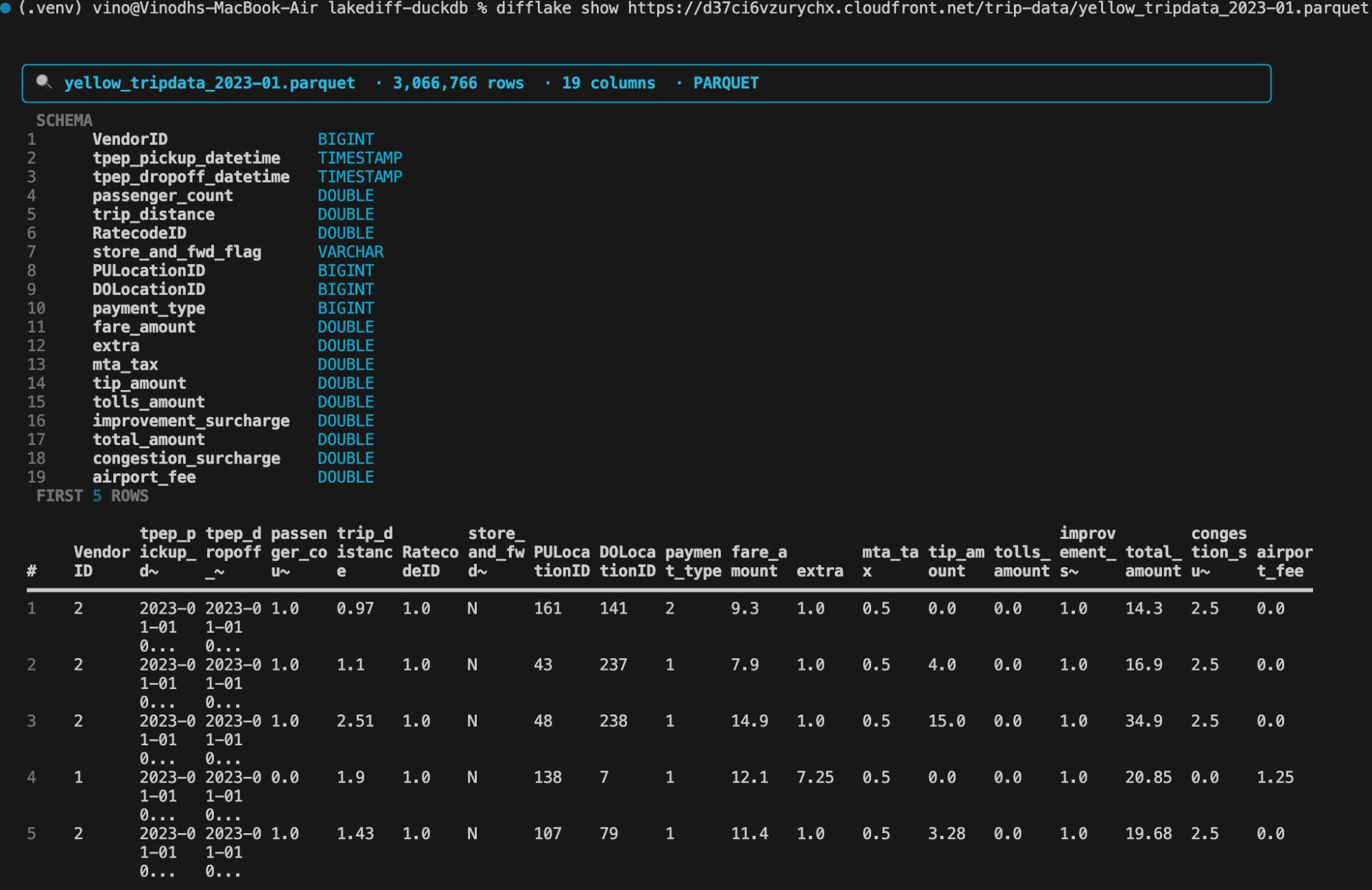
3M row remote Parquet file — schema, row count, and first 5 rows in one command. No download needed.
difflake compare --mode schema — schema diff and drift alerts
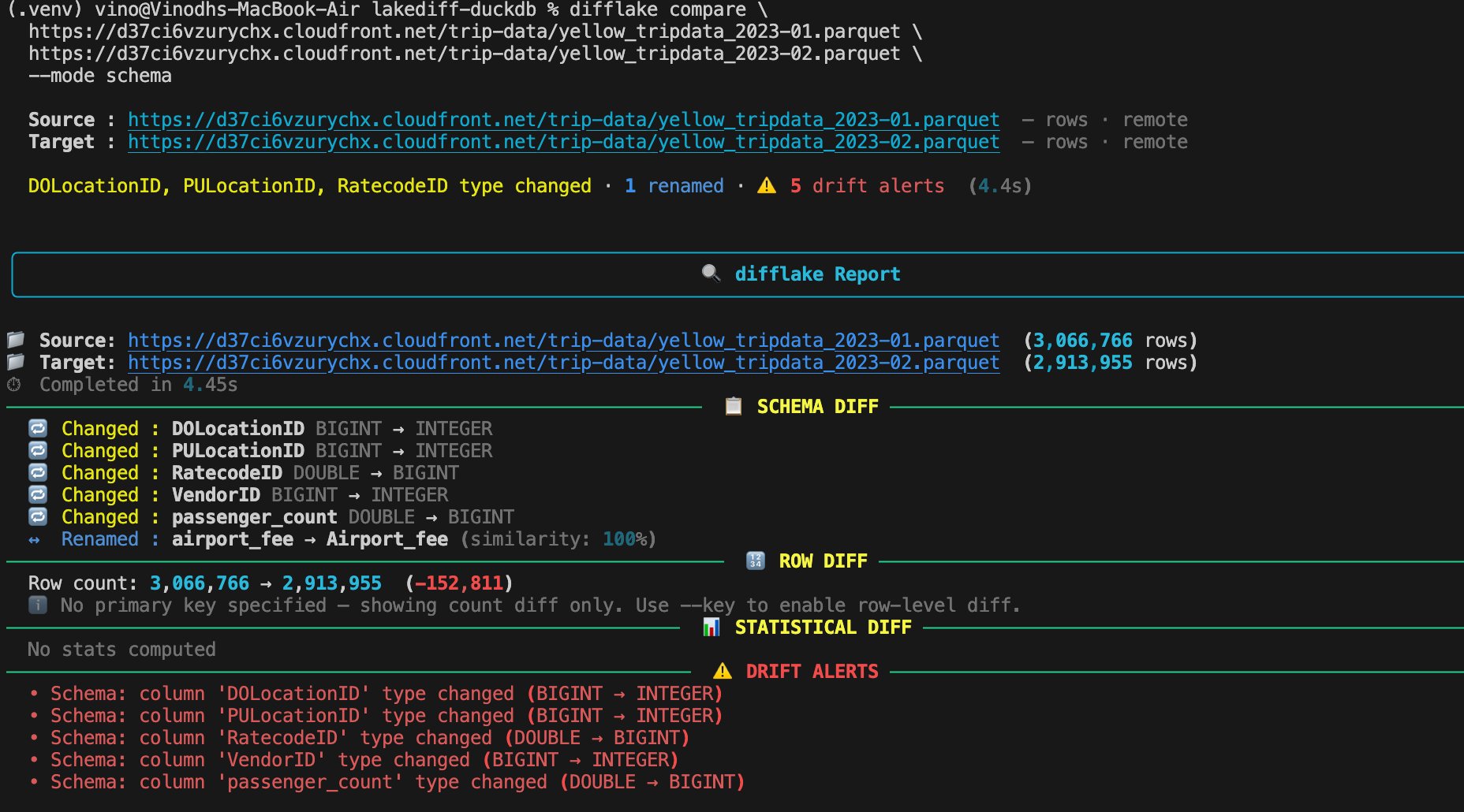
5 column type changes and 1 rename detected between two months of NYC taxi data over HTTPS in 4.4 seconds.
difflake compare --mode stats — statistical diff
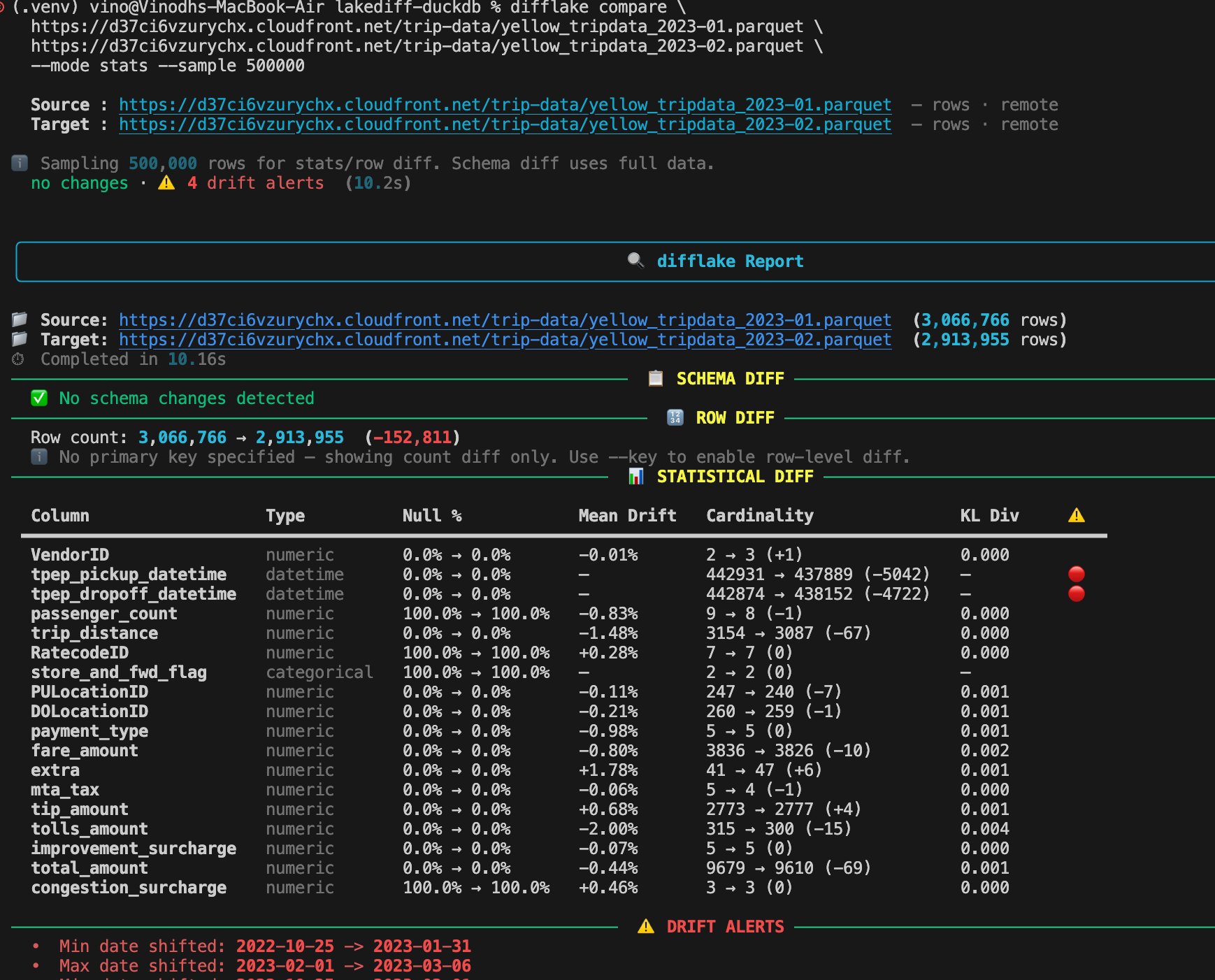
Full statistical diff with 500k sample — mean drift, cardinality changes, KL divergence, and datetime shift alerts per column. 10.2s on 6M rows, 0 MB memory.
difflake show --stats --where — column profiling with SQL filter
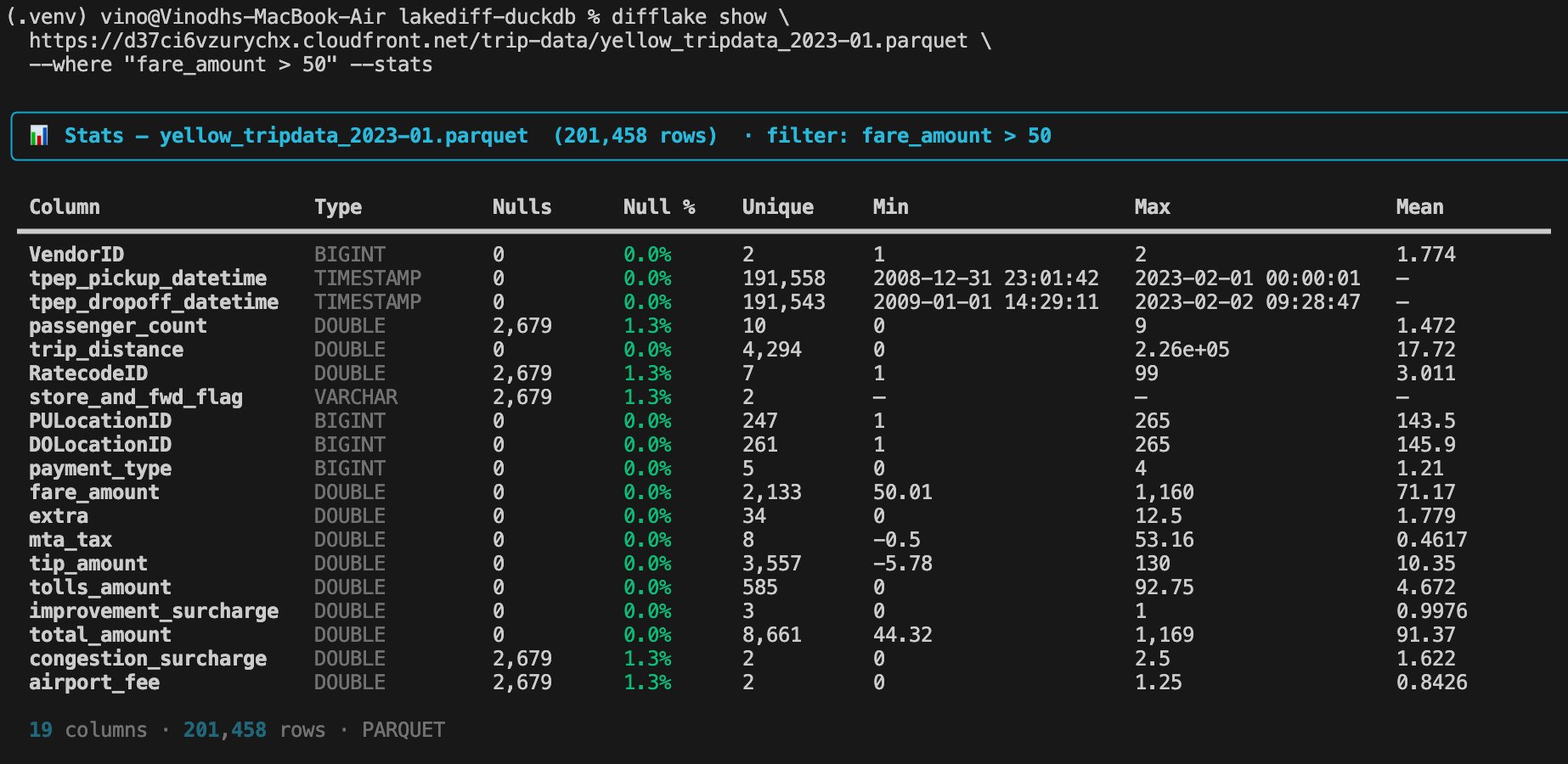
Profile any subset of data with a SQL WHERE filter. Showing only high-fare trips (fare_amount > 50) across 201k matching rows.
difflake show --freq — value frequency distribution
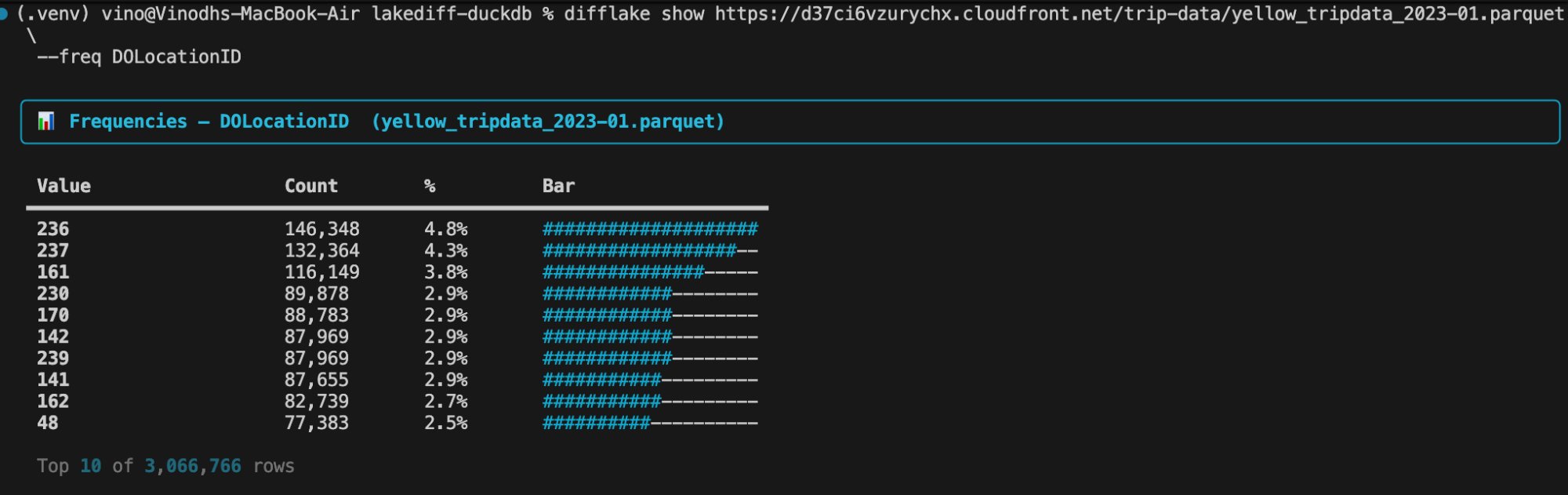
Top-10 value frequencies with counts, percentages, and a bar chart. Runs in 0.2s on 3M rows.
Why difflake
Data engineers spend hours answering questions that should take seconds:
- Did the schema change between yesterday and today?
- Which columns drifted after the pipeline ran?
- How many rows were added, removed, or changed?
- Why are my downstream metrics off?
difflake answers all of these in one command. Unlike data quality tools such as Great Expectations or Soda, which validate data against rules you define in advance, difflake is a differ — it discovers what changed between two snapshots without any pre-configuration.
It is the only actively maintained open-source tool that does schema, statistical, and row-level diff across files in a single command.
Install
pip install difflake
That is the only dependency you need for local files and most formats. DuckDB extensions for Delta Lake, Avro, Iceberg, and cloud storage are installed automatically on first use.
For cloud storage credential helpers:
pip install difflake[s3]      # adds boto3
pip install difflake[gcs]     # adds google-cloud-storage
pip install difflake[azure]   # adds azure-storage-blob
pip install difflake[cloud]   # all three
Verify the install:
difflake --version
difflake formats
Requirements: Python 3.9 or later. No database, no server, no external services.
Supported formats
| Format | Extension | Directory | Cloud | Notes |
|---|---|---|---|---|
| Parquet | .parquet .pq |
✅ Hive partitions | ✅ S3 GCS Azure HTTPS | Native columnar, fastest |
| CSV / TSV | .csv .tsv |
✅ glob concat | ✅ | Type inference, multi-file merge |
| JSON | .json |
✅ | ✅ | Array of records |
| JSONL / NDJSON | .jsonl .ndjson |
✅ | ✅ | Streaming scan |
| Delta Lake | directory | ✅ | ✅ | Auto-installed delta extension |
| Avro | .avro |
— | ✅ | Auto-installed avro extension |
| Iceberg | directory / URI | ✅ | ✅ | Auto-installed iceberg extension |
| Parquet over HTTP | https://... |
— | — | Any public URL |
Format is detected automatically from the file extension or directory structure. Use --format to override when the extension is ambiguous.
Cross-format comparison is supported. You can compare a CSV source against a Parquet target, or a local file against a cloud path.
Quick start
# Try it right now with public data — no files needed
difflake compare \
  https://d37ci6vzurychx.cloudfront.net/trip-data/yellow_tripdata_2023-01.parquet \
  https://d37ci6vzurychx.cloudfront.net/trip-data/yellow_tripdata_2023-02.parquet \
  --mode schema

# Or with local files
difflake show data.parquet
difflake compare old.parquet new.parquet
difflake diff old.parquet new.parquet          # same thing

# See what columns changed
difflake compare old.parquet new.parquet --mode schema

# Full diff with a primary key for row-level comparison
difflake compare old.parquet new.parquet --key user_id

# Export an HTML report
difflake compare old.parquet new.parquet --output html --out report.html

# Preview a file
difflake show data.parquet --schema
difflake show data.parquet --stats
difflake show data.parquet --where "status = 'active'" --count
Feature guide
1. Schema diff
Schema diff detects every structural change between two datasets: columns added or removed, data types that changed, and columns that were likely renamed. It reads only file metadata and never loads row data, making it safe and instant even on files with billions of rows.
difflake compare old.parquet new.parquet --mode schema
What it detects:
- Added columns — present in target but not in source
- Removed columns — present in source but not in target
- Type changes — same column name, different data type (e.g.
INTEGER→VARCHAR) - Renamed columns — detected using string similarity (Jaro-Winkler). A column called
user_idbeing dropped whileuserIdis added will be flagged as a rename rather than an independent add and remove. - Column order changes — tracked and reported
Example output:
📋 SCHEMA DIFF
  ➕ Added   : subscription_tier (VARCHAR)
  🔁 Changed : age  INTEGER → DOUBLE
  ↔  Renamed : user_id → userId  (92% similar)
Schema diff is always included in --mode full (the default). To run it alone without computing any row or statistics data, use --mode schema.
2. Statistics diff
Statistics diff computes per-column drift metrics and flags columns where values have changed beyond a configurable threshold. All computation happens inside DuckDB — no data is pulled into Python memory.
difflake compare old.parquet new.parquet --mode stats
difflake compare old.parquet new.parquet --mode stats --threshold 0.05
Numeric columns — mean, median, standard deviation, min, max, null rate, cardinality, and KL divergence (distribution shift score).
Categorical columns — null rate, cardinality, new categories that appeared, categories that disappeared.
All columns — null rate change is always computed regardless of type.
The drift threshold controls when a column is flagged as drifted. The default is 0.15, meaning any metric that changed by more than 15% triggers an alert. Setting --threshold 0.05 makes it more sensitive.
# More sensitive — flag anything that changed more than 5%
difflake compare old.parquet new.parquet --mode stats --threshold 0.05

# Diff only specific columns
difflake compare old.parquet new.parquet --mode stats --columns fare_amount,trip_distance,passenger_count
KL divergence measures distribution shift. A value above 0.1 indicates the underlying distribution has changed meaningfully, not just the mean. This is useful for catching cases where the mean is stable but the data has become bimodal or skewed.
3. Row-level diff
Row-level diff identifies which specific rows were added, removed, or changed between two datasets. It requires a primary key column (or composite key) that uniquely identifies each row.
# Count diff only (no key)
difflake compare old.parquet new.parquet --mode rows

# Key-based diff — tells you which rows changed and what changed in them
difflake compare old.parquet new.parquet --mode rows --key user_id

# Composite key
difflake compare old.parquet new.parquet --mode rows --key tenant_id,order_id,event_date

# With sample rows shown in output
difflake compare old.parquet new.parquet --mode rows --key user_id --verbose
The diff uses a SQL FULL OUTER JOIN inside DuckDB on the primary key. DuckDB handles spilling to disk automatically so this works on files of any size.
Null-aware comparison — null → value and value → null are both detected as changes, not silently ignored.
Low-cardinality key guard — if the key column has fewer than 10 unique values (e.g. VendorID which only contains 1 and 2), the join would match every row against every other row and explode memory. difflake detects this before running the join and falls back to count-only diff with a clear message:
✗ LOW-CARDINALITY KEY: 'VendorID' has only 2 unique values across 2,463,931 rows.
  A join on this key would create billions of row combinations.
  Choose a high-cardinality column instead.
  Run: difflake show <file> --schema  to see available columns.
Key validation — if the key column name is missing from one of the files, difflake shows which file it is missing from and suggests the closest column names:
✗ 'tpep_pickup_datetime' not found in TARGET file.
  Did you mean: lpep_pickup_datetime, lpep_dropoff_datetime ?
4. File preview — difflake show
difflake show lets you inspect any dataset quickly without running a diff. It works on all formats including remote cloud files.
With no flags, difflake show runs in overview mode — it shows schema, row count, and first 5 rows in a single output. This is the most useful starting point when encountering an unfamiliar file.
# Overview mode — schema + count + first 5 rows in one output (default)
difflake show data.parquet

# First 10 rows
difflake show data.parquet

# Last 20 rows
difflake show data.parquet --tail --rows 20

# Column names and types only — never loads row data
difflake show data.parquet --schema

# Row count, column count, file size, format
difflake show data.parquet --count

# Per-column statistics: nulls, unique count, min, max, mean
difflake show data.parquet --stats

# Specific columns only — combines with all other flags
difflake show data.parquet --columns VendorID,fare_amount,trip_distance

# Remote file
difflake show s3://my-bucket/data/users.parquet --schema
difflake show az://container/data/trips.parquet --count
5. SQL WHERE filter
The --where flag applies a SQL filter before any diff or preview operation. It is pushed down into DuckDB as a predicate, which means for Parquet files only the matching row groups are read from disk — not the entire file. The filter works identically on all supported formats.
# Show only rows matching a condition
difflake show data.parquet --where "fare_amount > 500"

# Count matching rows
difflake show data.parquet --where "passenger_count is null" --count

# Stats for a filtered subset
difflake show data.parquet --where "VendorID = 2" --stats

# Diff only active users
difflake compare old.parquet new.parquet --where "status = 'active'"

# Compound conditions
difflake show data.parquet --where "trip_distance > 10 and fare_amount < 5"

# Date range
difflake compare old.parquet new.parquet --where "event_date >= '2024-01-01'"
Supported SQL syntax:
| Pattern | Example |
|---|---|
| Comparison | fare_amount > 500 |
| Equality | status = 'active' |
| Null check | passenger_count is null |
| Not null | passenger_count is not null |
| AND / OR | fare_amount > 100 and VendorID = 2 |
| IN | payment_type in (1, 2) |
| BETWEEN | fare_amount between 10 and 100 |
| LIKE | name like 'A%' |
6. Output formats
difflake can render results in four formats.
CLI (default) — colorized Rich terminal output with tables, drift alerts, and sample rows.
difflake compare old.parquet new.parquet
difflake compare old.parquet new.parquet --verbose   # include sample changed rows
HTML — self-contained browser report with a Chart.js doughnut chart. No server required. The file is fully portable — email it or commit it.
difflake compare old.parquet new.parquet --output html --out report.html
open report.html
JSON — machine-readable full diff result. Suitable for CI pipelines, downstream automation, or feeding into other tools.
difflake compare old.parquet new.parquet --output json --out report.json
The JSON structure contains schema_diff, stats_diff, row_diff, drift_alerts, elapsed_seconds, and metadata.
Markdown — GitHub PR-ready diff report. Post it directly as a PR comment or embed it in dbt documentation.
difflake compare old.parquet new.parquet --output markdown --out diff.md
cat diff.md | gh pr comment --body-file -
7. Cloud storage
difflake reads directly from S3, GCS, and Azure Blob Storage by passing cloud URIs as paths. No code changes are needed — authentication is handled via environment variables, which is the same pattern used by the AWS CLI, gcloud, and az CLI.
AWS S3
export AWS_ACCESS_KEY_ID="AKIA..."
export AWS_SECRET_ACCESS_KEY="your+secret"
export AWS_DEFAULT_REGION="us-east-1"

difflake compare s3://bucket/v1/users.parquet s3://bucket/v2/users.parquet
difflake show s3://bucket/data/trips.parquet --schema
For MinIO or any S3-compatible store:
export AWS_ENDPOINT_URL="https://minio.mycompany.com"
Google Cloud Storage
export GOOGLE_APPLICATION_CREDENTIALS="/path/to/service-account.json"

difflake compare gs://bucket/v1/users.parquet gs://bucket/v2/users.parquet
Azure Blob Storage
export AZURE_STORAGE_ACCOUNT="mystorageaccount"
export AZURE_STORAGE_KEY="your+key=="

difflake compare az://container/v1/users.parquet az://container/v2/users.parquet

# ADLS Gen2 with SSL
difflake compare \
  "abfss://bronze@mystorageaccount.dfs.core.windows.net/tables/v1/" \
  "abfss://bronze@mystorageaccount.dfs.core.windows.net/tables/v2/"
Cross-cloud diff — source and target can be in different clouds or mixed local and cloud:
# Local vs S3 — check if your local copy matches production
difflake compare ./users_local.parquet s3://prod-bucket/users.parquet --mode schema

# S3 vs GCS — validate a cross-cloud migration
difflake compare s3://old-bucket/users.parquet gs://new-bucket/users.parquet \
  --mode full --sample 500000

# Azure vs S3
difflake compare az://container/users.parquet s3://bucket/users.parquet \
  --key user_id --sample 200000
8. Sampling large files
For very large datasets, use --sample N to limit the number of rows used for stats and row diff. Schema diff always runs on the full dataset regardless of the sample size, since it only reads metadata.
Sampling uses DuckDB's USING SAMPLE N ROWS which draws a random sample without loading the full file first.
# Sample 500,000 rows for stats and row diff
difflake compare old.parquet new.parquet --sample 500000

# Combine with a key for sampled row diff
difflake compare old.parquet new.parquet --key user_id --sample 200000

# Sample a remote file
difflake compare s3://bucket/v1/large.parquet s3://bucket/v2/large.parquet \
  --mode stats --sample 1000000
The CLI prints a note when sampling is active so you know the counts in the output reflect the sample, not the full dataset.
9. Composite primary keys
When no single column uniquely identifies a row, pass multiple columns as a comma-separated string or use the flag multiple times.
# Comma-separated
difflake compare old.parquet new.parquet --key tenant_id,order_id,event_date

# Python API — list form
DiffLake(
    source="old.parquet",
    target="new.parquet",
    primary_key=["tenant_id", "order_id", "event_date"],
).run()
The composite key is joined inside DuckDB using IS NOT DISTINCT FROM on each key column, which handles nulls correctly — two rows where the key column is null in both datasets are treated as matching, not as different rows.
10. Config file
Place a difflake.yaml in your project root and difflake will read it automatically. This is useful for committing repeatable diff configurations to version control.
# difflake.yaml
source: data/v1/users.parquet
target: data/v2/users.parquet
key: user_id
mode: full
output: html
out: reports/diff.html
threshold: 0.10
verbose: true
where: "status = 'active'"
sample: 500000
Run with no arguments:
difflake compare
CLI flags always override config file values:
# Override the output format from the config
difflake compare --output cli

# Use a different config file
difflake compare --config path/to/other.yaml
A full annotated example is provided in difflake.yaml.example in the project root.
11. CI integration
difflake exits with code 2 when drift alerts fire, making it straightforward to fail a CI pipeline when data changes beyond the threshold.
GitHub Actions
- name: Diff datasets
  run: |
    difflake compare \
      s3://bucket/prod/users.parquet \
      s3://bucket/staging/users.parquet \
      --mode full \
      --threshold 0.10 \
      --output json \
      --out drift_report.json
  env:
    AWS_ACCESS_KEY_ID: ${{ secrets.AWS_ACCESS_KEY_ID }}
    AWS_SECRET_ACCESS_KEY: ${{ secrets.AWS_SECRET_ACCESS_KEY }}

- name: Upload drift report
  if: always()
  uses: actions/upload-artifact@v4
  with:
    name: drift-report
    path: drift_report.json
dbt post-model hook
# dbt_project.yml
on-run-end:
  - "{{ lakediff_diff(ref('users'), ref('users__previous'), key='user_id') }}"
Or call difflake directly from a dbt post-hook shell command:
difflake compare \
  "{{ ref('users') }}" \
  "{{ ref('users__previous') }}" \
  --key user_id \
  --output markdown \
  --out dbt_diff.md
Exit codes
| Code | Meaning |
|---|---|
| 0 | Diff completed, no drift alerts |
| 1 | Error — bad path, bad credentials, parse failure |
| 2 | Diff completed, drift alerts fired |
12. Ignore columns
Use --ignore-columns to exclude audit columns, ETL timestamps, or any columns that will always differ between snapshots and would otherwise pollute the diff with noise.
difflake compare old.parquet new.parquet --ignore-columns updated_at,_etl_loaded_at,row_hash

# Combine with other flags
difflake compare old.parquet new.parquet \
  --key user_id \
  --ignore-columns updated_at,_loaded_at \
  --mode full
In the Python API:
DiffLake(
    source="old.parquet",
    target="new.parquet",
    ignore_columns=["updated_at", "_etl_loaded_at"],
).run()
13. Sort and limit
--order-by sorts the rows shown by difflake show. Use it to find the top or bottom N values without knowing the threshold in advance.
# Top 10 highest fares
difflake show data.parquet --order-by fare_amount DESC --rows 10

# Earliest trips
difflake show data.parquet --order-by tpep_pickup_datetime ASC --rows 5

# Combine with WHERE
difflake show data.parquet --where "VendorID = 2" --order-by fare_amount DESC --rows 5
--limit uses the first N rows of a file in file order. This is deterministic — the same rows every time. Use it when you want a fixed slice of a large file (e.g. the most recent partition).
difflake compare old.parquet new.parquet --limit 1000000
--sample draws N rows randomly with a fixed seed (reproducible but not ordered). Use it when you want a representative cross-section of a large file for stats diff.
difflake compare old.parquet new.parquet --sample 500000
14. Value frequencies
--freq shows the top-10 most common values for a single column with counts and a bar chart. Useful for understanding cardinality, spotting unexpected values, or checking category distributions before diffing.
difflake show data.parquet --freq payment_type
difflake show data.parquet --freq status
difflake show data.parquet --freq VendorID

# Combine with WHERE to see frequencies in a filtered subset
difflake show data.parquet --where "trip_distance > 20" --freq payment_type
Example output:
Value           Count      %        Bar
credit card     1,842,341  74.8%    ####################
cash              583,210  23.7%    ######
no charge          32,104   1.3%    -
dispute             6,276   0.3%    -
15. Summary line
Every compare and diff run now prints a one-line summary before the full report. This is easy to copy into Slack, a ticket, or a PR description.
+1 col added · age type changed · +2 rows added · 3 rows changed · ⚠️ 2 drift alerts (1.3s)
Python API
The CLI is a thin wrapper around the DiffLake class. All CLI features are available programmatically.
from difflake import DiffLake

result = DiffLake(
    source="data/v1/users.parquet",
    target="data/v2/users.parquet",
    primary_key="user_id",
    mode="full",                   # "full" | "schema" | "stats" | "rows"
    drift_threshold=0.15,          # flag columns that changed more than 15%
    where="status = 'active'",     # SQL filter applied before diff
    sample_size=500_000,           # random sample N rows for stats/row diff
    limit=1_000_000,               # first N rows in file order (deterministic)
    columns=["age", "revenue"],    # limit to specific columns
    ignore_columns=["updated_at"], # exclude these columns from diff
).run()

# Schema diff
print(result.schema_diff.has_changes)          # bool
print(result.schema_diff.added_columns)        # list of ColumnSchemaDiff
print(result.schema_diff.removed_columns)
print(result.schema_diff.type_changed_columns)
print(result.schema_diff.renamed_columns)
print(result.schema_diff.summary())            # "1 added, 1 type changed"

# Stats diff
print(result.stats_diff.has_drift)             # bool
print(result.stats_diff.drifted_columns)       # list of column names
for col in result.stats_diff.column_diffs:
    print(col.column, col.mean_before, col.mean_after, col.kl_divergence)

# Row diff
print(result.row_diff.row_count_before)
print(result.row_diff.row_count_after)
print(result.row_diff.rows_added)
print(result.row_diff.rows_removed)
print(result.row_diff.rows_changed)
print(result.row_diff.sample_added)    # list of dicts
print(result.row_diff.sample_changed)  # list of dicts with before/after values

# Drift alerts
print(result.drift_alerts)             # list of strings
print(result.elapsed_seconds)

# Export
result.to_html("report.html")
result.to_json("report.json")
result.to_markdown("diff.md")
json_str = result.to_json()   # returns string if no path given
md_str = result.to_markdown()
Cloud paths work identically in the API:
result = DiffLake(
    source="s3://bucket/prod/users.parquet",
    target="s3://bucket/staging/users.parquet",
    primary_key="user_id",
).run()
Delta Lake:
result = DiffLake(
    source="path/to/delta_table_v1/",
    target="path/to/delta_table_v2/",
    primary_key="user_id",
).run()
Cross-format:
result = DiffLake(
    source="old_data.csv",
    target="new_data.parquet",
    primary_key="id",
).run()
Exit codes
| Code | Meaning |
|---|---|
| 0 | Success — diff ran, no drift alerts |
| 1 | Error — path not found, bad credentials, unsupported format, parse failure |
| 2 | Success — diff ran, one or more drift alerts fired |
Code 2 is not an error. It means the diff ran successfully and the results crossed your configured threshold. Use it to fail CI pipelines when data drift is detected.
Performance
Benchmarked against NYC Yellow Taxi public Parquet files on a MacBook Air (M-series). All 34 test scenarios passed with 0 MB Python memory overhead at every scale — data never leaves DuckDB.
| Scenario | Rows | File size | Time |
|---|---|---|---|
| Schema diff | any size | any | < 0.3s |
| Row count diff | 35.2M rows | 527 MB | 0.2s |
Frequency distribution (--freq) |
35.2M rows | 282 MB | 0.2s |
Stats diff (--sample 100k) |
6M rows | 91 MB | 1.3s |
Stats diff (--sample 500k) |
6M rows | 91 MB | 6.1s |
Stats diff (--sample 500k) |
16.2M rows | 486 MB | 8.0s |
Stats diff (--sample 500k) |
32.4M rows | 486 MB | 10.7s |
Stats diff (--sample 500k) |
35.2M rows | 527 MB | 11.2s |
Stats diff (--sample 1000k) |
35.2M rows | 527 MB | 23.1s |
| Stats full scan | 6M rows | 91 MB | 12.7s |
Full diff + HTML report (--sample 500k) |
35.2M rows | 527 MB | 11.2s |
Why it's fast: The original version used Polars — it pulled full datasets into Python memory and OOM'd on large files. The rewrite uses DuckDB as the query engine. Schema diff reads only file metadata. Stats diff runs as SQL aggregations — only the results (mean, min, max, cardinality) touch Python. Row diff is a native FULL OUTER JOIN with automatic disk spill. The same architecture works for every format DuckDB supports — Parquet, CSV, Delta Lake, Avro, Iceberg, S3, GCS, Azure — with no code changes.
Sampling scales correctly: --sample 500k on 35M rows (11.2s) is only 1.8x slower than on 6M rows (6.1s). The extra time is one additional Parquet file scan, not proportional to row count.
How it works
difflake is built on DuckDB, an embedded analytical database that runs entirely inside your Python process. There is no server, no external service, and no data size limit — DuckDB spills to disk automatically when it needs more memory than is available.
When you run a diff, difflake:
- Registers the source and target datasets as DuckDB SQL views. For Parquet this means the file is not read yet — DuckDB only reads the metadata.
- Runs
DESCRIBEon both views to get the schema. No row data is loaded. - For stats diff, runs a single SQL aggregation query per column group inside DuckDB. The results (mean, min, max, etc.) are tiny numbers that come back to Python. The full dataset never enters Python memory.
- For row diff, runs a
FULL OUTER JOINinside DuckDB on the primary key, counts the added/removed/changed rows, and fetches only a small sample of each for display. - Builds the result object from the tiny outputs and renders the report.
This architecture means:
- Schema diff is always instant regardless of file size
- Stats diff on a 10GB Parquet file uses no more Python memory than stats diff on a 10MB file
- Row diff on 50 million rows works because DuckDB handles the join on disk
Contributing
git clone https://github.com/VinoKmani/difflake
cd difflake
python3 -m venv .venv && source .venv/bin/activate
pip install -e ".[dev]"
pytest tests/ -v
Pull requests welcome. Please run ruff check difflake/ and mypy difflake/ before submitting.
License
MIT — see LICENSE.
difflake is free to use, modify, and distribute. If you build something on top of difflake, a link back to this repository is appreciated.
Project details
Verified details
These details have been verified by PyPIProject links
GitHub Statistics
Maintainers
Release history Release notifications | RSS feed


Download files
Download the file for your platform. If you're not sure which to choose, learn more about installing packages.
Source Distribution
Built Distribution
Filter files by name, interpreter, ABI, and platform.
If you're not sure about the file name format, learn more about wheel file names.
Copy a direct link to the current filters
File details
Details for the file difflake-1.0.1.tar.gz.
File metadata
- Download URL: difflake-1.0.1.tar.gz
- Upload date:
- Size: 62.6 kB
- Tags: Source
- Uploaded using Trusted Publishing? Yes
- Uploaded via: twine/6.1.0 CPython/3.13.7
File hashes
| Algorithm | Hash digest | |
|---|---|---|
| SHA256 |
447b8a15ed8474a2a7982ecdb806cfbed0045e3e21a4656a4ef8621e96729c47
|
|
| MD5 |
fb9445079a6b01cbed4bf0fad08e8237
|
|
| BLAKE2b-256 |
a0a59e6b30dde9bb3a076c94c41c0337322f1ecec349051cadb838c135d655a8
|
Provenance
The following attestation bundles were made for difflake-1.0.1.tar.gz:
Publisher:
publish.yml on VinoKmani/difflake
-
Statement:
-
Statement type:
https://in-toto.io/Statement/v1 -
Predicate type:
https://docs.pypi.org/attestations/publish/v1 -
Subject name:
difflake-1.0.1.tar.gz -
Subject digest:
447b8a15ed8474a2a7982ecdb806cfbed0045e3e21a4656a4ef8621e96729c47 - Sigstore transparency entry: 1129268888
- Sigstore integration time:
-
Permalink:
VinoKmani/difflake@804d3488c0d1d09355f4ab98a214f4f13544c90c -
Branch / Tag:
refs/tags/v1.0.1 - Owner: https://github.com/VinoKmani
-
Access:
public
-
Token Issuer:
https://token.actions.githubusercontent.com -
Runner Environment:
github-hosted -
Publication workflow:
publish.yml@804d3488c0d1d09355f4ab98a214f4f13544c90c -
Trigger Event:
push
-
Statement type:
File details
Details for the file difflake-1.0.1-py3-none-any.whl.
File metadata
- Download URL: difflake-1.0.1-py3-none-any.whl
- Upload date:
- Size: 49.5 kB
- Tags: Python 3
- Uploaded using Trusted Publishing? Yes
- Uploaded via: twine/6.1.0 CPython/3.13.7
File hashes
| Algorithm | Hash digest | |
|---|---|---|
| SHA256 |
0a1d385fddb2bf9e38af71a5818367978894260a04807bf8105fba5eb7683a01
|
|
| MD5 |
07bb109710dc105657c8c6309253c495
|
|
| BLAKE2b-256 |
ddd0995cdcd79c2637c180a324b3e80518e95bd213e6a11d4edb099103a600b0
|
Provenance
The following attestation bundles were made for difflake-1.0.1-py3-none-any.whl:
Publisher:
publish.yml on VinoKmani/difflake
-
Statement:
-
Statement type:
https://in-toto.io/Statement/v1 -
Predicate type:
https://docs.pypi.org/attestations/publish/v1 -
Subject name:
difflake-1.0.1-py3-none-any.whl -
Subject digest:
0a1d385fddb2bf9e38af71a5818367978894260a04807bf8105fba5eb7683a01 - Sigstore transparency entry: 1129268930
- Sigstore integration time:
-
Permalink:
VinoKmani/difflake@804d3488c0d1d09355f4ab98a214f4f13544c90c -
Branch / Tag:
refs/tags/v1.0.1 - Owner: https://github.com/VinoKmani
-
Access:
public
-
Token Issuer:
https://token.actions.githubusercontent.com -
Runner Environment:
github-hosted -
Publication workflow:
publish.yml@804d3488c0d1d09355f4ab98a214f4f13544c90c -
Trigger Event:
push
-
Statement type:






