
Library to easily sync/diff/update 2 different data sources

Reason this release was yanked:
Bug introduced throws multiple exceptions.
Project description
DiffSync
DiffSync is a utility library that can be used to compare and synchronize different datasets.
For example, it can be used to compare a list of devices from 2 inventory systems and, if required, synchronize them in either direction.
Primary Use Cases
DiffSync is at its most useful when you have multiple sources or sets of data to compare and/or synchronize, and especially if any of the following are true:
- If you need to repeatedly compare or synchronize the data sets as one or both change over time.
- If you need to account for not only the creation of new records, but also changes to and deletion of existing records as well.
- If various types of data in your data set naturally form a tree-like or parent-child relationship with other data.
- If the different data sets have some attributes in common and other attributes that are exclusive to one or the other.
Overview of DiffSync
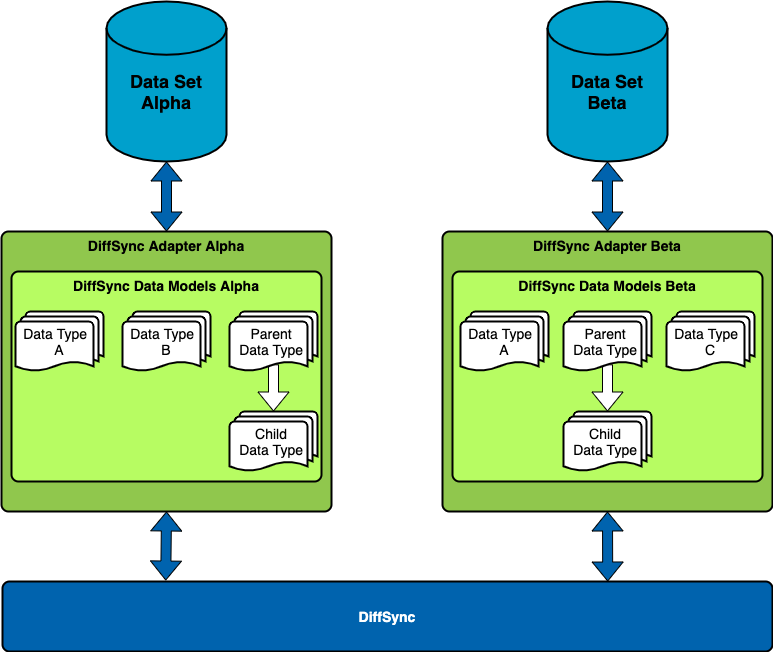
DiffSync acts as an intermediate translation layer between all of the data sets you are diffing and/or syncing. In practical terms, this means that to use DiffSync, you will define a set of data models as well as the “adapters” needed to translate between each base data source and the data model. In Python terms, the adapters will be subclasses of the Adapter class, and each data model class will be a subclass of the DiffSyncModel class.
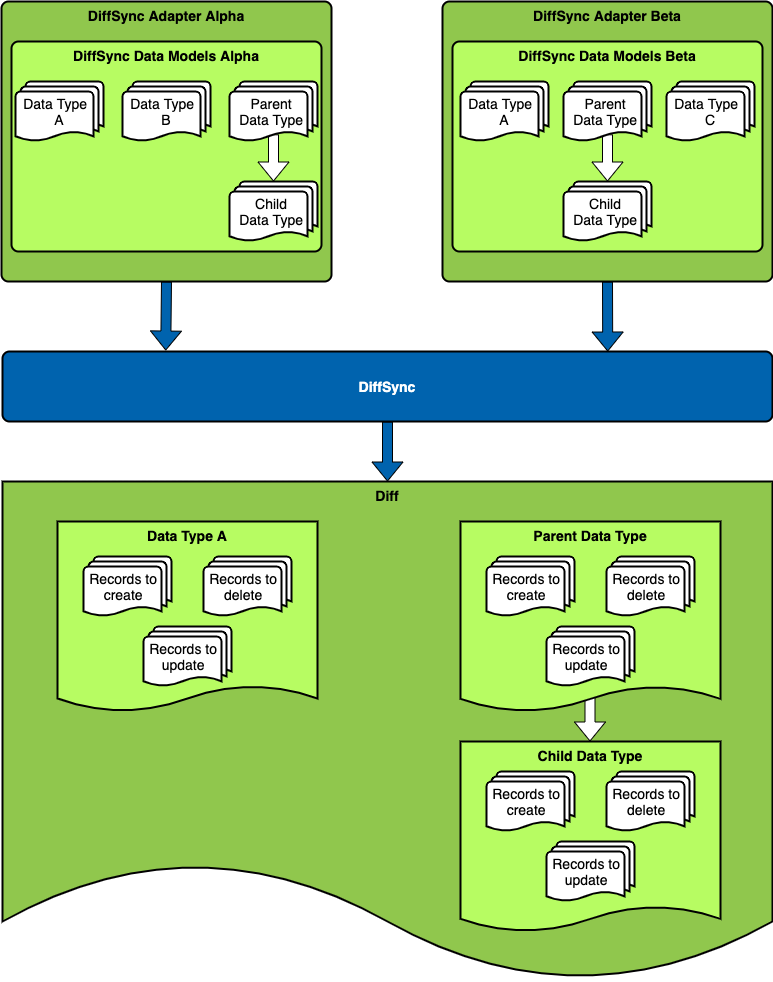
Once you have used each adapter to load each data source into a collection of data model records, you can then ask DiffSync to “diff” the two data sets, and it will produce a structured representation of the difference between them. In Python, this is accomplished by calling the diff_to() or diff_from() method on one adapter and passing the other adapter as a parameter.
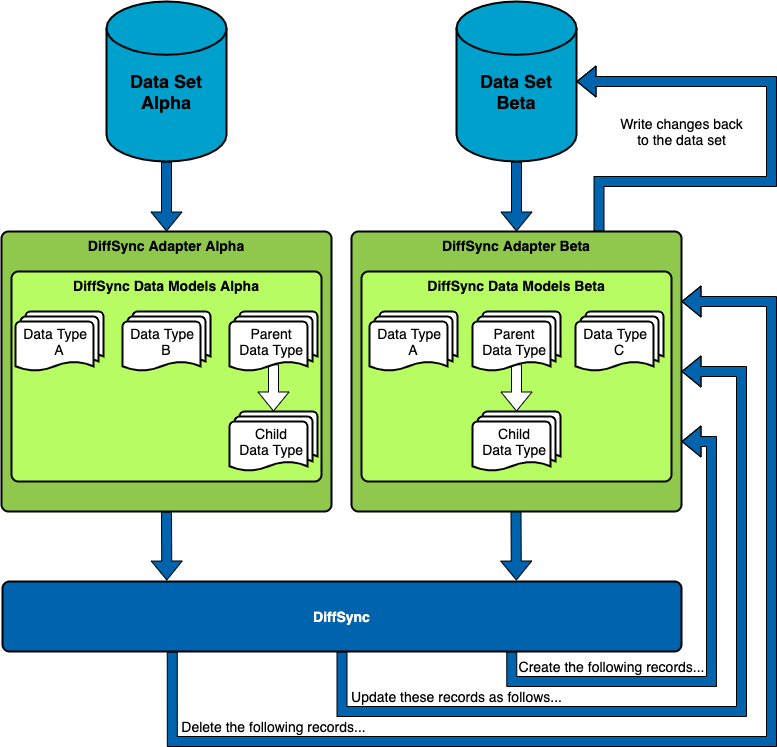
You can also ask DiffSync to “sync” one data set onto the other, and it will instruct your adapter as to the steps it needs to take to make sure that its data set accurately reflects the other. In Python, this is accomplished by calling the sync_to() or sync_from() method on one adapter and passing the other adapter as a parameter.
Simple Example
A = DiffSyncSystemA()
B = DiffSyncSystemB()

A.load()
B.load()

# Show the difference between both systems, that is, what would change if we applied changes from System B to System A
diff_a_b = A.diff_from(B)
print(diff_a_b.str())

# Update System A to align with the current status of system B
A.sync_from(B)

# Update System B to align with the current status of system A
A.sync_to(B)
You may wish to peruse the
diffsyncGitHub topic for examples of projects using this library.
Documentation
Full documentation for this library can be found over on the Diffsync Docs website:
- User Guide - Overview, Using the Library, Getting Started.
- Administrator Guide - How to Install, Configure, Upgrade, or Uninstall the Library.
- Developer Guide - Extending the Library, Code Reference, Contribution Guide.
- Release Notes / Changelog.
- Frequently Asked Questions.
Installation
Option 1: Install from PyPI
pip install diffsync
Option 2: Install from a GitHub branch, such as main as shown below.
pip install git+https://github.com/networktocode/diffsync.git@main
Contributing
Pull requests are welcomed and automatically built and tested against multiple versions of Python through GitHub Actions.
The project is following Network to Code software development guidelines and is leveraging the following:
- Ruff, mypy for Python linting, formatting and type hint checking.
- pytest, coverage, and unittest for unit tests.
You can ensure your contribution adheres to these checks by running invoke tests from the CLI.
The command invoke build builds a docker container with all the necessary dependencies (including the redis backend) locally to facilitate the execution of these tests.
Contributing to the Documentation
You can find all the Markdown source for the App documentation under the docs folder in this repository. For simple edits, a Markdown capable editor is sufficient: clone the repository and edit away.
If you need to view the fully-generated documentation site, you can build it with MkDocs. A container hosting the documentation can be started using the invoke commands (details in the Development Environment Guide) on http://localhost:8001. Using this container, as your changes to the documentation are saved, they will be automatically rebuilt and any pages currently being viewed will be reloaded in your browser.
Any PRs with fixes or improvements are very welcome!
Questions
For any questions or comments, please check the FAQ first. Feel free to also swing by the Network to Code Slack (channel #networktocode), sign up here if you don't have an account.
Release history Release notifications | RSS feed


Download files
Download the file for your platform. If you're not sure which to choose, learn more about installing packages.
Source Distribution
Built Distribution
Filter files by name, interpreter, ABI, and platform.
If you're not sure about the file name format, learn more about wheel file names.
Copy a direct link to the current filters
File details
Details for the file diffsync-2.2.2.tar.gz.
File metadata
- Download URL: diffsync-2.2.2.tar.gz
- Upload date:
- Size: 31.7 kB
- Tags: Source
- Uploaded using Trusted Publishing? No
- Uploaded via: twine/6.1.0 CPython/3.13.7
File hashes
| Algorithm | Hash digest | |
|---|---|---|
| SHA256 |
379ef12bf515d2dbbd42c2696fa2f78e015c464d6df867f9768d1f0f6286befe
|
|
| MD5 |
35ddb6f8864954fcb5978a58a7a254da
|
|
| BLAKE2b-256 |
416ad80d21de3891be7a966ee6160c5f941562cdafcfb3d368efaa9957fd1981
|
File details
Details for the file diffsync-2.2.2-py3-none-any.whl.
File metadata
- Download URL: diffsync-2.2.2-py3-none-any.whl
- Upload date:
- Size: 36.5 kB
- Tags: Python 3
- Uploaded using Trusted Publishing? No
- Uploaded via: twine/6.1.0 CPython/3.13.7
File hashes
| Algorithm | Hash digest | |
|---|---|---|
| SHA256 |
d80a867415bb4a4cc83887b8fc0c02bd3d36b9aed2bd7aafddf5b5034e69b2fa
|
|
| MD5 |
b1585c29d6cdde1f825f84f03287ab0b
|
|
| BLAKE2b-256 |
3ea4cb944ace5f734c8b60051f3f7bbed7bc893ba7098d947e7ebc6639927a4a
|






