
Stable Diffusion image generation for Apple Silicon, powered by MLX

Project description
diffuse-mlx
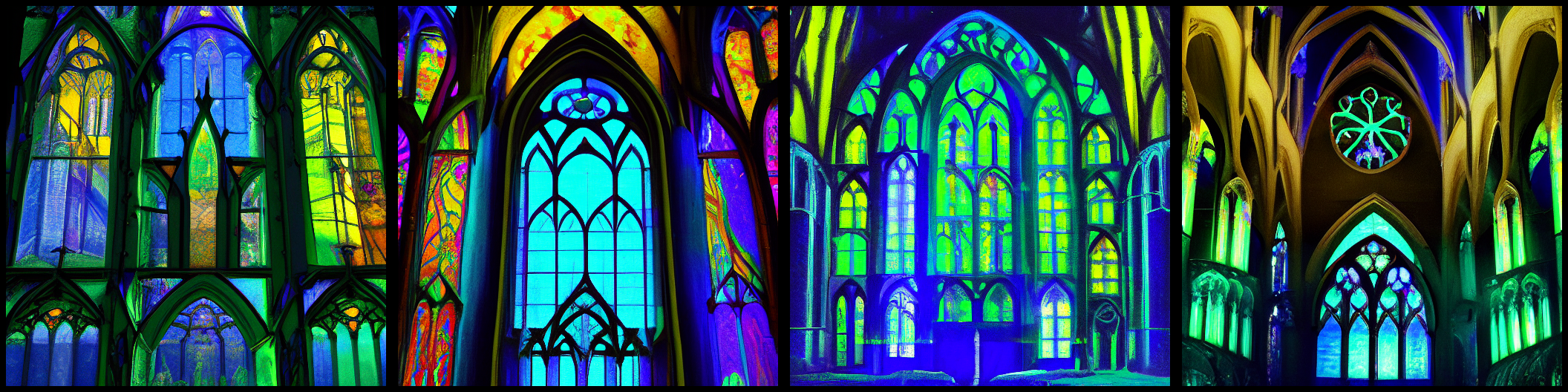
MLX-powered Stable Diffusion CLI for Apple Silicon. Fast, memory-efficient, runs quantized — no CUDA required. This is a touched-up version of Apple's mlx-examples to make it compatible with SD-1.5.
Install
No install — run directly with uvx
uvx diffuse-mlx generate "a red fox in a snowy forest"
Permanent install with uv tool
uv tool install diffuse-mlx
diffuse-mlx generate "a red fox in a snowy forest"
Quick start
SDXL Turbo (default — blazing fast, 2 steps)
diffuse-mlx generate "a red fox in a snowy forest, cinematic lighting, 8k"
Stable Diffusion 2.1
diffuse-mlx generate "a red fox in a snowy forest" --model sd --steps 30
DALL-E 2 Finetune (painterly surrealist quality)
diffuse-mlx generate \
  "Victorian botanist cataloguing impossible flowers that are also doors, gouache illustration, soft candlelight, muted palette, highly detailed, trending on artstation" \
  --model dalle2 -q
The DALL-E 2 Finetune
snwy/SD1.5-DALLE-2 on HuggingFace is an SD 1.5 model finetuned on DALL-E 2 outputs. The training data gives it a distinctive painterly, surrealist quality — images come out soft, dreamlike, and compositionally unusual in ways that feel closer to illustration than photorealism.
Tips for best results:
- Use
-q(quantized) — strongly recommended on 8 GB devices, and the quality loss is negligible. - Write prompts in the old-school comma-separated style:
"subject, style, mood, lighting, medium". - Lean into the surreal: this model shines with imaginative, painterly subjects rather than photorealistic ones.
- Default cfg (7.5) and steps (50) are already tuned for it; no need to adjust unless experimenting.
diffuse-mlx generate \
  "clockwork cathedral assembled from musical instruments, choral light, baroque architecture, concept art" \
  --model dalle2 -q --n-images 4
Models
| Alias | HuggingFace repo | Description |
|---|---|---|
sdxl |
stabilityai/sdxl-turbo | SDXL Turbo — distilled model, 2-step inference, default |
sd |
stabilityai/stable-diffusion-2-1-base | SD 2.1 Base — solid all-rounder, 50 steps |
dalle2 |
snwy/SD1.5-DALLE-2 | SD 1.5 finetuned on DALL-E 2 outputs — painterly, surreal |
Memory and quantization
On Apple Silicon Macs with 8 GB unified memory, run with -q (quantize) to keep memory usage manageable:
diffuse-mlx generate "your prompt here" --model sd -q
Quantization applies 8-bit quantization to the UNet and linear layers of the text encoder(s). Quality impact is minimal for most prompts. SDXL Turbo is already fast and light; -q helps most with SD 2.1 and the DALL-E 2 finetune.
For 16 GB+ devices you can skip -q and use --no-float16 for full float32 precision if you notice any numerical issues.
Image-to-image (img2img)
Transform an existing image guided by a text prompt:
diffuse-mlx img2img photo.jpg "oil painting of a harbour at dusk, impressionist style" \
  --model sd --strength 0.75 -q
--strength controls how much the original image is preserved:
0.0— output is identical to the input (no change)1.0— input image is completely ignored, purely text-driven0.75— a good starting point: retains composition and colours while applying the style
Lower strength values work well for style transfer; higher values for more drastic transformations.
All options
diffuse-mlx generate
diffuse-mlx generate PROMPT [OPTIONS]

  --model           [sdxl|sd|dalle2]  default: sdxl
  --n-images        INT               Number of images to generate (default: 4)
  --steps           INT               Diffusion steps (default: 2 for sdxl, 50 for others)
  --cfg             FLOAT             Guidance weight (default: 0.0 for sdxl, 7.5 for others)
  --negative-prompt TEXT              Negative prompt (default: "")
  --n-rows          INT               Grid rows in output image (default: 1)
  --decoding-batch-size INT           VAE decoding batch size (default: 1)
  --no-float16                        Use float32 instead of float16
  -q, --quantize                      Quantize model weights
  --preload-models                    Preload all weights before generation
  --output          PATH              Output file (default: out.png)
  --seed            INT               Random seed for reproducibility
  -v, --verbose                       Print peak memory usage
diffuse-mlx img2img
diffuse-mlx img2img IMAGE PROMPT [OPTIONS]

  --model           [sdxl|sd|dalle2]  default: sdxl
  --strength        FLOAT             Transformation strength 0.0–1.0 (default: 0.9)
  --n-images        INT               Number of images to generate (default: 4)
  --steps           INT               Diffusion steps
  --cfg             FLOAT             Guidance weight
  --negative-prompt TEXT              Negative prompt
  --no-float16                        Use float32
  -q, --quantize                      Quantize model weights
  --preload-models                    Preload all weights
  --output          PATH              Output file (default: out.png)
  --seed            INT               Random seed
  -v, --verbose                       Print peak memory usage
See also
If you're interested in running Flux models locally on Apple Silicon, check out mflux — a similar project that brings the Flux family of models to MLX with a comparable CLI experience.
Credits
Core MLX implementation ported from Apple's mlx-examples (Copyright © Apple Inc.). The stable diffusion library files are reproduced verbatim under the terms of the original Apple MIT license.
The DALL-E 2 finetune model (snwy/SD1.5-DALLE-2) is by snwy on HuggingFace. Check the model card for its license terms.
Release history Release notifications | RSS feed


Download files
Download the file for your platform. If you're not sure which to choose, learn more about installing packages.
Source Distribution
Built Distribution
Filter files by name, interpreter, ABI, and platform.
If you're not sure about the file name format, learn more about wheel file names.
Copy a direct link to the current filters
File details
Details for the file diffuse_mlx-0.1.1.tar.gz.
File metadata
- Download URL: diffuse_mlx-0.1.1.tar.gz
- Upload date:
- Size: 10.5 MB
- Tags: Source
- Uploaded using Trusted Publishing? No
- Uploaded via: uv/0.10.4 {"installer":{"name":"uv","version":"0.10.4","subcommand":["publish"]},"python":null,"implementation":{"name":null,"version":null},"distro":{"name":"macOS","version":null,"id":null,"libc":null},"system":{"name":null,"release":null},"cpu":null,"openssl_version":null,"setuptools_version":null,"rustc_version":null,"ci":null}
File hashes
| Algorithm | Hash digest | |
|---|---|---|
| SHA256 |
cb305b7af95f1a8cc882d86e4b7d3e871ac6a7e682a3efdd0bebe7c3553f7948
|
|
| MD5 |
90664b0c8e40f3a33c9a27cc2e58e472
|
|
| BLAKE2b-256 |
5000563886f19b407488465d1df74674ec5bb07242314845295406cefc24c73d
|
File details
Details for the file diffuse_mlx-0.1.1-py3-none-any.whl.
File metadata
- Download URL: diffuse_mlx-0.1.1-py3-none-any.whl
- Upload date:
- Size: 21.3 kB
- Tags: Python 3
- Uploaded using Trusted Publishing? No
- Uploaded via: uv/0.10.4 {"installer":{"name":"uv","version":"0.10.4","subcommand":["publish"]},"python":null,"implementation":{"name":null,"version":null},"distro":{"name":"macOS","version":null,"id":null,"libc":null},"system":{"name":null,"release":null},"cpu":null,"openssl_version":null,"setuptools_version":null,"rustc_version":null,"ci":null}
File hashes
| Algorithm | Hash digest | |
|---|---|---|
| SHA256 |
1be336d443490a2d15fe990476f3232333f60b4175195585fe78f96a0ea2cd41
|
|
| MD5 |
c212f035384ec762121e384aa15b060e
|
|
| BLAKE2b-256 |
ef9957df38580de7c15afb744c05320fb93364259f4a938707d477604820e087
|






