
diffuzers

Project description
diffuzers
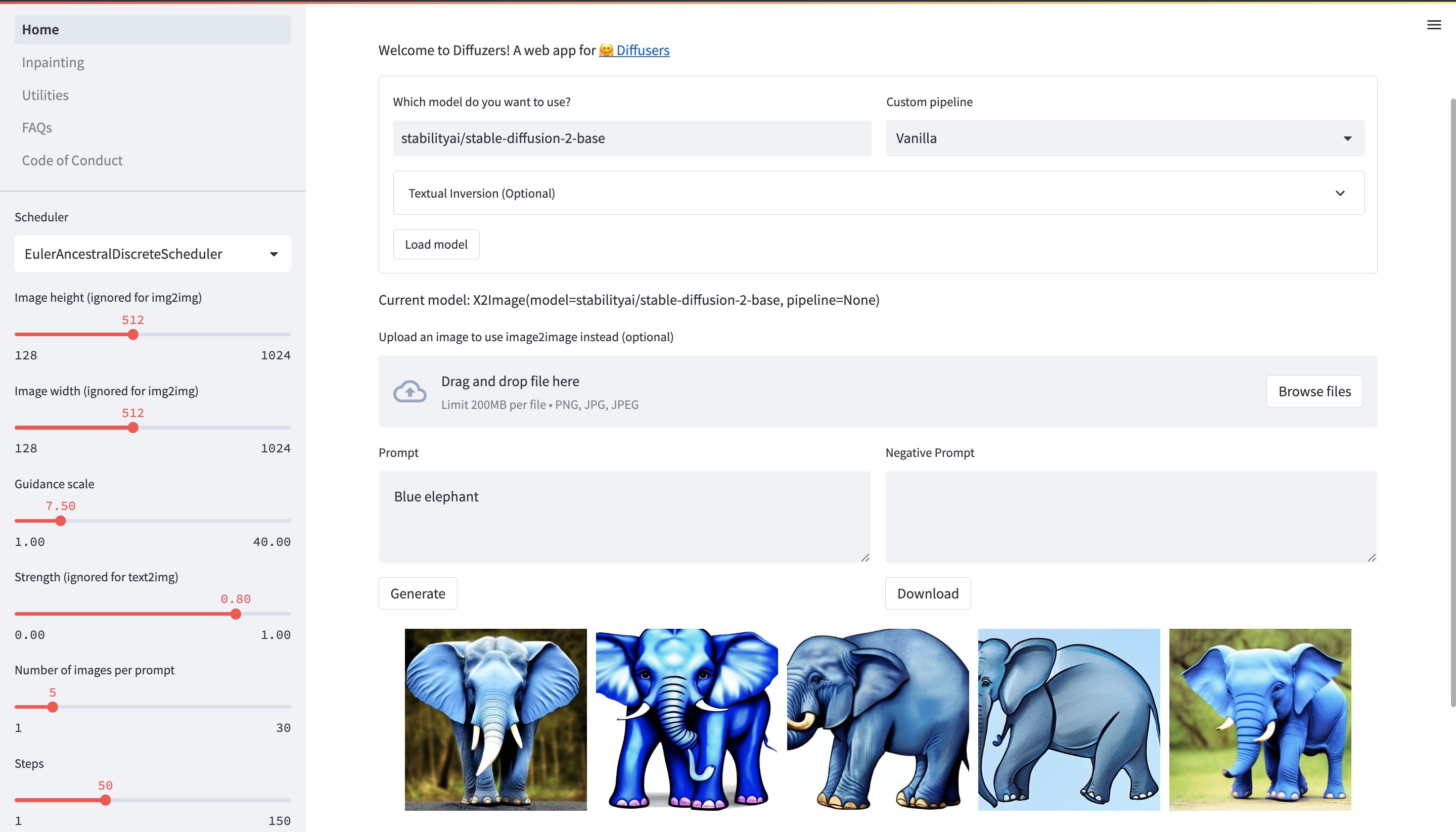
A web ui and deployable API for 🤗 diffusers.
< under development, request features using issues, prs not accepted atm >


If something doesnt work as expected, or if you need some features which are not available, then create request using github issues
Features available in the app:
- text to image
- image to image
- instruct pix2pix
- textual inversion
- inpainting
- outpainting (coming soon)
- image info
- stable diffusion upscaler
- gfpgan
- clip interrogator
- more coming soon!
Features available in the api:
- text to image
- image to image
- instruct pix2pix
- textual inversion
- inpainting
- outpainting (via inpainting)
- more coming soon!
Installation
To install bleeding edge version of diffuzers, clone the repo and install it using pip.
git clone https://github.com/abhishekkrthakur/diffuzers
cd diffuzers
pip install -e .
Installation using pip:
pip install diffuzers
Usage
Web App
To run the web app, run the following command:
diffuzers app
API
To run the api, run the following command:
diffuzers api
Starting the API requires the following environment variables:
export X2IMG_MODEL=stabilityai/stable-diffusion-2-1
export DEVICE=cuda
If you want to use inpainting:
export INPAINTING_MODEL=stabilityai/stable-diffusion-2-inpainting
To use long prompt weighting, use:
export PIPELINE=lpw_stable_diffusion
If you have OUTPUT_PATH in environment variables, all generations will be saved in OUTPUT_PATH. You can also use other (or private) huggingface models. To use private models, you must login using huggingface-cli login.
API docs are available at host:port/docs. For example, with default settings, you can access docs at: 127.0.0.1:10000/docs.
All CLI Options for running the app:
❯ diffuzers app --help
usage: diffuzers <command> [<args>] app [-h] [--output OUTPUT] [--share] [--port PORT] [--host HOST]
                                        [--device DEVICE] [--ngrok_key NGROK_KEY]

✨ Run diffuzers app

optional arguments:
  -h, --help            show this help message and exit
  --output OUTPUT       Output path is optional, but if provided, all generations will automatically be saved to this
                        path.
  --share               Share the app
  --port PORT           Port to run the app on
  --host HOST           Host to run the app on
  --device DEVICE       Device to use, e.g. cpu, cuda, cuda:0, mps (for m1 mac) etc.
  --ngrok_key NGROK_KEY
                        Ngrok key to use for sharing the app. Only required if you want to share the app
All CLI Options for running the api:
❯ diffuzers api --help
usage: diffuzers <command> [<args>] api [-h] [--output OUTPUT] [--port PORT] [--host HOST] [--device DEVICE]
                                        [--workers WORKERS]

✨ Run diffuzers api

optional arguments:
  -h, --help         show this help message and exit
  --output OUTPUT    Output path is optional, but if provided, all generations will automatically be saved to this
                     path.
  --port PORT        Port to run the app on
  --host HOST        Host to run the app on
  --device DEVICE    Device to use, e.g. cpu, cuda, cuda:0, mps (for m1 mac) etc.
  --workers WORKERS  Number of workers to use
Using private models from huggingface hub
If you want to use private models from huggingface hub, then you need to login using huggingface-cli login command.
Note: You can also save your generations directly to huggingface hub if your output path points to a huggingface hub dataset repo and you have access to push to that repository. Thus, you will end up saving a lot of disk space.
Release history Release notifications | RSS feed


Download files
Download the file for your platform. If you're not sure which to choose, learn more about installing packages.
Source Distribution
Built Distribution
Filter files by name, interpreter, ABI, and platform.
If you're not sure about the file name format, learn more about wheel file names.
Copy a direct link to the current filters
File details
Details for the file diffuzers-0.3.2.tar.gz.
File metadata
- Download URL: diffuzers-0.3.2.tar.gz
- Upload date:
- Size: 825.9 kB
- Tags: Source
- Uploaded using Trusted Publishing? No
- Uploaded via: twine/3.4.2 importlib_metadata/4.8.1 pkginfo/1.7.1 requests/2.25.1 requests-toolbelt/0.9.1 tqdm/4.49.0 CPython/3.8.13
File hashes
| Algorithm | Hash digest | |
|---|---|---|
| SHA256 |
589446d1af7956de4901a683cfc1af1f4204017a42e4225395d54cc8dac7bbd6
|
|
| MD5 |
2ac2011549f965c8eb3e747e9734cecd
|
|
| BLAKE2b-256 |
f545cf09e42b81bb8969555bafd49e6e8cbe77989c5c677269f56f00738ac537
|
File details
Details for the file diffuzers-0.3.2-py3-none-any.whl.
File metadata
- Download URL: diffuzers-0.3.2-py3-none-any.whl
- Upload date:
- Size: 842.5 kB
- Tags: Python 3
- Uploaded using Trusted Publishing? No
- Uploaded via: twine/3.4.2 importlib_metadata/4.8.1 pkginfo/1.7.1 requests/2.25.1 requests-toolbelt/0.9.1 tqdm/4.49.0 CPython/3.8.13
File hashes
| Algorithm | Hash digest | |
|---|---|---|
| SHA256 |
abfca27d08b611755263f7c2ddab8924cb486230ebbcb8b96d713cf0e3f43a2a
|
|
| MD5 |
91a9bf806fe66beba1c1989bf96f9b02
|
|
| BLAKE2b-256 |
5ced629fac984ad712d732c5c45460975232de1c9b8ff80505f54290823ea159
|






