Automatically profile your pandas dataframes in jupyter lab.

Project description



Profile your Pandas Dataframes! Autoprofiler will automatically visualize your Pandas dataframes after every execution, no extra code necessary.
Autoprofiler allows you to spend less time specifying charts and more time interacting with your data by automatically showing you profiling information like:
- Distribution of each column
- Sample values
- Summary statistics
Updates profiles as your data updates
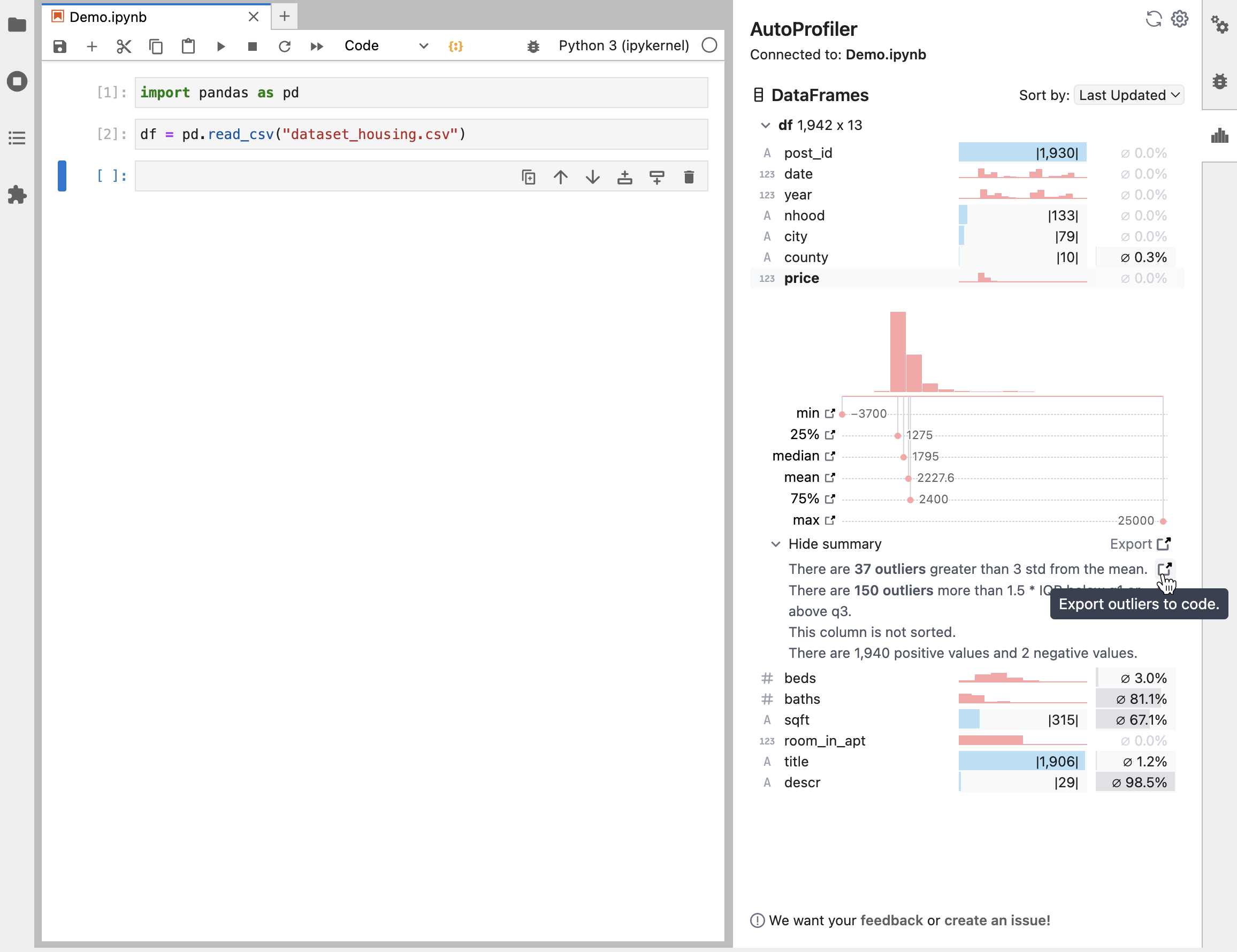
Autoprofiler reads your current Jupyter notebook and produces profiles for the Pandas Dataframes in your memory as they change.
Install
To instally locally use pip and then open jupyter lab and the extension will be running.
pip install -U digautoprofiler
Please note, AutoProfiler only works in JupyterLab with version > 3.
Try it out
To try out Autoprofiler in a hosted notebook, use one of the options below
| Jupyter Lite | Binder |
|---|---|
|
|
Browser support
AutoProfiler has been developed and tested with Chrome.
Development Install
For development install instructions, see CONTRIBUTING.md.
If you're having install issues, see TROUBLESHOOTING.md.
Acknowledgements
Big thanks to the Rill Data team! Much of our profiler UI code is adapted from Rill Developer.
Let us know what you think! 📢
We would love to hear your feedback on how you are using AutoProfiler! Please fill out this form or email Will at willepp@cmu.edu.
Release history Release notifications | RSS feed


Download files
Download the file for your platform. If you're not sure which to choose, learn more about installing packages.
Source Distribution
Built Distribution
Hashes for digautoprofiler-0.2.10-py3-none-any.whl
| Algorithm | Hash digest | |
|---|---|---|
| SHA256 | 50c35777639f0776c11dacc02c086fa7c87ae9dc05c14598272c264fb295035b |
|
| MD5 | 568e1fbffc0677c899daa4b7b70a76d2 |
|
| BLAKE2b-256 | 211300f0dc058b35946364d15b07402a7d7f9029dd0e245a14f59fa1dec1166f |