
Dimipy
Python3 library for dimensional analysis and unit conversion.
pros: easy to define custom units and constants, easy unit check and conversion (just use +).
cons: units are not named; only linear units are handled; currently not compatible with numpy, pandas, etc



Content and Paradigm
3 levels datastructure: Dimension - Unit - Quantity
Dimension: relates to a physical dimension (immutable)Unit: describes a physical unit with it's scale (immutable)Quantity: describes a certain amount of a given unit
Basic rules for Unit, Quantity and other types operations:
- an ordinary object is considered as a
Quantityobject whose Unit isUnit.SCALAR(no dimension, scale1), - if the result of an operation is a
Quantitywhose Unit has no dimension and scale1(i.e. equal toUnit.SCALAR), the result is substituted with the quantity itself - the result of (A * B) has the type of A (so n*
Unitis aQuantitybutUnit*n is a newUnit), - the result of (A + B) is a
Quantity(unless A and B are bothUnits) and has the unit of B (Quantity+Unitgives the same quantity but converted in the given unit). If either A or B is aDimension, perform the dimension check without unit conversion, and return the other value.
Examples
Predefined units and constants
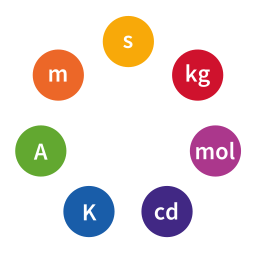
The SI base units are based on 7 dimensions of measurement:
'T'for time'L'for length'M'for mass'I'for electric current intensity'Θ'for thermodynamic temperature'N'for amount of substance'J'for luminous intensity
Those dimensions are used in the module dimipy.units.si.
You can still define your own arbitrary dimensions on top of that, like '$' or 'people'.
from dimipy.units import * # see source file for exhaustive list of standard units
from dimipy.constants import c,G

u_age       =      13.799e9*y_                 # y_ is defined as (s_*31556925)
u_radius    =m_+   c * u_age                   # checks that result is a length, unit will still be (m_*y_/s_) = (m_*31556925)
u_crit_mass =kg_+  0.5 * c**2 / G * u_radius   # checks that result is a mass
u_mass      =      1e53*kg_                    # https://en.wikipedia.org/wiki/Universe

print( u_crit_mass       ) # unit is kg_*31556925 = Unit[31556925 * M]
print( u_crit_mass  +kg_ ) # print it in standard units

print( u_mass / u_crit_mass     ) # unit is s_/year_ = Unit[3.1688765e-08 * 1]
print( u_mass / u_crit_mass  +0 ) # print it as a Unit.SCALAR
Create your own dimensions, units and quantities
# dimensions
length = Dimension(L=1)
speed  = Dimension(L=1, T=-1)
acceleration = Dimension( {'L':1, 'T':-2} )

# units
m_    = Unit(scale=1, dim=length)       # a unit is composed of a dimension and a scale
km_   = Unit(scale=1000, dim=length)    # scale is relative to the SI-unit
kn_   = Unit(0.514444,speed)            # the knot definition
kg_   = Unit(1,M=1)     # the dimension parameters can be passed as kwargs
s_    = Unit(T=1)       # a unit with scale 1 (default)
min_  = Unit(60,T=1)    # a unit with scale 60
h_    = s_ * 3600       # a unit with scale 3600 (s_ MUST be on left)
d_    = h_ * 24         # a unit with scale 3600 * 24 = 86400
km_h_ = km_ / h_        # equivalent to Unit(1000/3600, speed)
N_    = Unit(M=1,L=1,T=-2)
J_    = Unit(M=1,L=2,T=-2) +N_*m_ # checks the compatibility of units (homogeneity)
W_    = Unit(M=1,L=2,T=-3) +J_/s_ # actually, W_ takes the value of (J_/s_), the last term

# quantities
g = Quantity(amount=9.81, unit=m_*s_**-2)  # a quantity is composed of a unit and an amount
c = 299792458 * (m_/s_)             # ((m_/s_) MUST be on right)
sun_earth = (8*min_ + 20*s_) / c    # operation between quantities (result is a distance)
au_ = Unit(sun_earth)               # create a unit from a quantity

time = 9*h_ + 80.1*min_ # first convert 9*h_ in min_, then add
time.convert(d_)        # convert time in place in minutes
time.convert()          # convert time in place in SI, i.e. in s_
time2 = time +d_        # Quantity + Unit -> convert the quantity (time2 in d_)
time3 = d_+ time        # Unit + Quantity -> only checks the compatibility (time3 still in s_)
time3 += d_             # same as time3.convert(d_)
b1 = (time2 == time3)   # True
b2 = ( 12*d_ < 1e6*s_ ) # False
print( c +km_h_ )       # print the speed of light in kilometers per hour
print(( c )/(km_h_)+0., "km/h") # print the converted amount; adding zero converts to Unit.SCALAR
print( f"{time //h_ :n}:{time%h_ //min_ :02n}:{time%min_ //s_ :02n}" ) # prints '10:20:06'
Formats
Several formatters are available (see dimipy.formatters for available formatters).
from dimipy.units import *
from dimipy.formatters import *
quantity = 1.21*GW_
print(Formatter().format(quantity))
print(PrettyFormatter().format(quantity))
print(LegacyFormatter().format(quantity))
print(CodeFormatter().format(quantity))
print(CodeFormatter(explicit_type=True).format(quantity))
print(LatexFormatter(dim_spacing=r"\cdot").format(quantity))
This prints:
1.21(10^9 M L^2 T^-3)
1.21(10⁹ML²T⁻³)
Quantity[1.21 * (10⁹ * M L² T⁻³)]
1.21 * Unit(Fraction(1000000000, 1), M=1, L=2, T=-3)
Quantity(1.21, Unit(Fraction(1000000000, 1), M=1, L=2, T=-3))
$1.21{\color{cyan}\left({10}^{9}\cdot\mathsf{M}\cdot\mathsf{L}^{2}\cdot\mathsf{T}^{-3}\right)}$
One can easily reconfigure default formatters.
import dimipy
dimipy.params.update(
	str_formatter=dimipy.formatters.PrettyFormatter(),                  # for str()
	repr_formatter=dimipy.formatters.PrettyFormatter(),                 # for repr()
	display_formatter=dimipy.formatters.LatexFormatter(),               # for IPython
)
What next?
-
include more standard units and constants (ongoing process)
-
named units and composed units
-
non linear units (like celsius compared to Kelvin, or decibels) - If I have time and motivation For temperatures, one can currently use:
from dimipy.units.si import K_, zero_celsius
from dimipy.units.imperial import Ra_, zero_farenheit
T_absolute = 300.*K_

T_celsius = 27.*K_  # use Kelvin instead of Celsius
T_celsius = T_absolute -zero_celsius
T_absolute = T_celsius +zero_celsius

T_farenheit = 80.*Ra_  # use Rankine instead of Farenheit
T_farenheit = T_absolute -zero_farenheit
T_farenheit = T_celsius +zero_celsius-zero_farenheit
T_absolute = T_farenheit +zero_farenheit+K_  # if Kelvin desired
Contact
Jean-Raphaël Gaglione < jr dot gaglione at yahoo dot fr >
If you are interested in this project, do not hesitate to contact me!
1 maintainer

Metadata
1 maintainer
Release files for dimipy 0.0.1
For a detailed explanation of source distributions (sdists) and built distributions (wheels), please see the package formats documentation.
Source distribution (sdist)
| File | Size | Uploaded | |
|---|---|---|---|
| dimipy-0.0.1.tar.gz | 23.9 kB | Details |
Built distribution (wheel)
| File | Interpreter | ABI | Platform | Reset |
|---|---|---|---|---|
| dimipy-0.0.1-py3-none-any.whl | Python 3 | none | any | Details |
Total release size: 49.6 kB
Release files / dimipy-0.0.1.tar.gz
| Download URL | dimipy-0.0.1.tar.gz |
|---|---|
| Size | 23.9 kB |
| Tags | Source |
|
SHA-256 checksum How to use checksums |
3d1e2b4a79e1cb0f8c125a335dfa5cd713883a7c2b08c2994bd5819de11dade6
|
|
BLAKE2b-256 checksum How to use checksums |
2c4835a4d0c67cc4501d7cbdf3d8fe5b5c8438a316248f779cc7608720b7a567
|
| Upload date | |
|
Uploaded using Trusted Publishing? What is trusted publishing? |
Yes |
| Uploaded via |
twine/6.1.0 CPython/3.12.9
|
Provenance
Provenance describes where a file came from. On PyPI, provenance is shared via attestations, which provide a verifiable record of the build or publishing details. View details, limitations and caveats.


PyPI Publish Attestation
PyPI verified that this artifact, at this checksum, originated from the publisher listed below.
Signed by GitHub Actions, verified by PyPI on Mar 9, 2025.
Transparency logRelease files / dimipy-0.0.1-py3-none-any.whl
| Download URL | dimipy-0.0.1-py3-none-any.whl |
|---|---|
| Size | 25.7 kB |
| Tags | Python 3 |
|
SHA-256 checksum How to use checksums |
206fc70c7974515206175af878280b18002ed2ff03ac8b55b235d74b3bca4157
|
|
BLAKE2b-256 checksum How to use checksums |
cc4e6d57f4d5ee456a635c74070ff1d4be95659cafd5da3b4a94b2febc5d2b6b
|
| Upload date | |
|
Uploaded using Trusted Publishing? What is trusted publishing? |
Yes |
| Uploaded via |
twine/6.1.0 CPython/3.12.9
|
Provenance
Provenance describes where a file came from. On PyPI, provenance is shared via attestations, which provide a verifiable record of the build or publishing details. View details, limitations and caveats.
PyPI Publish Attestation
PyPI verified that this artifact, at this checksum, originated from the publisher listed below.
Signed by GitHub Actions, verified by PyPI on Mar 9, 2025.
Transparency log












