
Interactive Rerun viewer for DimOS with click-to-navigate support
Project description
Advanced example showing how to control an external application from the Rerun viewer, by extending the viewer UI.
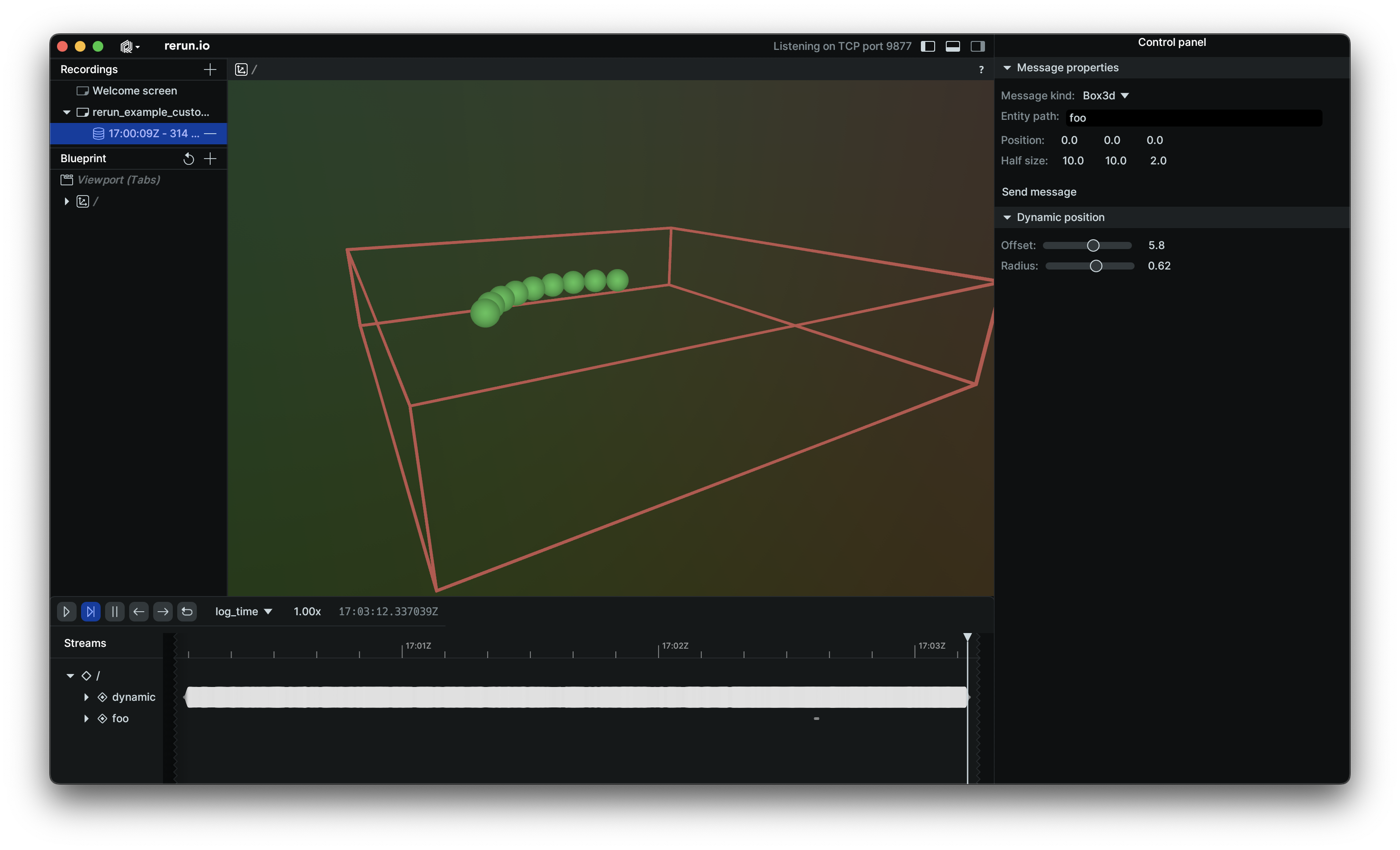
[!NOTE] #2337: In order to spawn a web viewer with these customizations applied, you have to build the web viewer of the version yourself. This is currently not supported outside of the Rerun repository.
Overview
This example is divided into two parts:
- Viewer (
src/viewer.rs): Wraps the Rerun viewer inside aneframeapp. - App (
src/app.rs): The application that uses the Rerun SDK.
In the app, an additional gRPC server is opened to allow the viewer to send messages to the app.
Similar to the extend_viewer_ui example, the viewer is wrapped in an eframe app, which allows us to handle the extra communication logic and define our own control UI using egui.
The communication between the viewer and the app is implemented in the comms module. It defines a simple protocol to send messages between the viewer and the app using bincode.
The protocol supports basic commands that the viewer can send to the app, such as logging a Boxes3D or Point3D to an entity, or changing the radius of a set of points that is being logged.
Usage
First start the Rerun SDK app with cargo run -p custom_callback --bin custom_callback_app,
and then start the extended viewer with cargo run -p custom_callback --bin custom_callback_viewer.
Relationship with Viewer callbacks
The [re_viewer] crate also exposes some baseline Viewer events through the StartupOptions.on_event field,
which can exist alongside your own events from widgets added by extending the UI.
Project details
Release history Release notifications | RSS feed


Download files
Download the file for your platform. If you're not sure which to choose, learn more about installing packages.
Source Distributions
Built Distributions
Filter files by name, interpreter, ABI, and platform.
If you're not sure about the file name format, learn more about wheel file names.
Copy a direct link to the current filters
File details
Details for the file dimos_viewer-0.30.0a1-cp310-cp310-manylinux_2_28_x86_64.whl.
File metadata
- Download URL: dimos_viewer-0.30.0a1-cp310-cp310-manylinux_2_28_x86_64.whl
- Upload date:
- Size: 40.7 MB
- Tags: CPython 3.10, manylinux: glibc 2.28+ x86-64
- Uploaded using Trusted Publishing? Yes
- Uploaded via: twine/6.1.0 CPython/3.13.7
File hashes
| Algorithm | Hash digest | |
|---|---|---|
| SHA256 |
e33492ff1f2877a562b0748d5c39e69ae469732abac4ed5b872c8259b649ab5b
|
|
| MD5 |
d5e1b800efa751a4a7b6313799df3241
|
|
| BLAKE2b-256 |
76aaf394c6579a4871780752b66b7425a4189a709b11014d7a87e0af1e3ceefb
|
Provenance
The following attestation bundles were made for dimos_viewer-0.30.0a1-cp310-cp310-manylinux_2_28_x86_64.whl:
Publisher:
build-viewer.yml on dimensionalOS/dimos-viewer
-
Statement:
-
Statement type:
https://in-toto.io/Statement/v1 -
Predicate type:
https://docs.pypi.org/attestations/publish/v1 -
Subject name:
dimos_viewer-0.30.0a1-cp310-cp310-manylinux_2_28_x86_64.whl -
Subject digest:
e33492ff1f2877a562b0748d5c39e69ae469732abac4ed5b872c8259b649ab5b - Sigstore transparency entry: 1031849937
- Sigstore integration time:
-
Permalink:
dimensionalOS/dimos-viewer@5436dce43c902c8accaa04c62155f591991d888f -
Branch / Tag:
refs/tags/v0.30.0a1 - Owner: https://github.com/dimensionalOS
-
Access:
public
-
Token Issuer:
https://token.actions.githubusercontent.com -
Runner Environment:
github-hosted -
Publication workflow:
build-viewer.yml@5436dce43c902c8accaa04c62155f591991d888f -
Trigger Event:
push
-
Statement type:
File details
Details for the file dimos_viewer-0.30.0a1-cp310-cp310-macosx_11_0_arm64.whl.
File metadata
- Download URL: dimos_viewer-0.30.0a1-cp310-cp310-macosx_11_0_arm64.whl
- Upload date:
- Size: 34.6 MB
- Tags: CPython 3.10, macOS 11.0+ ARM64
- Uploaded using Trusted Publishing? Yes
- Uploaded via: twine/6.1.0 CPython/3.13.7
File hashes
| Algorithm | Hash digest | |
|---|---|---|
| SHA256 |
69a5f12810e4efd2cf4c3c9214a5fa9bc71a027c486f2a742d34ac8337e6a5df
|
|
| MD5 |
0bcbe9f879c0a66a3c495945ec54bd73
|
|
| BLAKE2b-256 |
8592fb718bc8c1050df8f99d0edcb79101a08549c2ce403fcca78609b12c5a30
|
Provenance
The following attestation bundles were made for dimos_viewer-0.30.0a1-cp310-cp310-macosx_11_0_arm64.whl:
Publisher:
build-viewer.yml on dimensionalOS/dimos-viewer
-
Statement:
-
Statement type:
https://in-toto.io/Statement/v1 -
Predicate type:
https://docs.pypi.org/attestations/publish/v1 -
Subject name:
dimos_viewer-0.30.0a1-cp310-cp310-macosx_11_0_arm64.whl -
Subject digest:
69a5f12810e4efd2cf4c3c9214a5fa9bc71a027c486f2a742d34ac8337e6a5df - Sigstore transparency entry: 1031850023
- Sigstore integration time:
-
Permalink:
dimensionalOS/dimos-viewer@5436dce43c902c8accaa04c62155f591991d888f -
Branch / Tag:
refs/tags/v0.30.0a1 - Owner: https://github.com/dimensionalOS
-
Access:
public
-
Token Issuer:
https://token.actions.githubusercontent.com -
Runner Environment:
github-hosted -
Publication workflow:
build-viewer.yml@5436dce43c902c8accaa04c62155f591991d888f -
Trigger Event:
push
-
Statement type:






