
在线安装
pip install dingding
例子
from dingding import DingDing
access_token="xxxxxxxxxxxxxxxxxxxxxxxxxx"
ding = DingDing(access_token)
# @所有人
ding.send_text('hello', at_all=True)

# @手机号为1333333333的人
ding.send_text('hello', ['13333333333'])

ding.send_link('title', 'text', 'message_url')

ding.send_markdown('title', 'text')

ding.send_action_card('title', 'text', [('title1', 'url1'), ('title2', 'url2')])
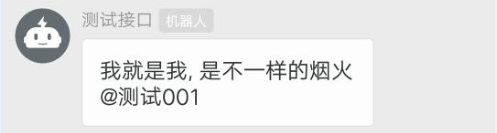
ding.send_text('我就是我, 是不一样的烟火', ['13333333333'])
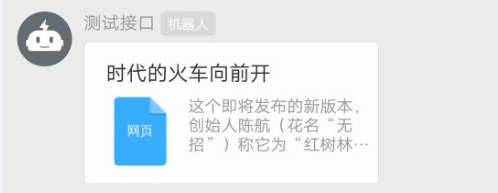
ding.send_link('时代的火车向前开', '这个即将发布的新版本,创始人陈航(花名“无招”)称它为“红树林”。 而在此之前,每当面临重大升级,产品经理们都会取一个应景的代号,这一次,为什么是“红
    树林”?', 'https://mp.weixin.qq.com/s?__biz=MzA4NjMwMTA2Ng==&mid=2650316842&idx=1&sn=60da3ea2b29f1dcc43a7c8e4a7c97a16&scene=2&srcid=09189AnRJEdIiWVaKltFzNTw&from=timeline&isappinstalled=0&key=&ascene=2&uin=&devicetype=android-23&version=26031933&nettype=WIFI')
ding.send_feed_card([('学vue','https://cn.vuejs.org/','https://cn.vuejs.org/images/logo.png'),
                     ('哪家强', 'https://cn.vuejs.org/', 'https://cn.vuejs.org/images/logo.png')])

添加签名秘钥
d = DingDing(
    "https://oapi.dingtalk.com/robot/send?access_token=tttttttttttttttttttttttttttttttttttttttttttttttttttttttttttttttt"
)
# 如果使用了签名秘钥,需要添加下面这条语句
d.set_secret("SSSSSSSSSSSSSSSSSSSSSSSSSSSSSSSSSSSSSSSSSSSSSSSSSSSSSSSSSSSSSSSSSSS")
d.send_text("hello")
返回结果
如果发送正常
{'errcode': 0, 'errmsg': 'ok'}
1 maintainer

Metadata
1 maintainer
Release files for dingding 0.6.2
For a detailed explanation of source distributions (sdists) and built distributions (wheels), please see the package formats documentation.
Source distribution (sdist)
| File | Size | Uploaded | Provenance | Actions |
|---|---|---|---|---|
| dingding-0.6.2.tar.gz | 5.1 kB | Without provenance | Details for dingding-0.6.2.tar.gz |
Built distribution (wheel)
| File | Interpreter | ABI | Platform | Actions Reset |
|---|---|---|---|---|
| dingding-0.6.2-py3-none-any.whl | Python 3 | none | any | Details for dingding-0.6.2-py3-none-any.whl |
Total release size: 10.4 kB
Release files / dingding-0.6.2.tar.gz
| Download URL | dingding-0.6.2.tar.gz |
|---|---|
| Size | 5.1 kB |
| Tags | Source |
|
SHA-256 checksum How to use checksums |
876ac94a2e96ffcde1a05b41131e5b3e1ec8cfc4d273edc3ef0d5f3b3d4e00dd
|
|
BLAKE2b-256 checksum How to use checksums |
4ecdca7aacf43aa74650afbc67f5a003099a35122db1d48464a0640ba17a4a1f
|
| Upload date | |
|
Uploaded using Trusted Publishing? What is trusted publishing? |
No |
| Uploaded via |
twine/3.2.0 pkginfo/1.6.1 requests/2.24.0 setuptools/50.3.2 requests-toolbelt/0.9.1 tqdm/4.54.0 CPython/3.8.6
|
Release files / dingding-0.6.2-py3-none-any.whl
| Download URL | dingding-0.6.2-py3-none-any.whl |
|---|---|
| Size | 5.3 kB |
| Tags | Python 3 |
|
SHA-256 checksum How to use checksums |
27f21d261f6596d30b126ed8834f903ecd116728231b984d0510cc0302f70905
|
|
BLAKE2b-256 checksum How to use checksums |
0de2619a12871041fcf4ce3565f0888fdc80d1e3f3eaa8b1298c5d65e12348ba
|
| Upload date | |
|
Uploaded using Trusted Publishing? What is trusted publishing? |
No |
| Uploaded via |
twine/3.2.0 pkginfo/1.6.1 requests/2.24.0 setuptools/50.3.2 requests-toolbelt/0.9.1 tqdm/4.54.0 CPython/3.8.6
|
Security for dingding 0.6.2
Provenance
Provenance describes where a file came from. On PyPI, provenance is shared via attestations, which provide a verifiable record of the build or publishing details. View details, limitations and caveats.
No provenance found
None of the files in this release were uploaded with provenance metadata.
A note on package security
PyPI is a repository for distributing packages, not a service for auditing them. While third-party security researchers and our staff do their best to detect and remove malicious packages, PyPI cannot guarantee the quality, security or suitability of any given package.
To learn more about protecting yourself from malicious actors, visit our package security documentation.














