
diRAGnosis - Diagnose the performance of your RAG!

Project description
diRAGnosis🩺
Diagnose the performance of your RAG
If you find diRAGnosis useful, please consider to donate and support the project:


diRAGnosis is a lightweight framework, built with LlamaIndex, that allows you to evaluate the performance of LLMs and retrieval models in RAG frameworks with your documents. It can be used as an application (thanks to FastAPI + Gradio) running locally on your machine, or as a python package.
Installation and usage
As an application
Clone the application:
git clone https://github.com/AstraBert/diRAGnosis.git
cd diRAGnosis/
**Docker (recommended)**🐋
Required: Docker and docker compose
- Launch the Docker application:
# If you are on Linux/macOS
bash run_services.sh
# If you are on Windows
.\run_services.ps1
Or, if you prefer:
docker compose up db -d
docker compose up dashboard -d
You will see the application running on http://localhost:8000/dashboard and you will be able to use it. Depending on your connection and on your hardware, the set up might take some time (up to 30 mins to set up) - but this is only for the first time your run it!
Source code🗎
Required: Docker, docker compose and conda
- Set up diRAGnosis app using the dedicated script:
# For MacOs/Linux users
bash setup.sh
# For Windows users
.\setup.ps1
- Or you can do it manually, if you prefer:
docker compose up db -d

conda env create -f environment.yml

conda activate eval-framework

cd scripts/
uvicorn main:app --host 0.0.0.0 --port 8000

conda deactivate
You will see the application running on http://localhost:8000/dashboard and you will be able to use it.
As a python package
As a python package, you will be able to install diRAGnosis using pip:
pip install diRAGnosis
Once you have installed it, you can import the four functions (detailed in the dedicated reference file) available for diRAGnosis like this:
from diRAGnosis.evaluation import generate_question_dataset, evaluate_llms, evaluate_retrieval, display_available_providers
Once you imported them, this is an example of how you can use them:
from qdrant_client import QdrantClient, AsyncQdrantClient
import asyncio
import os
from dotenv import load_dotenv
import json

load_dotenv()
# import your API keys (in this case, only OpenAI)
openai_api_key = os.environ["OPENAI_API_KEY"]
# define your data
input_files = ["file1.pdf", "file2.pdf"]
# create a Qdrant client (asynchronous and synchronous)
qdrant_client = QdrantClient("http://localhost:6333")
qdrant_aclient = AsyncQdrantClient("http://localhost:6333")
# display available LLM and Embedding model providers
display_available_providers()
async def main():
    # generate dataset
    question_dataset, docs = await generate_question_dataset(input_files = input_files, llm = "OpenAI", model="gpt-4o-mini", api_key = openai_api_key, questions_per_chunk = 10, save_to_csv = "questions.csv", debug = True)
    # evaluate LLM performance
    binary_pass, scores = await evaluate_llms(qc = qdrant_client,  aqc = qdrant_aclient, llm = "OpenAI", model="gpt-4o-mini", api_key = openai_api_key, docs = docs, questions = question_dataset, embedding_provider = "HuggingFace", embedding_model = "Alibaba-NLP/gte-modernbert-base",  enable_hybrid = True, debug = True)
    print(json.dumps(binary_pass, indent=4))
    print(json.dumps(scores, indent=4))
    # evaluate retrieval performance
    retrieval_metrics = await evaluate_retrieval(qc = qdrant_client,  aqc = qdrant_aclient, input_files = input_files, llm = "OpenAI", model="gpt-4o-mini", api_key = openai_api_key, embedding_provider = "HuggingFace", embedding_model = "Alibaba-NLP/gte-modernbert-base", questions_per_chunk = 5, enable_hybrid = True, debug = True)
    print(json.dumps(retrieval_metrics, indent=4))

if __name__ == "__main__":
    asyncio.run(main())
How it works
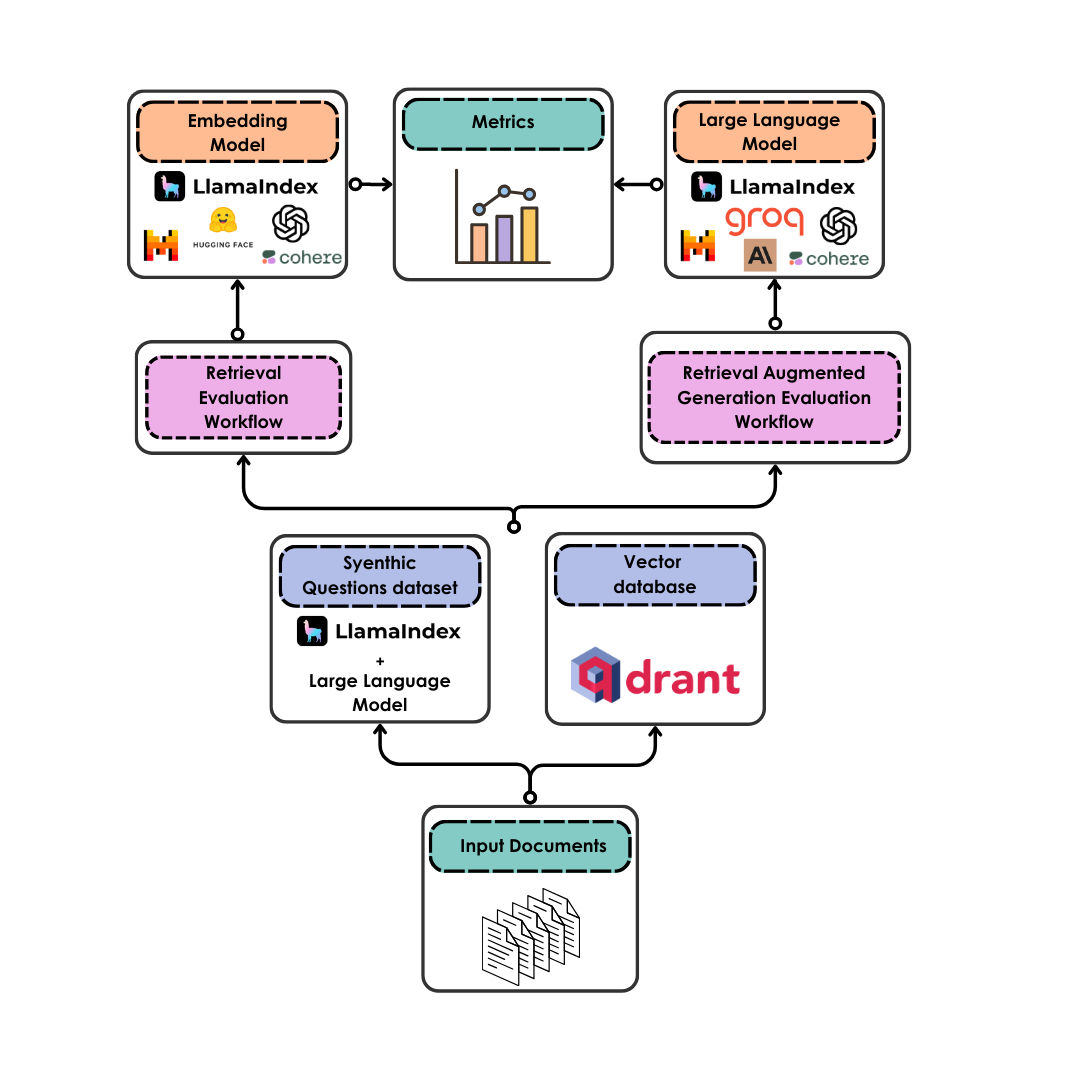
diRAGnosis takes care of the evaluation of LLM and retrieval model performance on your documents in a completely automated way:
- Once your documents are uploaded, they are converted into a synthetic question dataset (either for Retrieval Augmented Generation or for retrieval only) by an LLM of your choice
- The documents are also chunked and uploaded to a vector database served by Qdrant - you can choose a semantic search only or an hybrid search setting
- The LLMs are evaluated, with binary pass and with scores, on the faithfulness and relevancy of their answers based on the questions they are given and on the retrieved context that is associated to each question
- The retrieval model is evaluated according to hit rate (retrieval of the correct document as first document) and to MRR (Mean Reciprocal Ranking, i.e. the positioning of the correct document in the ranking of the retrieved documents)
- The metrics are returned to the user
Contributing
Contributions are always welcome! Follow the contributions guidelines reported here.
License and rights of usage
The software is provided under MIT license.
Release history Release notifications | RSS feed


Download files
Download the file for your platform. If you're not sure which to choose, learn more about installing packages.
Source Distribution
Built Distribution
Filter files by name, interpreter, ABI, and platform.
If you're not sure about the file name format, learn more about wheel file names.
Copy a direct link to the current filters
File details
Details for the file diragnosis-0.0.0.post1.tar.gz.
File metadata
- Download URL: diragnosis-0.0.0.post1.tar.gz
- Upload date:
- Size: 9.8 kB
- Tags: Source
- Uploaded using Trusted Publishing? No
- Uploaded via: twine/6.0.1 CPython/3.11.11
File hashes
| Algorithm | Hash digest | |
|---|---|---|
| SHA256 |
752cb186520dd72416a648965e8f2d4d39a4e702f69c02f692f0f640ca29215f
|
|
| MD5 |
fb6257620c6579140e8ba95f066b77c7
|
|
| BLAKE2b-256 |
2bffe3dc6e89892ed8d29e61ae9760e5cd9e0adf2f83546ed3154e7990bb6206
|
File details
Details for the file diragnosis-0.0.0.post1-py3-none-any.whl.
File metadata
- Download URL: diragnosis-0.0.0.post1-py3-none-any.whl
- Upload date:
- Size: 7.2 kB
- Tags: Python 3
- Uploaded using Trusted Publishing? No
- Uploaded via: twine/6.0.1 CPython/3.11.11
File hashes
| Algorithm | Hash digest | |
|---|---|---|
| SHA256 |
568a01e1ef1c02887d324e5c8d5785b831a67ebf293485a9b7bb693749469394
|
|
| MD5 |
a11c1db603889846bbb088fd8ec0f161
|
|
| BLAKE2b-256 |
e0fef40985064dc07356e38d5a469c2772878ef1199b9b2b2ddacef05de71a55
|






