
dirgo




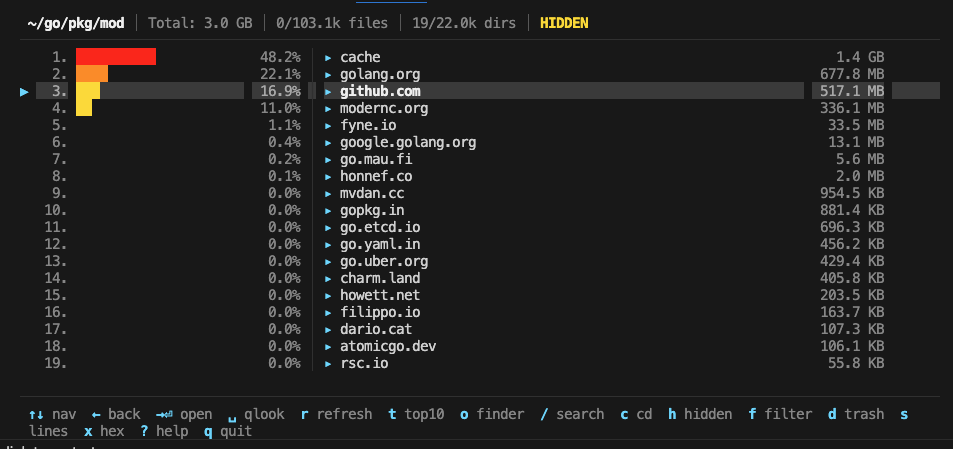
A fast, minimal and interactive terminal disk usage analyzer built with Go and Bubble Tea. Visualize disk usage, explore directories and files, and find what's eating your disk space — all from your terminal, on macOS, Linux, and Windows.
Features
- Instant directory listing — files appear immediately; directory sizes compute in the background
- Proportional size bars — color-coded percentage bars for quick visual scanning
- Efficient directory scanning — uses
os.ReadDir+ manual recursion to minimize syscalls; parallel stat with bounded concurrency - Smart refresh — checks directory modtime before rescanning; skips unchanged directories
- LRU cache — bounded in-memory cache (100 entries) for instant back-navigation within a session
- Line counting — automatic line count for the selected text file; batch count all with
s - Hex view — built-in hex dump for binary files (
xxdon macOS,hexdumpfallback on Linux) - Large file protection — prevents accidentally opening very large blob files
- Fuzzy search — filter entries in real time with subsequence matching
- Symlink detection — symlinks shown with
→/⇢indicators - Move to trash — safely delete files/directories with
d - Cross-platform — works on macOS, Linux, and Windows (Quick Look, file open, trash, and hex view adapt per OS)
- CPU profiling — built-in
--profileflag for performance analysis
How it compares
dirgo is in the same family as ncdu, gdu, and dust. The differences:
- No up-front scan. ncdu and gdu scan the whole tree before you can browse; dirgo lists the current directory immediately and fills in sizes as they're computed. dust prints a one-shot report rather than an interactive view.
- File-level tools, not just sizes. Line counts, hex view, Quick Look / open, and move to trash are one key away, so you can inspect and clean up without leaving the browser.
- Installs everywhere. One static binary via Homebrew, pip/uv,
go install, or the release archives.
Install
Homebrew (macOS / Linux)
brew install mohsinkaleem/tap/dirgo
pip / uv (any platform)
pip install dirgo
uv tool install dirgo
Go install
go install github.com/mohsinkaleem/dirgo@latest
From source
git clone https://github.com/mohsinkaleem/dirgo.git
cd dirgo
make build
Usage
# Analyze current directory
dirgo

# Analyze a specific path
dirgo ~/Documents

# Print version
dirgo --version

# Enable CPU profiling
dirgo --profile /path/to/dir
Keybindings
| Key | Action |
|---|---|
↑ / k |
Move cursor up |
↓ / j |
Move cursor down |
← / Backspace |
Go to parent directory |
→ / l / Enter |
Open selected directory / file |
Space |
Quick Look preview (macOS qlmanage, Linux xdg-open, Windows explorer) |
g |
Jump to top |
G |
Jump to bottom |
PgUp / Ctrl+U |
Page up |
PgDn / Ctrl+D |
Page down |
r |
Smart refresh (skips if unchanged) |
t |
Toggle top 10 view |
o |
Open in Finder / file manager |
/ |
Search / filter |
Esc |
Clear search filter / exit top 10 / close help |
h |
Toggle hidden files |
f |
Cycle filter (all → dirs only → files only) |
s |
Count lines for all files |
c |
cd to path |
x |
Hex view (binary files) |
d |
Move to trash |
? |
Help |
q / Ctrl+C |
Quit |
Architecture
For a full walkthrough of the design — component breakdown, message flow, the scanning pipeline, and a deep dive on the concurrency model — see the architecture guide.
Prefer to learn by doing? The interactive tour lets you drive a working replica of the TUI in your browser, step through the message loop one frame at a time, and run the concurrent scanner with adjustable core counts.
main.go        Entry point, --profile/--version flags, Bubble Tea program setup
model.go       Application state, Update loop, message handling
scanner.go     Directory scanning with os.ReadDir + manual recursion, bounded concurrency
cache.go       Bounded in-memory LRU cache with eviction
entry.go       FileEntry data model, sorting, filtering, fuzzy match
render.go      Row rendering, header/footer, help overlay
keys.go        Key bindings
styles.go      Lipgloss color and style definitions (pre-defined bar color styles)
utils.go       Formatting, line counting (bytes.Count + sync.Pool), helpers
Scanning Pipeline
scanDirectory()callsos.ReadDirto read the directory in a single syscall, immediately stats files, and separates directories from files.- Directory sizes are computed in parallel using
dirSizeRecursive()— a manual recursive function usingos.ReadDirthat avoids the overhead offilepath.WalkDir. Bounded concurrency is enforced via a semaphore (CPU count, max 16). - File stat is parallelised for directories with 20+ files to leverage multi-core CPUs.
Caching
- In-memory: LRU cache holding up to 100 directory scan results. Accessed on navigation; updated on scan completion.
- On-disk: Not implemented as of now. Wanted to keep it simple and deterministic.
Smart Refresh
Pressing r compares the directory's current modtime against the cached value. If unchanged, the rescan is skipped entirely (~microseconds). If changed, a full rescan is triggered.
Development
# Run tests
make test

# Run benchmarks
make bench

# CPU profile a benchmark
make profile-cpu

# Memory profile
make profile-mem

# Build cross-platform release binaries
make release
Requirements
- Go 1.25+ (only needed to build from source or
go install) - macOS / Linux / Windows
Contributing
Contributions are welcome! See CONTRIBUTING.md for the development setup, and please follow the code of conduct. To report a security issue, see SECURITY.md.
- Fork the repository
- Create your feature branch (
git checkout -b feature/amazing-feature) - Commit your changes (
git commit -m 'Add amazing feature') - Push to the branch (
git push origin feature/amazing-feature) - Open a Pull Request
License
1 maintainer

Metadata
1 maintainer
Release files for dirgo 1.2.1
For a detailed explanation of source distributions (sdists) and built distributions (wheels), please see the package formats documentation.
Source distribution (sdist)
| File | Size | Uploaded | |
|---|---|---|---|
| dirgo-1.2.1.tar.gz | 7.3 kB | Details |
Built distribution (wheel)
| File | Interpreter | ABI | Platform | Reset |
|---|---|---|---|---|
| dirgo-1.2.1-py3-none-any.whl | Python 3 | none | any | Details |
Total release size: 15.0 kB
Release files / dirgo-1.2.1.tar.gz
| Download URL | dirgo-1.2.1.tar.gz |
|---|---|
| Size | 7.3 kB |
| Tags | Source |
|
SHA-256 checksum How to use checksums |
a70546dae32ecd79f21c2ea3d9b37f3ab0a5556a923557aef9aa1610135af8b1
|
|
BLAKE2b-256 checksum How to use checksums |
f2547453b1ad086d10864eb6f3b7e8cc33d3798f8c685e9894f9125fc4b3b7a0
|
| Upload date | |
|
Uploaded using Trusted Publishing? What is trusted publishing? |
Yes |
| Uploaded via |
twine/7.0.0 CPython/3.13.14
|
Provenance
Provenance describes where a file came from. On PyPI, provenance is shared via attestations, which provide a verifiable record of the build or publishing details. View details, limitations and caveats.


PyPI Publish Attestation
PyPI verified that this artifact, at this checksum, originated from the publisher listed below.
Signed by GitHub Actions, verified by PyPI on Sep 28, 2026.
Transparency logRelease files / dirgo-1.2.1-py3-none-any.whl
| Download URL | dirgo-1.2.1-py3-none-any.whl |
|---|---|
| Size | 7.6 kB |
| Tags | Python 3 |
|
SHA-256 checksum How to use checksums |
a243aa3833db27131f4acf88fcc3a80683d329b4550f08db3c8fc13424c646b8
|
|
BLAKE2b-256 checksum How to use checksums |
a8fc1d540ce07fbf59e983baa5daf48bce92e319028b2ac377589daefb408444
|
| Upload date | |
|
Uploaded using Trusted Publishing? What is trusted publishing? |
Yes |
| Uploaded via |
twine/7.0.0 CPython/3.13.14
|
Provenance
Provenance describes where a file came from. On PyPI, provenance is shared via attestations, which provide a verifiable record of the build or publishing details. View details, limitations and caveats.
PyPI Publish Attestation
PyPI verified that this artifact, at this checksum, originated from the publisher listed below.
Signed by GitHub Actions, verified by PyPI on Sep 28, 2026.
Transparency log













