
discface
Transforms photos of CDs and DVDs into flat, top-down disc images. It removes perspective distortion, cuts out the disc with a transparent outer rim and centre hole, and rotates it so printed text reads upright. The disc boundary is detected geometrically, while text is read with doritex.
pip install discface
Example
import discface

disc = discface.extract("blank_dvd.jpg")       # photo of a blank DVD+R on a light table
print(disc.image.size, disc.image.mode)
print(f"turned by {disc.rotation:.1f}°, faint print enhanced: {disc.enhanced}")
disc.save("blank_dvd_disc.png")
Output:
(2048, 2048) RGBA
turned by -17.7°, faint print enhanced: True
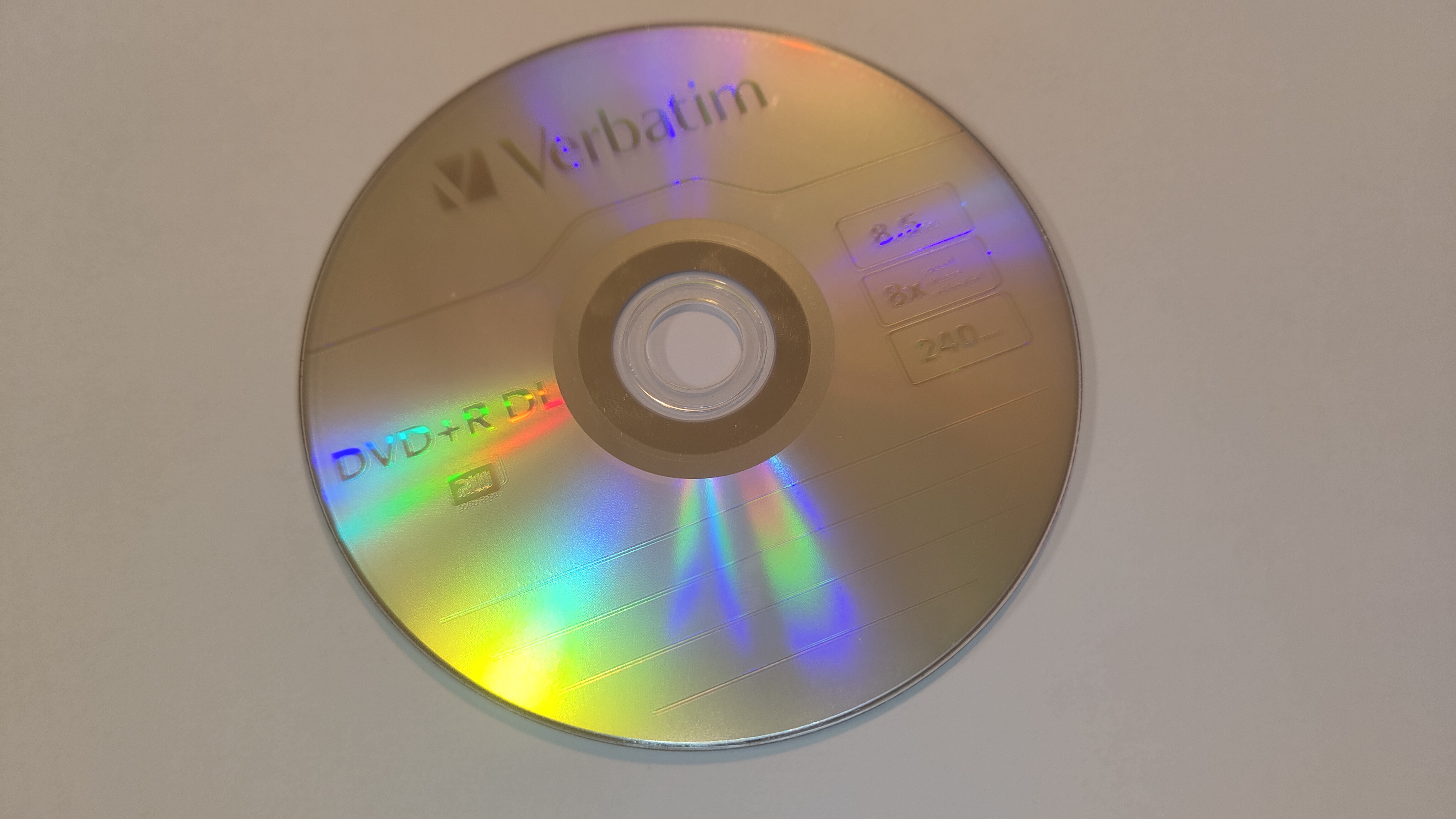 blank_dvd.jpg |
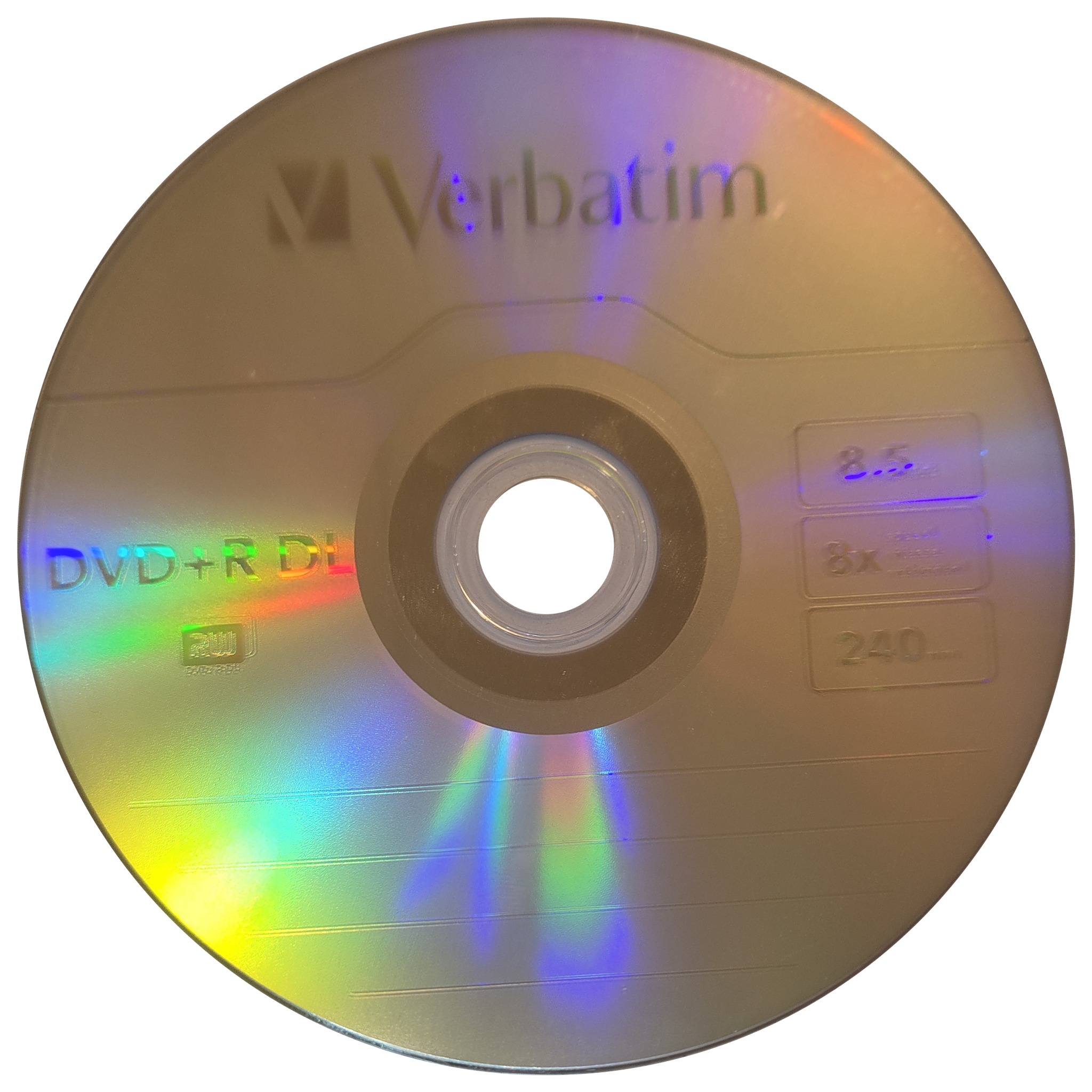 blank_dvd_disc.png |
Perspective distortion is removed, leaving the disc neatly cut out with a transparent outer rim and centre hole. The image was rotated by −17.7° so that "Verbatim" reads horizontally. Because grey print on silver is often faint, it was also detected via edge-enhanced views (enhanced: True).
Taking the photo
discface is designed for discs placed on a plain, uniform background and photographed from roughly above. A sheet of white paper or a light grey tabletop works best, which is how all reference test photos were taken.
- Keep the entire disc in frame with some surrounding margin, ensuring the centre hole is visible.
- Shoot from roughly above. Moderate tilt is corrected automatically, and perspective is rectified precisely.
- Ensure even lighting. Moderate reflections are tolerated, and faint print benefits from enabling
enhance. - Capture a single disc per photo, keeping other circular objects out of frame.
In a benchmark where backgrounds around real discs were replaced while keeping the discs intact, rim detection rates were as follows:
| background | rim found |
|---|---|
| light, uniform (all real photos) | 7/7 |
| dark, uniform | 6/7 |
| mid grey, uniform | 6/7 |
| busy (photos, printed paper, noise) | 5/35 |
On dark backgrounds, centre hole detection is less reliable (4/7). Patterned or cluttered backgrounds are not currently supported.
Command line
discface photos/ -o discs/
photos/IMG_4097.JPG -> discs/IMG_4097.png  turned 39.2°  59 words
photos/IMG_4100.JPG -> discs/IMG_4100.png  turned -1.7°  80 words
blank_dvd.jpg -> discs/blank_dvd.png  turned -17.7°  71 words  (faint print, edge-enhanced)
Inputs can be individual photos, directories, or a mix of both. Each disc is saved as <photo name><suffix>.<format> in the output folder.
| option | meaning |
|---|---|
-o DIR |
output folder (default: current folder) |
--size N |
output image dimension in px (default 2048) |
--margin N |
margin between the rim and the image border in px (default 32) |
--no-autorotate |
rectify perspective only, without rotating text upright |
--enhance auto|always|off |
edge enhancement for faint print, detailed below (default auto) |
--min-support X |
minimum text agreement score required to rotate a disc (default 40) |
--background COLOR |
fill transparent areas with a solid colour, e.g. white or '#202020' |
--format png|jpg|webp |
output format; jpg defaults to a white background unless --background is specified |
--suffix TEXT |
string appended to output filenames |
--device auto|cpu |
device used for text recognition (OpenCL GPU or CPU) |
--draw |
also save <name>_words.png visualizing detected words |
--json |
print one JSON line per photo containing detection metadata |
-q |
quiet mode, suppressing all output except errors |
Photos without a detectable disc are reported and skipped, returning exit code 1. You can also run the tool via python -m discface.
API
discface.extract(image, size=2048, margin=32, autorotate=True, enhance="auto", min_support=40, device="auto", detector=None) -> Disc
Runs the three steps below in sequence. image can be a file path (with automatic EXIF orientation handling), a PIL.Image, or an RGB NumPy array. device selects the text recognition backend: "auto" uses an OpenCL GPU if present and falls back to CPU, while "cpu" forces CPU execution. Raises discface.DiscNotFound if no disc is detected.
The individual steps can also be called directly:
geometry = discface.locate("photo.jpg")                       # DiscGeometry: rim, hole, center in the photo
flat = discface.rectify("photo.jpg", geometry, size=2048)      # flat disc, RGBA, not turned
o = discface.orient(flat, enhance="always")                   # Orientation: rotation, support, turned, enhanced, words
upright = flat.rotate(o.rotation)
Disc.image |
Rectified disc as a PIL.Image (RGBA, size × size) with transparency outside the rim and inside the centre hole |
Disc.rotation |
Counter-clockwise rotation in degrees applied to align text upright (0 if unrotated) |
Disc.orientation_support |
Cumulative score of agreeing text; below min_support, the disc is left unrotated |
Disc.enhanced |
True if faint text was detected using edge-enhanced views |
Disc.words |
Words detected on the disc (doritex.Word: quad, angle360, score, …) in image coordinates |
Disc.rim, .hole, .center |
Disc geometry in the input photo: fitted ellipses ((cx, cy), (width, height), angle) and true centre coordinates |
Disc.save(path, background=None) |
Saves the image to disk. PNG and WebP preserve transparency, while JPEG defaults to a white background |
Disc.to_image(background=None) |
Returns the PIL.Image, optionally composited over a solid background colour |
discface.load_detector(device="auto") |
Returns a cached doritex detector instance; pass via detector= to reuse across calls |
How upright orientation is decided
Every word detected on the disc votes for its reading direction. Large words carry more weight than fine print, and high-confidence detections outweigh uncertain ones. The dominant direction wins, so a few words printed sideways do not skew the result. Small text running circular along the rim is excluded, as it points in every direction. If too little text agrees (min_support), the disc retains its original orientation from the photo.
Faint print, such as grey text on a silver disc or lettering obscured by rainbow reflections, can also be read from two edge-enhanced views. These views emphasize character strokes, boost local contrast, and suppress smooth shading and reflections. The enhance option controls this behavior:
auto(default): applies edge enhancement only when standard detection yields insufficient confidence. Discs that read well are processed without extra overhead.always: processes edge-enhanced views for every disc, adding roughly 1 to 2 seconds per image.off: never applies edge enhancement.
Performance
Benchmark times for a 24-megapixel photo after the initial warmup run (which compiles GPU kernels on first execution):
| step | GPU (device="auto") |
CPU (device="cpu") |
|---|---|---|
| read the photo | 0.2 s | 0.2 s |
locate |
1.1 s | 1.1 s |
rectify |
0.8 s | 0.8 s |
orient |
0.3 s | 1.9 s |
orient, enhance="always" |
3.1 s | 8.6 s |
| total per photo | ≈ 2.4 s | ≈ 4.1 s |
Both devices produce identical results. Only text recognition runs on the GPU; locating and rectifying the disc always run on the CPU.
License
MIT
1 maintainer

Metadata
1 maintainer
Release files for discface 0.1.0
For a detailed explanation of source distributions (sdists) and built distributions (wheels), please see the package formats documentation.
Source distribution (sdist)
| File | Size | Uploaded | |
|---|---|---|---|
| discface-0.1.0.tar.gz | 26.0 kB | Details |
Built distribution (wheel)
| File | Interpreter | ABI | Platform | Reset |
|---|---|---|---|---|
| discface-0.1.0-py3-none-any.whl | Python 3 | none | any | Details |
Total release size: 50.4 kB
Release files / discface-0.1.0.tar.gz
| Download URL | discface-0.1.0.tar.gz |
|---|---|
| Size | 26.0 kB |
| Tags | Source |
|
SHA-256 checksum How to use checksums |
17e7e47009fe4f1c3f191ffd8d5c9433fcb9356891638ed42dded8f1796acbc9
|
|
BLAKE2b-256 checksum How to use checksums |
6f5c2a385d2ff2b0c16d75b5eaae5d4a2147e64d3ea9222508c5d7c7baf9cc38
|
| Upload date | |
|
Uploaded using Trusted Publishing? What is trusted publishing? |
No |
| Uploaded via |
twine/6.2.0 CPython/3.12.3
|
Release files / discface-0.1.0-py3-none-any.whl
| Download URL | discface-0.1.0-py3-none-any.whl |
|---|---|
| Size | 24.4 kB |
| Tags | Python 3 |
|
SHA-256 checksum How to use checksums |
5781e40a0faeddc5893a5384e221b942dac6f1eb8434894b767ed707bcb907ca
|
|
BLAKE2b-256 checksum How to use checksums |
fd0c6d9d6285c90bdf70c6128c2d44690c541bcffe8c17127a24995e36f9f9f8
|
| Upload date | |
|
Uploaded using Trusted Publishing? What is trusted publishing? |
No |
| Uploaded via |
twine/6.2.0 CPython/3.12.3
|













