
A simple package for building, sending and queuing Discord webhook messages

Project description
Simple Discord Webhook Messages
This package enables the creation and sending of simple Discord webhook messages. It can additionally save messages which have failed to send as a file, enabling the creation of a message queue which can be re-sent at a later time.
This was originally created to the requirements of my own personal projects and as such is not an exhaustive implementation of Discords webhook capabilities (see Limitations).
Installation
pip install discord-andshrew
Typical Usage
Create a DiscordMessage object specifying your Discord webhook URL. By default, should any messages fail to send they will be saved as a file in a directory named discord within the current working directory. To disable this behaviour set queue_path to '' or None. Alternatively set to a path of your choice.
For more complex messages create and attach up to 10 DiscordMessageEmbed objects to your message.
Limitations
Text field limits are not validated. You should verify against the Discord Limits specification and implement checks within your application as required.
Usage Examples
Simple Text Message
from discord_andshrew import message as discord

webhook_url = 'https://discord.com/api/webhooks/...'
message = discord.DiscordMessage(webhook_url=webhook_url)
message.content = 'Simple message example!'
message.send_message()

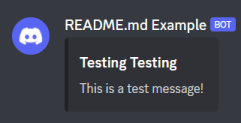
Message with Single Embed
from discord_andshrew import message as discord

webhook_url = 'https://discord.com/api/webhooks/...'
message = discord.DiscordMessage(webhook_url=webhook_url)
embed = discord.DiscordMessageEmbed(
        title="Testing Testing",
        message="This is a test message!"
    )
message.add_embed(embed.get_embed())
message.send_message()
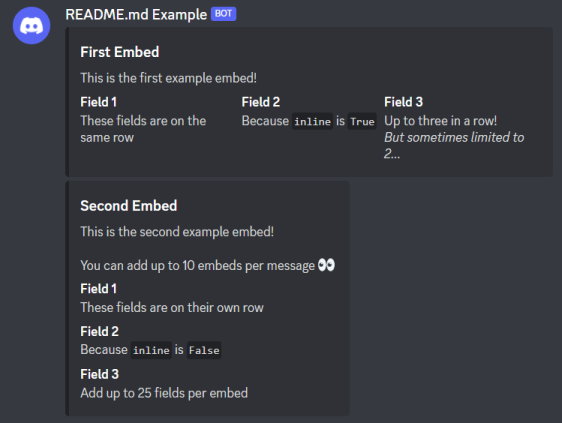
Message with Multiple Embeds and Fields
from discord_andshrew import message as discord

webhook_url = 'https://discord.com/api/webhooks/...'
message = discord.DiscordMessage(webhook_url=webhook_url)

embed = discord.DiscordMessageEmbed(
        title="First Embed",
        message="This is the first example embed!"
    )
embed.add_field(
        title='Field 1',
        message='These fields are on the same row',
        inline=True
    )
embed.add_field(
    title='Field 2',
    message='Because `inline` is `True`',
    inline=True
)
embed.add_field(
    title='Field 3',
    message='Up to three in a row!\n_But sometimes limited to 2..._',
    inline=True
)
message.add_embed(embed.get_embed())

embed = discord.DiscordMessageEmbed(
        title="Second Embed",
        message="This is the second example embed!\n\nYou can add up to 10 embeds per message :eyes:"
    )
embed.add_field(
        title='Field 1',
        message='These fields are on their own row',
    )
embed.add_field(
    title='Field 2',
    message='Because `inline` is `False`',
)
embed.add_field(
    title='Field 3',
    message='Add up to 25 fields per embed',
)
message.add_embed(embed.get_embed())

message.send_message()
Message Queue
By default, should any messages fail to send they will be saved as a file in a directory named discord within the current working directory. To disable this behaviour when creating your DiscordMessage object set queue_path to '' or None. Alternatively set to a path of your choice.
You can manually invoke saving a message as a file by calling save_message() on your DiscordMessage object.
When a message is saved to a file:
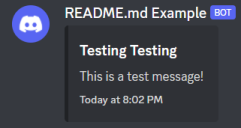
- If the message includes an embed then a timestamp property is appended. This is to give a visual indication within the Discord client of the original sending time for the message.
- The
webhook_urlis appended as a new property on the messages JSON. This enables the queue sending process to re-send the message to the correct URL.
The contents of a saved message will look similar to:
{
    "content": null,
    "embeds": [
        {
            "title": "Testing Testing",
            "description": "This is a test message!",
            "timestamp": "2023-02-13T20:02:19.835651"
        }
    ],
    "webhook_url": "https://discord.com/api/webhooks/..."
}
⚠️ Note
As a result of adding thewebhook_urlproperty the saved JSON is not suitable for sending directly to Discords servers, because it is no longer complaint with their specification. Before attempting to re-send this JSON thewebhook_urlproperty must be removed.
Message files are deleted once they have been successfully sent by the queue sending process.
Examples for Sending Queued Messages
Default Parameters
from discord_andshrew import queue

queue.DiscordQueue().send_queue()
Custom Queue Path
from discord_andshrew import queue

queue.DiscordQueue(queue_path='my_custom_queue_path').send_queue()
Release history Release notifications | RSS feed

Download files
Download the file for your platform. If you're not sure which to choose, learn more about installing packages.
Source Distribution
Built Distribution
Filter files by name, interpreter, ABI, and platform.
If you're not sure about the file name format, learn more about wheel file names.
Copy a direct link to the current filters
File details
Details for the file discord_andshrew-0.1.0.tar.gz.
File metadata
- Download URL: discord_andshrew-0.1.0.tar.gz
- Upload date:
- Size: 8.8 kB
- Tags: Source
- Uploaded using Trusted Publishing? No
- Uploaded via: twine/5.0.0 CPython/3.12.3
File hashes
| Algorithm | Hash digest | |
|---|---|---|
| SHA256 |
5bbe697ac261c221db58c02e45f9e61168f50a40f70a23697ef05a6320cee446
|
|
| MD5 |
a4fddf97a7349490743608b0ba5aa0d3
|
|
| BLAKE2b-256 |
8578bf8df81bb55e11e4bb1a8d1680c21271fc056181923c10ba84109f300110
|
File details
Details for the file discord_andshrew-0.1.0-py3-none-any.whl.
File metadata
- Download URL: discord_andshrew-0.1.0-py3-none-any.whl
- Upload date:
- Size: 12.9 kB
- Tags: Python 3
- Uploaded using Trusted Publishing? No
- Uploaded via: twine/5.0.0 CPython/3.12.3
File hashes
| Algorithm | Hash digest | |
|---|---|---|
| SHA256 |
75f46d46d58d990c1c67f40cd90a1073ad2db32d2a8cc35f31ce3429b7f84944
|
|
| MD5 |
f69309a981212217351bd5b5e27d42ed
|
|
| BLAKE2b-256 |
e45719a2a3874f309023143c5d080f800aa935cdba55f247333828faf5cfd27d
|






