
discord-pager




A lightweight modern embed + Components V2 paginator for discord.py 2.6.0+ (2.7.1+ for cv2)
Yes!! You heard that right, Pager also supports the new Components V2 system (discord.ui.layout)!
Table of Contents
- Requirements
- Install
- Basic Usage
- Custom Views
- Per-Page Views
- Components V2
- API Reference
- Common Issues
- Contributing
- License
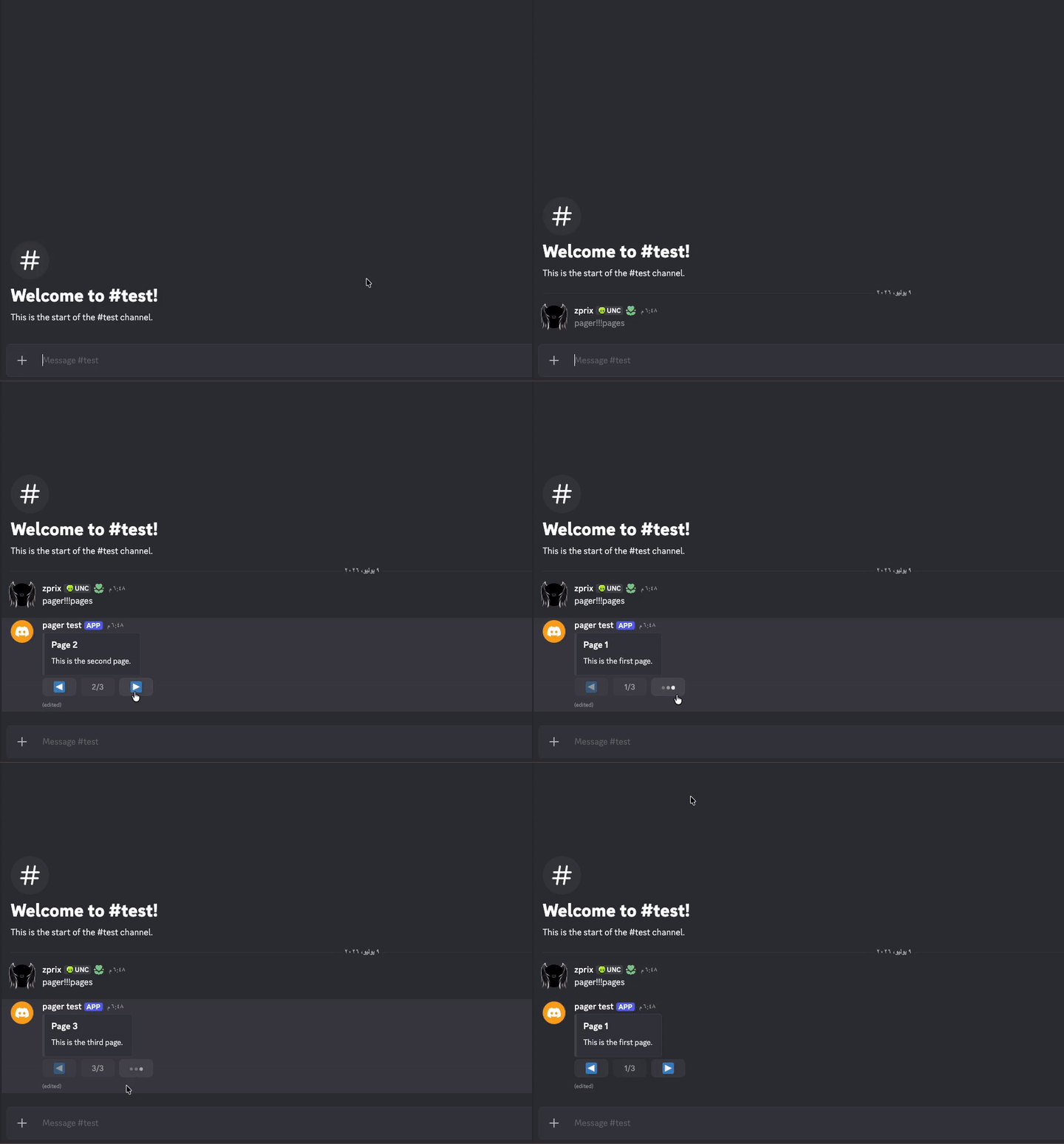
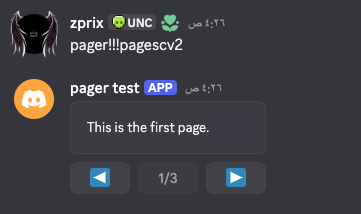
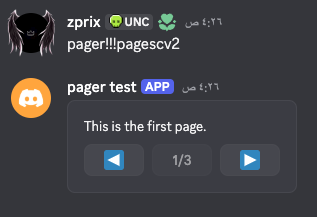
Why discord-pager?
- We do it all for you! All the burden of manual page navigation is removed when using Pager
- CV2 Ready! Supports Discord's new Components V2 system unlike older paginators before this
- Flexible! You can add custom buttons, per-page views, and extra components
Requirements
- Python 3.8+
- discord.py 2.6.0+ (2.7.1+ for Components V2 features)
Install
pip install discord-pager
or just copy the discord_pager/ folder into your bot's project if u want.
Basic usage
import discord
from discord.ext import commands
from discord_pager import Pager

bot = commands.Bot(command_prefix="pager!!!", intents=discord.Intents.default())


@bot.command()
async def pages(ctx: commands.Context):
    embeds = [
        discord.Embed(title="Page 1", description="This is the first page."),
        discord.Embed(title="Page 2", description="This is the second page."),
        discord.Embed(title="Page 3", description="This is the third page."),
    ]

    paginator = Pager()
    await paginator.start(ctx, embeds)
Merging in a custom view
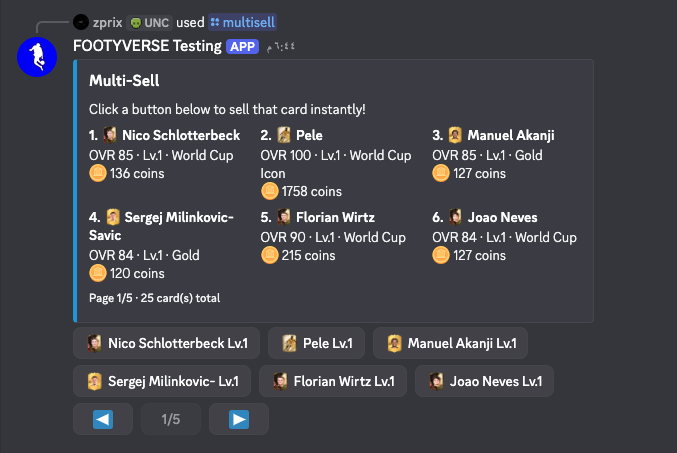
Custom views can use rows 0-3 (4 rows max). Pager's own controls take whatever row comes right after the highest one you used, so they always end up on the last row instead of colliding with your layout.
import discord
from discord.ext import commands
from discord_pager import Pager, PagerViewError

bot = commands.Bot(command_prefix="pager!!!", intents=discord.Intents.default())


@bot.command()
async def shop(ctx: commands.Context):
    embeds = [
        discord.Embed(title="Sword", description="A sharp blade. 100 gold."),
        discord.Embed(title="Shield", description="Sturdy protection. 80 gold."),
    ]

    custom_view = discord.ui.View(timeout=None)

    buy_button = discord.ui.Button(
        label="Buy", style=discord.ButtonStyle.green, row=0
    )

    async def buy_callback(interaction: discord.Interaction):
        await interaction.response.send_message("Purchased!", ephemeral=True)

    buy_button.callback = buy_callback
    custom_view.add_item(buy_button)

    wishlist_button = discord.ui.Button(
        label="Add to wishlist", style=discord.ButtonStyle.blurple, row=1
    )
    custom_view.add_item(wishlist_button)

    paginator = Pager()

    try:
        await paginator.start(ctx, embeds, view=custom_view)
    except PagerViewError as e:
        await ctx.send(f"Couldn't build the paginator: {e}")
Per-page custom views
If you want the custom controls to change alongside the embed (eg. a
different "Buy" button and price per page), pass a list[discord.ui.View]
the same length as pages (IMPORTANT!!!) instead of a single view. Pager
swaps in the matching view's items every time the page changes:
import discord
from discord.ext import commands
from discord_pager import Pager

bot = commands.Bot(command_prefix="pager!!!", intents=discord.Intents.default())


@bot.command()
async def shop(ctx: commands.Context):
    items = [
        {"name": "Sword", "price": 100},
        {"name": "Shield", "price": 80},
        {"name": "Potion", "price": 15},
    ]

    embeds = [
        discord.Embed(title=item["name"], description=f"{item['price']} gold")
        for item in items
    ]

    views = []
    for item in items:
        v = discord.ui.View(timeout=None)
        buy_button = discord.ui.Button(
            label=f"Buy for {item['price']} gold",
            style=discord.ButtonStyle.green,
            row=0,
        )

        async def buy_callback(interaction: discord.Interaction, item=item):
            await interaction.response.send_message(
                f"Bought {item['name']}!", ephemeral=True
            )

        buy_button.callback = buy_callback
        v.add_item(buy_button)
        views.append(v)

    paginator = Pager()
    await paginator.start(ctx, embeds, view=views)
Each view in the list is validated the same way as a single static view
(rows 0-3 only), and start() raises PagerViewError if the list's length
doesn't match the number of pages. The controls row is based on the highest
row used across all the views in the list, so it stays put as you page
through instead of jumping around.
Components V2
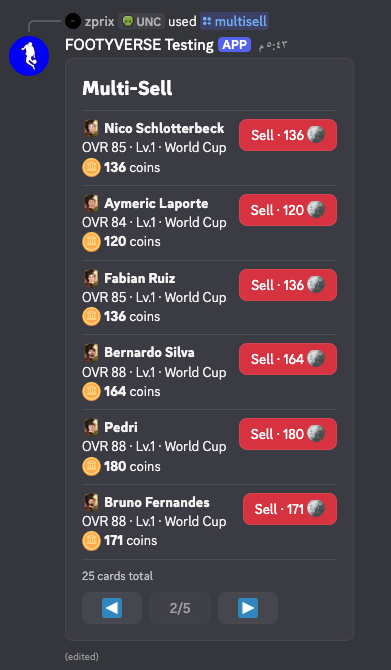
Discord's newer Components V2 system replaces embed and even content entirely
with layout components (Container, TextDisplay, Section, etc), so it
needs its own paginator: PagerCV2. It works the exact same way as Pager,
just with discord.ui.Container (or any other layout item really) standing in
for embeds, because a CV2 message can't send embeds at all.
You can also (if you are paging containers) pass controls_in_container=True into PagerCV2(...)
in order to put the pagination controls inside the container
import discord
from discord.ext import commands
from discord_pager import PagerCV2

bot = commands.Bot(command_prefix="pager!!!", intents=discord.Intents.default())


class ContainerPage(discord.ui.Container):
    def __init__(self, name: str, price: int):
        super().__init__()
        self.add_item(discord.ui.TextDisplay(f"{name}"))


@bot.command()
async def pagescv2(ctx: commands.Context):
    pages = [
        ContainerPage("This is the first page."),
        ContainerPage("This is the second page."),
        ContainerPage("This is the third page."),
    ]

    paginator = PagerCV2()  # if u prefer the controls in the container, use controls_in_container=True
    await paginator.start(ctx, pages)
Merging in extra components
Just like Pager's view argument, pass extra to keep additional
top-level components (eg. a Container with its own buttons) on screen
alongside the paged item:
from discord_pager import PagerCV2, PagerLayoutError

extra_container = discord.ui.Container()
extra_row = discord.ui.ActionRow()


@extra_row.button(label="Add to wishlist", style=discord.ButtonStyle.blurple)
async def wishlist(interaction: discord.Interaction, button: discord.ui.Button):
    await interaction.response.send_message("Added!", ephemeral=True)


extra_container.add_item(extra_row)

paginator = PagerCV2()

try:
    await paginator.start(ctx, pages, extra=extra_container)
except PagerLayoutError as e:
    await ctx.send(f"Couldn't build the paginator: {e}")
extra can also be a list[list[discord.ui.Item]] the same length as
pages, one list per page, the same way default Pager's view accepts a
list[discord.ui.View] for per-page controls. Raises PagerLayoutError
if that list's length doesn't match the number of pages. Unlike the
classic Pager, there's no row 0-3 restriction to worry about here, since
CV2 top-level components aren't laid out on the same 5-row grid buttons
use.
API
Pager(...)
| Parameter | Type | Default | Description |
|---|---|---|---|
timeout |
int |
60 |
Seconds before the view times out. |
previous_button |
discord.ui.Button |
◀ grey button | Overrides the default previous button. |
next_button |
discord.ui.Button |
▶ grey button | Overrides the default next button. |
page_counter_style |
discord.ButtonStyle |
discord.ButtonStyle.grey |
Style of the disabled page-counter button. |
show_page_counter |
bool |
True |
If False, the page-counter button is removed entirely. |
initial_page |
int |
0 |
Page index to start on. |
ephemeral |
bool |
False |
Whether the paginator message is ephemeral. |
restrict_to_author |
bool |
False |
If True, only the original user can page through. |
await Pager.start(source, pages, view=None)
source:discord.Interactionorcommands.ext.commands.Context.pages:list[discord.Embed].view: optionaldiscord.ui.View, or alist[discord.ui.View]the same length aspagesfor per-page controls. Every item must setrowto 0-3; Pager's controls take the row right after the highest one used. RaisesPagerViewErrorif a row is invalid, or if a list of views doesn't match the number of pages.
PagerCV2(...)
Same parameters as Pager almost
| Parameter | Type | Default | Description |
|---|---|---|---|
timeout |
int |
60 |
Seconds before the view times out. |
previous_button |
discord.ui.Button |
◀ grey button | Overrides the default previous button. |
next_button |
discord.ui.Button |
▶ grey button | Overrides the default next button. |
page_counter_style |
discord.ButtonStyle |
discord.ButtonStyle.grey |
Style of the disabled page-counter button. |
show_page_counter |
bool |
True |
If False, the page-counter button is removed entirely. |
initial_page |
int |
0 |
Page index to start on. |
ephemeral |
bool |
False |
Whether the paginator message is ephemeral. |
allowed_mentions |
discord.AllowedMentions |
None |
Controls mentions allowed in the pager message. |
restrict_to_author |
bool |
False |
If True, only the original user can page through. |
controls_in_container |
bool |
False |
If True, controls will be inside the passed containers (if any). |
await PagerCV2.start(source, pages, extra=None)
source:discord.Interactionorcommands.ext.commands.Context.pages:listof layout items, eg.list[discord.ui.Container].extra: optional extra components, either a single item / list of items shown on every page, or alist[list[discord.ui.Item]]the same length aspagesfor per-page extras. RaisesPagerLayoutErrorif a list of per-page extras doesn't match the number of pages.
Common Issues
PagerViewError: Invalid row
Custom views can only use rows 0-3 (meaning max 4 rows). Pager automatically uses the next available row for its controls.
PagerViewError: View list length doesn't match pages
When passing per-page views, the list must have the same length as your pages.
PagerLayoutError: Extra list length doesn't match pages
Same as above, but for CV2 per-page extras.
My CV2 message isn't showing
Make sure you're using PagerCV2 (not Pager!!!!!) and passing layout items like discord.ui.Container, not embeds! You cannot
have embeds in CV2 messages
Contributing
Contributions are welcome! Feel free to open issues and PRs as you like.
Guidelines:
- Make sure your code is formatted by
yapf
That's all!
License
This project is licensed under the MIT License. See the LICENSE file for details.
1 maintainer

Release files for discord-pager 0.1.2
For a detailed explanation of source distributions (sdists) and built distributions (wheels), please see the package formats documentation.
Source distribution (sdist)
| File | Size | Uploaded | |
|---|---|---|---|
| discord_pager-0.1.2.tar.gz | 14.4 kB | Details |
Built distribution (wheel)
| File | Interpreter | ABI | Platform | Reset |
|---|---|---|---|---|
| discord_pager-0.1.2-py3-none-any.whl | Python 3 | none | any | Details |
Total release size: 27.8 kB
Release files / discord_pager-0.1.2.tar.gz
| Download URL | discord_pager-0.1.2.tar.gz |
|---|---|
| Size | 14.4 kB |
| Tags | Source |
|
SHA-256 checksum How to use checksums |
0efc781d2f1d965e9df40e36ffcb6f156f0611715b5d1534fd2882bd7a2087b1
|
|
BLAKE2b-256 checksum How to use checksums |
a00707b1422d827e22833286e469ddfe0c50625a87085adc26ca320fdadb31d9
|
| Upload date | |
|
Uploaded using Trusted Publishing? What is trusted publishing? |
No |
| Uploaded via |
uv/0.11.30 {"installer":{"name":"uv","version":"0.11.30","subcommand":["publish"]},"python":null,"implementation":{"name":null,"version":null},"distro":null,"system":{"name":null,"release":null},"cpu":null,"openssl_version":null,"setuptools_version":null,"rustc_version":null,"ci":null}
|
Release files / discord_pager-0.1.2-py3-none-any.whl
| Download URL | discord_pager-0.1.2-py3-none-any.whl |
|---|---|
| Size | 13.4 kB |
| Tags | Python 3 |
|
SHA-256 checksum How to use checksums |
b9f2b94d30e37318c3e1df90e117351eff3659cc83288a9d71bc9e6ea5e0607c
|
|
BLAKE2b-256 checksum How to use checksums |
4d6161ca07bf8da10297e9694d81044eabc53e2096115912fb88a3504f68b22e
|
| Upload date | |
|
Uploaded using Trusted Publishing? What is trusted publishing? |
No |
| Uploaded via |
uv/0.11.30 {"installer":{"name":"uv","version":"0.11.30","subcommand":["publish"]},"python":null,"implementation":{"name":null,"version":null},"distro":null,"system":{"name":null,"release":null},"cpu":null,"openssl_version":null,"setuptools_version":null,"rustc_version":null,"ci":null}
|














