
A simple library that gives you access to discord activities

Project description
How to install
pip install discord-py-activity
set up
ac = activities.activity("Your bot token")
import discord
bot = discord.Client()
ac = activities.activity(TOKEN)

@bot.event
async def on_ready():
    print(f"The bot {bot.user.name} is up")

if __name__ == "__main__":
    bot.run(TOKEN)
Features
- get invite link to activity
- icon_url
- name
- created_at (Invite code)
- expires_at (Invite code)
Activity included
- Watch_Together
- Poker_Night
- Betrayal_io
- Fishington_io
- Chess_In_The_Park
- Sketchy_Artist
- Awkword
- Delete_Me_Calla
- Doodle_Crew
- Sketch_Heads
- Letter_League
- Word_Snacks
- SpellCast
- Checkers_In_The_Park
- Blazing_8s
- Putt_Party
- Land_io
- Bobble_League
- Ask_Away
- Know_What_I_Meme
Set activity channel
import discord
bot = discord.Client()
ac = activities.activity(TOKEN)

@bot.event
async def on_ready():
    print(f"The bot {bot.user.name} is up")

@bot.event
async def on_message(msg):
	args = msg.content.split()
	if args[0] == f"ac":
		ac_var = ac.new_link(msg.channel, activities.get_id_of().Watch_Together)

if __name__ == "__main__":
    bot.run(TOKEN)
Get name/link/icon url/created_at/expires_at example/channel
import discord
bot = discord.Client()
ac = activities.activity(TOKEN)

@bot.event
async def on_ready():
    print(f"The bot {bot.user.name} is up")

@bot.event
async def on_message(msg):
	args = msg.content.split()
	if args[0] == f"ac":
		ac_var = ac.new_link(msg.channel, activities.get_id_of().Watch_Together)
		ac_var.name
		ac_var.channel
		ac_var.created_at
		ac_var.expires_at
		ac_var.icon_url
		ac_var.link

if __name__ == "__main__":
    bot.run(TOKEN)
Embed
import discord
bot = discord.Client()
ac = activities.activity(TOKEN)

@bot.event
async def on_ready():
    print(f"The bot {bot.user.name} is up")

@bot.event
async def on_message(msg):
	args = msg.content.split()
	if args[0] == f"ac":
		ac_var = ac.new_link(msg.channel, activities.get_id_of().Watch_Together)
		await msg.channl.send(ac_var.make_embed())

if __name__ == "__main__":
    bot.run(TOKEN)
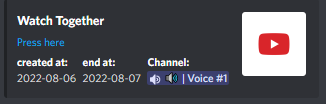
The embed code
You can just change the values you want
embed_var = discord.Embed(title=self.name, description=f"[Press here]({self.link})")
embed_var.add_field(name="created at:", value=self.created_at[:10])
embed_var.add_field(name="end at:", value=self.expires_at[:10])
embed_var.add_field(name="Channel:", value=self.channel.mention)
embed_var.set_thumbnail(url=self.icon_url)
return embed_var
Get all Activity as dictionary
activities.get_id_of.to_dict()
Will return a dictionary that work like this: Name = id activities.get_id_of.to_dict()["Watch_Together"] will return the Watch_Together id


Download files
Download the file for your platform. If you're not sure which to choose, learn more about installing packages.
Source Distribution
File details
Details for the file discord-py-activity-1.3.tar.gz.
File metadata
- Download URL: discord-py-activity-1.3.tar.gz
- Upload date:
- Size: 4.5 kB
- Tags: Source
- Uploaded using Trusted Publishing? No
- Uploaded via: twine/4.0.1 CPython/3.10.4
File hashes
| Algorithm | Hash digest | |
|---|---|---|
| SHA256 |
28fb1cc43636e0ed2593cf6d2e7e5271462cf2107946ba79f09a97bd13f4f858
|
|
| MD5 |
c4620111a3e835780668ff567f5eca83
|
|
| BLAKE2b-256 |
606be7c872bfb080ed03aad80f953b2baa021bae986daa85127bc56682a667bd
|






