

dispatchbox
Event-driven automation for Claude Code and Codex on your own machines.
Route webhooks, cron jobs, and chat messages to local coding agents—and pause for human approval only when an action crosses your risk boundary.



English · 简体中文 · Documentation · Rules Guide · CLI & API Reference
dispatchbox is a lightweight hub-and-worker daemon (~2,700 lines of dependency-free Python) that turns Claude Code (claude) and OpenAI Codex CLI (codex) from interactive terminal tools into event-driven background workers running on your own hardware.
Incoming signals—GitHub webhooks, 5-field cron schedules, Slack or Feishu mentions, or any POST /events payload—are normalized, deduplicated, and matched against a hot-reloading JSON rules file. Workers on your macOS or Linux machines long-poll the hub over outbound HTTP, execute claude or codex in allowed local directories using your existing CLI login, and report structured results, token usage, and session IDs.
When an agent reaches an operation you classified as sensitive (such as delete_data or spend_money), it pauses and sends an interactive decision prompt to Slack, Feishu, or the built-in web dashboard. Clicking an option emits a decision.made event; a follow-up rule matching it resumes the same agent session (claude --resume / codex exec resume), optionally with wider tool permissions to finish the job.
git clone https://github.com/XixianWasTaken/dispatchbox.git && cd dispatchbox
python3 -m dispatchbox check --rules examples/hello.json
Table of contents
- Why dispatchbox?
- Quick start (2 minutes)
- Installation
- Core capabilities
- Real-world use cases
- How it works
- Comparison with alternatives
- Limitations & trade-offs
- Security model
- Documentation
- Development & contributing
- License
Why dispatchbox?
Most developers already have claude or codex signed in on their workstation with access to local repositories, toolchains, and credentials. Automating those agents on background events usually forces an unpleasant trade-off:
- Cloud runners lack your local environment. Running agents in GitHub Actions or vendor-hosted sandboxes means re-provisioning toolchains and copying secrets into an environment that is not the one you develop in.
- Unattended agents are either too risky or too noisy. Giving a background agent unrestricted
Bashpermissions on your machine is dangerous, while requiring approval on every tool call defeats the purpose of background automation. - Ad-hoc cron scripts and chat wrappers lose context. Simple shell wrappers around
claude -pdo not deduplicate webhook bursts, serialize concurrent runs on the same branch, detect silent permission failures when a CLI exits0, or preserve session state across human approvals.
dispatchbox solves all three with a minimal, inspectable architecture:
- Bring your own machine and CLI subscription: No model API keys to configure in
dispatchbox. Workers invoke the stockclaudeandcodexbinaries already installed on your macOS or Linux machines. - Two-stage privilege escalation via session resume: Start runs with narrow, read-only flags (e.g.,
--allowed-tools Read,Glob,Grep). When the agent asks for approval and you confirm, the follow-up rule resumes the same session ID with targeted write permissions (e.g.,Bash(rm:*)). - Outbound-only workers: Workers pull tasks via
GET /claimlong polling. Your workstation or Mac mini behind home NAT never needs an open inbound port.
Quick start
Prerequisites:
- Python 3.10+ (uses the Python standard library only; no
pip installrequired). - Claude Code (
claude) or Codex CLI (codex) installed and signed in (examples/hello.jsonusesclaude).
1. Create a scratch workspace and shared token
From the repository root, create a ./demo directory with two sample files and generate a DISPATCHBOX_TOKEN:
mkdir -p demo && echo "stale" > demo/old.log && echo "# notes" > demo/notes.md
export DISPATCHBOX_TOKEN="$(python3 -c 'import secrets; print(secrets.token_urlsafe(32))')"
2. Start the hub
The bundled examples/hello.json defines require_decision_for: ["delete_data"] and three rules:
ask: read-only (--allowed-tools Read,Glob,Grep)tidy: read-only initially; must ask before deleting any fileafter-decision: triggered ondispatchbox/decision.made; resumes the session withRead,Glob,Grep,Bash(rm:*)
python3 -m dispatchbox hub --rules examples/hello.json
3. Start a local worker
In a second terminal (with the same DISPATCHBOX_TOKEN exported), start a worker restricted to ./demo:
export DISPATCHBOX_TOKEN="<paste-same-token>"
python3 -m dispatchbox worker --name local --allow-dir ./demo
4. Dispatch two events
In a third terminal (with the same DISPATCHBOX_TOKEN exported), send a read-only question and a file-deletion request:
export DISPATCHBOX_TOKEN="<paste-same-token>"
python3 -m dispatchbox send manual ask --summary "What files are here?"
python3 -m dispatchbox send manual tidy --summary "Delete old.log"
Both events are routed immediately:
{"event_id": 1, "status": "routed", "runs": [1], "coalesced_into": []}
{"event_id": 2, "status": "routed", "runs": [2], "coalesced_into": []}
5. Approve the decision and watch the session resume
In the hub terminal log, run #1 finishes on its own, while run #2 pauses at the delete_data boundary:
NOTIFY [dispatchbox] run #1 ask: succeeded | The directory holds two small files, notes.md and old.log, and nothing else. | Open: /runs/1
NOTIFY [dispatchbox] run #2 tidy: awaiting_decision | Question: Delete old.log from the working directory? | Options: Delete old.log / Keep old.log | Context: Found old.log (6 bytes, modified Nov 3 04:55) in the demo directory next to notes.md; no deletion has been performed. | Open: /runs/2
Open http://127.0.0.1:8787 in your browser, click run #2, and click Delete old.log. Your choice emits a decision.made event, queuing run #3 (after-decision), which resumes run #2's Claude session with Bash(rm:*) enabled:
NOTIFY [dispatchbox] run #3 after-decision: succeeded | Deleted old.log from the demo directory after owner approval and verified only notes.md remains. | Open: /runs/3
Installation
dispatchbox is on PyPI and has no dependencies:
pip install dispatchbox          # or: uv tool install dispatchbox
dispatchbox --version
The installed dispatchbox command is the same as python3 -m dispatchbox in the quick start. The quick start runs from a clone because it uses the bundled examples/hello.json. To decrypt Feishu events signed with an Encrypt Key, install the optional extra: pip install "dispatchbox[feishu-encryption]".
Core capabilities
1. Multi-source event normalization, deduplication, and coalescing
GitHub webhooks (pull_request, issues, issue_comment, pull_request_review_comment, push, workflow_run), built-in 5-field cron schedules, Slack mentions/DMs, Feishu messages, and POST /events calls all normalize into a single event schema (source, type, subject, summary, link, payload, dedupe_key).
- Deduplication: Repeated events within
dedupe_window(default10m, or24hfor chat events) are dropped automatically. - Coalescing: When rapid-fire events (e.g., three commits pushed to the same PR or follow-up comments) match a rule while a run for the same
groupis stillqueued, they merge into that queued run so the agent handles the full batch in one pass.
2. Policy-gated human-in-the-loop with session continuation
Instead of approving individual bash commands, you declare high-level risk categories in require_decision_for (e.g., ["delete_data", "spend_money", "send_external_message"]).
- When an agent hits one of those boundaries, it outputs a structured
DISPATCHBOX_DECISION:line and exits cleanly. - The hub transitions the run to
awaiting_decisionand renders interactive option buttons in Slack, Feishu, or the web UI. - Recording a decision emits a
dispatchbox/decision.madeevent carrying the run'srun_idandsession_id. If a rule matches that event (likeafter-decisionin the examples), its run invokesclaude --resume <session_id>orcodex exec resume <session_id>, keeping the agent's context while applying that rule's tool flags. Without such a rule, nothing happens after the decision. - Standing memory: Configure
"memory": ["DECISIONS.md", "WONT_DO.md"]so agents read prior owner rulings before asking repetitive questions.
3. Pull-based workers with directory and concurrency guards
- NAT-friendly: Workers poll
GET /claimover outbound HTTP/HTTPS. Run the hub on a small VPS or behind a Cloudflare Tunnel while workers run on your local workstation, build server, or laptop. - Directory allowlisting: Workers enforce
--allow-dir(repeatable) and refuse any rule whosecwdresolves outside allowed paths (exit code126). - Process and secret hygiene: Prompts are piped via
stdin(never exposed inpsprocess arguments),DISPATCHBOX_TOKENis stripped from the child environment, and timed-out process groups are terminated cleanly (SIGTERMthenSIGKILL). - Group serialization & concurrency: Runs sharing a
groupkey (default{rule}:{subject}) never execute concurrently, preventing git index locks or race conditions on the same repo/PR, whileconcurrencycaps parallel runs per rule across all workers.
4. Honest status reporting, usage accounting, and automatic retries
- Agent verdict over exit code: When a coding agent is blocked by
--allowed-toolsor sandbox flags, the CLI process often still exits0.dispatchboxrequires agents to emitDISPATCHBOX_STATUS: succeeded | failedand marks a runfailedif either the exit code is non-zero or the agent reportsfailed. - Cost & token tracking: Parses
claude -p --output-format json(capturingtotal_cost_usd, fresh + cached input tokens, and output tokens) andcodex exec --json(capturinginput_tokensandoutput_tokens). - Heartbeat reaping & retries: Workers send heartbeats every 20 seconds. If a worker goes silent for >120 seconds, the hub marks the run
lostand (ifretries > 0) re-queues it with a prompt warning that a prior attempt may have partially completed the task.
5. Thread-aware Slack and Feishu chat-ops
- Mention the bot or DM it in Slack or Feishu (飞书) to trigger a run.
- Enforce strict user access via hot-reloaded
allowed_users(who can trigger runs) andapprovers(who can click decision buttons). - Replies, decision cards, and post-decision follow-up answers stay in the originating chat thread, with internal
DISPATCHBOX_*protocol markers stripped automatically.
Real-world use cases
rules.example.json contains example rules to adapt. Replace its placeholder worker names (m4, m5), paths and sources with your own:
- Automated read-only PR reviews (
codex): Trigger ongithubpr.opened/pr.synchronize, runcodexwith-s read-onlyin your local checkout, and post actionable bug reports viagh pr review. - Self-healing CI failures (
claude): Trigger ongithubci.failure, route to a specific build machine ("worker": "m4"), allowBash(git:*),Bash(gh:*),Bash(npm test:*), and let Claude inspect logs and push a fix to the failing branch. - Two-stage destructive maintenance (a pattern to write yourself): Give a
cronrule read-onlyargsand listdelete_datainrequire_decision_for, so the agent finds stale resources and asks first; approve from Slack or Feishu, and anafter-decisionrule resumes the session with delete permissions.rules.example.jsondoes not include this; itsnightly-cleanuprule runs weekly without an approval step.examples/hello.jsonshows the same two-stage pattern on a small scale (tidy, thenafter-decision). - Test rules before running: Validate your configuration and dry-run event matching from the CLI:
python3 -m dispatchbox check --rules rules.example.json --source github --type ci.failure --subject me/app:main
# ok: 7 rules, 1 schedules, dedupe window 600s
# matches: ci-failed
How it works
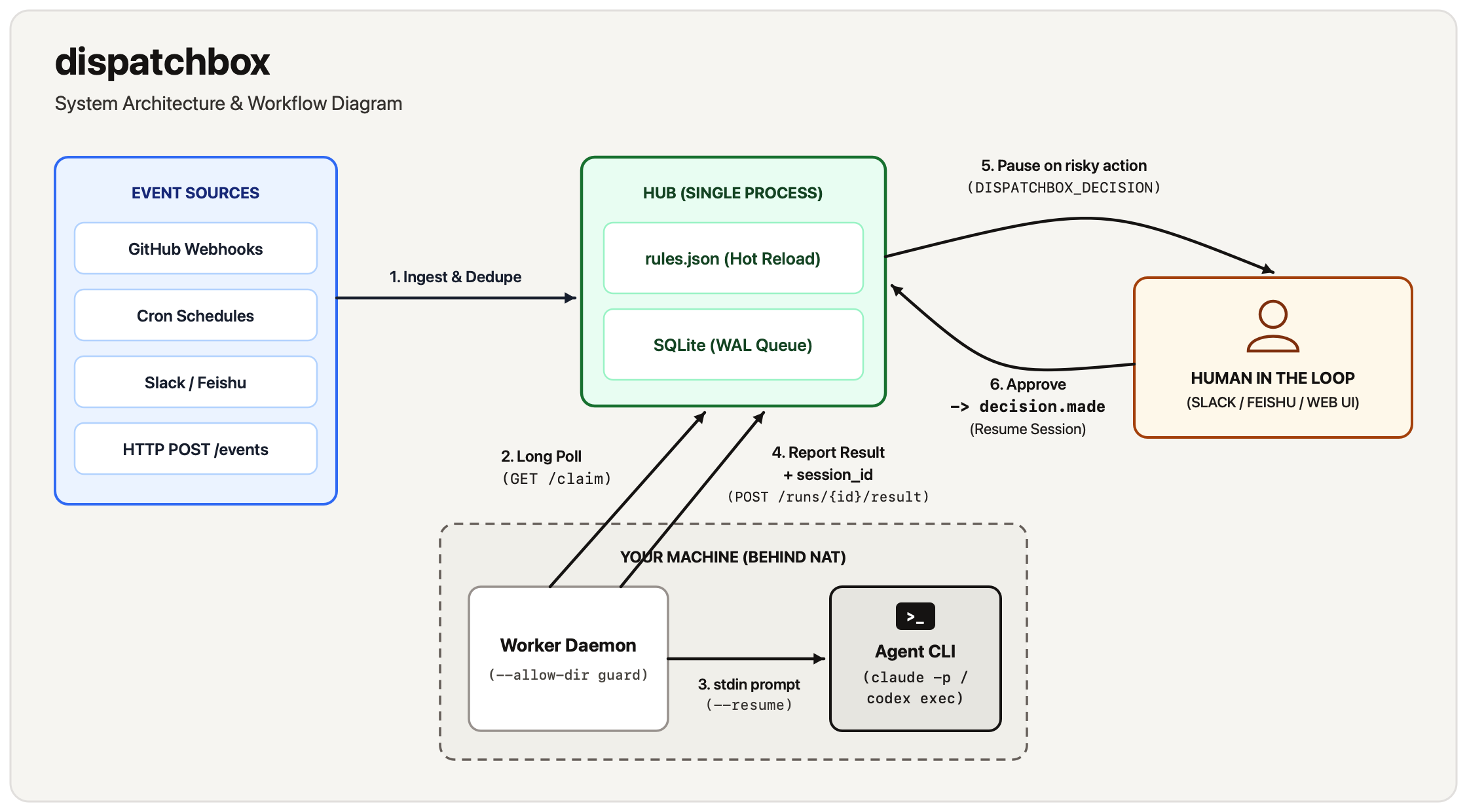
- Ingest & Match: The hub receives an event, checks
dedupe_keyagainst the SQLiteeventstable, evaluatesrules.jsonin order, and either coalesces the event into an existingqueuedrun or inserts a newqueuedrun. - Claim & Render: A worker matching the rule's
workerglob pattern andrunnercapability claims the run viaGET /claim. The hub renders the prompt template ({subject},{summary},{payload.*}), appends trigger metadata, standingmemoryfile instructions, and theDISPATCHBOX_*reporting contract. - Execute & Parse: The worker verifies
cwdis inside--allow-dir, spawnsclaude,codex, or/bin/sh, streams heartbeats every 20s, and parses the CLI's JSON output for the final response,session_id, token counts, and cost. - Decide & Resume: If the output contains
DISPATCHBOX_DECISION: {...}, the run entersawaiting_decision. When an authorized user selects an option (via Web UI, Slack, Feishu, orPOST /runs/{id}/decision), the hub records the choice and emits adispatchbox/decision.madeevent. A rule matching that event queues a follow-up run with the original run as its parent, and the worker resumes the parent'ssession_id.
See Architecture for the sequence diagram, SQLite schema, and module breakdown.
Comparison with alternatives
| Approach | Where it excels | What dispatchbox does differently |
|---|---|---|
| Claude Code GitHub Actions | Running Claude on GitHub-hosted runners for GitHub repo events | Runs on your own machines with local toolchains and signed-in CLIs; supports Codex, cron, Slack, Feishu, and custom HTTP events; supports mid-task decision pause & session resume |
| Chat-only agent bots (Slack/Discord wrappers) | Interactive Q&A with a local agent from a chat channel | Handles non-chat sources (webhooks, cron, HTTP); provides deduplication, event coalescing, group serialization, and per-rule concurrency; supports both Slack and Feishu |
| Agent orchestration SDKs (LangGraph, custom Python/TS) | Building bespoke agents with fine-grained programmatic tool hooks | Zero code to write; orchestrates unmodified claude and codex CLIs via a declarative JSON rules file |
| General workflow engines (n8n, Zapier, cron scripts) | Connecting SaaS APIs or running stateless shell scripts | Purpose-built for coding agents: outbound long-polling workers, stdin prompt piping, session ID resumption, agent verdict parsing (DISPATCHBOX_STATUS), and token/cost tracking |
| Cloud background agents (Devin, hosted coding sandboxes) | Fully managed cloud execution without local hardware | Self-hosted and zero-dependency: code, credentials, and execution stay on your hardware |
When to use dispatchbox: You already use Claude Code or Codex locally, want them to react automatically to webhooks, schedules, or chat messages on your own machines, and want human approval strictly at high-risk boundaries.
When not to use dispatchbox: You need multi-node high availability, multi-tenant isolation across untrusted users, a built-in VM/container sandbox, or a drag-and-drop visual workflow builder.
Limitations & trade-offs
- Single-process hub: State lives in one local SQLite database (
WALmode). There is no multi-node clustering or automatic failover. - Public HTTPS required for Slack and Feishu: Both chat platforms deliver events and button callbacks via HTTP webhooks (
POST /hooks/slack,POST /hooks/feishu), requiring a reverse proxy or tunnel (e.g.,cloudflared). Slack Socket Mode and Feishu WebSocket long connections are not supported yet. - Prompt-level reporting contract:
DISPATCHBOX_DECISION,DISPATCHBOX_STATUS, andDISPATCHBOX_SUMMARYrely on the agent following prompt instructions. If an agent exits0without printing a status line, the hub treats the run assucceeded. - CLI JSON format coupling:
dispatchboxparsesclaude -p --output-format jsonandcodex exec --json. Breaking upstream changes to those CLI flags or JSON schemas require updatingdispatchbox/worker.py. - No built-in OS sandbox:
dispatchboxenforces--allow-dirfor the working directory, but sandboxing the agent's actions relies on the flags you pass inargs(such as Claude's--allowed-toolsor Codex's-s read-only) and the OS user account running the worker.
Security model
A worker executes coding agents on your machine under your OS user account. Keep these essentials in mind:
- Protect
DISPATCHBOX_TOKEN: The bearer token authorizes queueing events and claiming tasks. Treat it like an SSH key. - Apply least privilege per rule: Always restrict initial rules using
--allowed-tools(Claude) or-s read-only/-s workspace-write(Codex) inargs. Grant broader permissions only in follow-up rules triggered after human approval (decision.made). - Treat event payloads as untrusted input: Public GitHub issues, PR descriptions, and chat messages are injected into prompts. Never give rules triggered by untrusted external events unrestricted shell or write access.
- Lock down public hubs: Always pass
--public-url https://...when exposing the hub behind a reverse proxy or tunnel so the web dashboard enforces token authentication on every request.
Read SECURITY.md before exposing the hub to a network.
Documentation
| Guide | What it covers |
|---|---|
| Documentation Index | Overview of all guides, example configs, and project roadmap |
| Rules, Events & Decisions | Complete rules.json schema, event normalization, GitHub webhook mapping, templating, cron syntax, decisions, and retries |
| Slack & Feishu Integration | Step-by-step app setup, permissions, signature/encryption verification, allowlists, and interactive cards |
| Deployment Guide | Single-machine vs. remote-hub topologies, launchd (macOS) and systemd (Linux) service templates, GitHub webhooks, and SQLite backups |
| CLI & API Reference | All dispatchbox subcommands (hub, worker, send, check), environment variables, HTTP API endpoints, and run states |
| Architecture | Internal design decisions, request lifecycle, SQLite data model, and module breakdown |
| Troubleshooting | Common exit codes (124, 126, 127), webhook signature errors, TLS certificate fixes, and stuck runs |
Development & contributing
Run the full test suite (unit tests, end-to-end hub/worker tests with a scripted fake claude binary, and Slack/Feishu tests against a local mock API server) using Python's built-in test runner:
python3 -m unittest discover -s tests -t . -v
Validate rule files at any time:
python3 -m dispatchbox check --rules examples/hello.json
python3 -m dispatchbox check --rules rules.example.json
Contributions are welcome! Please read CONTRIBUTING.md for our design principles (stdlib-only core, thin over clever, safe by default) and instructions for adding new adapters.
License
Released under the MIT License.
1 maintainer

Metadata
1 maintainer
Release files for dispatchbox 0.1.0
For a detailed explanation of source distributions (sdists) and built distributions (wheels), please see the package formats documentation.
Source distribution (sdist)
| File | Size | Uploaded | Provenance | Actions |
|---|---|---|---|---|
| dispatchbox-0.1.0.tar.gz | 70.8 kB | Without provenance | Details for dispatchbox-0.1.0.tar.gz |
Built distribution (wheel)
| File | Interpreter | ABI | Platform | Actions Reset |
|---|---|---|---|---|
| dispatchbox-0.1.0-py3-none-any.whl | Python 3 | none | any | Details for dispatchbox-0.1.0-py3-none-any.whl |
Total release size: 121.7 kB
Release files / dispatchbox-0.1.0.tar.gz
| Download URL | dispatchbox-0.1.0.tar.gz |
|---|---|
| Size | 70.8 kB |
| Tags | Source |
|
SHA-256 checksum How to use checksums |
cf4a5265d8501f6df4ed9bedccb7adbc3fd3d2869f6dfeb34994c9ebcbae86c4
|
|
BLAKE2b-256 checksum How to use checksums |
69d36c8be020dd607182beae35b18ad03e3b385c06d18e8bc668a236a40c9549
|
| Upload date | |
|
Uploaded using Trusted Publishing? What is trusted publishing? |
No |
| Uploaded via |
uv/0.12.17 {"installer":{"name":"uv","version":"0.12.17","subcommand":["publish"]},"python":null,"implementation":{"name":null,"version":null},"distro":{"name":"macOS","version":null,"id":null,"libc":null},"system":{"name":null,"release":null},"cpu":null,"openssl_version":null,"setuptools_version":null,"rustc_version":null,"ci":null}
|
Release files / dispatchbox-0.1.0-py3-none-any.whl
| Download URL | dispatchbox-0.1.0-py3-none-any.whl |
|---|---|
| Size | 50.9 kB |
| Tags | Python 3 |
|
SHA-256 checksum How to use checksums |
22738e87d7927b3b8e9462a37d70eebc702502c3a8f8627ede07c41f5564b6d6
|
|
BLAKE2b-256 checksum How to use checksums |
4011c368a64eabf8da947f829195eaf4d2e1ad1234d398e4d5d8880bc781a8e8
|
| Upload date | |
|
Uploaded using Trusted Publishing? What is trusted publishing? |
No |
| Uploaded via |
uv/0.12.17 {"installer":{"name":"uv","version":"0.12.17","subcommand":["publish"]},"python":null,"implementation":{"name":null,"version":null},"distro":{"name":"macOS","version":null,"id":null,"libc":null},"system":{"name":null,"release":null},"cpu":null,"openssl_version":null,"setuptools_version":null,"rustc_version":null,"ci":null}
|
Security for dispatchbox 0.1.0
Provenance
Provenance describes where a file came from. On PyPI, provenance is shared via attestations, which provide a verifiable record of the build or publishing details. View details, limitations and caveats.
No provenance found
None of the files in this release were uploaded with provenance metadata.
A note on package security
PyPI is a repository for distributing packages, not a service for auditing them. While third-party security researchers and our staff do their best to detect and remove malicious packages, PyPI cannot guarantee the quality, security or suitability of any given package.
To learn more about protecting yourself from malicious actors, visit our package security documentation.














