
This release is a pre-release and may not be stable for production use.
Dissecting Cobalt Strike using Python



dissect.cobaltstrike is a Python library for dissecting and parsing Cobalt Strike related data such as beacon payloads and Malleable C2 Profiles.
Installation
The library is available on PyPI. Use pip to install it:
$ pip install dissect.cobaltstrike
Or install using the full extra to automatically install dependencies for C2 and PCAP support:
$ pip install 'dissect.cobaltstrike[full]'
If you want to install the latest pre-release version, use the --pre flag:
$ pip install --pre dissect.cobaltstrike
dissect.cobaltstrike requires Python 3.10 or later.
Documentation
The project documentation can be found here: https://dissect-cobaltstrike.readthedocs.io
Basic Usage
Parse a Cobalt Strike beacon and extract some config settings
>>> from dissect.cobaltstrike.beacon import BeaconConfig

>>> bconfig = BeaconConfig.from_path("beacon.bin")

>>> hex(bconfig.watermark)
'0x5109bf6d'
>>> bconfig.protocol
'https'
>>> bconfig.version
<BeaconVersion 'Cobalt Strike 4.2 (Nov 06, 2020)', tuple=(4, 2), date=2020-11-06>

>>> bconfig.settings
mappingproxy({'SETTING_PROTOCOL': 8,
              'SETTING_PORT': 443,
              'SETTING_SLEEPTIME': 5000,
              'SETTING_MAXGET': 1048576,
              'SETTING_JITTER': 0, ...

>>> bconfig.settings["SETTING_C2_REQUEST"]
[('_HEADER', b'Connection: close'),
 ('_HEADER', b'Accept-Language: en-US'),
 ('BUILD', 'metadata'),
 ('MASK', True),
 ('BASE64', True),
 ('PREPEND', b'wordpress_ed1f617bbd6c004cc09e046f3c1b7148='),
 ('HEADER', b'Cookie')]
Parse a Malleable C2 Profile and read some configuration settings
>>> from dissect.cobaltstrike.c2profile import C2Profile
>>> profile = C2Profile.from_path("amazon.profile")
>>> profile.as_dict()
{'sleeptime': ['5000'],
 'jitter': ['0'],
 'maxdns': ['255'],
 'useragent': ['Mozilla/5.0 (Windows NT 6.1; WOW64; Trident/7.0; rv:11.0) like Gecko'],
 'http-get.uri': ['/s/ref=nb_sb_noss_1/167-3294888-0262949/field-keywords=books'],
 'http-get.client.header': [('Accept', '*/*'), ('Host', 'www.amazon.com')],
 ...
}

>>> profile.properties["useragent"]
['Mozilla/5.0 (Windows NT 6.1; WOW64; Trident/7.0; rv:11.0) like Gecko']

>>> profile.properties["http-get.uri"]
['/s/ref=nb_sb_noss_1/167-3294888-0262949/field-keywords=books']
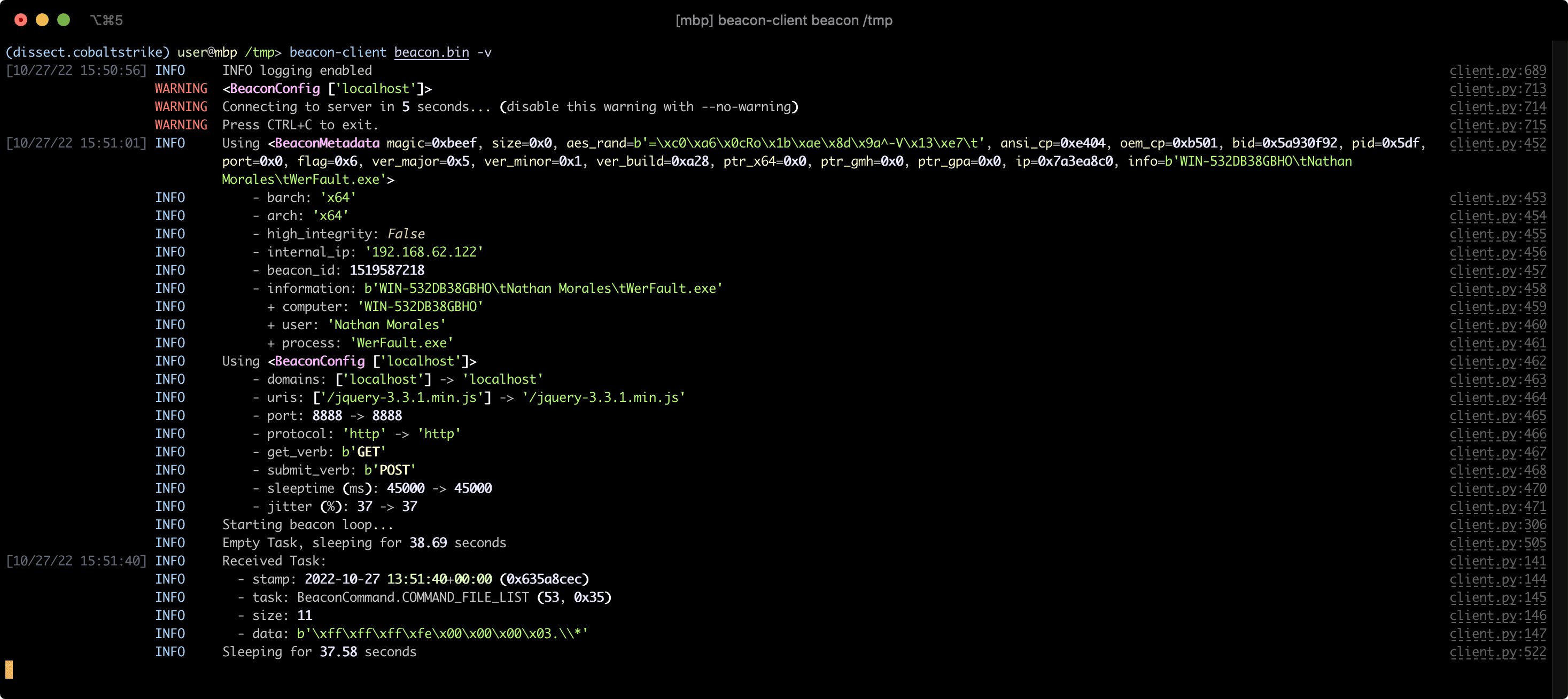
Connect to Team Server as a Beacon Client
See also A Minimal Beacon Client tutorial in the documentation.
Parse and decrypt a PCAP containing Cobalt Strike traffic
See also the Decrypt Cobalt Strike PCAPs tutorial in the documentation.
$ beacon-pcap --extract-beacons 2021-06-15-Hancitor-with-Ficker-Stealer-and-Cobalt-Strike.pcap
[+] Found <BeaconConfig ['<redacted>']> at b'/ZsDK', extracted beacon payload to 'beacon-ZsDK.bin'
[+] Found <BeaconConfig ['<redacted>']> at b'/8mJm', extracted beacon payload to 'beacon-8mJm.bin'

$ beacon-pcap -p key.pem 2021-06-15-Hancitor-with-Ficker-Stealer-and-Cobalt-Strike.pcap --beacon beacon-8mJm.bin
<Beacon/BeaconMetadata packet_ts=2021-06-15 15:08:55.172675 src_ip=net.ipaddress('10.0.0.134') src_port=52886 dst_ip=net.ipaddress('<redacted>') dst_port=443 raw_http=b'GET /activity HTTP/1.1\r\nAccept: */*\r\nCookie: kR/OTFMhCYQpv09cXl2R7qEespVUfQ/8YahAbs1b+rEESbSzcAc44R9Klf4zH4GGYxT4dErzNQWimmMW5wQVQSEGFZ36mWc/beoUTQUGVUxcZWXl0t8WBO12qC6vsmRSV5uQO+qxz0Lbz1P/wOkWwbNM0XF9LhVjRrGYSR0Jlrc=\r\nUser-Agent: Mozilla/4.0 (compatible; MSIE 7.0; Windows NT 5.1; .NET CLR 2.0.50727)\r\nHost: <redacted>:443\r\nConnection: Keep-Alive\r\nCache-Control: no-cache\r\n\r\n' magic=48879 size=92 aes_rand=b'\xf9dA\xc8\x8b\x07\xe1:\xfa\np\xbc{`m\xe0' ansi_cp=58372 oem_cp=46337 bid=693615746 pid=6396 port=0 flag=4 ver_major=10 ver_minor=0 ver_build=19042 ptr_x64=0 ptr_gmh=1972243040 ptr_gpa=1972237648 ip=net.ipaddress('<redacted>') info=b'DESKTOP-X9JH6AW\ttabitha.gomez\tsvchost.exe'>
<Beacon/TaskPacket packet_ts=2021-06-15 15:09:56.371968 src_ip=net.ipaddress('<redacted>') src_port=443 dst_ip=net.ipaddress('10.0.0.134') dst_port=52894 raw_http=b'HTTP/1.1 200 OK\r\nDate: Tue, 15 Jun 2021 15:09:55 GMT\r\nContent-Type: application/octet-stream\r\nContent-Length: 48\r\n\r\nP\xc1\xf1\xa0{3 \xa8\x01}\xfe\xbcl\x8e\xa2\x81\xd7A2\xa3;\xe0\x91\xf5\x90\xdd]\xc5\x88`\xa2\x88\x93\x14-\xb4\xbb\x96\xf1\x1c\xd7\r\xa60\xfe\xc5\x9e\xd6' epoch=2021-06-15 15:09:55 total_size=16 command='COMMAND_SLEEP' size=8 data=b'\x00\x00\x00d\x00\x00\x00Z'>
License
dissect.cobaltstrike is developed and distributed under the MIT license.
1 maintainer

Metadata
1 maintainer
Release files for dissect.cobaltstrike 1.2.2.dev4
For a detailed explanation of source distributions (sdists) and built distributions (wheels), please see the package formats documentation.
Source distribution (sdist)
| File | Size | Uploaded | |
|---|---|---|---|
| dissect_cobaltstrike-1.2.2.dev4.tar.gz | 386.8 kB | Details |
Built distribution (wheel)
| File | Interpreter | ABI | Platform | Reset |
|---|---|---|---|---|
| dissect_cobaltstrike-1.2.2.dev4-py3-none-any.whl | Python 3 | none | any | Details |
Total release size: 789.9 kB
Release files / dissect_cobaltstrike-1.2.2.dev4.tar.gz
| Download URL | dissect_cobaltstrike-1.2.2.dev4.tar.gz |
|---|---|
| Size | 386.8 kB |
| Tags | Source |
|
SHA-256 checksum How to use checksums |
a6d51fd1a61e0b63a6d8d29d75479f5e0d7276c8e420383155880af9d9744416
|
|
BLAKE2b-256 checksum How to use checksums |
e987d7cf3391be3a9784e68287d4fbacd9b97528c42fa366d7ae8b0ba979cd24
|
| Upload date | |
|
Uploaded using Trusted Publishing? What is trusted publishing? |
Yes |
| Uploaded via |
twine/7.0.0 CPython/3.13.14
|
Provenance
Provenance describes where a file came from. On PyPI, provenance is shared via attestations, which provide a verifiable record of the build or publishing details. View details, limitations and caveats.


PyPI Publish Attestation
PyPI verified that this artifact, at this checksum, originated from the publisher listed below.
Signed by GitHub Actions, verified by PyPI on Oct 1, 2026.
Transparency logRelease files / dissect_cobaltstrike-1.2.2.dev4-py3-none-any.whl
| Download URL | dissect_cobaltstrike-1.2.2.dev4-py3-none-any.whl |
|---|---|
| Size | 403.1 kB |
| Tags | Python 3 |
|
SHA-256 checksum How to use checksums |
5516a67047c4b56e6831ab2188af98acb1453562020677baaa2c25415fe1dbaa
|
|
BLAKE2b-256 checksum How to use checksums |
4f3bb997b394eccb6689e1ce65ee20915fd8db42bc7264a93034db90c3bdc365
|
| Upload date | |
|
Uploaded using Trusted Publishing? What is trusted publishing? |
Yes |
| Uploaded via |
twine/7.0.0 CPython/3.13.14
|
Provenance
Provenance describes where a file came from. On PyPI, provenance is shared via attestations, which provide a verifiable record of the build or publishing details. View details, limitations and caveats.
PyPI Publish Attestation
PyPI verified that this artifact, at this checksum, originated from the publisher listed below.
Signed by GitHub Actions, verified by PyPI on Oct 1, 2026.
Transparency log













