
AI Feedback (AIF) framework

Project description
⚗️ distilabel
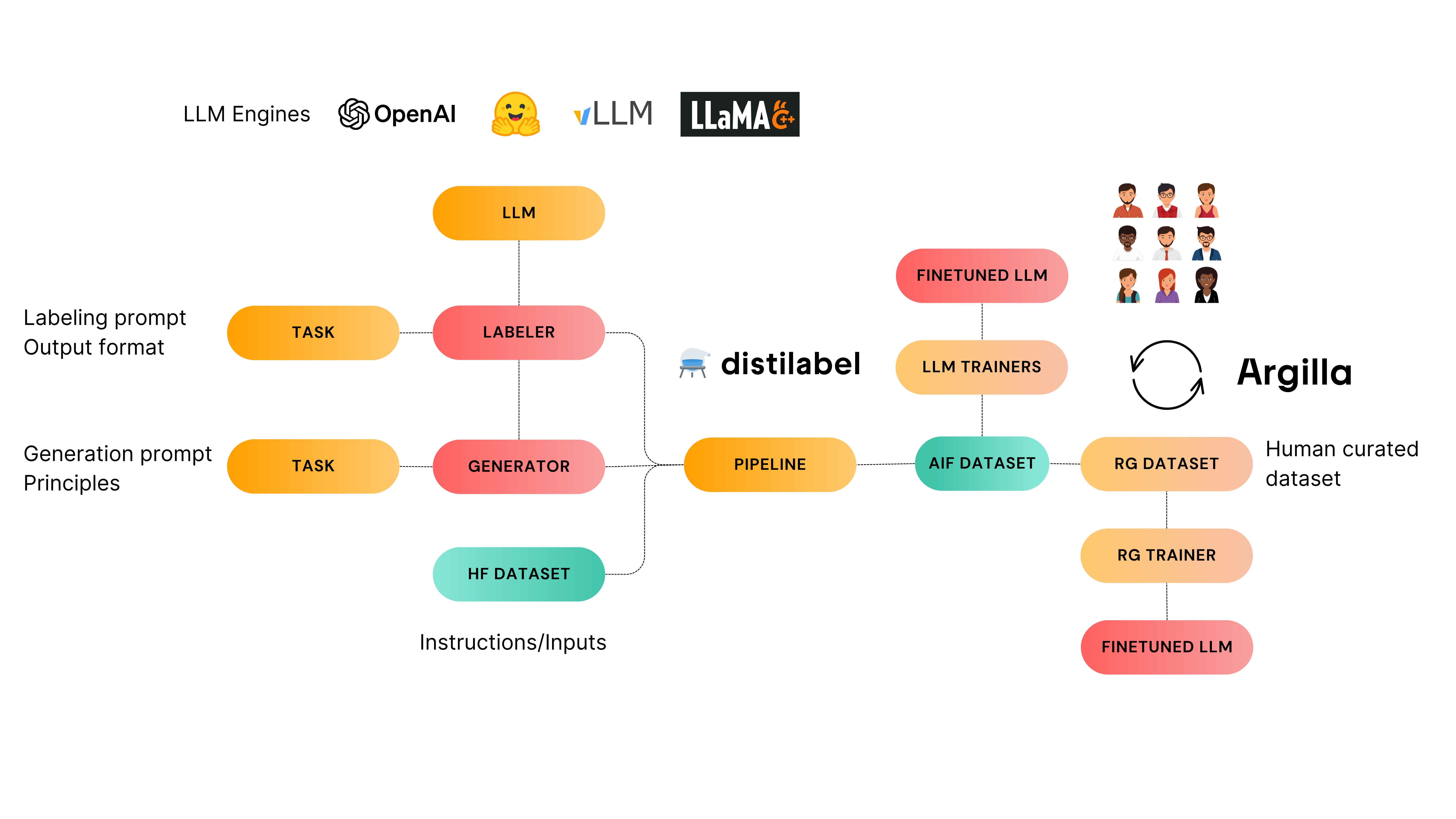
AI Feedback (AIF) framework for building datasets with and for LLMs.
[!TIP] To discuss, get support, or give feedback join Argilla's Slack Community and you will be able to engage with our amazing community and also with the core developers of
argillaanddistilabel.
Features
- Integrations with the most popular libraries and APIs for LLMs: HF Transformers, OpenAI, vLLM, etc.
- Multiple tasks for Self-Instruct, Preference datasets and more.
- Dataset export to Argilla for easy data exploration and further annotation.
[!WARNING]
distilabelis currently under active development and we're iterating quickly, so take into account that we may introduce breaking changes in the releases during the upcoming weeks, and also theREADMEmight be outdated the best place to get started is the documentation.
Installation
pip install distilabel --upgrade
Requires Python 3.8+
In addition, the following extras are available:
hf-transformers: for using models available in transformers package via theTransformersLLMintegration.hf-inference-endpoints: for using the HuggingFace Inference Endpoints via theInferenceEndpointsLLMintegration.openai: for using OpenAI API models via theOpenAILLMintegration.vllm: for using vllm serving engine via thevLLMintegration.llama-cpp: for using llama-cpp-python as Python bindings forllama.cpp.ollama: for using Ollama and their available models via their Python client.together: for using Together Inference via their Python client.anyscale: for using Anyscale endpoints.ollama: for using Ollama.mistralai: for using Mistral AI via their Python client.vertexai: for using both Google Vertex AI offerings: their proprietary models and endpoints via their Python clientgoogle-cloud-aiplatform.argilla: for exporting the generated datasets to Argilla.
Example
To run the following example you must install distilabel with both openai and argilla extras:
pip install "distilabel[openai,argilla]" --upgrade
Then run the following example:
from datasets import load_dataset
from distilabel.llm import OpenAILLM
from distilabel.pipeline import pipeline
from distilabel.tasks import TextGenerationTask

dataset = (
    load_dataset("HuggingFaceH4/instruction-dataset", split="test[:10]")
    .remove_columns(["completion", "meta"])
    .rename_column("prompt", "input")
)

# Create a `Task` for generating text given an instruction.
task = TextGenerationTask()

# Create a `LLM` for generating text using the `Task` created in
# the first step. As the `LLM` will generate text, it will be a `generator`.
generator = OpenAILLM(task=task, max_new_tokens=512)

# Create a pre-defined `Pipeline` using the `pipeline` function and the
# `generator` created in step 2. The `pipeline` function will create a
# `labeller` LLM using `OpenAILLM` with the `UltraFeedback` task for
# instruction following assessment.
pipeline = pipeline("preference", "instruction-following", generator=generator)

dataset = pipeline.generate(dataset)
Additionally, you can push the generated dataset to Argilla for further exploration and annotation:
import argilla as rg

rg.init(api_url="<YOUR_ARGILLA_API_URL>", api_key="<YOUR_ARGILLA_API_KEY>")

# Convert the dataset to Argilla format
rg_dataset = dataset.to_argilla()

# Push the dataset to Argilla
rg_dataset.push_to_argilla(name="preference-dataset", workspace="admin")
More examples
Find more examples of different use cases of distilabel under examples/.
Or check out the following Google Colab Notebook:

Badges
If you build something cool with distilabel consider adding one of these badges to your dataset or model card.
[<img src="https://raw.githubusercontent.com/argilla-io/distilabel/main/docs/assets/distilabel-badge-light.png" alt="Built with Distilabel" width="200" height="32"/>](https://github.com/argilla-io/distilabel)

[<img src="https://raw.githubusercontent.com/argilla-io/distilabel/main/docs/assets/distilabel-badge-dark.png" alt="Built with Distilabel" width="200" height="32"/>](https://github.com/argilla-io/distilabel)

Contribute
To directly contribute with distilabel, check our good first issues or open a new one.
References
Release history Release notifications | RSS feed


Download files
Download the file for your platform. If you're not sure which to choose, learn more about installing packages.
Source Distribution
Built Distribution
Filter files by name, interpreter, ABI, and platform.
If you're not sure about the file name format, learn more about wheel file names.
Copy a direct link to the current filters
File details
Details for the file distilabel-0.6.0.tar.gz.
File metadata
- Download URL: distilabel-0.6.0.tar.gz
- Upload date:
- Size: 2.7 MB
- Tags: Source
- Uploaded using Trusted Publishing? No
- Uploaded via: twine/4.0.2 CPython/3.11.8
File hashes
| Algorithm | Hash digest | |
|---|---|---|
| SHA256 |
cae75113b5bb34227e11f00aa6c9d18b5286a6fe02b6dcae7d486210560f2e58
|
|
| MD5 |
ab219c8ebae0d144edd65c899746bc36
|
|
| BLAKE2b-256 |
a41a75dc49b1f55483e07f8d77404584c95ff281f3fa54097e9b7158c295e78e
|
File details
Details for the file distilabel-0.6.0-py3-none-any.whl.
File metadata
- Download URL: distilabel-0.6.0-py3-none-any.whl
- Upload date:
- Size: 132.4 kB
- Tags: Python 3
- Uploaded using Trusted Publishing? No
- Uploaded via: twine/4.0.2 CPython/3.11.8
File hashes
| Algorithm | Hash digest | |
|---|---|---|
| SHA256 |
dfedd5af372ad52dcca4945811e77dffa6365aebdade8ebd5f0b9e967d1c5154
|
|
| MD5 |
059cc60e1f540222159ea49e15331b29
|
|
| BLAKE2b-256 |
b123d751cce6f3639cb9507fec6c2ec902bbeb89328494147cb4a225560e5058
|






