





About The Project
Diffusion Visualization and Explorer (DiVE) is a command-line tool for visualizing diffusion MRI and medical imaging data. It supports tractography (TRK, TCK, TRX, TinyTrack), NIfTI masks, and VTK meshes, which can be displayed individually or overlaid with anatomical slices and a 3D glass brain. DiVE provides streamline coloring by orientation, labels, or along-tract statistics, supports linear and non-linear spatial transformations (ANTs/DSI Studio), and enables interactive visualization as well as high quality image and video export for presentations and publications.
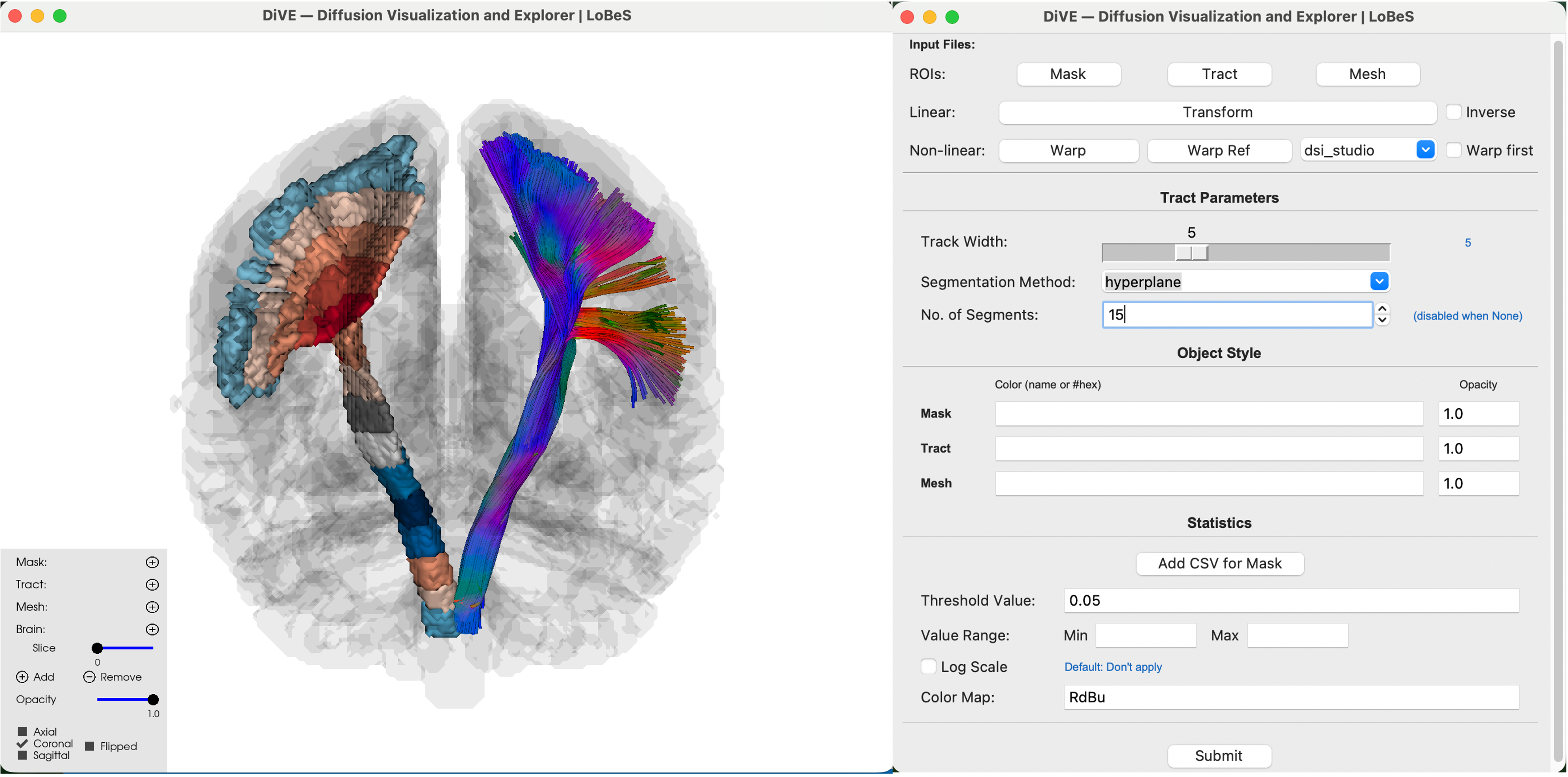
Demo
A 360° rotation exported with DiVE's movie mode:
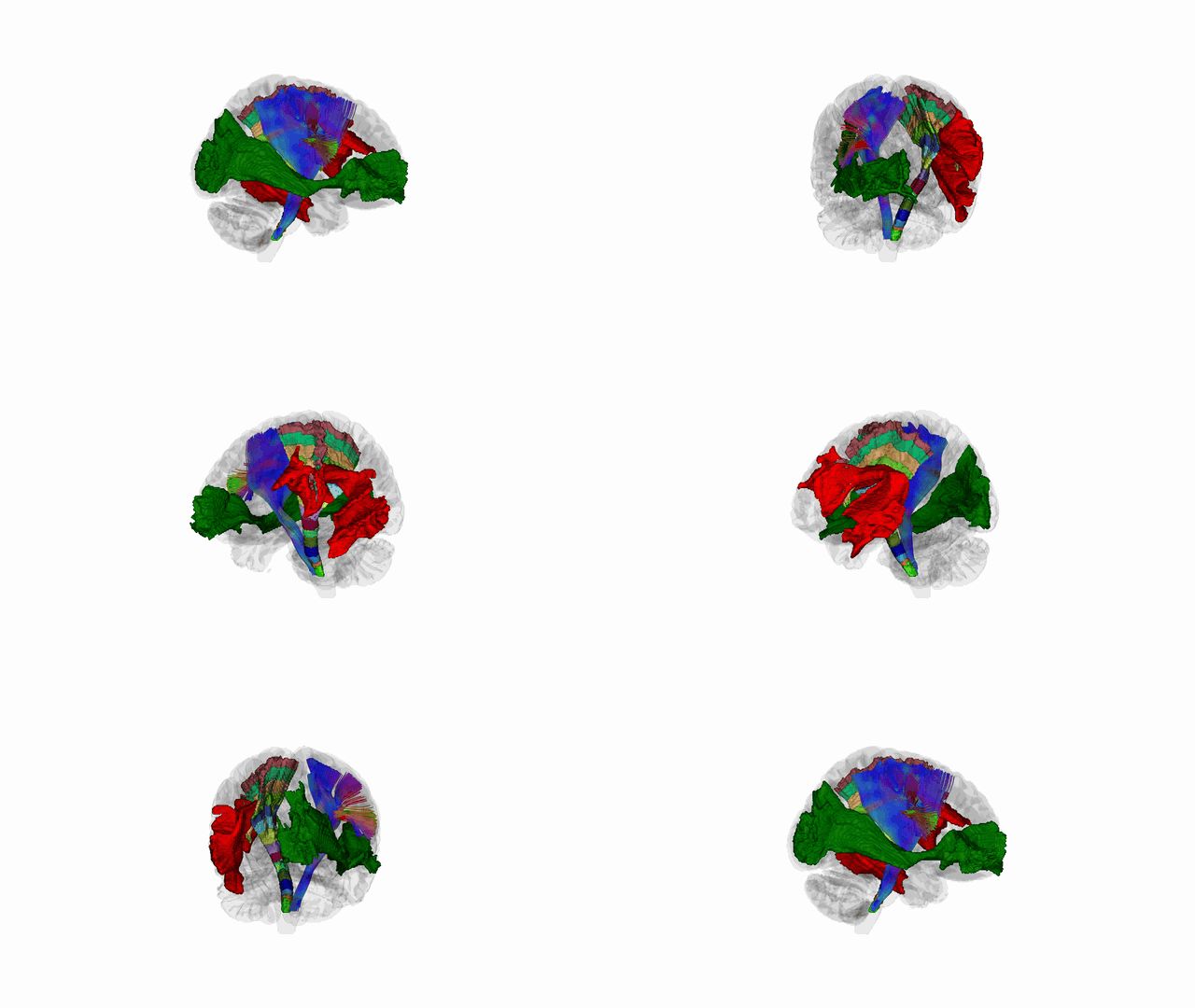
Prefer full quality? Watch it here: ▶ dive_movie.mp4
Getting Started
Requirements
| Python | 3.11, 3.12, or 3.13 |
| OS | macOS, Linux, and Windows (offscreen rendering supported) |
| GPU | Not required - DiVE renders via VTK / OpenGL on the host |
| Movies | H.264 encoding is bundled via PyAV — no system ffmpeg needed |
Installation
Using pip:
pip install dive-mri
Using Bioconda:
conda config --add channels bioconda
conda install bioconda::dive-mri
Quick sanity check
The bundled MNI templates let you smoke-test without downloading anything:
# Opens a 3D window with a glass brain + MNI T1 slice
dive --brain_2d --mode interactive

# CLI
dive --glass_brain --mode cli --background 1 --output .
Modes
DiVE has one entry point (dive) and three rendering modes selected via --mode. The same data-loading pipeline runs in every mode; only where the frames go changes.
interactive (default) |
cli |
movie |
|
|---|---|---|---|
| Opens a window | ✅ | ❌ | ❌ |
| Cluster friendly | ❌ (needs a display) | ✅ | ✅ |
| Output | 3D UI | one PNG per view | one MP4 |
Requires --output |
no | yes | yes |
| Camera View | — | ✅ | orbit (not fixed views) |
dive --mode interactive   # Default, open a 3D window with GUI
dive --mode cli           # Render PNGs to disk and exit
dive --mode movie         # Create movie
Usage
# Interactive mode: along-tract segments (CST_R) mask colored by CSV statistics, (color map RdBu_r, min/max to ±5, segments with p > 0.05 grayed out and a white-background glass brain)
dive --mask resources/meta_CST_R_15_segments.nii.gz \
     --stats_csv resources/stat_template.csv --map RdBu_r --threshold 0.05 \
     --value_range -5 5 --tract resources/CST_L.trk --tract_width 5 \
     --mode interactive --glass_brain --background 1
# Movie mode: two meshes (IFOF_R in green, AF_L in red) + along-tract segments (CST_L) mask + a CST_R TinyTrack bundle → a 16 s, 1080p rotation written to resources/dive_movie_1.mp4
dive --mesh resources/IFOF_R.vtk resources/AF_L.vtk --mesh_colors green red \
     --mask resources/meta_CST_L_15_segments.nii.gz \
     --tract resources/CST_R.tt.gz --tract_width 5 \
     --glass_brain --mode movie --background 1 \
     --output resources/dive_movie_1.mp4 \
     --movie_duration 16 --movie_fps 30 --movie_size 1920x1080
Transforms — subject ↔ MNI, on the fly (data on disk is never modified):
# DSI Studio, subject → MNI (the warp already includes the affine)
dive --tract subject.tt.gz --glass_brain --background 1 \
     --warp 1Warp.nii.gz --warp_source dsi_studio --warp_ref MNI_QA.nii.gz

# ANTs, subject → MNI (inverse affine + inverse warp)
dive --tract subject.tt.gz --glass_brain --background 1 \
     --transform 0GenericAffine.mat --inverse \
     --warp 1InverseWarp.nii.gz --warp_source ants
CLI Options
Run dive --help for the full list. Grouped reference below.
All flags (grouped)
Mode
| Flag | Default | Description |
|---|---|---|
--mode {interactive,cli,movie} |
interactive |
GUI, batch PNGs, or MP4 recording |
-v, --verbose |
off | DEBUG-level logging from dive.* modules |
--version |
— | Print version and exit |
Tracts
| Flag | Default | Description |
|---|---|---|
--tract FILE... |
[] |
Tractograms (.trk / .tck / .trx / .tt.gz) |
--tract_colors COLOR... |
[] |
Per-tract color: name (red), hex (#00ff00) |
--tract_opacity FLOAT... |
1 |
Per-tract opacity in [0, 1] |
--tract_width INT |
1 |
Streamline tube width in pixels |
Masks (ROIs) & meshes
| Flag | Default | Description |
|---|---|---|
--mask FILE... |
[] |
NIfTI label files (.nii / .nii.gz) |
--mask_colors COLOR... |
[] |
Per-mask color (single-label masks only) |
--mask_opacity FLOAT... |
1 |
Per-mask opacity |
--mesh FILE... |
[] |
VTK PolyData files |
--mesh_colors COLOR... |
[] |
Per-mesh color |
--mesh_opacity FLOAT... |
1 |
Per-mesh opacity |
Anatomical context & display
| Flag | Default | Description |
|---|---|---|
--brain_2d [PATH] |
none | NIfTI rendered as a 2D slice. Omit PATH for the bundled MNI T1 |
--glass_brain [PATH] |
none | Binary NIfTI rendered as a translucent isosurface. Omit PATH for the bundled MNI WM |
--background {0,1} |
0 |
0 = black, 1 = white |
--zoom FLOAT |
1.0 |
Multiplicative camera zoom |
Output & statistics
| Flag | Default | Description |
|---|---|---|
--output STEM |
none | Output path stem. Required for cli and movie modes |
--stats_csv FILE... |
[] |
Statistics CSVs (segment,value,p_value); pair by position with --tract |
--group_stat NAME |
none | Filter CSV rows where groups == NAME |
--map NAME |
RdBu |
Any matplotlib colormap (viridis, plasma, …) |
--value_range MIN MAX |
none | Clamp colormap normalization |
--threshold FLOAT |
0.05 |
Rows with p_value > this render gray (active with --value_range) |
--log_p_value |
off | Color by −log10(p_value) instead of value |
Segmentation
| Flag | Default | Description |
|---|---|---|
--seg_method {centerline,hyperplane,linear,spline} |
none | Along-tract parcellation method |
--num_segments INT |
none | Number of along-tract segments |
--s_len FLOAT |
none | Target segment length in mm (linear / spline only; ignored if --num_segments is set) |
Transforms
| Flag | Default | Description |
|---|---|---|
--transform PATH |
none | Affine matrix (.txt / .npy / .mat / .mz) |
--inverse |
off | Apply the inverse of the affine |
--warp PATH |
none | Non-linear warp field NIfTI |
--warp_ref PATH |
none | Reference image for the warp (required with --warp) |
--warp_source {ants,dsi_studio} |
dsi_studio |
Displacement convention |
--warp_first |
off | Apply warp before the affine |
--no_trim |
off | Keep streamline endpoints outside the warp grid |
Camera & movie
| Flag | Default | Description |
|---|---|---|
--cam_view VIEW... |
all six | Subset of Axial_S Axial_I Coronal_A Coronal_P Sagittal_L Sagittal_R (cli mode) |
--movie_axis {yaw,pitch} |
yaw |
Orbit axis |
--movie_duration FLOAT |
8.0 |
Seconds |
--movie_fps INT |
30 |
Frames per second |
--movie_size WxH |
1920x1080 |
e.g. 1280x720, 3840x2160 |
--movie_loops INT |
1 |
Full revolutions |
--movie_elevation FLOAT |
0.0 |
Degrees above/below the orbit equator |
--movie_show_slice |
off | Keep the 2D slice visible during rotation |
UI Interaction
- Choose Type: Use the ROI type (Mask/Mesh/Tract/Brain) to open the drop-down of all files of that type, and select the one you want.
- Change View: Click the buttons to switch to Sagittal / Coronal / Axial view.
- Choose Slice: Change the brain slice value for the selected view (requires a
--brain_2dfile). - Change Opacity (Streamlines, Mask, Mesh, Slice): Use the sliders to change the opacity of the selected file.
- Add Button: To add more items, click the add (
+) button and choose the type of file to add. - Remove Button: To remove a file, select it via Choose Type, then click the remove (
−) button.
Mouse: left-drag rotates, middle-drag pans, scroll zooms. R resets the camera, S/W toggle surface/wireframe. The full control panel is shown on the right in the overview above.
Contributing
Bug reports and feature requests are welcome via the issue tracker. For code contributions, fork the repo, create a feature branch, and open a pull request against main.
Acknowledgments
1 maintainer

Release files for dive-mri 2.0.0
For a detailed explanation of source distributions (sdists) and built distributions (wheels), please see the package formats documentation.
Source distribution (sdist)
| File | Size | Uploaded | |
|---|---|---|---|
| dive_mri-2.0.0.tar.gz | 17.8 MB | Details |
Built distribution (wheel)
| File | Interpreter | ABI | Platform | Reset |
|---|---|---|---|---|
| dive_mri-2.0.0-py3-none-any.whl | Python 3 | none | any | Details |
Total release size: 35.7 MB
Release files / dive_mri-2.0.0.tar.gz
| Download URL | dive_mri-2.0.0.tar.gz |
|---|---|
| Size | 17.8 MB |
| Tags | Source |
|
SHA-256 checksum How to use checksums |
1fa8fc04d0e1defecba5a13b7e1317409267523c0ce03f1e3554ce98e0316eb2
|
|
BLAKE2b-256 checksum How to use checksums |
9a79051b24630f89055b61922acc4b8fbb0d56f956c5bb6211f7a57306377ca8
|
| Upload date | |
|
Uploaded using Trusted Publishing? What is trusted publishing? |
Yes |
| Uploaded via |
twine/6.1.0 CPython/3.13.14
|
Provenance
Provenance describes where a file came from. On PyPI, provenance is shared via attestations, which provide a verifiable record of the build or publishing details. View details, limitations and caveats.


PyPI Publish Attestation
PyPI verified that this artifact, at this checksum, originated from the publisher listed below.
Signed by GitHub Actions, verified by PyPI on Jul 20, 2026.
Transparency logRelease files / dive_mri-2.0.0-py3-none-any.whl
| Download URL | dive_mri-2.0.0-py3-none-any.whl |
|---|---|
| Size | 17.8 MB |
| Tags | Python 3 |
|
SHA-256 checksum How to use checksums |
e7ea60d2cefb16f80a0497fb4398066cee42ba1d36b3a45600c28b00d3c60c3a
|
|
BLAKE2b-256 checksum How to use checksums |
156b6fbb5054354f91e2af4444f4d6aa7c3d03a18a48a9134c4d4021b009ab2f
|
| Upload date | |
|
Uploaded using Trusted Publishing? What is trusted publishing? |
Yes |
| Uploaded via |
twine/6.1.0 CPython/3.13.14
|
Provenance
Provenance describes where a file came from. On PyPI, provenance is shared via attestations, which provide a verifiable record of the build or publishing details. View details, limitations and caveats.
PyPI Publish Attestation
PyPI verified that this artifact, at this checksum, originated from the publisher listed below.
Signed by GitHub Actions, verified by PyPI on Jul 20, 2026.
Transparency log













