
dj-admin-tui





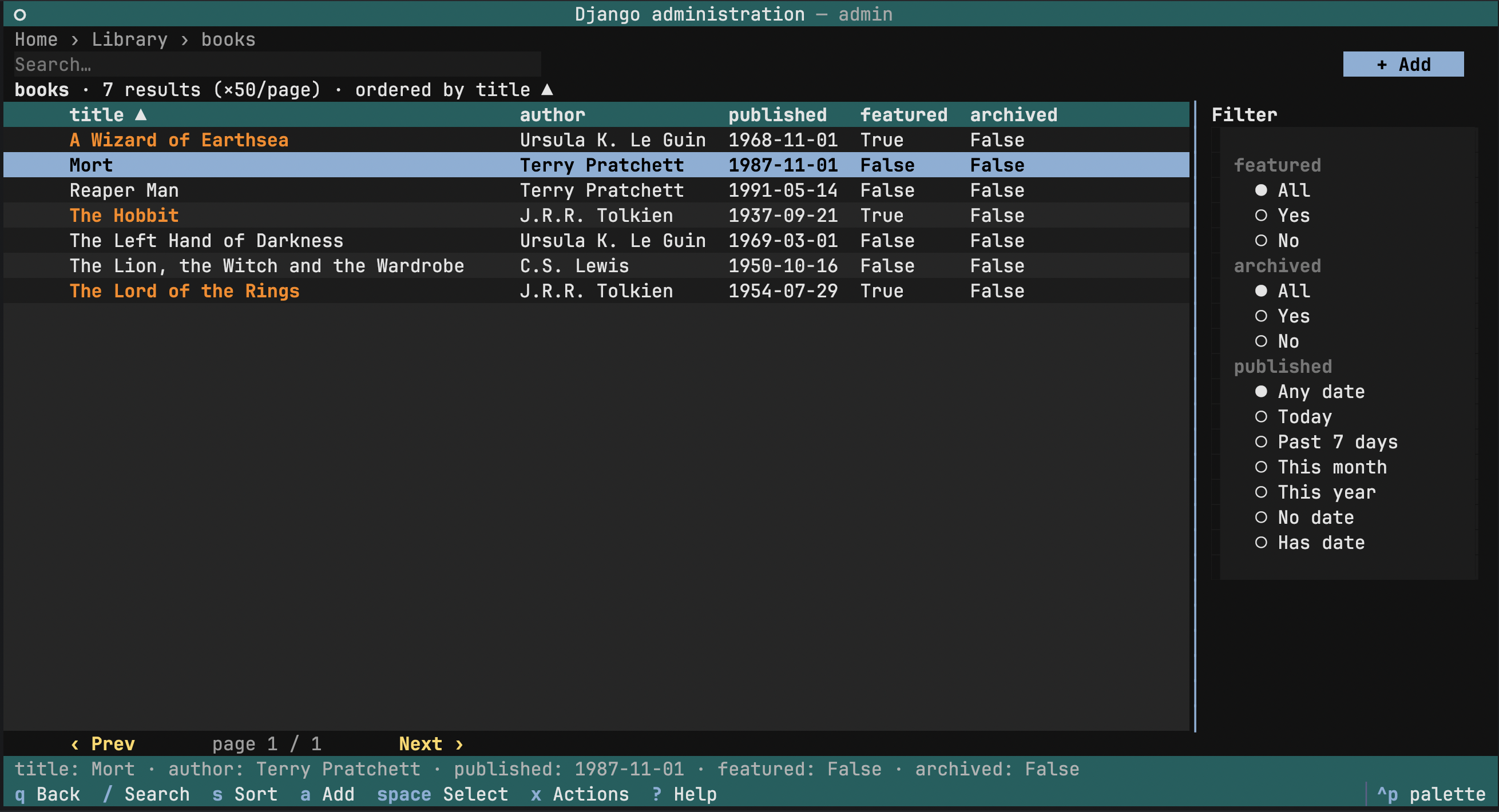
A Textual terminal UI that drives the Django admin from your terminal: browse, search, filter, sort, create, edit, delete, and run admin actions — honoring the same permissions and audit log as the web admin, because it reuses Django's own admin internals rather than reimplementing them.
It works with zero configuration: any project that has ModelAdmins gets a
working terminal admin with no extra code. Write a tui.py only when you want
TUI-specific behaviour.
Why
Servers, CI shells, and SSH sessions don't have a browser. dj-admin-tui gives
you the day-to-day admin workflows — find a record, fix a field, run a bulk
action — over a plain terminal, with the exact permission scoping and audit
trail the web admin would apply.
Features
- Reuses the admin, never reimplements it. Querysets, search, filtering,
ordering, pagination, form construction & validation, permissions, actions,
and audit all come from your registered
ModelAdminand Django's own internals. The TUI only renders and adds interaction. - Zero-config. A project with
ModelAdmins and notui.pyworks fully. - Full CRUD — create / edit / delete with the admin's fieldsets, widgets, and validation, including foreign keys, many-to-many, and multi-line text.
- Search, sort, and filter — driven by
search_fields,list_filter, andget_ordering_field_columns, identical to the web changelist. - Admin actions — bulk actions and per-row actions, with confirmation.
- Permission-scoped & audited — every operation runs as a chosen user and
writes
LogEntryrows, exactly like the web admin. - Keyboard and mouse — arrows/Enter or click;
?shows the keymap. - Themeable — bundled themes plus a single-stylesheet design system you can
override with your own
.tcss.
Trust model — read first
The TUI runs in-process as a manage.py subcommand. There is no network
port, no token, no remote API.
Whoever can run
manage.pyon the host already has full database access. The--userflag scopes which records the operator sees and attributes audit entries to that account — it is NOT an access-control boundary. Access control is the host's responsibility (Unix permissions, SSH, etc.).
Install
pip install dj-admin-tui
# settings.py
INSTALLED_APPS += ["dj_admin_tui"]
Launch
python manage.py admin_tui                # run as the lone superuser
python manage.py admin_tui --user alice   # run as alice (must be is_staff)
You land on an index of every app and model the web admin would show that user.
Arrows + Enter (or the mouse) to drill in, q to quit, ? for help.
Customising (optional)
Drop a tui.py next to your admin.py — it is autodiscovered like admin.py:
# myapp/tui.py
from dj_admin_tui import register, TuiAdmin

@register(Book)
class BookTui(TuiAdmin):
    row_actions = ["mark_featured"]   # TUI-only per-row actions
The public API is exactly five names; everything else under dj_admin_tui.*
is internal and may change without notice:
from dj_admin_tui import register, TuiAdmin, tui_site, field_widgets, AdminTuiApp
Documentation
Full docs live at dj-admin-tui.readthedocs.io:
| Topic | What it covers |
|---|---|
| Installation | Requirements, install, first launch, trust model |
| Usage | Keymap, mouse map, search / sort / filter, the screens |
| Configuration | The ADMIN_TUI settings dict |
| CLI | The manage.py admin_tui command, flags, exit codes |
| Theming | Bundled themes, custom themes, .tcss overrides |
| Extending | TuiAdmin overlays, hooks, custom widgets & screens |
| API | The public Python API and stability policy |
| Architecture | How it fits together; the reuse-the-admin design |
Supported versions
- Python: 3.12, 3.13, 3.14
- Django: 4.2 LTS, 5.2 LTS, 6.0
- Textual:
>=8.2,<9
See pyproject.toml for the exact ranges.
Contributing
Issues and pull requests are welcome. See CONTRIBUTING.md for the dev setup, test, and lint workflow. Public-API changes follow SemVer with a deprecation path.
License
MIT.
1 maintainer

Metadata
1 maintainer
Release files for dj-admin-tui 0.0.1
For a detailed explanation of source distributions (sdists) and built distributions (wheels), please see the package formats documentation.
Source distribution (sdist)
| File | Size | Uploaded | Provenance | Actions |
|---|---|---|---|---|
| dj_admin_tui-0.0.1.tar.gz | 47.9 kB | With provenance | Details for dj_admin_tui-0.0.1.tar.gz |
Built distribution (wheel)
| File | Interpreter | ABI | Platform | Actions Reset |
|---|---|---|---|---|
| dj_admin_tui-0.0.1-py3-none-any.whl | Python 3 | none | any | Details for dj_admin_tui-0.0.1-py3-none-any.whl |
Total release size: 114.7 kB
Release files / dj_admin_tui-0.0.1.tar.gz
| Download URL | dj_admin_tui-0.0.1.tar.gz |
|---|---|
| Size | 47.9 kB |
| Tags | Source |
|
SHA-256 checksum How to use checksums |
dff73ffe9a588bb8a9e0b516e84ae4959a228fabfe4527d86ba93819708170a6
|
|
BLAKE2b-256 checksum How to use checksums |
fedc5311a87708959f8ce610d0da1391a43a3fb3547b6b3adaf22d72f52e2b99
|
| Upload date | |
|
Uploaded using Trusted Publishing? What is trusted publishing? |
Yes |
| Uploaded via |
twine/6.1.0 CPython/3.13.12
|
Provenance
Provenance describes where a file came from. On PyPI, provenance is shared via attestations, which provide a verifiable record of the build or publishing details. View details, limitations and caveats.


PyPI Publish Attestation
PyPI verified that this artifact, at this checksum, originated from the publisher listed below.
Signed by GitHub Actions, verified by PyPI on Jun 2, 2026.
Transparency logRelease files / dj_admin_tui-0.0.1-py3-none-any.whl
| Download URL | dj_admin_tui-0.0.1-py3-none-any.whl |
|---|---|
| Size | 66.9 kB |
| Tags | Python 3 |
|
SHA-256 checksum How to use checksums |
05a46f242983ac3f9785d08e2119658e017cee18fd74900145067d6c84ff6d88
|
|
BLAKE2b-256 checksum How to use checksums |
579c1a0e11fe47085e500b85926d0224a24c3a70fa0e618d39eca6d24a73211e
|
| Upload date | |
|
Uploaded using Trusted Publishing? What is trusted publishing? |
Yes |
| Uploaded via |
twine/6.1.0 CPython/3.13.12
|
Provenance
Provenance describes where a file came from. On PyPI, provenance is shared via attestations, which provide a verifiable record of the build or publishing details. View details, limitations and caveats.
PyPI Publish Attestation
PyPI verified that this artifact, at this checksum, originated from the publisher listed below.
Signed by GitHub Actions, verified by PyPI on Jun 2, 2026.
Transparency logSecurity for dj-admin-tui 0.0.1
Provenance
Provenance describes where a file came from. On PyPI, provenance is shared via attestations, which provide a verifiable record of the build or publishing details. View details, limitations and caveats.
Full provenance
Both files in this release have been uploaded with provenance metadata.
Attestation for dj_admin_tui-0.0.1.tar.gz
PyPI Publish Attestation
PyPI verified that this artifact, at this checksum, originated from the publisher listed below.
Signed by GitHub Actions, verified by PyPI on Jun 2, 2026.
Transparency logA note on package security
PyPI is a repository for distributing packages, not a service for auditing them. While third-party security researchers and our staff do their best to detect and remove malicious packages, PyPI cannot guarantee the quality, security or suitability of any given package.
To learn more about protecting yourself from malicious actors, visit our package security documentation.













