
A Django Admin panel for browsing and inspecting Django cache backends
Verified details
These details have been verified by PyPIProject links
GitHub Statistics
Maintainers

Project description





Django Cache Panel
A universal cache inspector for Django.
Docs
https://yassi.github.io/dj-cache-panel/
Features
- Browse Cache Instances: View all configured cache backends from your
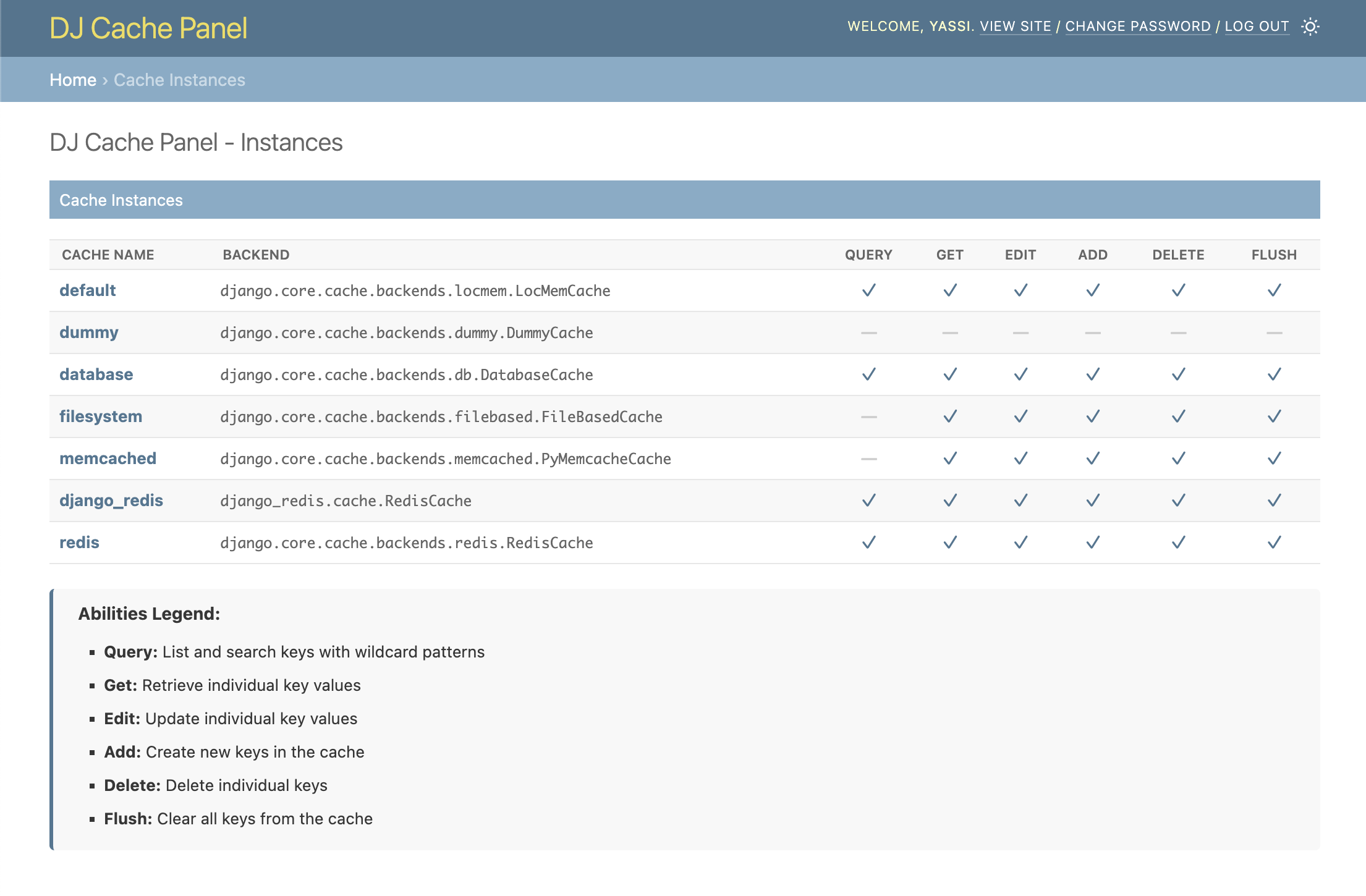
CACHESsetting - Abilities Matrix: See at a glance which operations each cache supports (Query, Get, Delete, Flush)
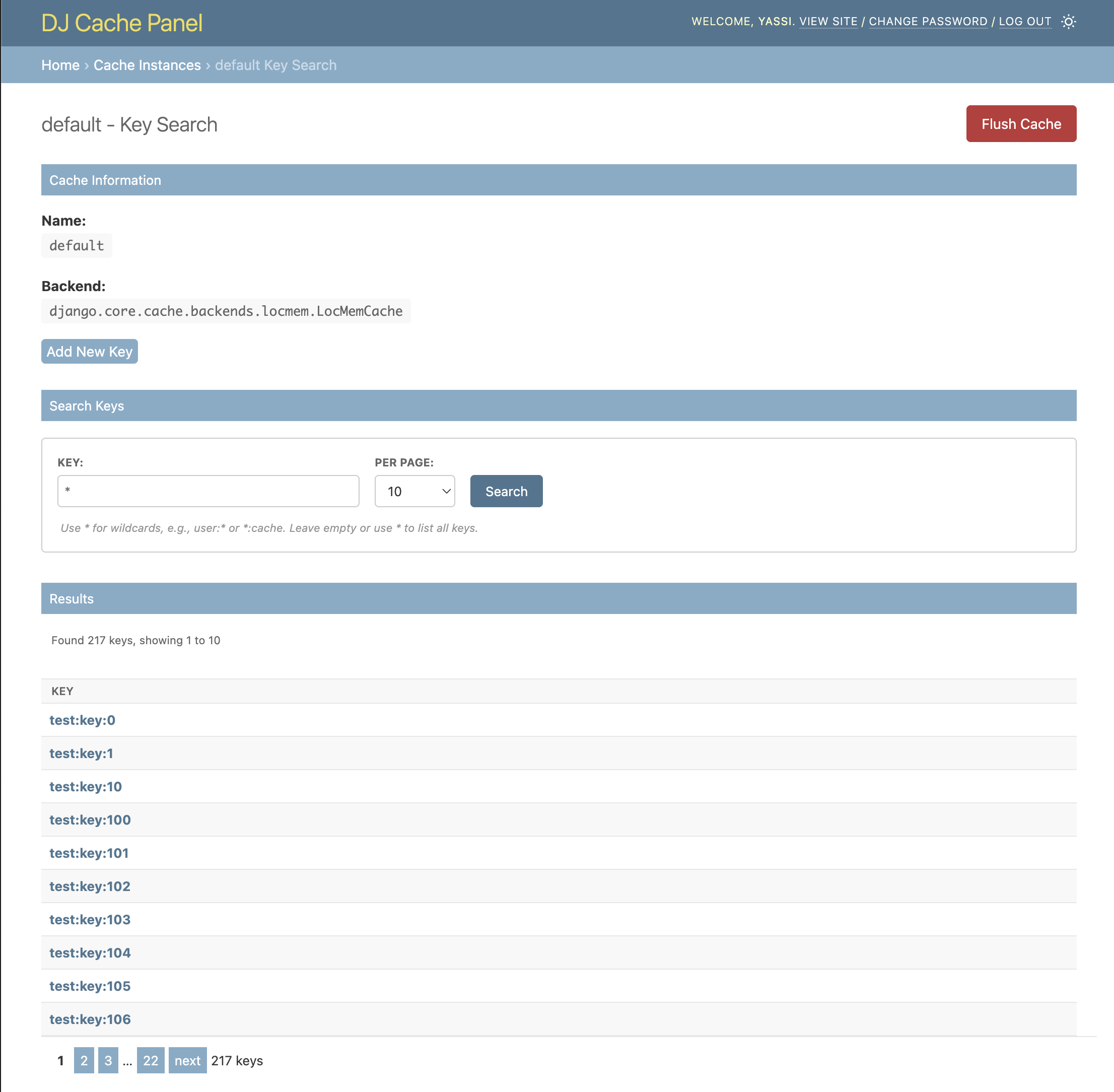
- Key Search: Search and browse cache keys with wildcard patterns (for supported backends)
- Value Preview: View cache values directly in search results
- Pagination: Navigate through large sets of keys efficiently
- Admin Integration: Seamlessly integrates with Django's admin interface
- Secure: Only accessible to staff users
- Backend Agnostic: Works with any Django cache backend (with varying feature support)
Project Structure
dj-cache-panel/
├── dj_cache_panel/          # Main package
│   ├── templates/           # Django templates
│   ├── cache_panels.py      # Backend specific panels
│   ├── views.py             # Django views
│   └── urls.py              # URL patterns
├── example_project/         # Example Django project
├── tests/                   # Test suite
├── images/                  # Screenshots for README
└── requirements.txt         # Development dependencies
Requirements
- Python 3.9+
- Django 4.2+
Screenshots
Django Admin Integration
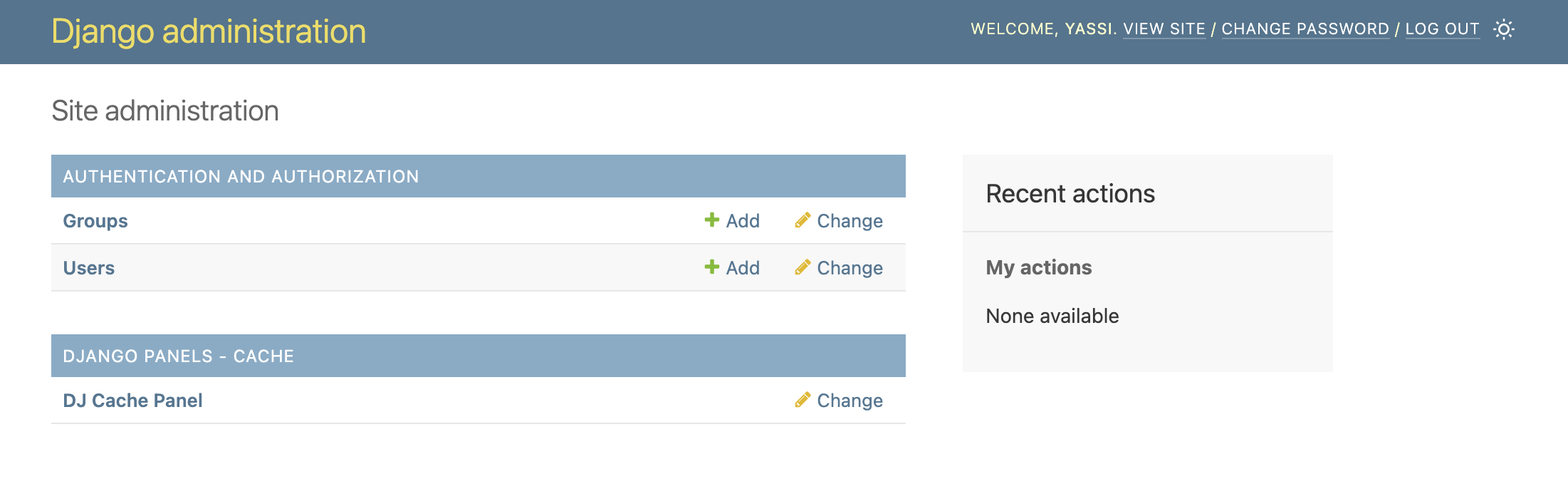
Seamlessly integrated into your Django admin interface. A new section for dj-cache-panel will appear in the same places where your models appear.
NOTE: This application does not actually introduce any model or migrations.
Caches Overview
Get a list of all your caches as well as the allowed capabilities for each cache
Key Search
Key Edits/Adds
Installation
1. Install the Package
pip install dj-cache-panel
2. Add to Django Settings
Add dj_cache_panel to your INSTALLED_APPS:
INSTALLED_APPS = [
    'django.contrib.admin',
    'django.contrib.auth',
    'django.contrib.contenttypes',
    'django.contrib.sessions',
    'django.contrib.messages',
    'django.contrib.staticfiles',
    'dj_cache_panel',  # Add this line
    # ... your other apps
]
3. Configure Cache Instances
Django cache panel will use the CACHES setting normally defined in django projects
CACHES = {
    ...
}
Additionally, you can also define some extra settings for extending or changing behavior of the existing cache panels.
Note: these are advanced settings; the vast majority of django projects will not need to define any of these
DJ_CACHE_PANEL_SETTINGS = {
    # Optional: completely replace the default backend-to-panel mapping
    # "BACKEND_PANEL_MAP": {}
    #
    # Optional: extend or override specific backend-to-panel mappings
    # Panel classes can be specified as:
    #   - Simple class name (e.g., "RedisCachePanel") - for built-in panels
    #   - Full module path (e.g., "myapp.panels.CustomCachePanel") - for custom panels
    "BACKEND_PANEL_EXTENSIONS": {
        # Example: Map a custom backend to a custom panel class
        # "myapp.backends.CustomCache": "myapp.panels.CustomCachePanel",
        # Example: Override a built-in backend mapping
        # "django.core.cache.backends.redis.RedisCache": "myapp.panels.MyRedisCachePanel",
    },
    # Optional: per-cache settings overrides
    # Typically used to lock down a cache instance to only certain abilities
    "CACHES": {
        "redis": {
            "abilities": {  # Optional: override the abilities for this cache instance
                # "query": True,
                # "get_key": True,
                # "delete_key": True,
                # "edit_key": True,
                # "add_key": True,
                # "flush_cache": True,
            },
        }
    },
}
4. Include URLs
Add the Cache Panel URLs to your main urls.py:
from django.contrib import admin
from django.urls import path, include

urlpatterns = [
    path('admin/dj-cache-panel/', include('dj_cache_panel.urls')),  # Add this line
    path('admin/', admin.site.urls),
]
5. Run Migrations and Create Superuser
python manage.py migrate
python manage.py createsuperuser  # If you don't have an admin user
6. Access the Panel
-
Start your Django development server:
python manage.py runserver
-
Navigate to the Django admin at
http://127.0.0.1:8000/admin/ -
Look for the "DJ_CACHE_PANEL" section in the admin interface
-
Click "Manage Cache keys and values" to start browsing your cache instances
License
This project is licensed under the MIT License. See the LICENSE file for details.
Development Setup
If you want to contribute to this project or set it up for local development:
Prerequisites
- Python 3.9 or higher
- Redis server running locally
- Git
- Autoconf
- Docker
It is reccommended that you use docker since it will automate much of dev env setup
1. Clone the Repository
git clone https://github.com/yassi/dj-cache-panel.git
cd dj-cache-panel
2a. Set up dev environment using virtualenv
python -m venv venv
source venv/bin/activate  # On Windows: venv\Scripts\activate

pip install -e . # install dj-cache-panel package locally
pip intall -r requirements.txt  # install all dev requirements

# Alternatively
make install # this will also do the above in one single command
2b. Set up dev environment using docker
make docker_up  # bring up all services (redis, memached) and dev environment container
make docker_shell  # open up a shell in the docker conatiner
3. Set Up Example Project
The repository includes an example Django project for development and testing
cd example_project
python manage.py migrate
python manage.py createsuperuser
4. Populate Test Data (Optional)
An optional CLI tool for populating cache keys automatically is included in the example django project in this code base.
python manage.py populate_redis
This command will populate your cache instance with sample data for testing.
6. Run the Development Server
python manage.py runserver
Visit http://127.0.0.1:8000/admin/ to access the Django admin with Cache Panel.
7. Running Tests
The project includes a comprehensive test suite. You can run them by using make or by invoking pytest directly:
# build and install all dev dependencies and run all tests inside of docker container
make test_docker

# Test without the docker on your host machine.
# note that testing always requires a redis and memcached service to be up.
# these are mostly easily brought up using docker
make test_local
Project details
Verified details
These details have been verified by PyPIProject links
GitHub Statistics
Maintainers
Release history Release notifications | RSS feed


Download files
Download the file for your platform. If you're not sure which to choose, learn more about installing packages.
Source Distribution
Built Distribution
Filter files by name, interpreter, ABI, and platform.
If you're not sure about the file name format, learn more about wheel file names.
Copy a direct link to the current filters
File details
Details for the file dj_cache_panel-0.2.2.tar.gz.
File metadata
- Download URL: dj_cache_panel-0.2.2.tar.gz
- Upload date:
- Size: 31.6 kB
- Tags: Source
- Uploaded using Trusted Publishing? Yes
- Uploaded via: twine/6.1.0 CPython/3.13.7
File hashes
| Algorithm | Hash digest | |
|---|---|---|
| SHA256 |
85afc5fe3842d3e941f381477325954cfb292b4abb8deca41232ca83f04d3bdb
|
|
| MD5 |
317a33c6ff4954abd6a925d704b937d1
|
|
| BLAKE2b-256 |
57462bfdbc5518c7a09951a1a197438ef68f04c988c5cdf139223105b09a9061
|
Provenance
The following attestation bundles were made for dj_cache_panel-0.2.2.tar.gz:
Publisher:
python-publish.yml on yassi/dj-cache-panel
-
Statement:
-
Statement type:
https://in-toto.io/Statement/v1 -
Predicate type:
https://docs.pypi.org/attestations/publish/v1 -
Subject name:
dj_cache_panel-0.2.2.tar.gz -
Subject digest:
85afc5fe3842d3e941f381477325954cfb292b4abb8deca41232ca83f04d3bdb - Sigstore transparency entry: 764096988
- Sigstore integration time:
-
Permalink:
yassi/dj-cache-panel@f9d1005917e3c835a7ac40b77cdd9e812ccaefdc -
Branch / Tag:
refs/tags/v0.2.2 - Owner: https://github.com/yassi
-
Access:
public
-
Token Issuer:
https://token.actions.githubusercontent.com -
Runner Environment:
github-hosted -
Publication workflow:
python-publish.yml@f9d1005917e3c835a7ac40b77cdd9e812ccaefdc -
Trigger Event:
release
-
Statement type:
File details
Details for the file dj_cache_panel-0.2.2-py3-none-any.whl.
File metadata
- Download URL: dj_cache_panel-0.2.2-py3-none-any.whl
- Upload date:
- Size: 27.8 kB
- Tags: Python 3
- Uploaded using Trusted Publishing? Yes
- Uploaded via: twine/6.1.0 CPython/3.13.7
File hashes
| Algorithm | Hash digest | |
|---|---|---|
| SHA256 |
1b4cf969cde3b27e68cea82a93d4b2a709f2dc1b5b195cb0dc8bdca5a3d3b9d2
|
|
| MD5 |
bac23f69f3f762bcc242f0d3e46c7ff8
|
|
| BLAKE2b-256 |
5a615697727ada619f735f402aa98c60a35f621d7011ed58a8cce7a183a6f198
|
Provenance
The following attestation bundles were made for dj_cache_panel-0.2.2-py3-none-any.whl:
Publisher:
python-publish.yml on yassi/dj-cache-panel
-
Statement:
-
Statement type:
https://in-toto.io/Statement/v1 -
Predicate type:
https://docs.pypi.org/attestations/publish/v1 -
Subject name:
dj_cache_panel-0.2.2-py3-none-any.whl -
Subject digest:
1b4cf969cde3b27e68cea82a93d4b2a709f2dc1b5b195cb0dc8bdca5a3d3b9d2 - Sigstore transparency entry: 764096993
- Sigstore integration time:
-
Permalink:
yassi/dj-cache-panel@f9d1005917e3c835a7ac40b77cdd9e812ccaefdc -
Branch / Tag:
refs/tags/v0.2.2 - Owner: https://github.com/yassi
-
Access:
public
-
Token Issuer:
https://token.actions.githubusercontent.com -
Runner Environment:
github-hosted -
Publication workflow:
python-publish.yml@f9d1005917e3c835a7ac40b77cdd9e812ccaefdc -
Trigger Event:
release
-
Statement type:






