A Django Admin panel for browsing and inspecting Celery tasks and workers

Project description

Tests codecov PyPI version Python versions License: MIT

Django Celery Panel

DJ Celery Panel brings Celery monitoring directly into Django Admin. No separate services to deploy, no extra infrastructure to maintain — just add it to INSTALLED_APPS and you're done.

DJ Celery Panel

Docs

https://yassi.github.io/dj-celery-panel/

Features

  • Workers Monitoring: View active Celery workers, their status, pool type, and concurrency
  • Task Management: Browse and inspect Celery tasks with detailed information
  • Queue Overview: Monitor configured queues and their routing
  • Periodic Tasks: View scheduled periodic tasks and their schedules
  • Real-time Inspection: Live data from Celery's inspect API
  • Django Admin Integration: Seamlessly integrated into your existing Django admin interface
  • Swappable Backends: Pluggable architecture for custom data sources and monitoring integrations

Project Structure

dj-celery-panel/
├── dj_celery_panel/         # Main package
│   ├── templates/           # Django templates
│   ├── views.py             # Django views
│   └── urls.py              # URL patterns
├── example_project/         # Example Django project
├── tests/                   # Test suite
├── images/                  # Screenshots for README
└── requirements.txt         # Development dependencies

Requirements

  • Python 3.9+
  • Django 4.2+

Architecture

Swappable Backend System

Django Celery Panel is built with a pluggable backend architecture that allows you to customize how data is retrieved and displayed. Each feature area (tasks, workers, queues) uses a configurable backend class, making it easy to adapt to different Celery configurations or add custom functionality.

Why Swappable Backends?

  • Flexibility: Switch between different data sources (inspect API, database, custom APIs)
  • Extensibility: Implement custom backends for specialized needs
  • Performance: Choose backends optimized for your infrastructure
  • Future-proof: Add support for new Celery features without breaking changes

Available Backends

Tasks Backends:

  • CeleryTasksDjangoCeleryResultsBackend - Uses django-celery-results for comprehensive task history (default)
  • Custom: Implement your own by extending CeleryAbstractInterface

Workers Backends:

  • CeleryWorkersInspectBackend - Real-time worker data via Celery's inspect API (default)
  • Custom: Could implement monitoring via Redis, custom metrics services, etc.

Queues Backends:

  • CeleryQueuesInspectBackend - Queue information via Celery's inspect API (default)
  • Custom: Could implement queue monitoring via broker-specific APIs

Periodic Tasks Backends:

  • CeleryPeriodicTasksConfigBackend - Reads from CELERY_BEAT_SCHEDULE configuration (default)
  • CeleryPeriodicTasksDjangoCeleryBeatBackend - Reads from django-celery-beat database
  • Custom: Could implement schedule management via custom schedulers

Example: Custom Backend

class CustomTasksBackend:
    """Custom backend that fetches tasks from your own API."""
    
    def get_tasks(self, search_query=None, page=1, per_page=50):
        # Your custom implementation
        # Fetch from external API, custom database, etc.
        return TaskListPage(...)
    
    def get_task_detail(self, task_id):
        # Your custom implementation
        return TaskDetailPage(...)

# Configure in settings.py
DJ_CELERY_PANEL_SETTINGS = {
    "tasks_backend": "myapp.backends.CustomTasksBackend",
}

This architecture means you're never locked into a specific implementation. As your infrastructure evolves, Django Celery Panel can evolve with it.

Screenshots

Django Admin Integration

Seamlessly integrated into your Django admin interface. A new section for dj-celery-panel will appear in the same places where your models appear.

NOTE: This application does not actually introduce any model or migrations.
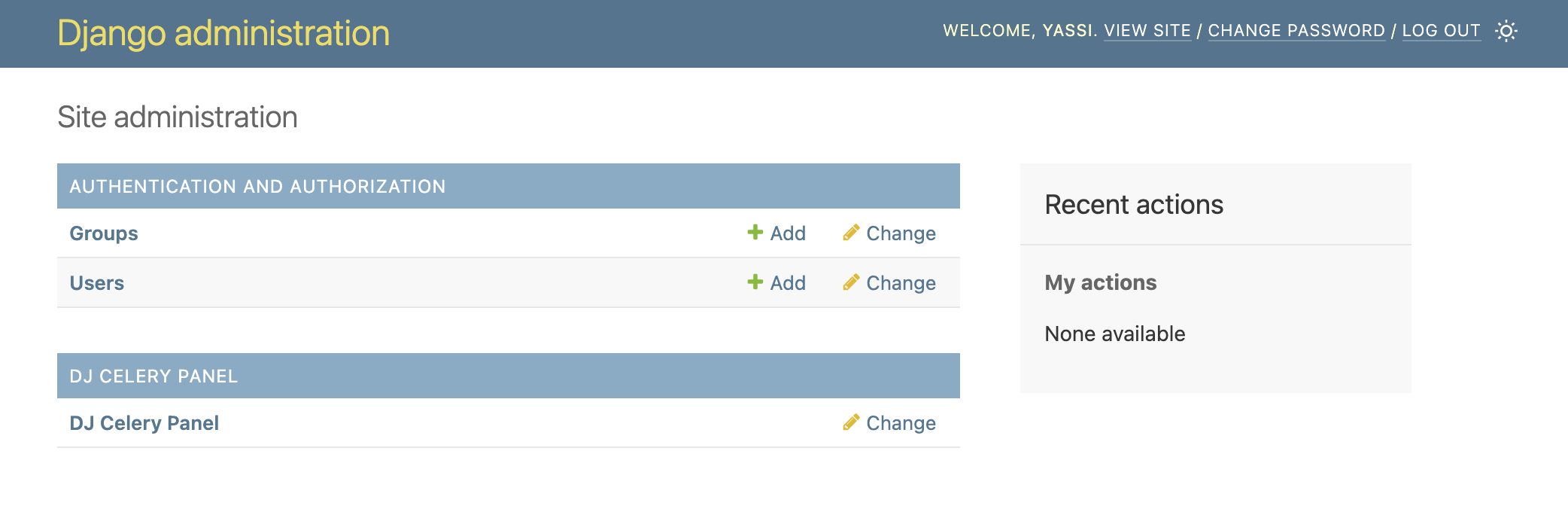
Admin Home

Dashboard Overview

Get a quick overview of your Celery infrastructure including active workers, recent tasks, and queue status.
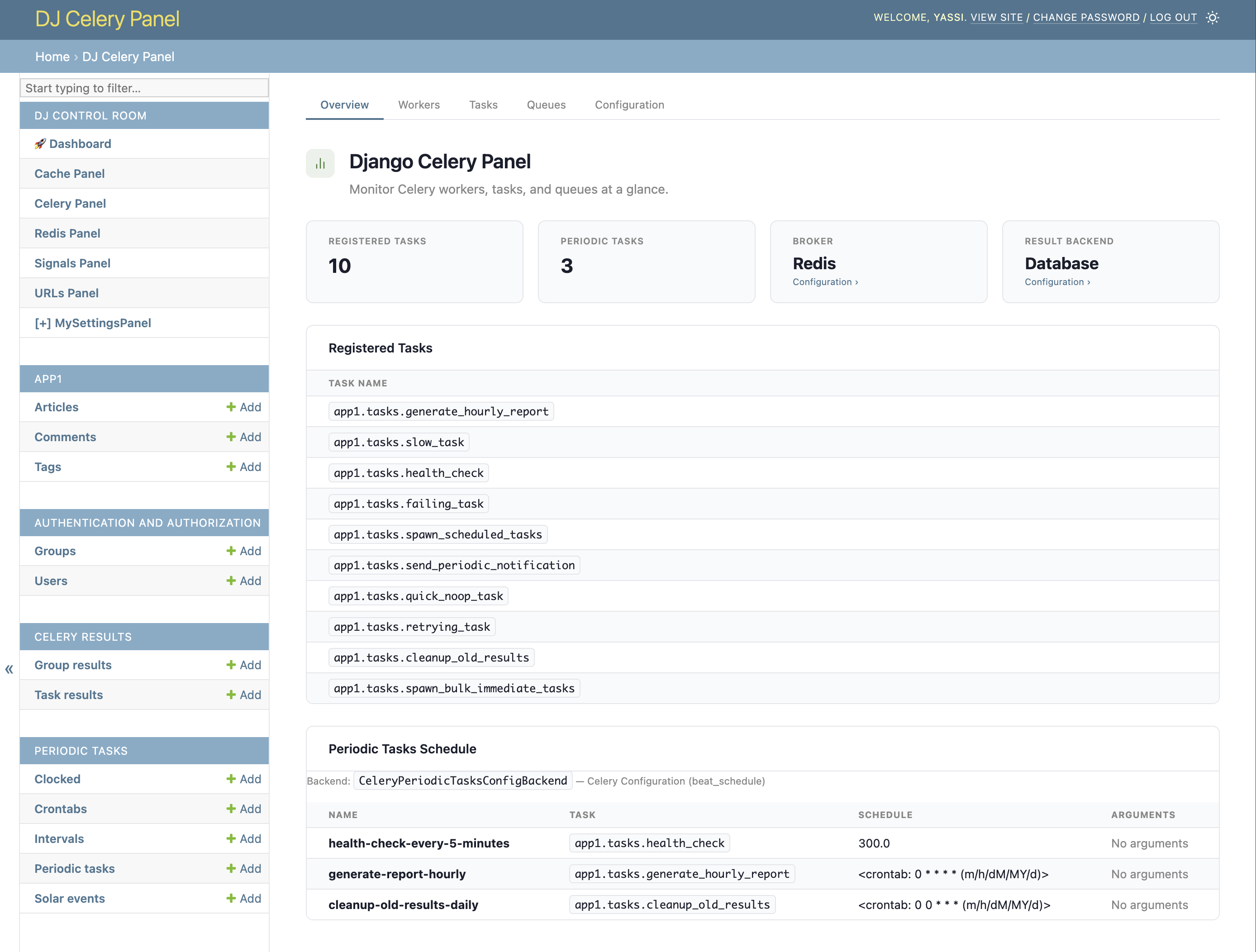
Dashboard Overview

Workers Monitoring

View all active Celery workers with detailed information about their status, pool type, concurrency, and processing capabilities.
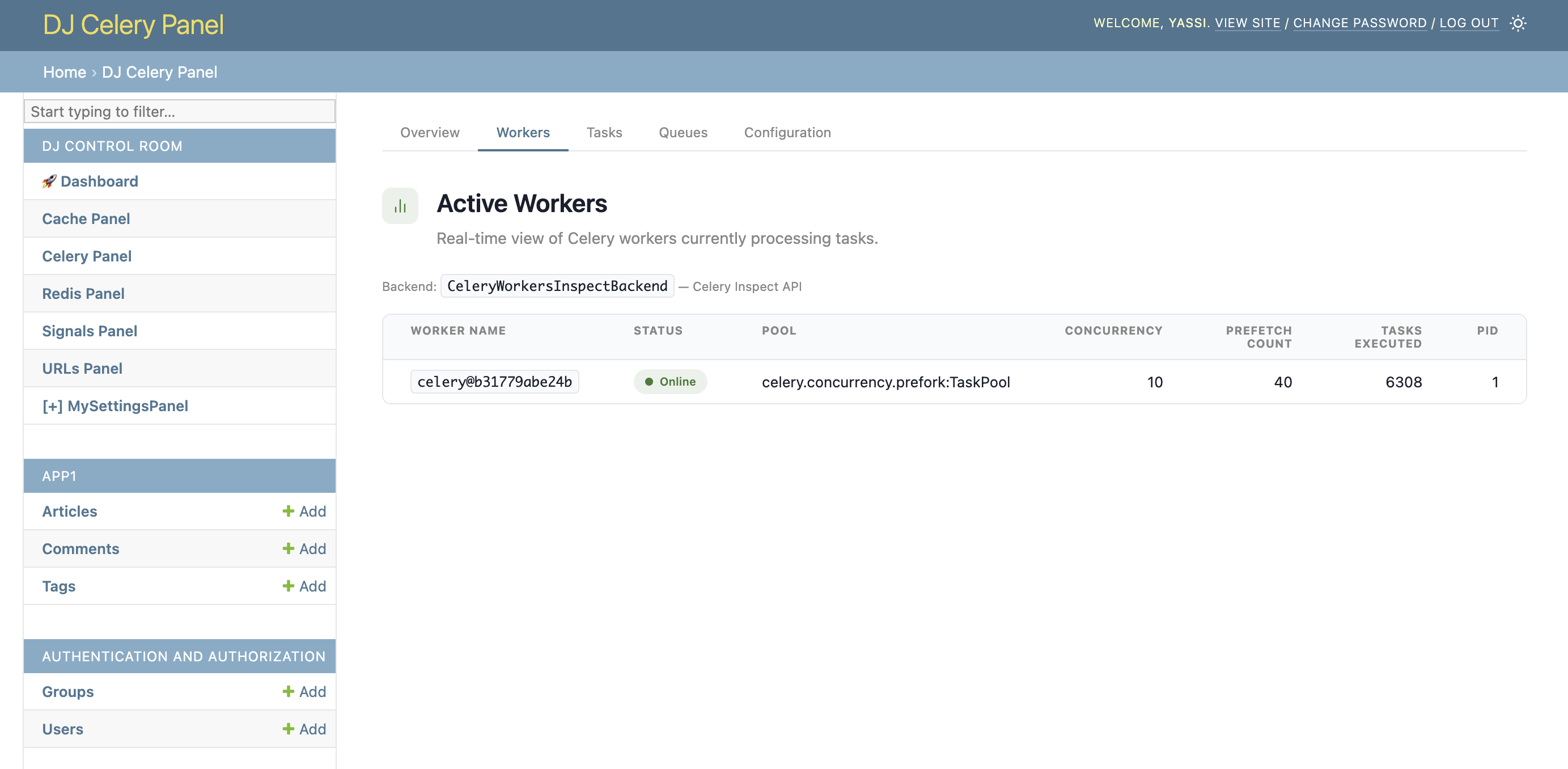
Workers

Task Management

Browse and inspect your Celery tasks with complete details including status, arguments, results, and execution time.
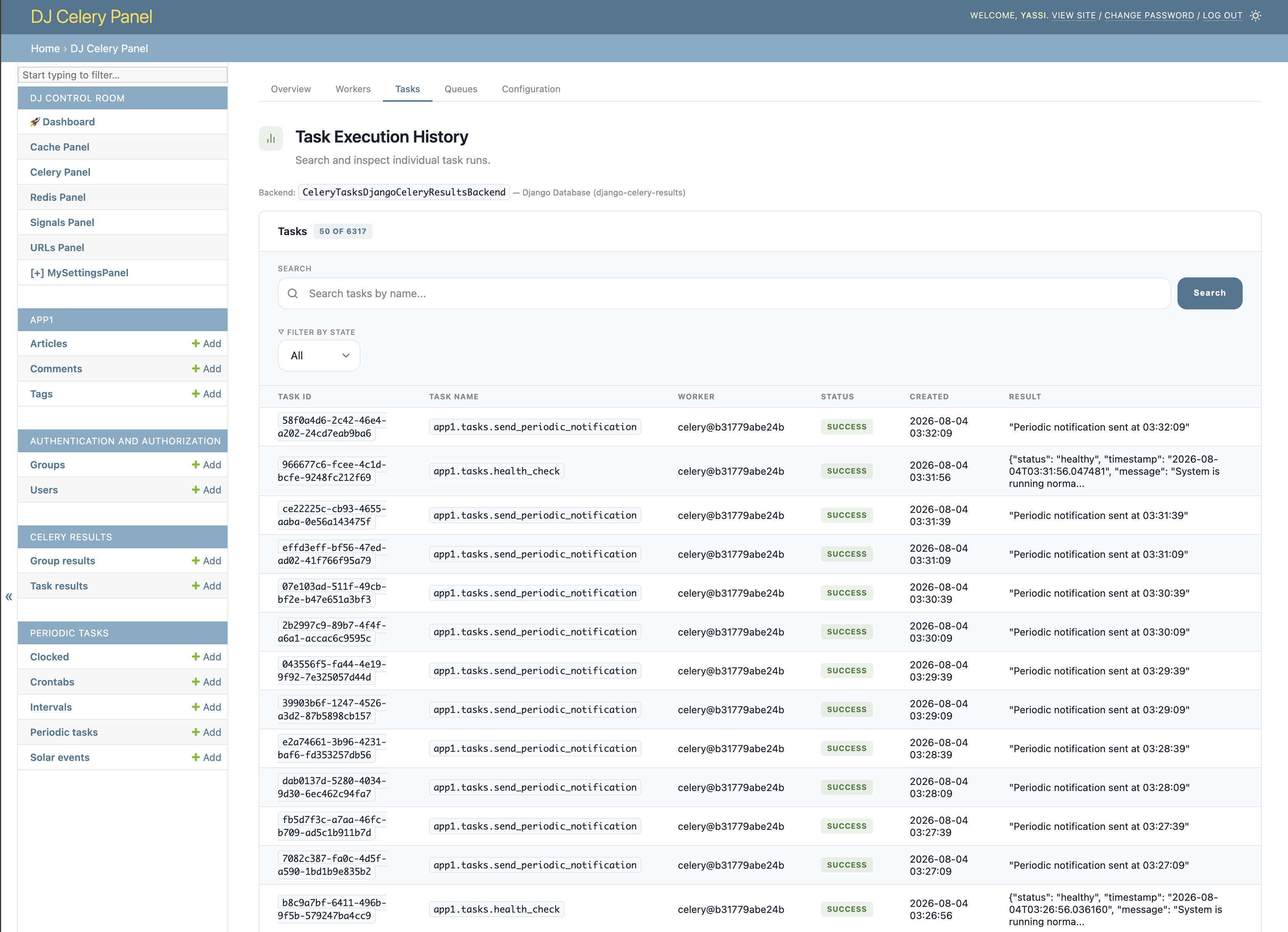
Tasks

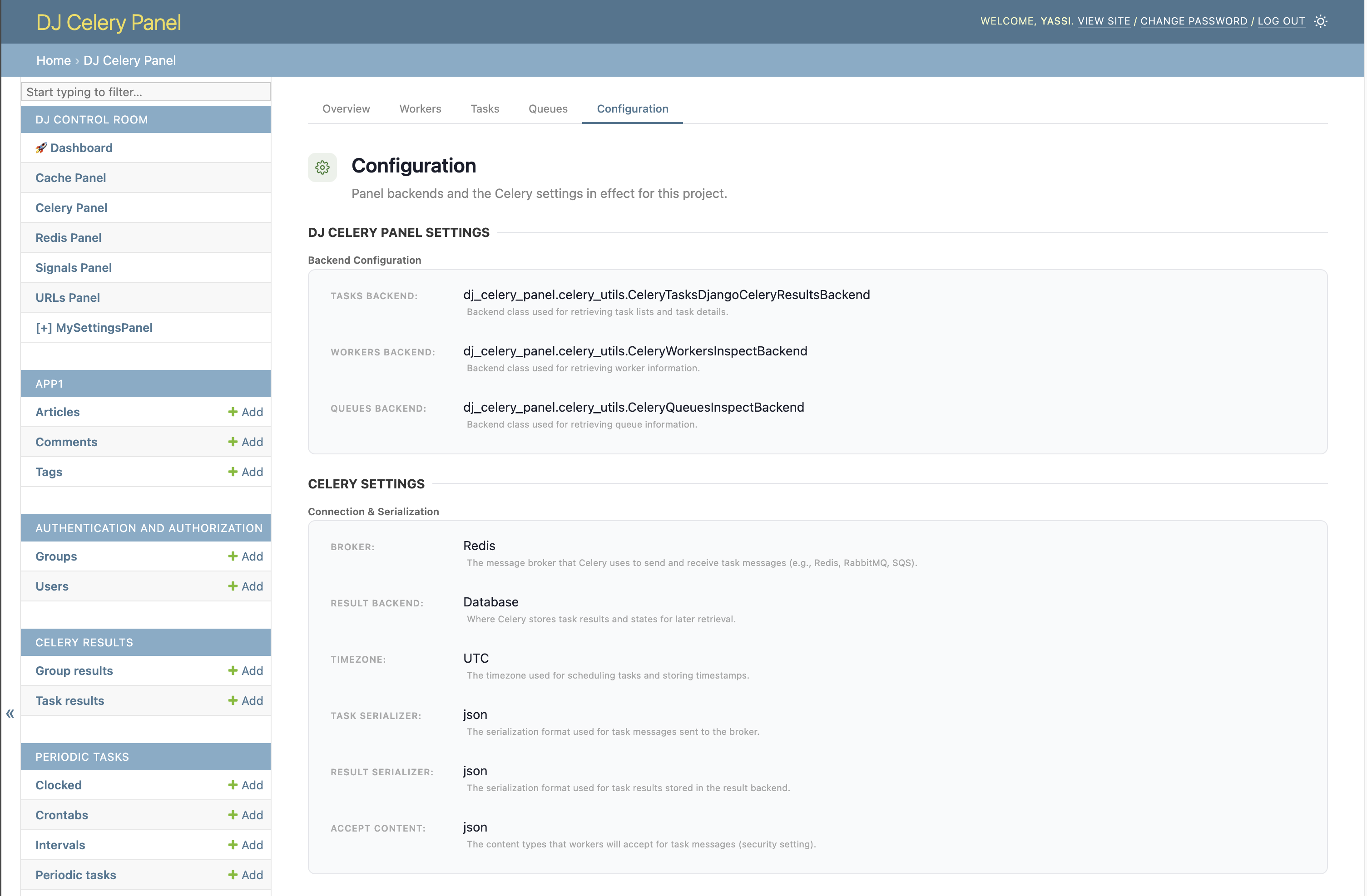
Configuration

View your Celery configuration including broker settings, result backend, and other runtime parameters.
Configuration

Installation

1. Install the Package

pip install dj-celery-panel

2. Add to Django Settings

Add dj_celery_panel to your INSTALLED_APPS:

INSTALLED_APPS = [
    'django.contrib.admin',
    'django.contrib.auth',
    'django.contrib.contenttypes',
    'django.contrib.sessions',
    'django.contrib.messages',
    'django.contrib.staticfiles',
    'dj_celery_panel',  # Add this line
    # ... your other apps
]

3. Configure Celery Settings

Django Celery Panel works with your existing Celery configuration. Ensure you have Celery properly configured:

# Celery Configuration
CELERY_BROKER_URL = 'redis://localhost:6379/0'  # or your broker URL
CELERY_RESULT_BACKEND = 'django-db'  # or your preferred backend

# Optional: Advanced configuration
DJ_CELERY_PANEL_SETTINGS = {
    # Backend classes for each interface
    "tasks_backend": "dj_celery_panel.celery_utils.CeleryTasksDjangoCeleryResultsBackend",
    "workers_backend": "dj_celery_panel.celery_utils.CeleryWorkersInspectBackend",
    "queues_backend": "dj_celery_panel.celery_utils.CeleryQueuesInspectBackend",

    # CSS: load built-in styles and/or inject your own
    "LOAD_DEFAULT_CSS": True,
    # Static paths are relative to app's static/ dir (e.g. 'myapp/css/overrides.css'
    # for a file at myapp/static/myapp/css/overrides.css). Full URLs also accepted.
    "EXTRA_CSS": [],
}

Note: The panel requires at least one Celery worker to be running to display worker and queue information.

4. Include URLs

Add the Celery Panel URLs to your main urls.py:

from django.contrib import admin
from django.urls import path, include

urlpatterns = [
    path('admin/dj-celery-panel/', include('dj_celery_panel.urls')),  # Add this line
    path('admin/', admin.site.urls),
]

5. Run Migrations and Create Superuser

python manage.py migrate
python manage.py createsuperuser  # If you don't have an admin user

6. Start Celery Worker

Start at least one Celery worker for the panel to monitor:

celery -A your_project worker --loglevel=info

7. Access the Panel

  1. Start your Django development server:

    python manage.py runserver
    
  2. Navigate to the Django admin at http://127.0.0.1:8000/admin/

  3. Look for the "DJ_CELERY_PANEL" section in the admin interface

  4. Click to browse workers, tasks, queues, and periodic tasks

License

This project is licensed under the MIT License. See the LICENSE file for details.


Development Setup

If you want to contribute to this project or set it up for local development:

Prerequisites

  • Python 3.9 or higher
  • Redis server (for Celery broker)
  • PostgreSQL (optional, can use SQLite)
  • Git
  • Docker (recommended)

Docker is recommended since it automates the setup of all required services including Redis, PostgreSQL, and Celery workers.

1. Clone the Repository

git clone https://github.com/yassi/dj-celery-panel.git
cd dj-celery-panel

2a. Set up dev environment using virtualenv

python -m venv venv
source venv/bin/activate  # On Windows: venv\Scripts\activate

pip install -e . # install dj-celery-panel package locally
pip intall -r requirements.txt  # install all dev requirements

# Alternatively
make install # this will also do the above in one single command

2b. Set up dev environment using docker

make docker_up     # Bring up all services (Redis, PostgreSQL, Celery workers)
make docker_shell  # Open a shell in the docker container

3. Set Up Example Project

The repository includes an example Django project for development and testing

cd example_project
python manage.py migrate
python manage.py createsuperuser

4. Start Celery Worker

For development, start at least one Celery worker:

cd example_project
celery -A example_project worker --loglevel=info

5. Run the Development Server

python manage.py runserver

Visit http://127.0.0.1:8000/admin/ to access the Django admin with Celery Panel.

6. Running Tests

The test suite requires running services (Redis, PostgreSQL, and at least one Celery worker) to test the monitoring functionality.

Using Docker (Recommended)

Docker automatically starts all required services:

make test_docker

Local Testing

For local testing, ensure services are running:

# Terminal 1: Start Redis
docker run -d -p 6379:6379 redis:7

# Terminal 2: Start PostgreSQL (optional, can use SQLite)
docker run -d -p 5432:5432 -e POSTGRES_PASSWORD=postgres postgres:16

# Terminal 3: Start Celery worker
cd example_project
python manage.py migrate
celery -A example_project worker --loglevel=info

# Terminal 4: Run tests
pytest tests/ -v

GitHub Actions

The CI pipeline automatically:

  • Starts Redis and PostgreSQL services
  • Runs database migrations
  • Starts a Celery worker in detached mode
  • Executes the full test suite with coverage reporting

Project details


Download files

Download the file for your platform. If you're not sure which to choose, learn more about installing packages.

Source Distribution

dj_celery_panel-0.4.0.tar.gz (46.6 kB view details)

Uploaded Source

Built Distribution

If you're not sure about the file name format, learn more about wheel file names.

dj_celery_panel-0.4.0-py3-none-any.whl (47.1 kB view details)

Uploaded Python 3

File details

Details for the file dj_celery_panel-0.4.0.tar.gz.

File metadata

  • Download URL: dj_celery_panel-0.4.0.tar.gz
  • Upload date:
  • Size: 46.6 kB
  • Tags: Source
  • Uploaded using Trusted Publishing? Yes
  • Uploaded via: twine/6.1.0 CPython/3.13.7

File hashes

Hashes for dj_celery_panel-0.4.0.tar.gz
Algorithm Hash digest
SHA256 f89397b5d7d8432fca721b92ac9fc8e5c4f72b3226609fd6cd36e3ab8a9fa0e5
MD5 1a807891e6b7deb8c1b1bd571fe01984
BLAKE2b-256 bb2de34a7fda4dc0e57d1e27121572942fb72c498f93149e0f807e45063ed27f

See more details on using hashes here.

Provenance

The following attestation bundles were made for dj_celery_panel-0.4.0.tar.gz:

Publisher: python-publish.yml on yassi/dj-celery-panel

Attestations: Values shown here reflect the state when the release was signed and may no longer be current.

File details

Details for the file dj_celery_panel-0.4.0-py3-none-any.whl.

File metadata

File hashes

Hashes for dj_celery_panel-0.4.0-py3-none-any.whl
Algorithm Hash digest
SHA256 8a573d04c54db18cefeda407ccdfa2f5e2da8f0e22639c11e62e8e21399ac166
MD5 3223051dfe491e541fa168dcdadf56ff
BLAKE2b-256 85a81d87a3f307e935bf8be3079b477cf3121433930851edd99cd2010208386c

See more details on using hashes here.

Provenance

The following attestation bundles were made for dj_celery_panel-0.4.0-py3-none-any.whl:

Publisher: python-publish.yml on yassi/dj-celery-panel

Attestations: Values shown here reflect the state when the release was signed and may no longer be current.

Supported by

AWS Cloud computing and Security Sponsor Datadog Monitoring Depot Continuous Integration Fastly CDN Google Download Analytics Pingdom Monitoring Sentry Error logging StatusPage Status page