

Django + shell_plus + Jupyter notebooks made easy
A Jupyter notebook with access to objects from the Django ORM is a powerful tool to introspect data and run ad-hoc queries.
Full documentation available at dj-notebook
Features
The ever-growing list of features:
- Easy Jupyter notebooks with Django
- Built-in integration with the imported objects from django-extensions
shell_plus - Saves the state between sessions so you don't need to remember what you did
- Inheritance diagrams on any object, including ORM models
- Converts any Django QuerySet to Pandas Dataframe
- Handy function for displaying MermaidJS charts
- Generates visual maps of model relations
- Works in the browser, VSCode, PyCharm, Emacs, Vim, and more!
Installation
Use your installation tool of choice, here we use venv and pip:
python -m venv venv
source venv/bin/activate
pip install dj_notebook
Usage
First, find your project's manage.py file and open it. Copy whatever is being set to DJANGO_SETTINGS_MODULE into your clipboard.
Create an ipython notebook in the same directory as manage.py, or another directory of your choosing. In VSCode,
simply add a new .ipynb file. If using Jupyter Lab, use the File -> New -> Notebook menu option.
Then in the first cell enter:
from dj_notebook import activate

plus = activate()

# If you have created your notebook in a different directory, instead do:
# plus = activate(search_dir="/path/to/your/project")

# If that throws an error, try one of the following:

# DJANGO_SETTINGS_MODULE_VALUE aka "book_store.settings"
# plus = activate("DJANGO_SETTINGS_MODULE_VALUE")

# Point to location of dotenv file with Django settings
# plus = activate(dotenv_file='.env')
In future cells, you can now load and run Django objects, including the ORM. This three line snippet should give an idea of what you can now do:
from django.contrib.auth import get_user_model
User = get_user_model()
User.objects.all()
Usage Plus
But wait, it gets better!
When you activated the Django environment, you instantiated a variable called 'plus'. The 'plus' variable is an object that contains everything loaded from django-extensions' shell_plus. Here's a demonstration, try running this snippet:
plus.User.objects.all()
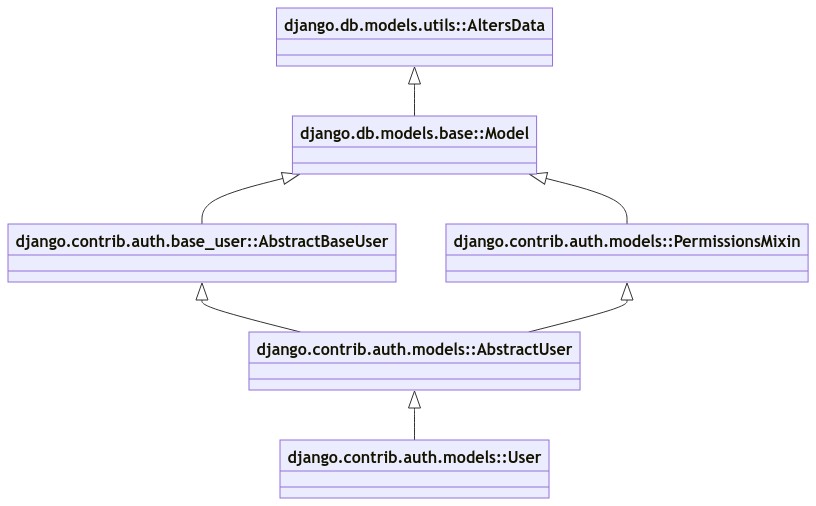
We also provide a utility for introspection of classes, which can be useful in sophisticated project architectures. Running this code in a Jupyter notebook shell:
plus.diagram(plus.User)
Generates this image
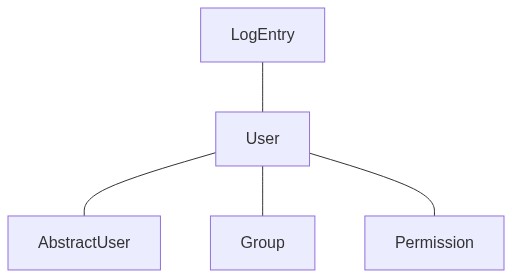
Here's another useful diagram:
plus.model_graph(plus.User)
QuerySet to Dataframe
Want to convert a Django query to a Pandas Dataframe? We got you covered.
plus.read_frame(plus.User.objects.all())
More things you can do!
dj-notebook official documentation
Contributors

Daniel Roy Greenfeld |

Cody Antunez |

Geoff Beier |

Nick Powell |

Saransh Sood |

Anna Zhydko |

Tejo Kaushal |

Simon Davy |

Null |

Dave Parr |

Siew-Yit Yong |
Special thanks
These are people who aren't in our formal git history but should be.
- Tom Preston did seminal work on Python paths that later became the foundation of dj-notebook
- Evie Clutton was co-author of a pull request and they don't show up in the contributor list above
- Tim Schilling assisted with the
model_graphmethod - Charlie Denton is responsible for django-schema-graph, which we leverage as part of the
model_graphfeature - Christopher Clarke built
django-pandas, which dj-notebook uses - Stephen Moore for some early work done on the internals of dj-notebook before it was open sourced.
- django-extensions for providing so many useful tools over the years, and being one of the backbones of this project

Tom Preston |

Null |

Tim Schilling |

Charlie Denton |

Christopher Clarke |

Stephen Moore |

Django Extensions |
Construction
This package was created with Cookiecutter and the simplicity project template.
1 maintainer

Release files for dj-notebook 0.7.0
For a detailed explanation of source distributions (sdists) and built distributions (wheels), please see the package formats documentation.
Source distribution (sdist)
| File | Size | Uploaded | |
|---|---|---|---|
| dj_notebook-0.7.0.tar.gz | 28.9 kB | Details |
Built distribution (wheel)
| File | Interpreter | ABI | Platform | Reset |
|---|---|---|---|---|
| dj_notebook-0.7.0-py3-none-any.whl | Python 3 | none | any | Details |
Total release size: 51.4 kB
Release files / dj_notebook-0.7.0.tar.gz
| Download URL | dj_notebook-0.7.0.tar.gz |
|---|---|
| Size | 28.9 kB |
| Tags | Source |
|
SHA-256 checksum How to use checksums |
048bd593808be243a056e548630e1d6b2c6ef592999811a7e11c8361da68b3f8
|
|
BLAKE2b-256 checksum How to use checksums |
b7395b4d4a775d0583d8f38d401563aa571a45f203ad23ba69a40d872ce6ae36
|
| Upload date | |
|
Uploaded using Trusted Publishing? What is trusted publishing? |
No |
| Uploaded via |
twine/5.0.0 CPython/3.10.6
|
Release files / dj_notebook-0.7.0-py3-none-any.whl
| Download URL | dj_notebook-0.7.0-py3-none-any.whl |
|---|---|
| Size | 22.5 kB |
| Tags | Python 3 |
|
SHA-256 checksum How to use checksums |
b8e75d4578adf8948d858502b6cd80b7c6ba520208d8d2716ded38017a877948
|
|
BLAKE2b-256 checksum How to use checksums |
4a800df11fc80da67dc2e1cea35484a779d229155929d688f9104415551b714f
|
| Upload date | |
|
Uploaded using Trusted Publishing? What is trusted publishing? |
No |
| Uploaded via |
twine/5.0.0 CPython/3.10.6
|














