
Django Admin Confirm






Features
-
AdminConfirmMixin Based on django-admin-confirm with support for django-object-actions AdminConfirmMixin is a mixin for ModelAdmin to add confirmations to change, add and actions.
-
AdminFormMixin AdminFormMixin is a mixin for ModelAdmin to add a form to configure your actions.
-
Ability to Confirm an action form with a preview of the objects and form data
-
Add support to chain form
ScreenShot
Confirm ScreenShot
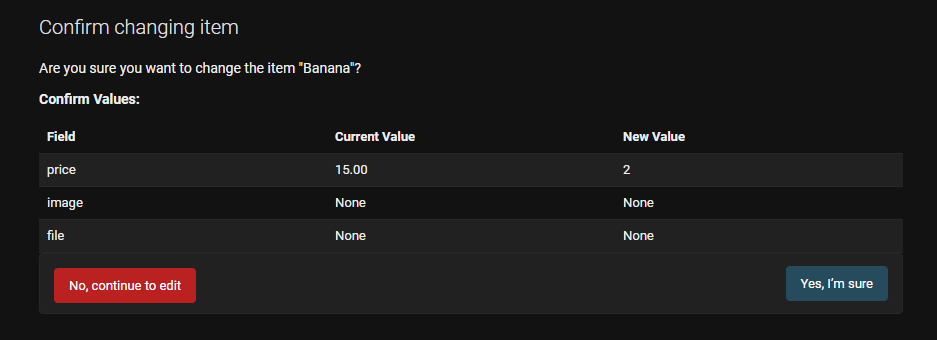
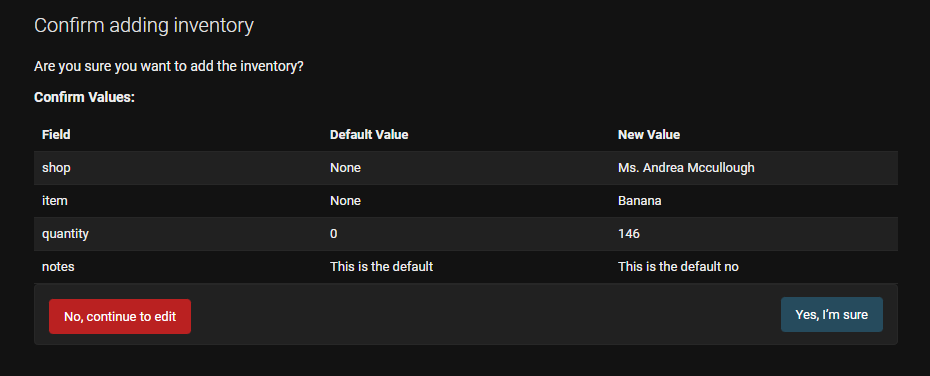
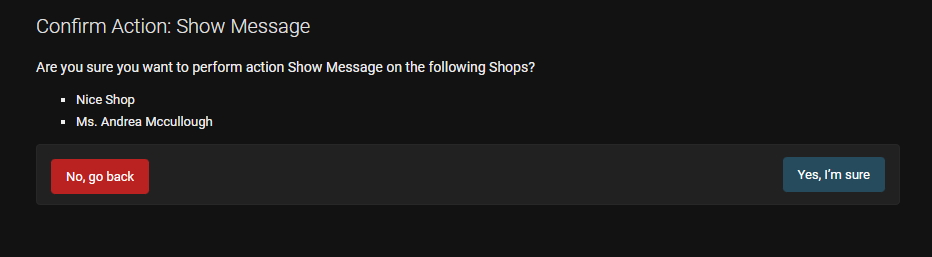
Form ScreenShot
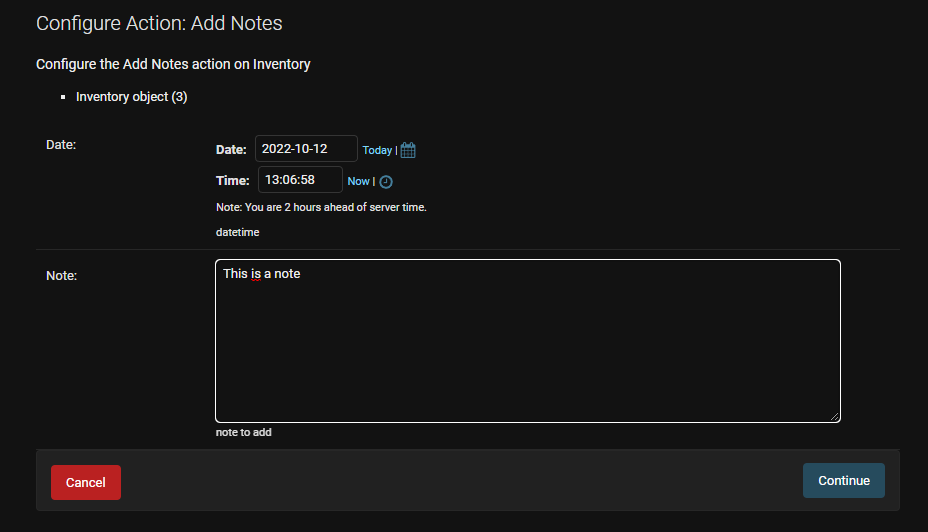
Installation
Install django-admin-action-tools by running:
poetry add django-admin-action-tools
Add admin_action_tools to INSTALLED_APPS in your project settings before django.contrib.admin:
INSTALLED_APPS = [
    ...
    'admin_action_tools',

    'django.contrib.admin',

    ...
    'widget_tweaks'
    ...
]
To use ActionFormMixin you also need to add widget_tweaks to the INSTALLED_APPS
Note that this project follows the template override rules of Django.
To override a template, your app should be listed before admin_action_tools in INSTALLED_APPS.
Configuration Options
Environment Variables:
Caching is used to cache files for confirmation. When change/add is submitted on the ModelAdmin, if confirmation is required, files will be cached until all validations pass and confirmation is received.
ADMIN_CONFIRM_CACHE_TIMEOUTdefault: 1000ADMIN_CONFIRM_CACHE_KEY_PREFIXdefault: admin_confirm__file_cache
Attributes:
confirm_changeOptional[bool] - decides if changes should trigger confirmationconfirm_addOptional[bool] - decides if additions should trigger confirmationconfirmation_fieldsOptional[Array[string]] - sets which fields should trigger confirmation for add/change. For adding new instances, the field would only trigger a confirmation if it's set to a value that's not its default.change_confirmation_templateOptional[string] - path to custom html template to use for change/addaction_confirmation_templateOptional[string] - path to custom html template to use for actions
Note that setting confirmation_fields without setting confirm_change or confirm_add would not trigger confirmation for change/add. Confirmations for actions does not use the confirmation_fields option.
Method Overrides: If you want even more control over the confirmation, these methods can be overridden:
get_confirmation_fields(self, request: HttpRequest, obj: Optional[Object]) -> List[str]render_change_confirmation(self, request: HttpRequest, context: dict) -> TemplateResponserender_action_confirmation(self, request: HttpRequest, context: dict) -> TemplateResponse
Usage
AdminConfirmMixin
It can be configured to add a confirmation page on ModelAdmin upon:
- saving changes
- adding new instances
- performing actions
Confirm Change:
    from admin_action_tools import AdminConfirmMixin

    class MyModelAdmin(AdminConfirmMixin, ModelAdmin):
        confirm_change = True
        confirmation_fields = ['field1', 'field2']
This would confirm changes on changes that include modifications onfield1 and/or field2.
Confirm Add:
    from admin_action_tools import AdminConfirmMixin

    class MyModelAdmin(AdminConfirmMixin, ModelAdmin):
        confirm_add = True
        confirmation_fields = ['field1', 'field2']
This would confirm add on adds that set field1 and/or field2 to a non default value.
Note: confirmation_fields apply to both add/change confirmations.
Confirm Action:
    from admin_action_tools import AdminConfirmMixin

    class MyModelAdmin(AdminConfirmMixin, ModelAdmin):
        actions = ["action1", "action2"]

        def action1(modeladmin, request, queryset):
            # Do something with the queryset

        @confirm_action()
        def action2(modeladmin, request, queryset):
            # Do something with the queryset

        action2.allowed_permissions = ('change',)
This would confirm action2 but not action1.
Action confirmation will respect allowed_permissions and the has_xxx_permission methods.
Note: AdminConfirmMixin does not confirm any changes on inlines
Confirm Object Action:
    from admin_action_tools import AdminConfirmMixin
    from django_object_actions import DjangoObjectActions

    class MyModelAdmin(AdminConfirmMixin, DjangoObjectActions, ModelAdmin):
        change_actions = ["action1"]

        @confirm_action()
        def action1(self, request, object):
            # Do something with the object
AdminFormMixin
Action Form
    from admin_action_tools import ActionFormMixin, add_form_to_action
    from myapp.form import NoteActionForm
    from django_object_actions import DjangoObjectActions

    class MyModelAdmin(ActionFormMixin, DjangoObjectActions, ModelAdmin):
        change_actions = ["object_action"]

        @add_form_to_action(NoteActionForm)
        def action1(modeladmin, request, queryset, form=None):
            # Do something with the queryset

        @add_form_to_action(NoteActionForm)
        def object_action(modeladmin, request, object, form=None):
            # Do something with the object
Chaining tools
    from admin_action_tools import AdminConfirmMixin, ActionFormMixin, confirm_action, add_form_to_action
    from django_object_actions import DjangoObjectActions
    from myapp.form import NoteActionForm

    class MyModelAdmin(AdminConfirmMixin, ActionFormMixin, DjangoObjectActions, ModelAdmin):
        change_actions = ["action1"]

        @add_form_to_action(NoteActionForm)
        @confirm_action()
        def action1(self, request, object, form=None):
            # Do something with the object
This will chain form and confirmation. The confirmation page will have the actions & form values displayed. If you only want the action (same as confirm only), you can pass the following argument
    from admin_action_tools import AdminConfirmMixin, ActionFormMixin, confirm_action, add_form_to_action
    from django_object_actions import DjangoObjectActions
    from myapp.form import NoteActionForm

    class MyModelAdmin(AdminConfirmMixin, ActionFormMixin, DjangoObjectActions, ModelAdmin):
        change_actions = ["action1"]

        @add_form_to_action(NoteActionForm)
        @confirm_action(display_form=False)
        def action1(self, request, object, form=None):
            # Do something with the object and form
    from admin_action_tools import AdminConfirmMixin, ActionFormMixin, confirm_action, add_form_to_action
    from django_object_actions import DjangoObjectActions
    from myapp.form import NoteActionForm, SecondForm

    class MyModelAdmin(AdminConfirmMixin, ActionFormMixin, DjangoObjectActions, ModelAdmin):
        change_actions = ["action1"]

        @add_form_to_action(NoteActionForm)
        @add_form_to_action(SecondForm)
        @confirm_action()
        def action1(self, request, object, forms=None):
            # Do something with the object and forms
This will chain 2 forms and confirmation. The confirmation page will have the actions & form values displayed.
if you want to not display the impacted objects, you can use
    from admin_action_tools import AdminConfirmMixin, ActionFormMixin, confirm_action, add_form_to_action
    from django_object_actions import DjangoObjectActions
    from myapp.form import NoteActionForm, SecondForm

    class MyModelAdmin(AdminConfirmMixin, ActionFormMixin, DjangoObjectActions, ModelAdmin):
        change_actions = ["action1"]

        @add_form_to_action(NoteActionForm, display_queryset=False)
        @add_form_to_action(SecondForm, display_queryset=False)
        @confirm_action(display_queryset=False)
        def action1(self, request, object, forms=None):
            # Do something with the object and forms
Adding Colors
    from admin_action_tools import AdminConfirmMixin, ActionFormMixin, confirm_action, add_form_to_action
    from django_object_actions import DjangoObjectActions
    from myapp.form import NoteActionForm, SecondForm

    class MyModelAdmin(ActionFormMixin, DjangoObjectActions, ModelAdmin):
        change_actions = ["action1", "action2"]

        @add_form_to_action(NoteActionForm, display_queryset=False)
        @color_action(color="green") # Set HTML color
        def action1(self, request, object, form=None):
            # Do something with the object and forms


        @add_form_to_action(NoteActionForm, display_queryset=False)
        @color_action(attrs={"style": "background-color: lightblue; color: black"}) # Or you can pass the style directly
        def action2(self, request, object, form=None):
            # Do something with the object and forms
Development
Check out our development process if you're interested.
2 maintainers


Metadata
2 maintainers
Release files for django-admin-action-tools 1.3.1
For a detailed explanation of source distributions (sdists) and built distributions (wheels), please see the package formats documentation.
Source distribution (sdist)
| File | Size | Uploaded | |
|---|---|---|---|
| django_admin_action_tools-1.3.1.tar.gz | 129.4 kB | Details |
Built distribution (wheel)
| File | Interpreter | ABI | Platform | Reset |
|---|---|---|---|---|
| django_admin_action_tools-1.3.1-py3-none-any.whl | Python 3 | none | any | Details |
Total release size: 278.8 kB
Release files / django_admin_action_tools-1.3.1.tar.gz
| Download URL | django_admin_action_tools-1.3.1.tar.gz |
|---|---|
| Size | 129.4 kB |
| Tags | Source |
|
SHA-256 checksum How to use checksums |
8a76291e33310a4709e94fe07ec787e1f544fdd4b821172e2b3a3c53ea6acb71
|
|
BLAKE2b-256 checksum How to use checksums |
cc659166925f03b6e4f6f29d767bb3d562dcec520c1224dcadd37f3554dd2165
|
| Upload date | |
|
Uploaded using Trusted Publishing? What is trusted publishing? |
No |
| Uploaded via |
poetry/2.2.1 CPython/3.9.25 Linux/6.11.0-1018-azure
|
Release files / django_admin_action_tools-1.3.1-py3-none-any.whl
| Download URL | django_admin_action_tools-1.3.1-py3-none-any.whl |
|---|---|
| Size | 149.3 kB |
| Tags | Python 3 |
|
SHA-256 checksum How to use checksums |
7d7f6d7fd9254d028e64303e6acda4d71dc80691060f1cfe6258e129bd877936
|
|
BLAKE2b-256 checksum How to use checksums |
c3d980cbe60ffc05b1edc460b72d56e94904258fb57a75c2959ecc645d948abd
|
| Upload date | |
|
Uploaded using Trusted Publishing? What is trusted publishing? |
No |
| Uploaded via |
poetry/2.2.1 CPython/3.9.25 Linux/6.11.0-1018-azure
|














