

Django Admin Autocomplete Filter
A simple Django app to render list filters in django admin using autocomplete widget. This app is heavily inspired from dal-admin-filters.
Overview:
Django comes preshipped with an admin panel which is a great utility to create quick CRUD's. The django 2.0 came with much needed autocomplete_fields which uses select2 widget that comes with a search feature that loads the options asynchronously. We can use this in django admin list filter.
Requirements:
Requires Django version >= 2.0
Installation:
You can install it via pip or to get the latest version clone this repo.
pip install django-admin-autocomplete-filter-faisal
Add admin_auto_filters to your INSTALLED_APPS inside settings.py of your project.
Usage:
Let's say we have following models:
class Artist(models.Model):
    name = models.CharField(max_length=128)

class Album(models.Model):
    name = models.CharField(max_length=64)
    artist = models.ForeignKey(Artist, on_delete=models.CASCADE)
    cover = models.CharField(max_length=256, null=True, default=None)
And you would like to filter results in Album Admin on the basis of artist, then you can define search fields in Artist and then define filter as:
from admin_auto_filters.filters import AutocompleteFilter

class ArtistFilter(AutocompleteFilter):
    title = 'Artist' # display title
    field_name = 'artist' # name of the foreign key field

class ArtistAdmin(admin.ModelAdmin):
    search_fields = ['name'] # this is required for django's autocomplete functionality
	...

class AlbumAdmin(admin.ModelAdmin):
    list_filter = [ArtistFilter]

    '''
       defining this class is required for AutocompleteFilter
       it's a bug and I am working on it.
    '''
    class Media:
        pass
	...
After following these steps you may see the filter as:
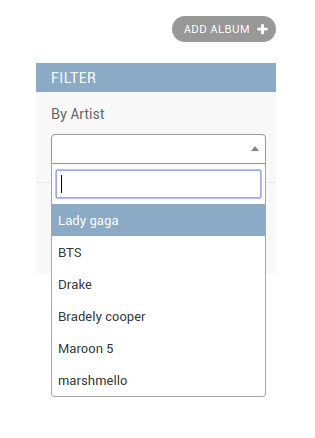
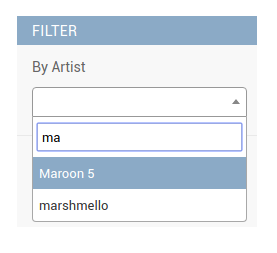
Now you can also register your custom view instead of using django admin's search_results to control the results in the autocomplete. For this you will need to create your custom view and register the url in your admin class as shown below:
In your views.py:
from admin_auto_filters.views import AutocompleteJsonView

class CustomSearchView(AutocompleteJsonView):
    def get_queryset(self):
    '''
       your custom logic goes here.
    '''
        queryset = Artist.objects.all().order_by('name')
        return queryset
After this, register this view in your admin class as:
class AlbumAdmin(admin.ModelAdmin):
    list_filter = [ArtistFilter]

    class Media:
        pass

    def get_urls(self):
        urls = super().get_urls()
        custom_urls = [
            path('custom_search/', self.admin_site.admin_view(CustomSearchView.as_view(model_admin=self)),
                 name='custom_search'),
        ]
        return custom_urls + urls
Finally just tell the filter class to use this new view as:
class ArtistFilter(AutocompleteFilter):
    title = 'Artist'
    field_name = 'artist'

    def get_autocomplete_url(self, request, model_admin):
        return reverse('admin:custom_search')
License:
Django Admin Autocomplete Filter is an Open Source project licensed under the terms of the GNU GENERAL PUBLIC LICENSE.
1 maintainer

Metadata
1 maintainer
Release files for django-admin-autocomplete-filter-faisal 0.4
For a detailed explanation of source distributions (sdists) and built distributions (wheels), please see the package formats documentation.
Source distribution (sdist)
| File | Size | Uploaded | Provenance | |
|---|---|---|---|---|
| django-admin-autocomplete-filter-faisal-0.4.tar.gz | 18.9 kB | Without provenance | Details |
Built distribution (wheel)
| File | Interpreter | ABI | Platform | Reset |
|---|---|---|---|---|
| django_admin_autocomplete_filter_faisal-0.4-py3-none-any.whl | Python 3 | none | any | Details |
Total release size: 38.7 kB
Release files / django-admin-autocomplete-filter-faisal-0.4.tar.gz
| Download URL | django-admin-autocomplete-filter-faisal-0.4.tar.gz |
|---|---|
| Size | 18.9 kB |
| Tags | Source |
|
SHA-256 checksum How to use checksums |
c3ea1b321a8f9874866489d9819fcbc94424bd17909b939582536315a739a279
|
|
BLAKE2b-256 checksum How to use checksums |
9d90f27cf922a5981a1858f16e15d5cc2ed82d397c34c155b29e17b9d06658cf
|
| Upload date | |
|
Uploaded using Trusted Publishing? What is trusted publishing? |
No |
| Uploaded via |
twine/2.0.0 pkginfo/1.5.0.1 requests/2.22.0 setuptools/41.0.1 requests-toolbelt/0.8.0 tqdm/4.36.1 CPython/3.7.4
|
Release files / django_admin_autocomplete_filter_faisal-0.4-py3-none-any.whl
| Download URL | django_admin_autocomplete_filter_faisal-0.4-py3-none-any.whl |
|---|---|
| Size | 19.8 kB |
| Tags | Python 3 |
|
SHA-256 checksum How to use checksums |
b6997b1fcba284c4ee67766f24a02cfc5cea55b446327cff32edeeeec7ade7c3
|
|
BLAKE2b-256 checksum How to use checksums |
14f526348b876f9fe784392703b681a5419a63028253fa9c8e35e815a25f087d
|
| Upload date | |
|
Uploaded using Trusted Publishing? What is trusted publishing? |
No |
| Uploaded via |
twine/2.0.0 pkginfo/1.5.0.1 requests/2.22.0 setuptools/41.0.1 requests-toolbelt/0.8.0 tqdm/4.36.1 CPython/3.7.4
|
Security for django-admin-autocomplete-filter-faisal 0.4
Provenance
Provenance describes where a file came from. On PyPI, provenance is shared via attestations, which provide a verifiable record of the build or publishing details. View details, limitations and caveats.
No provenance found
None of the files in this release were uploaded with provenance metadata.
A note on package security
PyPI is a repository for distributing packages, not a service for auditing them. While third-party security researchers and our staff do their best to detect and remove malicious packages, PyPI cannot guarantee the quality, security or suitability of any given package.














