
Add collapsible app groups to Django's built-in admin sidebar.

Project description
django-admin-collapse-apps




Collapsible app groups for the built-in Django admin sidebar — no theme, no jQuery, no server-side state.
📖 English · Русский
django-admin-collapse-apps adds a small toggle button to each app group in
Django's standard admin sidebar (and dashboard app list) so you can collapse the
apps you rarely touch. It enhances the sidebar Django already ships — it does not
replace it — and it stays fully usable when JavaScript is disabled.
| Expanded | Collapsed |
|---|---|
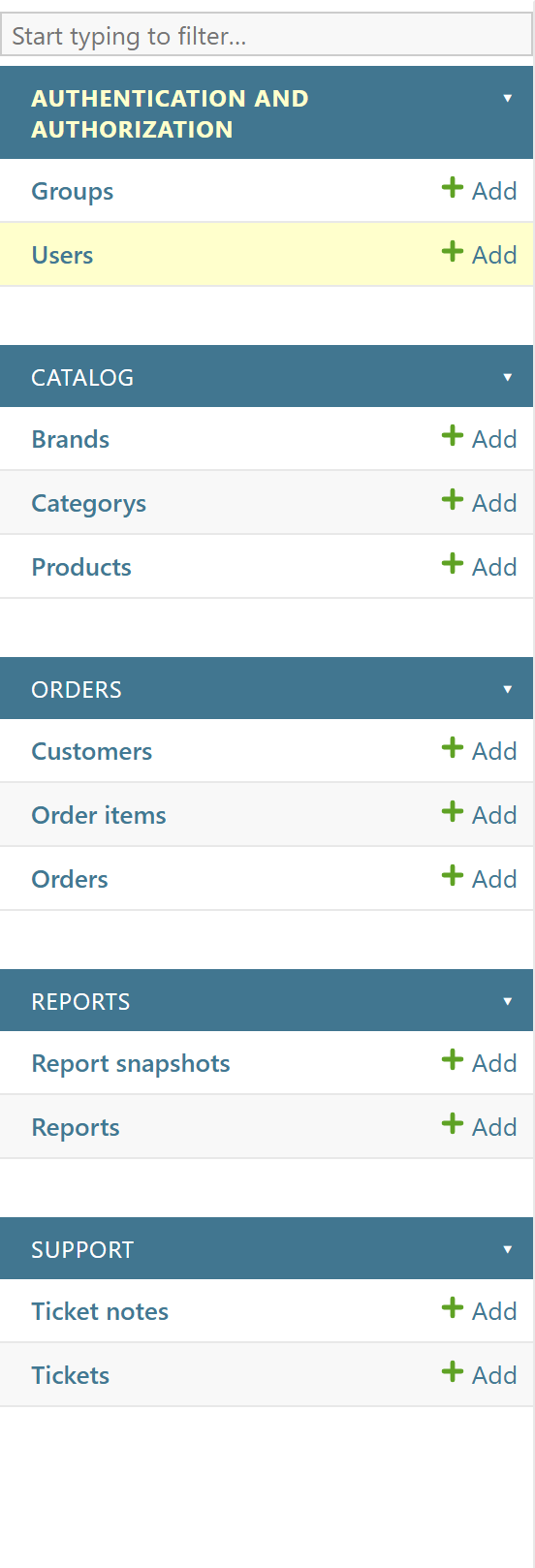 |
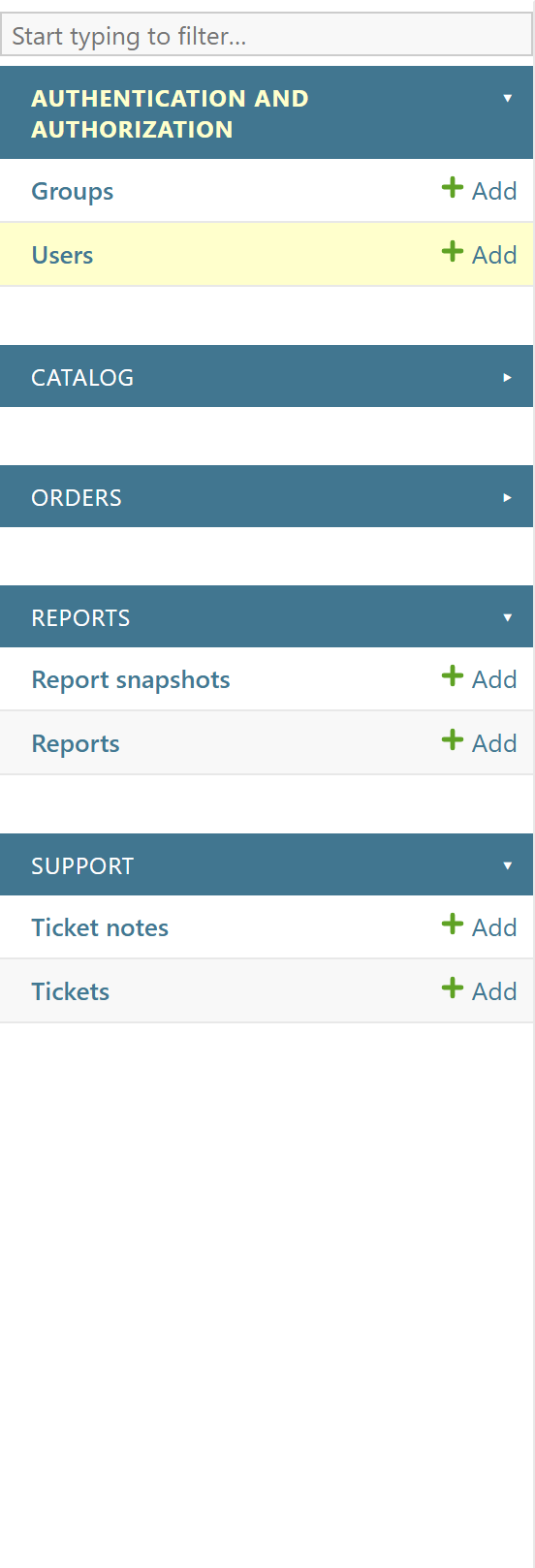 |
Features
- Zero-config. Install the app and every eligible app group gets a collapse toggle.
- Non-invasive. Keeps Django's sidebar structure, permissions, ordering, and search intact.
- Remembers your choice. Collapsed state is stored in one browser cookie per user agent.
- Progressive enhancement. Without JavaScript the sidebar stays fully expanded and usable.
- Accessible. Real
<button>controls with syncedaria-expanded/aria-controls, keyboard support, and a visible focus ring. - Search-friendly. Sidebar search still reveals models inside collapsed groups, then your collapsed state is restored.
- Themeable. Works with Django's light and dark admin themes; a few namespaced CSS variables let you restyle the toggle.
What it deliberately does not do
- Does not replace the full admin sidebar template.
- Does not add jQuery, icon fonts, CDN assets, or any frontend dependency.
- Does not persist state on the server (one cookie only, in the MVP).
- Does not touch admin permissions, model ordering, or your project branding.
Requirements
- Python 3.10 – 3.14
- Django 4.2, 5.0, 5.1, 5.2, or 6.0
Installation
python -m pip install django-admin-collapse-apps
Add the app to INSTALLED_APPS before django.contrib.admin so Django can
discover the package's admin/base_site.html extension:
INSTALLED_APPS = [
    "django_admin_collapse_apps",
    "django.contrib.admin",
    # ...
]
That's it. Open any admin page and each app group in the sidebar now has a toggle. No further configuration is required.
Configuration
By default every app group is collapsible. To restrict toggles to specific apps,
set ADMIN_COLLAPSE_APPS to a list of Django app labels:
ADMIN_COLLAPSE_APPS = ["auth", "orders", "catalog"]
Normalization rules:
| Value | Result |
|---|---|
unset / None / [] / () |
all sidebar apps are collapsible |
list / tuple of app labels |
only those apps are collapsible |
a plain string like "auth" |
invalid — never split into characters |
| empty or whitespace-only entries | invalid |
App labels are stripped of surrounding whitespace and deduplicated (first
occurrence wins). Invalid values degrade safely to the "all apps" behavior, and
Django's system check framework reports the problem as
django_admin_collapse_apps.E001 when you run manage.py check.
Tip: an app label is the segment in the admin URL —
/admin/auth/user/belongs to theauthapp,/admin/support/ticket/to thesupportapp. Use app labels, not verbose names or import paths.
How it works
- The setting is normalized once on the server into a small JSON payload
(
{mode, allApps, appLabels}) rendered into a<script type="application/json">element by the package'sadmin/base_site.html. - A vanilla-JS runtime reads that payload and scopes itself to Django's standard
app-list containers only:
#nav-sidebaron model pages and#content-mainon the dashboard (detected via thedashboardbody class, so it works on Django 4.2 through 6.0). On any other page it exits quietly. - It inserts one accessible toggle per eligible group, restores collapsed state
from the
django_admin_collapsed_appscookie, and keeps that cookie in sync as you collapse and expand groups.
The cookie stores only comma-separated app labels, uses SameSite=Lax (and adds
Secure on HTTPS), and is deleted entirely once nothing is collapsed.
Customizing the toggle
The stylesheet exposes namespaced CSS variables. Override them in your own admin CSS (loaded after the package stylesheet):
:root {
    --django-admin-collapse-apps-toggle-color: currentColor;
    --django-admin-collapse-apps-toggle-expanded-symbol: "▾";
    --django-admin-collapse-apps-toggle-collapsed-symbol: "▸";
    --django-admin-collapse-apps-toggle-focus-ring: currentColor;
    --django-admin-collapse-apps-toggle-focus-ring-width: 2px;
    --django-admin-collapse-apps-toggle-focus-ring-offset: 2px;
    --django-admin-collapse-apps-toggle-float: right;
    --django-admin-collapse-apps-toggle-margin-inline-start: 0.5rem;
    --django-admin-collapse-apps-toggle-margin-inline-end: 0;
}
For example, to use ASCII symbols or move the toggle before the app name:
:root {
    --django-admin-collapse-apps-toggle-expanded-symbol: "v";
    --django-admin-collapse-apps-toggle-collapsed-symbol: ">";
    --django-admin-collapse-apps-toggle-float: left;
    --django-admin-collapse-apps-toggle-margin-inline-start: 0;
    --django-admin-collapse-apps-toggle-margin-inline-end: 0.35rem;
}
The stylesheet is scoped to #nav-sidebar, body.dashboard #content-main, and
package-owned classes, and it honors prefers-reduced-motion and
forced-colors.
Custom admin/base_site.html
If your project already overrides admin/base_site.html and preserves Django's
extrahead/extrastyle blocks with {{ block.super }}, the package assets are
still discovered automatically. If your template fully owns those blocks, load
the assets explicitly:
{% extends "admin/base_site.html" %}
{% load django_admin_collapse_apps %}

{% block extrahead %}
{{ block.super }}
{% collapse_apps_assets %}
{% endblock %}
collapse_apps_assets renders the stylesheet, the JSON config, and the script
together. The lower-level tags collapse_apps_stylesheet,
collapse_apps_config_script, and collapse_apps_javascript are available when
you need finer placement. Don't copy Django's full sidebar template just to
enable this package.
Demo project
The repository ships a small demo project (catalog, orders, support,
reports, plus the standard auth app) for manual validation and screenshots:
python demo/manage.py migrate --run-syncdb
python demo/bootstrap_demo.py
python demo/manage.py runserver
Sign in at http://127.0.0.1:8000/admin/ with admin / admin. The default
mode (demo_project.settings.all_apps) makes every app collapsible;
demo_project.settings.selected_apps restricts toggles to catalog and
orders.
Development
python -m pip install -e ".[quality]"
python -m ruff check .        # lint
npm run check:js              # JavaScript syntax check (Node's --check)
python -m pytest              # test suite (self-configures Django; no plugin)
python -m build               # build wheel + sdist
The test suite is behavior-focused: configuration normalization, template-tag rendering, end-to-end admin integration, the demo project, packaging metadata, and a small set of static-asset guards.
License
MIT — see LICENSE.
Release history Release notifications | RSS feed


Download files
Download the file for your platform. If you're not sure which to choose, learn more about installing packages.
Source Distribution
Built Distribution
Filter files by name, interpreter, ABI, and platform.
If you're not sure about the file name format, learn more about wheel file names.
Copy a direct link to the current filters
File details
Details for the file django_admin_collapse_apps-0.1.0.tar.gz.
File metadata
- Download URL: django_admin_collapse_apps-0.1.0.tar.gz
- Upload date:
- Size: 128.8 kB
- Tags: Source
- Uploaded using Trusted Publishing? No
- Uploaded via: twine/6.2.0 CPython/3.12.9
File hashes
| Algorithm | Hash digest | |
|---|---|---|
| SHA256 |
1cf7975760e1d06d6e365559b1a32f657fe98b8473672f6dc872ed4ffdf142d2
|
|
| MD5 |
1c08518d719ab76c7519746d6fd897d7
|
|
| BLAKE2b-256 |
84b8466dec93c40c95ea22e1c9e168cb516c5d92464e1f6ab2b669cacd717362
|
File details
Details for the file django_admin_collapse_apps-0.1.0-py3-none-any.whl.
File metadata
- Download URL: django_admin_collapse_apps-0.1.0-py3-none-any.whl
- Upload date:
- Size: 14.4 kB
- Tags: Python 3
- Uploaded using Trusted Publishing? No
- Uploaded via: twine/6.2.0 CPython/3.12.9
File hashes
| Algorithm | Hash digest | |
|---|---|---|
| SHA256 |
f60200848840805e0372693f6764cbf7bc4888c37d168c7c2b41f4d1e9339f5e
|
|
| MD5 |
50bf02192fb6ac00dbe6da152c34b7b8
|
|
| BLAKE2b-256 |
5becfc78a5dc2f6f0e0e2977f74f2d3ef0bf6fc42651c8102fe4bb8912e9e8fe
|






